Corsair vs Thermaltake: PC Cases Compared by Specs
As an Amazon Associate we earn from qualifying purchases. Links on this page are affiliate links.
You are comparing a corsair vs thermaltake PC case choice that spans two very different form factors. Both models support standard ATX motherboards and use a black finish. The main difference lies in their physical scale and cooling capacity. The Corsair unit is a full-tower designed for massive builds with extensive radiator support. The Thermaltake option is a compact mid-tower focused on efficient airflow in a smaller footprint.
Key differences
| Aspect | Corsair 7000D Airflow Full-Tower Case | Thermaltake Versa H21 ATX Mid Tower |
|---|---|---|
| Tower Size | Full-Tower | Mid-Tower |
| Dimensions (H x W x D) | 23.6 x 9.76 x 21.7 inches | 16.9 x 8.2 x 18.7 inches |
| Weight | 41.2 pounds | 9.3 pounds |
| Radiator Support | Up to 420mm | Not listed |
| Included Fans | 3x 140mm | Not listed |
| Front Panel Connectivity | Not listed | USB 3.0, USB 2.0, Audio |
Which one should you choose?
Choose Corsair 7000D Airflow Full-Tower Case if
- You need a spacious interior for multiple radiators and extensive cable management.
- You want a heavy, rigid full-tower chassis that accommodates large components.
- You prefer a case that includes three 140mm fans for immediate cooling.
Choose Thermaltake Versa H21 ATX Mid Tower if
- You require a smaller mid-tower footprint that fits easily on a desk.
- You value tool-free installation and direct access to USB 3.0 ports.
- You prefer a lightweight chassis that is easier to move and handle.
Verdict: The Corsair 7000D Airflow suits builders who need maximum space and cooling potential for high-end components. The Thermaltake Versa H21 is a better fit for users seeking a compact, lightweight case with convenient front-panel connectivity.
Corsair vs Thermaltake Case Specs
tower size
The Corsair 7000D Airflow is a full-tower chassis with dimensions of 23.6 inches in height and 21.7 inches in length. It weighs 41.2 pounds, indicating a robust steel construction designed for large components. In contrast, the Thermaltake Versa H21 is a mid-tower model measuring 16.9 inches high and 18.7 inches long. It weighs only 9.3 pounds, making it significantly lighter and more compact. You must decide if you need the expansive interior space of the full-tower for extensive builds or if the smaller footprint of the mid-tower suits your desk setup better.
radiator support
Cooling flexibility differs greatly between these two cases. The Corsair 7000D Airflow supports massive radiators, including up to three simultaneous 360mm units or two 420mm radiators. This allows for extreme liquid cooling configurations. The Thermaltake Versa H21 supports liquid cooling systems but does not specify maximum radiator sizes in the provided data. It is optimized for standard ATX builds. If you plan to use large AIOs or custom loops with multiple radiators, the Corsair offers proven capacity. The Thermaltake is suitable for standard single-radiator setups.
fan capacity
Airflow potential is a key differentiator. The Corsair 7000D Airflow can accommodate up to 12x 120mm fans or 7x 140mm fans. It includes three 140mm AirGuide fans out of the box. The Thermaltake Versa H21 does not list a specific maximum fan count or included fans in the data. It features perforated mesh for ventilation but lacks the explicit high-density fan mounting options of the full-tower. You will have more control over airflow customization with the Corsair due to its higher fan support limits.
connectivity
Front panel I/O varies between the models. The Thermaltake Versa H21 includes a SuperSpeed USB 3.0 port, a standard USB 2.0 port, and HD microphone and headset jacks. These ports are conveniently located for quick access. The Corsair 7000D Airflow data does not specify front panel connectivity options. While it focuses on cable management and airflow, you may need to check the manual for I/O details. For immediate access to USB and audio, the Thermaltake provides clear, listed connectivity features.
cable management
Internal organization systems differ in approach. The Corsair 7000D Airflow features the RapidRoute cable management system, which routes major cables through a single hidden channel. It offers 30mm of space behind the motherboard and an easy-access hinged door. The Thermaltake Versa H21 mentions advanced cable management and tool-free installation but does not detail a specific routing system or hidden channel. The Corsair provides a more structured and specified approach to hiding cables, which can simplify building and maintenance.
Which Corsair or Thermaltake case fits you
Builder needing extreme multi-radiator cooling
The Corsair 7000D Airflow supports up to three simultaneous 360mm radiators or two 420mm units. Its full-tower design accommodates massive cooling setups. You get included 140mm fans with anti-vortex vanes. This chassis is built for high-end liquid cooling loops that require significant internal volume and airflow optimization.
User wanting easy cable management
Corsair includes the RapidRoute system for routing major cables through a single hidden channel. You get 30mm of space behind the motherboard for tidy cable placement. The hinged door provides easy access to these management areas. This feature simplifies the build process for users who prefer clean internal aesthetics.
Desk builder needing lighter weight
The Thermaltake Versa H21 weighs only 9.3 pounds, making it much lighter than the Corsair option. Its mid-tower size fits easily on most desks. You get tool-free installation and direct access to USB 3.0 and audio ports. This compact chassis is practical for standard ATX builds without excessive bulk.
The products compared

Corsair 7000D Airflow Full-Tower Case
Best for: Extreme cooling and cable management
- Motherboard Support
- ATX
- Case Type
- Full-Tower
- Included Fans
- 3x 140mm
- Radiator Support
- 420mm
- Dimensions
- 21.7 × 9.76 × 23.6 inches
- Weight
- 41.2 pounds
View on Amazon: Corsair 7000D Airflow Full-Tower Case Affiliate link
The Corsair 7000D Airflow is a full-tower ATX case designed for ambitious builds. It supports up to three simultaneous 360mm radiators or two 420mm units. The steel front panel maximizes airflow. You get three included 140mm AirGuide fans. The interior offers 30mm of cable management space. This chassis suits users needing extreme cooling capacity and extensive expansion options.
Pros
- Supports up to three simultaneous 360mm radiators
- Includes three 140mm AirGuide fans with anti-vortex vanes
- RapidRoute cable management with 30mm behind-motherboard space
- High-airflow optimized steel front panel
Cons
- Full-tower dimensions require ample desk or floor space
- Heavy at 41.2 pounds
- No mention of side-panel window material
Good fit if
- You need room for multiple large radiators
- You want high airflow for extreme cooling
- You prefer organized cable routing
Skip if
- You have limited space for a full-tower
- You prefer a smaller mid-tower form factor
- You want a lightweight portable case
Verdict: Corsair 7000D Airflow Full-Tower is ideal for builders prioritizing maximum cooling potential and cable management in a spacious chassis.
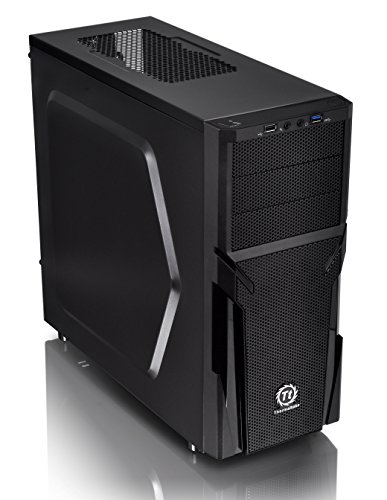
Thermaltake Versa H21 ATX Mid Tower
Best for: Standard ATX builds needing mesh airflow
- Motherboard Support
- ATX
- Case Type
- Mid Tower
- Dimensions
- 18.7 × 8.2 × 16.9 inches
- Weight
- 9.3 pounds
View on Amazon: Thermaltake Versa H21 ATX Mid Tower Affiliate link
The Thermaltake Versa H21 is a black mid-tower case supporting ATX motherboards. It measures 16.9 inches in height and weighs 9.3 pounds. The design features perforated mesh on the front and top for airflow, with raised feet to enhance ventilation. You get tool-free installation and front USB 3.0 connectivity. This chassis suits builders who need a straightforward, ventilated ATX enclosure without complex features.
Pros
- Perforated metal mesh front and top panel for heat dissipation
- Raised foot-stands at the bottom to enhance airflow
- Tool-free installation for easier assembly
- SuperSpeed USB 3.0 port on the front I/O panel
Cons
- Only supports standard ATX motherboards, not E-ATX
- Mid-tower size limits large component compatibility compared to full-towers
- Weighs 9.3 pounds, making it heavier than some lightweight alternatives
Good fit if
- You need a mid-tower case for an ATX motherboard
- You want tool-free installation for quick builds
- You prioritize front-panel airflow with mesh panels
Skip if
- You require E-ATX motherboard support
- You are building a full-tower system
- You need a lighter case under 9 pounds
Verdict: Thermaltake Versa H21 Mid-Tower ATX is a practical mid-tower for standard ATX builds. It fits users who want mesh ventilation and tool-free assembly without needing extra space for larger motherboards.
Specifications side by side
| Spec | Corsair 7000D Airflow Full-Tower Case | Thermaltake Versa H21 ATX Mid Tower |
|---|---|---|
| Motherboard Support | ATX | ATX |
| Case Type | Full-Tower | Mid Tower |
| Included Fans | 3x 140mm | not stated |
| Radiator Support | 420mm | not stated |
| Tower Size | Full-Tower | Mid-Tower |
| Fan Size | 140mm | not stated |
| Dimensions | 21.7 × 9.76 × 23.6 inches | 18.7 × 8.2 × 16.9 inches |
| Weight | 41.2 pounds | 9.3 pounds |
| Size | 7000 Series | H21 |
| Color | Black | Black |
| Model | CC-9011218-WW | CA-1B2-00M1NN-00 |
Frequently asked questions
Which case is better for extreme cooling?
The Corsair 7000D Airflow is the superior choice for extreme cooling needs. Its full-tower form factor provides ample internal volume for massive liquid cooling loops. You can install multiple large radiators without crowding components. The included 140mm fans feature anti-vortex vanes to enhance airflow efficiency. This spacious chassis is ideal for builders prioritizing maximum thermal performance over compactness.
Is the Thermaltake Versa H21 good for standard builds?
Yes, the Thermaltake Versa H21 is a practical option for standard ATX builds. It offers mesh ventilation to ensure adequate airflow for typical components. The mid-tower design fits users who do not require the extra space of a full-tower chassis. It supports tool-free assembly, making it easier to build in smaller spaces. This case is well-suited for standard desktop configurations.
How much space does the Corsair 7000D take up?
The Corsair 7000D Airflow is a large full-tower chassis. It measures 23.6 inches in height and 21.7 inches in length. The width is 9.76 inches, and it weighs 41.2 pounds. This substantial size indicates a robust steel construction designed to accommodate large components. You will need a desk or floor space that can handle these dimensions comfortably.
What motherboard size does the Thermaltake Versa H21 support?
The Thermaltake Versa H21 supports standard ATX motherboards. This is the most common motherboard size for desktop PCs. It does not accommodate larger E-ATX boards that might fit in the Corsair full-tower. If you are building with a standard ATX board, this mid-tower case provides a secure and compatible fit for your system.
Does the Corsair case come with fans installed?
Yes, the Corsair 7000D Airflow includes fans out of the box. It comes with 140mm fans that feature anti-vortex vanes. These vanes help direct airflow more efficiently across your components. This setup helps you achieve better cooling performance immediately after assembly. You do not need to purchase additional fans to start building your system.
Which case is lighter and easier to move?
The Thermaltake Versa H21 is significantly lighter and easier to handle. It weighs only 9.3 pounds compared to the Corsair’s 41.2 pounds. The mid-tower design is more compact, with dimensions of 16.9 inches in height. This makes it easier to transport and fit into smaller desks or car trunks. The Corsair is built for stationary high-performance setups rather than portability.
Can I use large GPUs in the Thermaltake Versa H21?
The Thermaltake Versa H21 is a mid-tower case, so GPU clearance is more limited than in the Corsair full-tower. While it supports standard ATX builds, you should check the maximum GPU length in the specifications. The Corsair 7000D Airflow offers more length for massive graphics cards due to its larger internal volume. For very large GPUs, the Corsair is the safer choice.
What is the main difference in tower size?
The main difference is the physical scale of the chassis. The Corsair 7000D Airflow is a full-tower, designed for maximum component compatibility and cooling. The Thermaltake Versa H21 is a mid-tower, offering a more compact footprint for standard builds. Full-towers like the Corsair allow for extensive cable management and multiple radiators. Mid-towers like the Thermaltake are better for smaller desks or simpler builds.