Corsair AIR 5400 Triple-Chamber Mid-Tower Review: Specs, Pros and Cons
As an Amazon Associate we earn from qualifying purchases. Links on this page are affiliate links.
This corsair air 5400 rs r argb review focuses on a mid-tower case built for thermal isolation. It features a triple-chamber design that separates the CPU, GPU, and PSU into distinct zones. The front chamber holds a 360mm radiator, keeping CPU heat away from other components. The central chamber manages the motherboard and GPU with vertical airflow. A rear chamber houses the PSU and cables. This model includes pre-installed ARGB fans and measures 18.5 inches in length. It is available in white or black.
What stands out
- Triple-chamber layout isolates CPU, GPU, and PSU heat
- Front chamber supports a 360mm CPU radiator
- Bottom airflow duct accelerates air velocity without increasing fan noise
- Dedicated intake and exhaust for the PSU and storage chamber
- Pre-installed reverse-rotor ARGB fans included
Who it fits
Good fit for
You should consider this case if you build high-end systems with powerful CPUs and GPUs. The isolated chambers prevent heat from one component from affecting another. The dedicated 360mm radiator support suits users who want extreme cooling performance. The airflow duct helps maintain low noise levels while moving air efficiently. If you prioritize thermal efficiency and clean cable management in a separate chamber, this design meets your needs.
Who should skip it
You might want another option if you prefer a compact build. This mid-tower measures 18.5 inches in length and 13.4 inches in width. It weighs 30.7 pounds, which is substantial. The triple-chamber design adds complexity to cable routing for some users. If you need a smaller footprint or simpler assembly, this case may feel too large and intricate for your desk or workspace constraints.
Verdict: The Corsair AIR 5400 offers exceptional thermal isolation through its triple-chamber design. It is an excellent choice for users prioritizing cooling performance over compact size.
Key specs explained for this case
Tower Size: Mid-Tower
This size fits most standard desks and offers a balance between footprint and internal space. You get enough room for mid-length graphics cards and standard ATX motherboards without taking up excessive desk area. If you need more space for extreme builds, look for full towers. If you prioritize compactness, consider mini-ITX options. Mid-tower is the standard choice for most gamers.
Radiator Support: 360mm
The case supports liquid coolers with a 360mm radiator, typically using three 120mm fans. This allows you to dissipate heat from high-end CPUs more effectively than air cooling alone. The front chamber isolates this heat, preventing it from affecting your GPU. Check your CPU cooler dimensions to ensure compatibility. Larger radiators offer better cooling potential but require more case depth.
Lighting: ARGB
Addressable RGB lighting lets you control each LED individually for complex color effects and patterns. You can sync these lights with motherboard software for a unified look across your build. This feature is ideal if you want a customized aesthetic without buying separate controllers. Standard RGB offers uniform color changes. ARGB provides more dynamic visual customization for your components and fans.
Weight: 30.7 pounds
This weight indicates a sturdy build, likely using steel and aluminum for rigidity. A heavier case reduces vibration and resonance from fans and hard drives. It also suggests good material quality, which helps with thermal mass and durability. Handle it with care during installation. Lighter cases may feel less premium or vibrate more. Heavier cases are easier to keep stable on your desk.
Design and Build Analysis
The Corsair AIR 5400 is a mid-tower case finished in white, though black is also available. According to the listing, the exterior measures 18.5 inches in length, 18.4 inches in height, and 13.4 inches in width. The total weight is 30.7 pounds. These dimensions define a standard footprint that fits most desktops, while the weight suggests a sturdy construction that resists flexing during component installation. You can choose the color that matches your existing setup, as the listing notes two distinct options.
Internally, the case uses a triple-chamber layout to isolate heat sources. The front chamber holds a 360mm radiator for the CPU, keeping that heat separate from the rest of the system. The central chamber houses the motherboard and GPU, allowing vertical airflow to cool these components before exhausting hot air. A third chamber at the bottom contains the power supply, storage drives, and cables. This chamber has its own dedicated intake and exhaust locations, preventing power supply heat from affecting other parts.
The listing highlights an airflow duct on the bottom fan array in the main chamber. This design accelerates airflow into a narrow channel, increasing velocity without requiring higher fan speeds. This approach aims to improve cooling power while managing noise levels. The ARGB lighting adds visual customization, allowing you to sync effects with compatible motherboards. The physical design prioritizes thermal management through strict separation of components rather than open mesh panels.
Setup and Daily Operation Specs
Setting up this mid-tower requires routing your hardware into dedicated compartments. You install the power supply, data storage, and cabling inside the dedicated third chamber, which features its own intake and exhaust vents. This layout keeps primary power runs away from the central motherboard area. The case includes three pre-installed reverse-rotor RS120-R fans. Because these fans include integrated ARGB lighting, you connect both power and illumination headers during assembly. The front chamber accepts a 360mm radiator, allowing you to mount your liquid cooler independently before completing internal connections. Due to the 30.7-pound empty weight, you should assemble the system close to its final desk location.
During everyday use, the chassis relies on vertical cooling pathways to manage heat across separated zones. The central chamber features bottom fan array ducts that force intake air through a narrow channel. This physical restriction accelerates airflow velocity without requiring you to raise fan speeds. As a result, you get increased cooling performance without added acoustic noise during standard workloads. The reverse-rotor fan configuration directs intake airflow through the system while displaying the ARGB lighting elements. Dedicated thermal paths ensure the front CPU radiator and rear power supply draw separate air streams continuously.
Before You Buy Considerations
Before you buy, verify your GPU length fits the central chamber. The isolated layout demands careful cable management between the three zones. You must plan routing paths for power and data lines to avoid blocking airflow. Check that your CPU cooler height clears the front chamber ceiling. This case includes three pre-installed fans, but you may need additional units for optimal thermal performance. The bottom intake duct accelerates airflow, yet larger components can obstruct this channel. Consider whether your storage drives fit in the dedicated PSU chamber. Maintenance involves cleaning dust from each isolated zone separately. This design suits builders prioritizing thermal isolation over maximum expansion. If you prefer a single open space, other options may serve you better. The triple-chamber approach requires patience during assembly. Ensure your motherboard stands align with the isolated mounting points. Verify that your power supply length does not interfere with the storage area. This case is best for users who value distinct thermal zones.
Check before you buy
- Verify GPU length fits the central chamber.
- Check CPU cooler height clearance in front zone.
- Plan cable routing between isolated chambers.
- Confirm PSU length fits storage area.
- Assess need for additional case fans.
The product at a glance
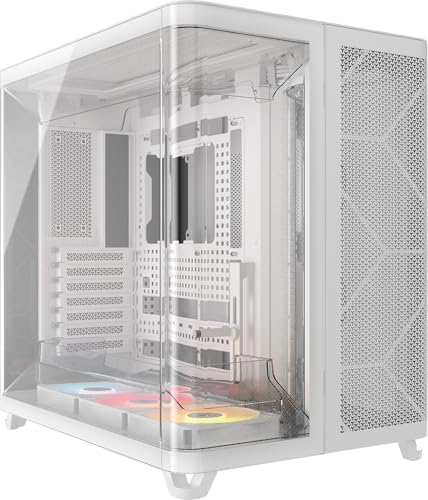
Corsair AIR 5400 Triple-Chamber Mid-Tower
Best for: High-end builds needing isolated thermal zones
- Case Type
- Mid-Tower
- Included Fans
- 3x 120mm RS120-R ARGB
- Radiator Support
- 360mm
- Dimensions
- 18.5 × 13.4 × 18.4 inches
- Weight
- 30.7 pounds
View on Amazon: Corsair AIR 5400 Triple-Chamber Mid-Tower Affiliate link
The Corsair AIR 5400 RS-R is a mid-tower case featuring a triple-chamber design that isolates the CPU, GPU, and PSU. It includes three pre-installed reverse-rotor RS120-R fans and supports 360mm radiators. The white ARGB model measures 18.5 by 13.4 by 18.4 inches. This layout helps manage heat for high-end builds while keeping cables hidden in a dedicated storage area.
Pros
- Triple-chamber design isolates CPU, GPU, and PSU heat
- Supports up to 360mm CPU radiators
- Includes three pre-installed reverse-rotor fans
- Dedicated intake and exhaust for PSU chamber
- Bottom airflow ducts increase velocity without higher fan speeds
Cons
- Heavy at 30.7 pounds
- Large footprint at 18.5 inches deep
- No mention of included RGB hub or software control
Good fit if
- You want isolated chambers to prevent heat soak
- You need space for a large 360mm radiator
- You prefer a clean cable management layout
Skip if
- You need a compact ITX or micro-ATX build
- You prefer a lighter case for frequent moves
- You want a smaller footprint for tight desks
Verdict: Corsair AIR 5400 RS-R Triple-Chamber Case offers isolated thermal zones and strong pre-installed airflow for high-performance builds. It suits builders who prioritize heat isolation and cable management over compact dimensions.
Specifications side by side
| Spec | Corsair AIR 5400 Triple-Chamber Mid-Tower |
|---|---|
| Case Type | Mid-Tower |
| Included Fans | 3x 120mm RS120-R ARGB |
| Radiator Support | 360mm |
| Tower Size | Mid-Tower |
| Lighting | ARGB |
| Dimensions | 18.5 × 13.4 × 18.4 inches |
| Weight | 30.7 pounds |
| Color | White |
| Model | CC-9011319-WW |
Frequently asked questions
What motherboard sizes does the Corsair AIR 5400 support?
The case is a mid-tower designed for standard ATX motherboards. This size offers a balance between desk footprint and internal space. You get enough room for mid-length graphics cards and standard ATX boards without taking up excessive area. It fits most standard desks well for typical builds.
How much weight can the case hold?
The Corsair AIR 5400 weighs 30.7 pounds. This substantial weight suggests a sturdy build using thick panels. You can expect the case to remain stable on your desk even with heavy components installed. The mass helps dampen vibrations from fans and hard drives during operation.
Does the Corsair AIR 5400 have RGB lighting?
Yes, this model features ARGB lighting. The RGB elements allow you to customize the look of your build. You can sync the lights with other compatible components for a unified aesthetic. The white finish complements the lighting, creating a bright and clean appearance inside the chassis.
What are the external dimensions of the case?
The case measures 18.5 inches in length, 18.4 inches in height, and 13.4 inches in width. These dimensions define its mid-tower footprint. You should measure your desk space to ensure it fits comfortably. The width allows for ample airflow and component spacing inside the triple-chamber layout.
Is the Corsair AIR 5400 suitable for high-end builds?
It is best for high-end builds needing isolated thermal zones. The triple-chamber design separates CPU, GPU, and PSU heat sources. This isolation helps maintain lower temperatures for critical components. If you prioritize heat management and cable organization over a compact size, this case is a strong choice.
What is the model number for the white version?
The model number for the white version is CC-9011319-WW. This specific identifier helps you locate the exact product online. You can use this number to verify compatibility with accessories or drivers. It distinguishes the white ARGB variant from other color options or configurations available from Corsair.