Cooler Master MasterFan MF140 Halo ARGB Review (2026): A Spec-Based Look
As an Amazon Associate we earn from qualifying purchases. Links on this page are affiliate links.
This cooler master masterfan mf140 halo argb review focuses on a 140mm case fan designed for visual impact and static pressure. It features a hybrid blade shape to push air through dense radiators or mesh panels. The standout specification is its duo-ring addressable RGB lighting, which uses 24 individually controlled LEDs. You can adjust the fan speed dynamically between 650 rpm and 1,500 rpm via PWM. This combination of silent cooling technology and customizable lighting makes it a practical choice for builders who want efficient airflow without sacrificing aesthetic control in their chassis.
What stands out
- 24 individually controlled ARGB LEDs create a duo-ring visual effect
- Hybrid static pressure blade design handles resistance in radiators and mesh panels
- PWM control allows dynamic speed adjustment from 650 rpm to 1,500 rpm
- Compatible with major motherboard RGB software including Aura, Mystic Light, and Polychrome Sync
Who it fits
Good fit for
This fan suits builders who prioritize both cooling performance and visual customization. The 140mm size and static pressure blades make it ideal for mounting on CPU liquid radiators or exhausting through mesh front panels. If you have a motherboard with addressable RGB headers, the 24 LEDs offer extensive lighting control. The wide speed range allows you to balance noise levels against airflow needs, making it a versatile option for mid-tower and full-tower cases that support 140mm mounts.
Who should skip it
You should look elsewhere if your case only supports 120mm fans, as this is strictly a 140mm unit. It is also not suitable for setups without addressable RGB headers, since the lighting requires a 3-pin ARGB connection rather than standard 5-pin RGB. If you need a fan that operates silently at all times, note that the minimum speed is 650 rpm, which may still produce audible noise in very quiet builds. Additionally, the black color option limits aesthetic flexibility for white-themed builds.
Verdict: The Cooler Master MasterFan MF140 Halo ARGB Fan offers a solid blend of static pressure performance and customizable lighting. It is a practical choice for builders with 140mm mounts and addressable RGB headers who want efficient airflow with visual flair.
Key specs explained for this fan
Fan Size: 140mm
This measurement refers to the width of the fan frame. You can use this fan in cases that support 140mm mounts. These fans often move more air at lower speeds than smaller options. Check your case specifications to ensure the mounting holes align. This size is common for front intakes and rear exhausts in mid-tower and full-tower chassis.
Max Fan Speed: 1500 rpm
This is the highest rotational speed the motor reaches. Higher speeds increase airflow but also raise noise levels. This fan adjusts between 650 rpm and 1500 rpm via PWM control. You can set it lower for quiet operation or higher for cooling heavy loads. Compare this range to other fans to find your balance of silence and cooling power.
Lighting Type: Addressable RGB
This lighting allows individual control of each LED on the fan. You can create complex patterns and color waves instead of uniform color changes. The fan uses a 3-pin connector for this data. Ensure your motherboard supports ARGB software like Aura or Mystic Light. This feature suits users who want customizable visual effects in their build.
Blade Design: Hybrid Static Pressure
This blade shape pushes air with force rather than just volume. It works well against resistance from radiators or mesh panels. Use this fan for CPU coolers or dense filters. It helps maintain airflow where standard fans might struggle. Choose this design if your case has restricted airflow paths or if you are mounting fans on a liquid cooling radiator.
Design and Build Overview
The fan measures 5.51 inches by 5.51 inches with a thickness of 0.98 inches. This 140mm frame size allows you to mount it in cases designed for larger intakes or exhausts. The listing states the unit weighs 7.58 ounces. This mass suggests a sturdy frame that resists vibration during operation. You can install this fan in standard 140mm slots found in many mid-tower and full-tower chassis.
The color is listed as black. This finish helps the fan blend into dark interior builds without drawing attention away from other components. The model number is MFL-B4DN-15NPA-R1. According to the listing, the fan uses a hybrid static pressure blade design. This layout pushes air directly forward, which is ideal for mounting against dense CPU liquid radiators or mesh front panels.
Controls are handled via a 3-pin ARGB connector and a 4-pin PWM header. The PWM feature allows dynamic speed adjustment between 650 rpm and 1,500 rpm. This range lets you balance cooling performance with noise levels. The ARGB connector connects to motherboard software for lighting control. This setup requires compatible headers on your motherboard. You must ensure your system supports Addressable RGB to use the lighting features effectively.
Setup and Everyday Use Guide
Setting up the Cooler Master MasterFan MF140 Halo ARGB Fan involves connecting two distinct cables to your motherboard. First, you must attach the PWM control wire. This allows the fan speed to adjust dynamically between 650 rpm and 1,500 rpm. This range lets you balance cooling performance against noise levels based on your system load. Second, you connect the 3-pin ARGB cable. This powers the 24 individually controlled LEDs that create the duo-ring lighting effect. The listing confirms compatibility with major motherboard suites, including ASUS Aura, MSI Mystic Light, and Gigabyte Polychrome Sync. You will need a motherboard with a dedicated 5V 3-pin ARGB header to use this feature. If your board lacks this header, you may require a separate controller. In daily use, the hybrid static pressure blade design helps move air through dense components like CPU liquid radiators or mesh chassis panels. The noise reduction technology and sound-absorbing materials aim to keep operation quieter than standard fans. This fan suits users who want to mount 140mm intakes or exhausts while maintaining customizable visual effects. The black frame blends well with most modern builds. You can set the lighting patterns once through your motherboard software. The fan will then maintain those settings while adjusting speed automatically based on temperature needs. This setup requires no additional software on your PC, relying entirely on the motherboard's built-in control capabilities.
Before You Buy This Fan
You need to verify your motherboard supports 3-pin addressable RGB headers before purchasing. This fan connects via PWM for speed control and a separate ARGB cable for lighting. If your board lacks these specific headers, you may require an additional controller hub to manage the twenty-four individually controlled LEDs. The hybrid static pressure blades make this unit suitable for dense CPU liquid radiators or mesh front panels where airflow resistance is high. You should check your case dimensions to ensure the 140mm frame fits your intended mount location. Regular upkeep involves keeping dust off the blades to maintain the specified 1,500 rpm maximum speed. This fan competes with other high-static pressure options in the 1 reviewed list, offering distinct visual customization through its duo-ring lighting design rather than just raw airflow metrics.
Check before you buy
- Confirm your motherboard has a 3-pin ARGB header.
- Check case compatibility for the 140mm frame size.
- Ensure you have space for the PWM cable.
- Verify support for Aura, Mystic Light, or Polychrome Sync.
The product at a glance
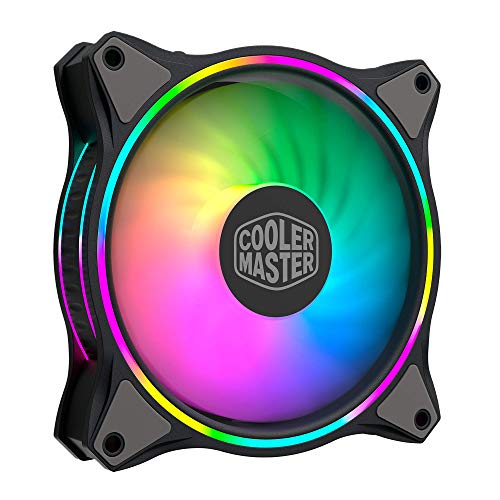
Cooler Master MasterFan MF140 Halo ARGB Fan
Best for: 140mm radiator cooling with RGB
- Fan Size
- 140mm
- Max Fan Speed
- 1500 rpm
- Lighting Type
- Addressable RGB
- Dimensions
- 5.51 × 5.51 × 0.98 inches
- Weight
- 7.58 ounces
View on Amazon: Cooler Master MasterFan MF140 Halo ARGB Fan Affiliate link
This 140mm fan uses hybrid static pressure blades to handle resistance in radiators or mesh cases. It features duo-ring addressable RGB lighting with 24 individually controlled LEDs. The PWM control adjusts speed from 650 to 1,500 rpm. It includes sound absorbing materials for quieter operation. It fits most ARGB-capable motherboards.
Pros
- 140mm size for high airflow
- 24 individually controlled ARGB LEDs
- PWM speed range 650-1,500 rpm
- Hybrid static pressure blade design
Cons
- Requires 3-pin ARGB motherboard header
- No included speed controller hub
- 1,500 rpm max speed is moderate
Good fit if
- You need 140mm fans for radiators
- You want customizable RGB lighting
- You have an ARGB motherboard
Skip if
- You require 120mm fans only
- You need software control without motherboard support
- You prefer non-RGB silent fans
Verdict: Cooler Master 140mm ARGB Fan suits builders who need static pressure for radiators and want visible lighting effects. It delivers solid airflow with customizable illumination for compatible motherboards.
Specifications side by side
| Spec | Cooler Master MasterFan MF140 Halo ARGB Fan |
|---|---|
| Fan Size | 140mm |
| Max Fan Speed | 1500 rpm |
| Lighting Type | Addressable RGB |
| Lighting | ARGB |
| Dimensions | 5.51 × 5.51 × 0.98 inches |
| Weight | 7.58 ounces |
| Size | 140mm ARGB |
| Color | Black |
| Model | MFL-B4DN-15NPA-R1 |
Frequently asked questions
Is the Cooler Master MasterFan MF140 Halo ARGB suitable for radiators?
Yes, this fan is designed for 140mm radiator cooling with static pressure. It features a hybrid blade shape to push air through dense radiators or mesh panels. This makes it a strong choice for builders who need effective cooling performance alongside visible lighting effects in their PC case.
What lighting technology does this fan use?
The Cooler Master MasterFan MF140 Halo ARGB uses addressable RGB lighting. This feature allows for customizable illumination that syncs with compatible motherboards. You can create dynamic visual effects by connecting the separate ARGB cable to your system, providing a distinct look compared to standard single-color LEDs.
How do I connect the fan to my motherboard?
You must connect two distinct cables to your motherboard for full functionality. First, attach the PWM control wire for dynamic speed adjustment between 650 rpm and 1,500 rpm. Second, connect the separate ARGB cable for lighting. Verify your motherboard has the specific 3-pin addressable RGB headers before purchasing.
What are the physical dimensions of this fan?
This fan measures 5.51 inches by 5.51 inches with a thickness of 0.98 inches. The unit weighs 7.58 ounces. These dimensions confirm it fits standard 140mm mounts. You can use it in cases designed for larger intakes or exhausts, ensuring compatibility with most mid-tower and full-tower chassis.
Does this fan require a separate controller for lighting?
You need to verify your motherboard supports 3-pin addressable RGB headers. If your board lacks these specific headers, you may require an additional controller hub to manage the lighting. The fan connects via PWM for speed control and a separate ARGB cable, so direct compatibility depends on your board.
What is the model number for this specific fan?
The model number for this fan is MFL-B4DN-15NPA-R1. This identifier helps you locate the correct product listing and verify specifications. It corresponds to the black 140mm ARGB version. Using this number ensures you purchase the exact hybrid blade fan designed for static pressure and customizable illumination.
Can I use this fan for case ventilation instead of cooling?
Yes, you can use this fan for general case ventilation. It delivers solid airflow and is suitable for mesh panels. While optimized for radiator static pressure, its design allows for effective air movement in standard intake or exhaust positions. The customizable illumination adds visual appeal to any open or closed case setup.