Fan Size Explained: What It Means for PC Cases
As an Amazon Associate we earn from qualifying purchases. Links on this page are affiliate links.
Fan Size Explained for PC Builders
Fan size explained helps you choose the right airflow for your build. The number refers to the diameter of the fan blades in millimeters. This measurement determines how much air moves through your case and how well it cools components.
The most common sizes are 120mm and 140mm. A 120mm fan is the standard for most mid-tower cases. It fits in many spots and moves a good amount of air. A 140mm fan is slightly larger. It can move more air at lower speeds. This often results in quieter operation. You must check your case specs to see which mounts it supports.
Smaller fans like 80mm, 40mm, and 30mm are rare. You might find 80mm fans in older or compact cases. The 40mm and 30mm sizes are mostly for specialized small form factor builds. They move less air but fit in tight spaces. Always verify the exact mount size before buying.
Larger options like 200mm exist for high-end cases. These fans move significant air volume. They require specific mounting holes. Not all cases can fit them. You need to check the front panel or top mount dimensions.
Why does this matter? Larger fans generally move more air at lower RPMs. Lower speed means less noise. If your case supports 140mm fans, you will likely get better cooling with less sound than using 120mm fans. However, you must ensure the physical space is available. A 140mm fan will not fit a 120mm hole.
Check your case manual or product listing. Look for supported fan sizes in the specifications. Match the fan size to the available mounting points. This ensures proper airflow and fits your budget. Proper matching prevents cooling issues and noise problems later.
PC Case Fan Sizes Compared
30mm
A 30mm fan is extremely small and rarely used for primary case airflow. It typically appears in specialized compact builds or as part of pre-installed cooling arrays in small form factor cases. The Geometric Future Model 3 includes 30mm fans alongside standard 120mm units. These tiny fans move very little air on their own. They are best suited for niche scenarios where space is severely limited. You will not find them in standard mid-tower or full-tower cases. Their primary role is often supplementary airflow in tight spaces. Most builders will ignore this size unless building a unique micro-ATX cube. It offers minimal cooling performance compared to larger options.
40mm
A 40mm fan is also a niche size, mostly found in small form factor builds or as exhaust fans in very compact enclosures. It is not a standard choice for main case ventilation. While it can move air, its small diameter limits total volume. You might encounter it in specialized mini-ITX cases or as part of custom cooling loops. It is generally not suitable for cooling high-end CPUs or GPUs on its own. If your case supports only these tiny fans, you must rely on high static pressure models. Most standard cases do not support 40mm mounts. This size is for specific, space-constrained projects rather than general building needs.
80mm
An 80mm fan is an older standard, now mostly seen in vintage builds or specific compact accessories. It moves less air than modern 120mm or 140mm fans. You might find it in older cases or as part of specialized GPU brackets like the SiyuXinyi PCI Slot Fan. These fans often run louder to achieve necessary airflow. They are not ideal for quiet, modern builds. Most new cases prioritize larger fans for better efficiency and noise levels. If you are building a retro PC or using specific legacy hardware, 80mm fans may be required. Otherwise, stick to larger sizes for better cooling performance and acoustic comfort in your case.
120mm
The 120mm fan is the most common size for PC cases. It offers a good balance of airflow, noise, and physical space. Most mid-tower and many full-tower cases support these fans. The iTek QBO 8 Evo and Zalman S3 both use 120mm fans as their primary cooling method. This size fits easily into standard mounting holes. You can buy a wide variety of options, from budget to premium. It provides reliable cooling for most components. If you are building a standard ATX or Micro-ATX system, 120mm is your safest choice. It is versatile and widely supported by case manufacturers. You can often stack multiple units to increase airflow without significant noise penalties.
140mm
A 140mm fan moves more air than a 120mm fan at the same RPM. This results in quieter operation because the fan can spin slower. The Corsair 7000D Airflow uses 140mm fans for maximum airflow. These fans require more space inside your case. Not all mid-towers support them, so check your case specs first. They are excellent for high-performance builds that need efficient cooling. The larger blade area allows for better static pressure. If your case supports 140mm mounts, they are generally superior to 120mm options. You get better airflow with less noise. This size is ideal for enthusiasts who prioritize thermal performance and acoustic comfort.
200mm
A 200mm fan is a large, specialized option for high-end cooling. It moves a massive volume of air at low RPMs. The Noctua 200mm PWM fan is designed for quiet, large-case cooling. These fans require cases with specific 200mm mounting holes. They are not compatible with standard 120mm or 140mm slots. You will find them in large full-tower cases or specialized enclosures. The benefit is exceptional airflow with minimal noise. However, they are expensive and less common. If you have a case that supports them, they are a great choice for high-airflow needs. Otherwise, stick to standard sizes. This option is for builders who want maximum cooling efficiency and have the hardware to support it.
Is Bigger Always Better
Who needs it
You should prioritize larger fan sizes, such as 140mm or 200mm models, if you are building a standard or large tower case. Larger blades move more air at lower speeds, which reduces noise while maintaining strong cooling performance. This is ideal for high-end gaming rigs or workstations that generate significant heat. If your case supports 120mm fans, you will find a wide selection of options that balance airflow and acoustic output effectively. Smaller sizes like 80mm or 30mm are generally unsuitable for main cooling duties in these builds. They are better reserved for specialized compact systems or specific component cooling where space is extremely limited. Choosing the right size ensures your components stay within safe temperature limits without requiring aggressive, loud fan curves. Verify your case compatibility first, as not all chassis accept every standard size.
Who can skip it
You can ignore detailed fan size comparisons if you are using a pre-built system or a compact mini-ITX build with integrated cooling solutions. Manufacturers often optimize fan placement and size for these specific form factors, so manual upgrades may not be necessary. If you are focusing on other aspects like GPU cooling or liquid AIOs, case fan dimensions become less critical. Prioritize cable management and airflow path design instead of obsessing over individual fan diameters. For users who rarely push their hardware to maximum limits, standard 120mm fans are sufficient and widely available. You do not need to seek out rare sizes like 30mm or 40mm unless you have a very specific niche requirement. Stick to common standards to ensure easy replacement and availability. Focus on static pressure ratings if you are mounting fans on dense radiators or dust filters, rather than just size.
Fan Glossary Basics
Airflow
The volume of air a fan moves, measured in cubic feet per minute. Higher airflow improves cooling performance for your components.
Static Pressure
The force air exerts to push through dense filters or radiators. High static pressure fans are best for restricted airflow paths.
RPM
Revolutions per minute, indicating how fast the fan blades spin. Higher RPMs generally increase airflow but also raise operational noise levels.
dBA
Decibels A-weighted, a scale measuring fan noise. Lower dBA values indicate quieter operation, which is preferable for quiet PC builds.
PWM
Pulse Width Modulation, a four-pin connector allowing precise speed control. This feature lets your motherboard adjust fan speed based on temperature.
MTBF
Mean Time Between Failures, measured in hours. It estimates the expected lifespan of the fan bearing before potential mechanical failure occurs.
Quick picks
| # | Product | Best for | Price |
|---|---|---|---|
| 1 | iTek QBO 8 Evo Micro-ATX Cube Case | Micro ATX cube builds with RGB | Check price of iTek QBO 8 Evo Micro-ATX Cube Case on Amazon |
| 2 | SiyuXinyi PCI Slot Fan and GPU Bracket | supporting GPUs with 120mm or 140mm fans | Check price of SiyuXinyi PCI Slot Fan and GPU Bracket on Amazon |
| 3 | Noctua 200mm PWM Case Fan | quiet 200mm case cooling | Check price of Noctua 200mm PWM Case Fan on Amazon |
| 4 | Geometric Future Model 3 Panoramic Micro-ATX Case | Compact builds needing pre-installed ARGB cooling | Check price of Geometric Future Model 3 Panoramic Micro-ATX Case on Amazon |
| 5 | Zalman S3 Compact ATX Mid-Tower Case | ATX builds needing included 120mm fans | Check price of Zalman S3 Compact ATX Mid-Tower Case on Amazon |
| 6 | Corsair 7000D Airflow Full-Tower Case | Extreme cooling and multi-radiator setups | Check price of Corsair 7000D Airflow Full-Tower Case on Amazon |
Our 6 picks

iTek QBO 8 Evo Micro-ATX Cube Case
Best for: Micro ATX cube builds with RGB
- Fan Size
- 120mm (what this guide is about)
- Motherboard Support
- Micro ATX
- Case Type
- Cube
- Lighting
- ARGB
- Dimensions
- 14.2 × 10.5 × 13.1 inches
- Weight
- 6.61 pounds
View on Amazon: iTek QBO 8 Evo Micro-ATX Cube Case Affiliate link
This cube-style Micro ATX case features three transparent windows for visibility. It includes two pre-installed ARGB fans: one 200mm and one 120mm. The front panel offers USB 3.0 connectivity and a card reader. Its compact dimensions make it suitable for smaller builds. You get a focused airflow design with aesthetic lighting options.
Pros
- Micro ATX cube form factor
- Includes 200mm ARGB fan
- Includes 120mm ARGB fan
- Three transparent side windows
- Front USB 3.0 port
Cons
- Supports only Micro ATX motherboards
- No mention of front USB-C port
- Limited to two fan mounts
Good fit if
- You want a compact cube case
- You prefer Micro ATX builds
- You like visible internal components
Skip if
- You need ATX motherboard support
- You require extensive fan mounting
- You want a full tower size
Verdict: The iTek Case QBO 8 Evo Micro ATX fits users who want a small, visible build with included ARGB lighting. It is a practical option for Micro ATX enthusiasts who value compactness.

SiyuXinyi PCI Slot Fan and GPU Bracket
Best for: supporting GPUs with 120mm or 140mm fans
- Fan Size
- 120mm, 140mm, 80mm (what this guide is about)
- Use
- Gaming
- Compatible Device
- Graphics Card
- Dimensions
- 4 × 6 × 0.3 inches
- Weight
- 3.53 ounces
View on Amazon: SiyuXinyi PCI Slot Fan and GPU Bracket Affiliate link
This bracket supports 80mm, 120mm, or 140mm fans to cool your graphics card. It is made of black metal and weighs 3.53 ounces. The design prevents sagging without blocking airflow. You need basic computer knowledge to install it. It fits various motherboards and chassis sizes. This tool helps maintain a rigid structure for your build.
Pros
- Supports 80mm, 120mm, or 140mm fans
- Adjustable for different graphics card weights
- Black metal construction resists rust
- Does not limit case airflow
Cons
- Requires user installation knowledge
- Only supports up to 140mm fans
- No included mounting hardware listed
Good fit if
- You need to support a heavy GPU
- You want to add 120mm or 140mm fans
- You have basic PC building skills
Skip if
- You only use 200mm fans
- You prefer plug-and-play solutions
- You lack computer assembly experience
Verdict: SiyuXinyi GPU Fan Bracket fits users who need to support heavy graphics cards with 120mm or 140mm fans. It is a practical metal solution for builders who can handle the installation themselves.
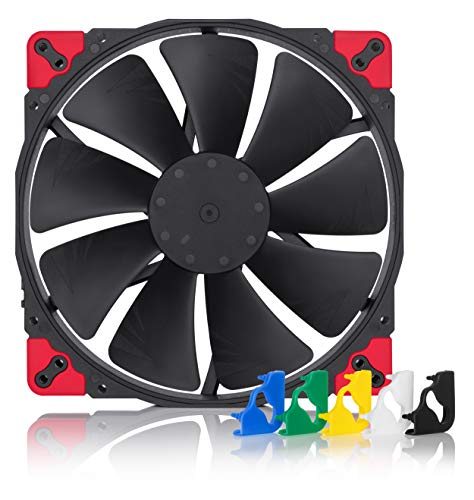
Noctua 200mm PWM Case Fan
Best for: quiet 200mm case cooling
- Fan Size
- 200mm, 30mm (what this guide is about)
- Connector Type
- 4-Pin
- Dimensions
- 7.87 × 7.87 × 1.18 inches
- Weight
- 11.2 ounces
View on Amazon: Noctua 200mm PWM Case Fan Affiliate link
This 200mm fan delivers high airflow with minimal noise. It runs at up to 800 RPM and produces a maximum of 18.1 dB(A). The 4-pin PWM header allows automatic speed control between 350 and 800 RPM. It features Flow Acceleration Channels for efficient cooling. The chromax edition includes swappable anti-vibration pads for color customization. It fits standard mounting holes for broad compatibility.
Pros
- 200x200x30 mm size for high airflow
- Maximum noise level of 18.1 dB(A)
- 4-pin PWM for automatic speed control
- Swappable anti-vibration pads for customization
- Broad compatibility with various mounting holes
Cons
- Limited to 800 RPM maximum speed
- No included mounting screws or brackets
- Single fan sold in a large pack
Good fit if
- You need quiet cooling for a 200mm case
- You want swappable colors for your build
- You prefer automatic PWM speed control
Skip if
- You require fans larger than 200mm
- You need RGB lighting effects
- You only have space for 120mm fans
Verdict: Noctua NF-A20 200mm Quiet Fan is ideal for builders prioritizing silence in large 200mm cases. It suits those who value acoustic performance over raw speed.

Geometric Future Model 3 Panoramic Micro-ATX Case
Best for: Compact builds needing pre-installed ARGB cooling
- Fan Size
- 120mm, 30mm (what this guide is about)
- Motherboard Support
- Micro-ATX, Mini-ITX
- Case Type
- Micro-ATX Tower
- Side Panel
- Tempered Glass
- Included Fans
- 5x 120mm PWM ARGB
- Radiator Support
- 360mm
View on Amazon: Geometric Future Model 3 Panoramic Micro-ATX Case Affiliate link
This Micro-ATX tower features a panoramic tempered glass design with five pre-installed 120mm PWM ARGB fans. The Squama 3003 series fans use a 30mm-thick frame to improve airflow direction and static pressure. It supports motherboards up to Micro-ATX, GPUs up to 435mm, and 360mm radiators. The dual-chamber layout aids cable management and cooling for compact high-performance builds.
Pros
- Five pre-installed 120mm PWM ARGB fans
- 30mm-thick fan frames for increased static pressure
- Panoramic tempered glass side panels
- Supports 360mm radiators on top and bottom
- Removable display platform for easy building
Cons
- Limited to Micro-ATX and Mini-ITX motherboards
- Only one USB Type-C port available
- No mention of fan speed control hub
Good fit if
- You need a compact case with high airflow
- You want pre-installed ARGB fans
- You use Micro-ATX or Mini-ITX motherboards
Skip if
- You require ATX or Full-Tower support
- You prefer a single-chamber design
- You need extensive rear I/O connectivity
Verdict: Geometric Future M3 Panoramic Micro-ATX Case offers strong cooling and aesthetics for small-form-factor builds. It suits users prioritizing airflow and visual appeal within a compact footprint.
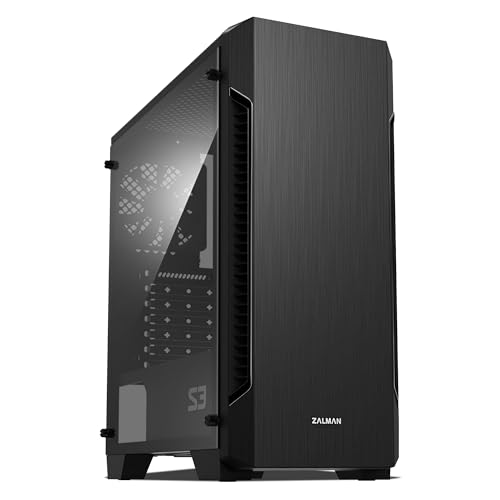
Zalman S3 Compact ATX Mid-Tower Case
Best for: ATX builds needing included 120mm fans
- Fan Size
- 120mm (what this guide is about)
- Motherboard Support
- ATX
- Case Type
- Mid-Tower
- Side Panel
- Acrylic
- Included Fans
- 3x 120mm
- Radiator Support
- 120mm
View on Amazon: Zalman S3 Compact ATX Mid-Tower Case Affiliate link
The Zalman S3 is a mid-tower case designed for ATX motherboards. It includes three 120mm fans and supports up to eight total. The side panel is made of acrylic. You get a maximum GPU length of 330mm and support for 120mm radiators. The case measures 17.8 inches in height and weighs 8.38 pounds. It suits builders who want a compact ATX setup with included airflow.
Pros
- Includes three 120mm fans for immediate airflow
- Supports up to eight fans total
- ATX motherboard compatibility
- Acrylic side panel
- Supports GPUs up to 330mm long
Cons
- Limited to 120mm radiator support
- Mid-tower form factor restricts large components
- Heavier at 8.38 pounds
Good fit if
- You need a case that includes 120mm fans
- You are building with an ATX motherboard
- You prefer an acrylic side panel
Skip if
- You require E-ATX motherboard support
- You need 240mm or larger radiator mounts
- You want a tempered glass side panel
Verdict: Zalman S3 ATX Mid-Tower with 120mm Fans is a practical option for ATX builders who want included 120mm fans. It fits compact cases but lacks support for larger radiators or E-ATX boards.

Corsair 7000D Airflow Full-Tower Case
Best for: Extreme cooling and multi-radiator setups
- Fan Size
- 140mm (what this guide is about)
- Motherboard Support
- ATX
- Case Type
- Full-Tower
- Included Fans
- 3x 140mm
- Radiator Support
- 420mm
- Dimensions
- 21.7 × 9.76 × 23.6 inches
View on Amazon: Corsair 7000D Airflow Full-Tower Case Affiliate link
The Corsair 7000D Airflow is a full-tower case designed for massive cooling potential. It supports up to twelve 120mm fans or seven 140mm fans. The package includes three 140mm AirGuide fans with anti-vortex vanes. You get room for three simultaneous 360mm radiators. This spacious interior suits builders who need extensive airflow and cable management space.
Pros
- Supports up to twelve 120mm or seven 140mm fans
- Includes three 140mm AirGuide fans with anti-vortex vanes
- Room for three simultaneous 360mm radiators
- RapidRoute cable management system with 30mm behind-motherboard space
Cons
- Large footprint at 23.6 inches tall
- Heavy at 41.2 pounds
- Limited to ATX motherboards only
Good fit if
- You need extreme cooling for high-end components
- You want to install multiple large radiators
- You have space for a full-tower chassis
Skip if
- You prefer compact micro-ATX or mini-ITX builds
- You have limited desk or floor space
- You need support for E-ATX boards
Verdict: Corsair 7000D Airflow Full-Tower is ideal for enthusiasts requiring maximum airflow and radiator support. It fits builders with large cases and high cooling demands.
Specifications side by side
| Spec | iTek QBO 8 Evo Micro-ATX Cube Case | SiyuXinyi PCI Slot Fan and GPU Bracket | Noctua 200mm PWM Case Fan | Geometric Future Model 3 Panoramic Micro-ATX Case | Zalman S3 Compact ATX Mid-Tower Case | Corsair 7000D Airflow Full-Tower Case |
|---|---|---|---|---|---|---|
| Motherboard Support | Micro ATX | not stated | not stated | Micro-ATX, Mini-ITX | ATX | ATX |
| Case Type | Cube | not stated | not stated | Micro-ATX Tower | Mid-Tower | Full-Tower |
| Side Panel | not stated | not stated | not stated | Tempered Glass | Acrylic | not stated |
| Included Fans | not stated | not stated | not stated | 5x 120mm PWM ARGB | 3x 120mm | 3x 140mm |
| Radiator Support | not stated | not stated | not stated | 360mm | 120mm | 420mm |
| Max GPU Length | not stated | not stated | not stated | 435mm | 330mm | not stated |
| Tower Size | not stated | not stated | not stated | not stated | Mid-Tower | Full-Tower |
| Fan Size | 120mm | 120mm, 140mm, 80mm | 200mm, 30mm | 120mm, 30mm | 120mm | 140mm |
| Use | not stated | Gaming | not stated | not stated | not stated | not stated |
| Lighting | ARGB | not stated | not stated | ARGB | not stated | not stated |
| Connectivity | not stated | not stated | not stated | Type-C | USB 3.0 | not stated |
| Connector Type | not stated | not stated | 4-Pin | not stated | not stated | not stated |
| Compatible Device | not stated | Graphics Card | not stated | Radiator | not stated | not stated |
| Dimensions | 14.2 × 10.5 × 13.1 inches | 4 × 6 × 0.3 inches | 7.87 × 7.87 × 1.18 inches | not stated | 16.2 × 7.44 × 17.8 inches | 21.7 × 9.76 × 23.6 inches |
| Weight | 6.61 pounds | 3.53 ounces | 11.2 ounces | not stated | 8.38 pounds | 41.2 pounds |
| Color | Black | Black | Black | White | Acrylic | Black |
| Model | ITGCAQBO30E | Ex:xq-060 | NF-A20PWMchromaxblackswap | GEO-M3F-W | not stated | CC-9011218-WW |
| Size | not stated | 80mm 90mm 120mm 140mm | 15 Count (Pack of 114) | not stated | 16.22 x 7.44 x 17.76 inches | 7000 Series |
Frequently asked questions
Can I use 140mm fans in a case designed for 120mm fans?
You generally cannot install 140mm fans in mounts designed for 120mm fans due to size differences. The Corsair 7000D Airflow Full-Tower supports 140mm fans, while the iTek QBO 8 Evo Micro-ATX Cube Case uses 120mm mounts. Check the motherboard support and fan size attributes in the product data to ensure compatibility before purchasing.
What is the largest standard case fan size available?
The largest standard case fan size listed here is 200mm. The Noctua 200mm PWM Case Fan is designed for quiet cooling in large cases. This size moves significant air at lower speeds, making it ideal for builders who prioritize acoustic performance over raw speed in spacious chassis.
Do I need a bracket to mount fans on a graphics card?
You may need a bracket if your graphics card requires additional support or airflow. The SiyuXinyi PCI Slot Fan and GPU Bracket supports 120mm, 140mm, and 80mm fans. It provides a metal solution for builders who need to support heavy graphics cards while managing heat in gaming setups.
Which fan size is best for a Micro-ATX cube case?
120mm fans are the standard choice for compact Micro-ATX cube cases. The iTek QBO 8 Evo Micro-ATX Cube Case includes ARGB lighting and supports 120mm fans. This size offers a practical balance of airflow and compactness for users who value small footprints without sacrificing cooling efficiency.
Can a Micro-ATX case fit a 360mm radiator?
Some compact Micro-ATX cases can accommodate large radiators. The Geometric Future Model 3 Panoramic Micro-ATX Case supports 360mm radiators alongside its 120mm and 30mm fan mounts. This makes it suitable for users who want strong cooling and aesthetics in a small form factor build with panoramic glass panels.
What fan size does the Zalman S3 ATX Mid-Tower use?
The Zalman S3 Compact ATX Mid-Tower Case uses 120mm fans. It is a practical option for ATX builders who want included 120mm fans for cooling. While it fits compact cases, it lacks support for larger radiators or E-ATX boards, making it best for standard ATX builds.