Apevia Prodigy Micro-ATX Case vs Apevia Genesis Pro Mid Tower (2026): Key Differences
As an Amazon Associate we earn from qualifying purchases. Links on this page are affiliate links.
The apevia prodigy micro atx case vs genesis pro mid tower comparison highlights two Apevia gaming chassis with tempered glass and preinstalled fans. Both offer high airflow designs and customizable lighting via the I/O panel. The main difference lies in their form factor and expansion capabilities. The Prodigy is a compact Micro-ATX tower, while the Genesis Pro is a larger Mid Tower. This size choice dictates which motherboards you can use and how many fans fit inside.
Key differences
| Aspect | Apevia Prodigy Micro-ATX Case | Apevia Genesis Pro Mid Tower with 6 ARGB Fans |
|---|---|---|
| Motherboard Support | Micro-ATX, Mini-ITX | ATX, Micro-ATX, Mini-ITX |
| Included Fans | 3x RGB | 6x ARGB |
| Radiator Support | 120mm (rear) | 240mm (top/front) |
| Windows | 1x side | 1x side, 1x front |
| Dimensions | 7.95 x 15.6 x 16.1 in | 7.91 x 17.1 x 15.9 in |
Which one should you choose?
Choose Apevia Prodigy Micro-ATX Case if
- You need a compact case for Micro-ATX or Mini-ITX builds
- You prefer a lighter chassis at 13 pounds
- You want simpler lighting with 30 play-through modes
Choose Apevia Genesis Pro Mid Tower with 6 ARGB Fans if
- You require full ATX motherboard compatibility
- You want preinstalled ARGB fans and more lighting modes
- You need space for larger 240mm radiators
Verdict: Choose the Prodigy if you prioritize a smaller footprint and only use Micro-ATX boards. The Genesis Pro is better for larger ATX builds and offers superior cooling flexibility with more fans and radiator options.
Case Size and Expansion Options
Motherboard Support
The Apevia Genesis Pro Mid Tower supports standard ATX, Micro-ATX, and Mini-ITX motherboards, giving you more room for larger components. The Apevia Prodigy Micro-ATX Case limits you to Micro-ATX and Mini-ITX boards. If you plan to use a full-size ATX motherboard for extra PCIe slots or dual GPUs, the Genesis Pro is the only viable option. The Prodigy’s smaller footprint restricts you to smaller form factors, which may limit your upgrade path if you need more expansion slots later.
Radiator Support
Cooling flexibility differs significantly between these two chassis. The Genesis Pro supports up to 240mm radiators in both the top and front positions, allowing for comprehensive liquid cooling setups. The Prodigy Case only supports 120mm radiators on the rear panel. This limits your liquid cooling options to a single small radiator. If you prefer high-performance water cooling for overclocking, the Genesis Pro offers far more mounting locations and larger radiator sizes. The Prodigy is better suited for air cooling or minimal liquid setups.
Included Fans
Both cases come with preinstalled fans, but the quantity and type vary. The Genesis Pro includes six ARGB fans, providing immediate airflow and lighting coverage across a larger volume. The Prodigy Case comes with three RGB fans. While both support up to six 120mm fans total, the Genesis Pro arrives with double the fans installed. This means you get better initial airflow and more lighting effects out of the box with the Genesis Pro. The Prodigy may require you to purchase additional fans to match the cooling capacity of the larger case.
RGB Lighting Modes
Lighting customization is controlled via the top I/O panel on both cases using a dedicated LED button. The Genesis Pro offers 366 distinct RGB lighting modes, including various breathing and single-color options. The Prodigy Case provides 30 play-through options, covering similar styles like RGB, breathing, and light off. The Genesis Pro gives you significantly more variety for personalizing your build’s aesthetic. If you want intricate lighting patterns without external controllers, the larger case provides a much wider selection of visual effects.
Physical Footprint
The Prodigy Case measures 15.6 inches in height and 16.1 inches in length, making it a compact Micro-ATX chassis. The Genesis Pro Mid Tower stands 17.1 inches tall and is 15.9 inches long. While the Genesis Pro is taller, the Prodigy is longer, which might affect desk space depending on your setup. The Prodigy is lighter at 13 pounds compared to the Genesis Pro’s 16 pounds. If you have limited desk space or prefer a smaller footprint, the Prodigy is the more space-efficient choice.
Choose the right Apevia case for you
Small form factor builders with limited space
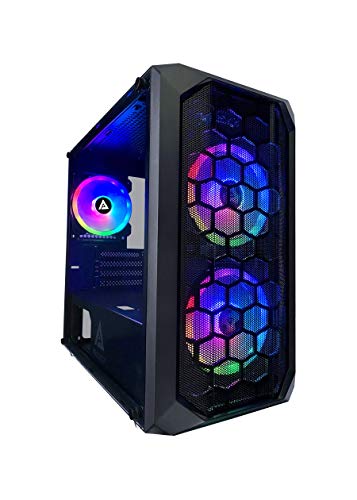
The Prodigy fits Micro-ATX and Mini-ITX boards in a compact 15.6-inch height. Its 16.1-inch length and 7.95-inch width make it easy to place on small desks. You get three preinstalled RGB fans and tempered glass on the left side for a clean look without taking up much room.
ATX users wanting maximum cooling and visibility
The Genesis Pro supports standard ATX, Micro-ATX, and Mini-ITX motherboards. It includes six ARGB fans and allows 240mm radiators in the top and front. Two tempered glass panels offer more visibility, and the 17.1-inch height provides ample space for larger components and better airflow for high-performance builds.
Users prioritizing extensive lighting customization options
The Genesis Pro offers 366 RGB lighting modes via the top I/O panel. It comes with six ARGB fans that feature inner and outer rings. This provides more visual variety compared to the Prodigy, which offers 30 modes and three RGB fans. You can tailor the lighting to match your setup perfectly.
The products compared
Apevia Prodigy Micro-ATX Case
Best for: compact Micro-ATX builds with RGB lighting
- Motherboard Support
- Micro-ATX, Mini-ITX
- Case Type
- Micro-ATX
- Side Panel
- Tempered Glass
- Included Fans
- 3x RGB
- Radiator Support
- 120mm
- Max GPU Length
- 350mm
View on Amazon: Apevia Prodigy Micro-ATX Case Affiliate link
The Apevia Prodigy is a Micro-ATX case with a tempered glass side panel and mesh front. It includes three pre-installed RGB fans and supports up to six 120mm fans for cooling. You get 350mm GPU clearance and 165mm CPU cooler height. The top I/O panel offers 30 lighting modes. It suits builders who want compact size with visible internals and customizable lighting.
Pros
- Supports Micro-ATX and Mini-ITX motherboards
- Includes 3 pre-installed RGB fans
- 350mm maximum GPU length clearance
- 30 customizable RGB lighting modes via I/O panel
Cons
- Only supports Micro-ATX and Mini-ITX form factors
- Radiator support limited to 120mm size
- Heavier at 13 pounds compared to other mid-tower options
Good fit if
- You need a compact case for Micro-ATX or Mini-ITX builds
- You want pre-installed RGB fans and visible tempered glass
- You prefer manual lighting control via the I/O panel
Skip if
- You require support for ATX or E-ATX motherboards
- You plan to install a 240mm or larger radiator
- You want a mid-tower chassis for larger components
Verdict: Apevia Prodigy Micro-ATX Case fits users building compact systems with Micro-ATX or Mini-ITX boards who value visible RGB lighting and tempered glass panels.

Apevia Genesis Pro Mid Tower with 6 ARGB Fans
Best for: ATX builders wanting six pre-installed ARGB fans
- Motherboard Support
- ATX, Micro-ATX, Mini-ITX
- Case Type
- Mid Tower
- Side Panel
- Tempered Glass
- Included Fans
- 6x ARGB
- Radiator Support
- 240mm
- Max GPU Length
- 350mm
View on Amazon: Apevia Genesis Pro Mid Tower with 6 ARGB Fans Affiliate link
The Apevia Genesis Pro is a mid-tower case supporting ATX, Micro-ATX, and Mini-ITX motherboards. It includes six pre-installed ARGB fans and features dual tempered glass windows on the left and front sides. You get clearance for GPUs up to 350mm and CPU coolers up to 160mm. The top I/O panel allows direct control of 366 lighting modes. This case suits builders who want extensive RGB customization and broad component compatibility.
Pros
- Supports ATX, Micro-ATX, and Mini-ITX motherboards
- Includes six pre-installed ARGB fans
- Dual tempered glass windows on left and front
- GPU clearance up to 350mm
Cons
- Heavier build at 16 pounds
- Lighting controlled via proprietary I/O button only
- Radiator support limited to 240mm size
Good fit if
- You need support for standard ATX motherboards
- You want six pre-installed ARGB fans
- You plan to use large graphics cards up to 350mm
Skip if
- You prefer a Micro-ATX form factor only
- You need support for larger 360mm radiators
- You want a lighter case under 10 pounds
Verdict: Apevia Genesis Pro Mid Tower fits builders who need ATX support and extensive pre-installed RGB lighting. It offers generous clearance for large components but lacks app control for its lighting effects.
Specifications side by side
| Spec | Apevia Prodigy Micro-ATX Case | Apevia Genesis Pro Mid Tower with 6 ARGB Fans |
|---|---|---|
| Motherboard Support | Micro-ATX, Mini-ITX | ATX, Micro-ATX, Mini-ITX |
| Case Type | Micro-ATX | Mid Tower |
| Side Panel | Tempered Glass | Tempered Glass |
| Included Fans | 3x RGB | 6x ARGB |
| Radiator Support | 120mm | 240mm |
| Max GPU Length | 350mm | 350mm |
| Tower Size | not stated | Mid-Tower |
| Use | Gaming | Gaming |
| Lighting | RGB | ARGB |
| Connectivity | USB 3.0 | USB 3.0 |
| Dimensions | 16.1 × 7.95 × 15.6 inches | 15.9 × 7.91 × 17.1 inches |
| Weight | 13 pounds | 16 pounds |
| Size | PRODIGY BLACK | GENESIS PRO BLACK |
| Color | Black | Black |
| Model | PRODIGY-BK | G-PRO-BK |
Frequently asked questions
Does the Apevia Prodigy support ATX motherboards?
No, the Apevia Prodigy Micro-ATX Case does not support standard ATX motherboards. It is designed specifically for Micro-ATX and Mini-ITX form factors. If you need to install a full-size ATX board, you should look at the Apevia Genesis Pro Mid Tower instead, which accommodates ATX, Micro-ATX, and Mini-ITX boards.
Which case includes more pre-installed fans?
The Apevia Genesis Pro Mid Tower includes six pre-installed ARGB fans. The Apevia Prodigy Micro-ATX Case comes with three pre-installed fans. If you want extensive airflow and lighting out of the box without buying additional units, the Genesis Pro offers a higher fan count for your build.
How tall is the Apevia Prodigy case?
The Apevia Prodigy Micro-ATX Case stands 15.6 inches tall. This compact height makes it suitable for smaller desks or tight spaces. In comparison, the Apevia Genesis Pro Mid Tower is slightly taller at 17.1 inches, providing more vertical clearance for larger components inside the chassis.
Do both cases feature tempered glass panels?
Yes, both the Apevia Prodigy and the Genesis Pro feature tempered glass panels. These panels allow you to showcase the internal components and RGB lighting of your build. The glass adds a modern aesthetic to both chassis while protecting the internal hardware from dust and accidental contact.
What is the weight difference between the two cases?
The Apevia Genesis Pro Mid Tower weighs 16 pounds, while the Apevia Prodigy Micro-ATX Case weighs 13 pounds. The Genesis Pro is heavier due to its larger mid-tower structure and additional pre-installed fans. The Prodigy is lighter, which may be preferable if you plan to move the case frequently.
Can I control the RGB lighting via an app?
The Apevia Genesis Pro Mid Tower lacks app control for its lighting effects. You must adjust the ARGB patterns directly using the controls on the I/O panel. The Prodigy also relies on physical controls for its RGB lighting. Neither case offers software-based customization through a mobile or desktop application.