Zerone 5-Fan LCD Screen Fan Review: Specs, Pros and Cons
As an Amazon Associate we earn from qualifying purchases. Links on this page are affiliate links.
This zerone 5 fans speed computer fan review covers a dedicated cooling controller designed for systems requiring precise thermal management. The Zerone unit manages five separate fan groups, allowing you to adjust airflow for different components independently. Its defining features are the large LCD screen, which displays real-time temperature and fan speed data, and the integrated CPU temperature sensor. This sensor automatically adjusts fan speeds based on heat levels, while also permitting manual overrides. The device weighs 9.88 ounces and arrives in a default color finish, focusing entirely on function rather than aesthetics. It serves as a central hub for monitoring and controlling your case airflow.
What stands out
- LCD screen displays temperature, fan speed, and hard disk state
- Controls five independent groups of case fans
- Automatic mode adjusts speed based on CPU sensor input
- Manual mode allows custom fan speed settings
- Alarm triggers if temperature exceeds 40 to 90 degree range
Who it fits
Good fit for
This controller suits builders who prioritize thermal data visibility and independent fan control. It is ideal for users running multiple fans who need to manage airflow for CPUs, GPUs, and chassis vents separately. The automatic mode benefits those who want set-and-forget cooling based on actual CPU heat. The LCD screen helps users monitor system health without opening software. If you need to track hard disk states alongside fan speeds, this unit provides that consolidated view on the front panel.
Who should skip it
Look elsewhere if you prefer software-based control or RGB lighting management. This device lacks smart app connectivity or Wi-Fi features, requiring physical interaction with the unit. It does not support fan synchronization across groups for uniform speed. Users seeking a minimalist design without a large LCD screen will find it bulky. If you only have one or two fans, the five-group capacity is unnecessary complexity. The manual alarm setup requires you to define thresholds rather than using preset smart profiles.
Verdict: The Zerone 5-Fan LCD Screen Fan Controller offers practical thermal monitoring and independent fan management. It is a solid choice for users who value physical data displays and manual control over automated software solutions.
Key specs explained for this unit
5-Fans Speed Controller
This controller manages five separate fan groups independently. You can adjust airflow for different components like the CPU, GPU, or case vents on their own settings. This setup benefits users with complex builds who need targeted cooling. When shopping, compare this to single-channel controllers that handle all fans with one speed setting, offering less precision for thermal management.
Big LCD Screen
The large display shows real-time data including temperature, fan speed, and hard disk state. You can constantly monitor the working condition of your system without opening software. This is useful for users who want immediate visual feedback. Compare this to basic controllers with small LED indicators that provide limited information, making it harder to track specific component temperatures at a glance.
AUTO /MANUAL mode
You can switch between automatic and manual control modes. Auto mode adjusts fan speed based on temperature, while manual mode lets you set a fixed speed. This flexibility suits users who want silent operation or maximum cooling on demand. Compare this to fixed-speed controllers that lack adjustment options, forcing you to choose between noise and cooling performance without the ability to toggle between them.
Alarm Temperature Range
You can manually set an alarm temperature range from 40 to 90 degrees. If the system exceeds this limit, the controller alerts you immediately. This feature helps prevent overheating damage by notifying you of potential issues. Compare this to standard controllers that only display temperature without active alerts, requiring you to constantly watch the screen to ensure your components remain within safe operating limits.
Build Quality and Physical Design
According to the listing, the Zerone controller weighs 9.88 ounces. This moderate weight suggests a sturdy internal chassis rather than a flimsy plastic shell. You can expect the unit to sit securely on your desk or mount inside a case without shifting during operation. The default color finish keeps the visual profile neutral, allowing it to blend into most PC builds without drawing unnecessary attention. This practical choice ensures the device does not clash with your existing hardware aesthetics.
The design centers around a large LCD screen that provides constant visibility into your system’s thermal state. You can monitor temperature, fan speed, alarm settings, and hard disk status all in one place. This layout eliminates the need to guess or open software utilities to check basic cooling metrics. The screen acts as a dedicated dashboard, keeping you informed about the working condition of your components at a glance. This direct feedback loop is essential for maintaining optimal performance during heavy workloads.
Controls are divided into automatic and manual modes, giving you flexibility in how you manage airflow. The manual mode allows for precise adjustments, while the automatic mode relies on the integrated CPU temperature sensor to regulate fan speeds. You can also set an alarm temperature range from 40 to 90 degrees. If a fan fails to cool the system effectively, the unit alerts you immediately. This combination of physical controls and digital display creates a straightforward, no-nonsense interface focused on reliability and clear information delivery.
Setup and Daily Operation Guide
Setting up this controller involves connecting your five fan groups to the respective ports on the unit. The device operates in two distinct modes: automatic and manual. In automatic mode, the controller monitors system temperatures and adjusts fan speeds accordingly. You can set the alarm temperature range between 40 and 90 degrees Celsius. This allows you to define precise thresholds for thermal alerts. The large LCD screen provides real-time data without needing to open software. It displays current temperature, individual fan speeds, the set alarm temperature, and hard disk status. This constant visibility helps you verify that your components are operating within safe limits. Daily use is straightforward. You simply switch between modes based on your cooling needs. If a fan fails, the system detects the loss of cooling and triggers an immediate alert. This feature ensures you are notified of hardware issues without constant monitoring. The interface is designed for quick adjustments. You can manually override automatic settings if you require specific airflow for a particular component. The weight of 9.88 ounces suggests a stable build that will not slide easily on your desk. This stability is useful when making frequent adjustments. The unit does not require complex driver installations for basic functionality. You interact directly with the hardware controls and the display. This direct interaction reduces potential software conflicts. It is suitable for users who prefer physical control over digital interfaces. The clear display ensures you can read critical data from a distance. This setup supports both simple builds and complex systems with multiple cooling zones. You maintain full control over thermal management through the dedicated buttons and screen.
Check Compatibility Before Buying
Before purchasing, verify that your motherboard supports the fan headers required for this controller. The unit manages five distinct groups, so ensure your case has enough mounting points for these fans. You will need to route cables from the fans to the controller, then connect the controller to your power supply. Check that your case interior provides enough clearance for the 9.88-ounce unit. The LCD screen displays temperature and fan speed, so position it where you can see it clearly without obstructing airflow. Regularly clean the fan blades to maintain efficiency. This device suits users who want granular control over cooling without relying on software. It fits well alongside other cooling solutions if you need independent control for different components. Consider your cable management capabilities, as multiple fan connections can create clutter. This controller is a practical choice for builds requiring precise thermal adjustments.
Check before you buy
- Verify motherboard fan header compatibility with the controller.
- Ensure case has space for five separate fan groups.
- Check interior clearance for the 9.88-ounce unit.
- Plan cable routing for five fan connections.
The product at a glance
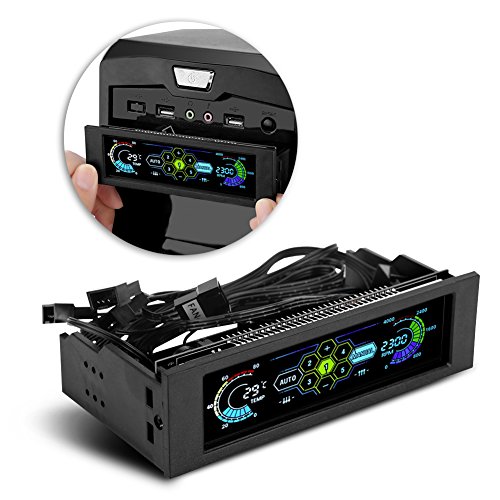
Zerone 5-Fan LCD Screen Fan Controller
Best for: builders wanting local temp monitoring
- Weight
- 9.88 ounces
View on Amazon: Zerone 5-Fan LCD Screen Fan Controller Affiliate link
The Zerone controller manages five fan groups with a large LCD screen showing temperature, speed, and hard disk status. You can switch between automatic and manual modes. It includes an adjustable alarm range from 40 to 90 degrees. This unit alerts you if a fan fails. It weighs 9.88 ounces. It suits builders who want real-time monitoring without extra software.
Pros
- Large LCD screen displays temperature and fan speed
- Supports automatic and manual mode switching
- Adjustable alarm temperature from 40 to 90 degrees
- Alerts immediately if a fan breaks down
- Controls five groups of fans independently
Cons
- No app or remote control for remote management
- No Bluetooth connectivity for wireless adjustment
- Limited to five fan groups compared to larger hubs
Good fit if
- You want to see real-time temperature and speed on a screen
- You prefer setting specific temperature alarms between 40 and 90 degrees
- You need to monitor hard disk status alongside fan performance
Skip if
- You require smartphone app control for adjustments
- You need to manage more than five fan groups
- You prefer a silent interface without a large display
Verdict: Zerone 5-Fan LCD Fan Controller offers direct hardware control with clear visual feedback. It fits users who prioritize local monitoring and manual temperature thresholds over wireless convenience.
Specifications side by side
| Spec | Zerone 5-Fan LCD Screen Fan Controller |
|---|---|
| Weight | 9.88 ounces |
| Color | default |
| Model | Zeronecd2ofn8ehk |
Frequently asked questions
Does the Zerone 5-Fan LCD Screen Fan Controller support wireless monitoring?
No, this unit relies on direct hardware control rather than wireless connectivity. It is designed for users who prioritize local monitoring and manual temperature thresholds. You view data directly on the integrated LCD screen without needing external apps or network connections.
How many fan groups can this controller manage independently?
The controller manages five separate fan groups. This allows you to adjust airflow for different components, such as the CPU, GPU, or case vents, on their own settings. This setup benefits users with complex builds who need targeted thermal management for each zone.
What is the weight of the Zerone fan controller?
The device weighs 9.88 ounces. This moderate weight suggests a sturdy internal chassis rather than a flimsy plastic shell. You can expect the unit to sit securely on your desk or mount inside a case without wobbling or feeling lightweight.
Can I use this controller for automatic temperature-based fan speed adjustment?
Yes, the device operates in both automatic and manual modes. In automatic mode, the controller monitors system temperatures and adjusts fan speeds accordingly. This helps maintain optimal cooling without requiring constant manual input from you during daily use.
Is this controller suitable for builders who want local temp monitoring?
Yes, it is best for builders wanting local temp monitoring. The large LCD screen provides clear visual feedback directly on the unit. It fits users who prefer immediate access to thermal data over relying on software running on their motherboard or PC.
What model number does this Zerone fan controller have?
The model number is Zeronecd2ofn8ehk. This specific identifier helps you verify compatibility and find replacement parts or documentation. It distinguishes this five-fan LCD unit from other Zerone products that may have different channel counts or display features.