Yoqanr PC Test Bench ATX Review: Who It Fits and Who Should Skip It
As an Amazon Associate we earn from qualifying purchases. Links on this page are affiliate links.
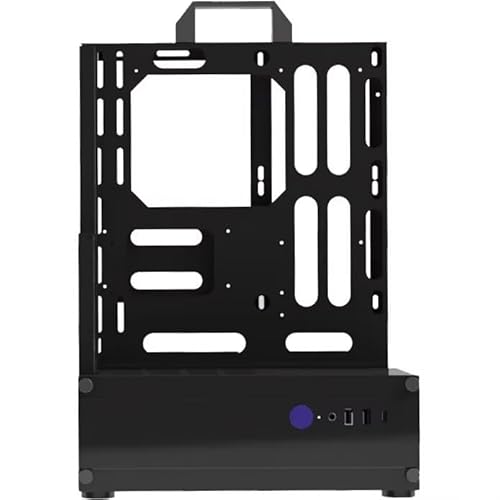
This yoqanr PC test bench atx review focuses on a portable, open-frame chassis designed for builders who need easy access. Constructed from zinc-coated steel with a black baked-paint finish, it offers a sturdy yet lightweight platform. The unit measures 11 by 6.49 by 20.43 inches and weighs 6.79 pounds. It supports ATX, Micro-ATX, and ITX motherboards, making it versatile for various build sizes. The open structure aids in heat dissipation and simplifies component installation.
What stands out
- Zinc-coated steel construction for durability
- Supports ATX, Micro-ATX, and ITX motherboards
- Integrated I/O panel with USB 3.0, USB 2.0, Type-C, and audio jacks
- Stable foot pads for secure placement
- Open frame design for improved airflow and accessibility
Who it fits
Good fit for
This case suits DIY enthusiasts and technicians who frequently assemble or test systems. The open frame allows quick access to components, while the integrated USB and Type-C ports simplify peripheral connections without needing external hubs. Its compact footprint and lightweight design make it ideal for workbenches or small setups where space is limited but performance monitoring is essential.
Who should skip it
You should look elsewhere if you need a fully enclosed case for dust protection or noise reduction. This open frame offers no side panels to contain sound or debris. Additionally, while it includes basic I/O, it lacks advanced features like integrated LCD displays or extensive cable management solutions found in traditional enclosures. If you prioritize aesthetics or a clean, hidden build, this bracket is not the right choice.
Verdict: The Yoqanr ATX Test Bench is a practical, spec-driven tool for builders who value accessibility and portability over enclosure aesthetics. It delivers essential functionality for assembly and testing without unnecessary complexity.
Yoqanr ATX Bench Key Specs
Motherboard Support: ITX, MATX, ATX
This listing states the frame supports ITX, Micro-ATX, and ATX motherboards. You can install standard desktop boards without worrying about fit. It also lists Micro-ATX in attributes. This flexibility lets you choose your board size. Compare this to enclosed cases that may only fit ATX. This open frame adapts to your build size.
Material: Zinc Coated Steel
The chassis uses zinc-coated steel with a black baked-paint finish. This material provides sturdy support for your components. It resists rust and adds durability. The open design relies on this strength. Check similar test benches for steel thickness. This build quality ensures your heavy parts stay secure during use.
Dimensions: 11.02 x 6.49 x 20.43 inches
The frame measures 11.02 by 6.49 by 20.43 inches. This compact footprint fits on most desks. The height allows clearance for large coolers. You get easy access to all sides. Compare these dimensions to full towers. This size is ideal for workspaces where space is limited but access matters.
Panel Interfaces: USB 3.0, USB 2.0, Audio, Type-C
The panel includes USB 3.0, USB 2.0, audio jacks, and a Type-C port. You connect peripherals directly without reaching inside. This saves time during testing. Type-C offers faster data transfer. Check other frames for similar ports. This setup keeps your workspace organized and functional for daily use.
Weight: 6.79 pounds
The unit weighs 6.79 pounds. This makes it portable and easy to move. You can reposition it for different setups. It is light enough for desk use. Compare this to heavier steel frames. This weight balances stability with mobility. You can carry it to a friend’s house for shared builds.
Build Quality and Physical Layout
The frame is constructed from zinc-coated steel with a black baked-paint finish. This material choice provides a sturdy base for your components while resisting corrosion. The open chassis design prioritizes airflow and accessibility. You can reach every part of your build without removing side panels. This layout is ideal for testing hardware or frequent upgrades. It also helps manage heat during intensive stress tests.
According to the listing, the unit weighs 6.79 pounds. Its dimensions are 11 by 6.49 by 20.43 inches. The bracket height without the handle is 16.34 inches. This portable form factor allows you to move the test bench easily. Foot pads on the bottom ensure stable support on your workbench. You do not need to worry about the frame sliding during component installation.
The front panel includes an independent power switch and multiple connectivity options. You get USB 3.0, USB 2.0, audio jacks, and a Type-C port. These interfaces let you connect peripherals directly to the test rig. The open structure means dust can accumulate faster than in a closed case. You will need to clean the frame regularly. This design suits builders who value performance and ease of use over aesthetics.
Setup And Everyday Use Guide
Setting up this Yoqanr test bench is straightforward because of its open-frame design. You do not need to manage complex cable routing or fit components into tight compartments. The zinc-coated steel frame measures 11 by 6.49 by 20.43 inches. This size accommodates ATX, Micro-ATX, and ITX motherboards. You simply place your motherboard onto the bracket and secure it. The structure is lightweight at 6.79 pounds, making it easy to move when you need to adjust your workspace. Stability is ensured by foot pads on the bottom. These pads keep the chassis level and prevent sliding during intense benchmarking sessions. The open chassis allows for excellent airflow. You can install large air coolers or liquid cooling radiators without worrying about clearance issues. Heat dissipates quickly, which helps maintain stable temperatures during long testing periods. The front panel includes a dedicated power switch. You also have access to four connection ports: USB 3.0, USB 2.0, audio jacks, and a Type-C interface. These ports allow you to connect peripherals directly without reaching behind the motherboard. This layout is ideal for builders who frequently swap components. You can test new hardware quickly without disassembling a full case. The black baked-paint finish resists scratches and blends with most desk setups. Daily use involves accessing your components freely. You can monitor voltages and temperatures in real time. The portable nature means you can take it to a friend’s house for cross-testing. It is a practical tool for enthusiasts who value accessibility over aesthetics.
What You Need To Know
You will need to source your own power supply, as this open frame does not include one. Ensure your PSU fits the ATX standard and has enough cable length to reach your components comfortably. The front panel offers USB 3.0, USB 2.0, audio, and Type-C ports, but verify these match your peripherals. Since the chassis is open, dust accumulation is a real concern. You should plan for regular cleaning with compressed air to keep your fans and heatsinks clear. This unit is ideal for testing builds or showcasing custom loops. If you need a quiet, enclosed environment for daily office work, this bench is not suitable. Compare it with enclosed ATX cases if noise reduction is a priority. The zinc-coated steel provides durability, but you must handle the frame carefully to avoid bending the bracket. Check your GPU length against the 11-inch depth before purchasing.
Check before you buy
- Verify your power supply fits the ATX form factor.
- Check GPU length against the 11-inch frame depth.
- Ensure you have tools for regular dust cleaning.
- Confirm front panel USB ports match your devices.
The product at a glance
Yoqanr ATX Open Frame Test Bench
Best for: hardware testing and easy assembly
- Motherboard Support
- ITX, MATX, ATX
- Case Type
- Open Frame
- Dimensions
- 11 × 6.49 × 20.4 inches
- Weight
- 6.79 pounds
View on Amazon: Yoqanr ATX Open Frame Test Bench Affiliate link
This open-frame ATX test bench uses zinc-coated steel for a sturdy, durable build. It supports ATX, Micro-ATX, and ITX motherboards, making it versatile for different system sizes. The design includes a convenient I/O panel with USB 3.0, USB 2.0, audio jacks, and a Type-C port. Its open structure aids heat dissipation and simplifies assembly. Weighing 6.79 pounds, it offers a stable platform with foot pads for secure placement during testing or development.
Pros
- Supports ATX, Micro-ATX, and ITX motherboards
- Zinc-coated steel construction for durability
- Integrated I/O panel with USB 3.0, USB 2.0, audio, and Type-C
- Open frame design improves airflow and access
Cons
- Open frame lacks dust protection
- No included PSU or motherboard
- No side panels for noise reduction
Good fit if
- You need a stable platform for hardware testing
- You want easy access to components for assembly
- You prioritize airflow over dust protection
Skip if
- You require a fully enclosed case for dust control
- You need a complete system with included components
- You want to minimize operational noise
Verdict: Yoqanr ATX Open Frame Test Bench is a practical choice for builders who prioritize accessibility and cooling. It fits those who test hardware frequently and do not need a dust-tight enclosure.
Specifications side by side
| Spec | Yoqanr ATX Open Frame Test Bench |
|---|---|
| Motherboard Support | ITX, MATX, ATX |
| Case Type | Open Frame |
| Dimensions | 11 × 6.49 × 20.4 inches |
| Weight | 6.79 pounds |
| Size | ATX |
| Color | Black |
| Model | aSP00015-ATX-gaopei-FBA |
Frequently asked questions
Does the Yoqanr ATX test bench include a power supply?
No, this open frame does not include a power supply unit. You must source your own ATX-compatible PSU. Ensure the unit has cables long enough to reach your motherboard and components comfortably. This allows you to choose a power supply that matches your specific wattage and efficiency needs.
What is the weight of the Yoqanr open frame chassis?
The chassis weighs 6.79 pounds. This lightweight design makes it easy to move around your workspace or take to different locations. The zinc-coated steel construction provides necessary stability without adding excessive bulk, keeping the total mass manageable for frequent repositioning during hardware testing sessions.
Is the Yoqanr bench suitable for dust protection?
No, this unit is an open-frame test bench. It does not offer a dust-tight enclosure. It is designed for builders who prioritize accessibility and cooling over protection from debris. If you work in a dusty environment, you may need to cover components manually or use a separate case.
What motherboard sizes fit inside this test bench?
The listing states it supports ITX, Micro-ATX, and ATX motherboards. The attributes section specifically highlights Micro-ATX support. This flexibility allows you to install standard desktop boards of various sizes. You can choose the board size that best fits your performance requirements without worrying about compatibility issues.
What are the dimensions of the Yoqanr ATX frame?
The frame measures 11 inches in length, 6.49 inches in width, and 20.4 inches in height. These compact dimensions make it suitable for smaller desks or workbenches. The vertical orientation saves horizontal space while providing ample room for standard ATX components and cooling solutions.
What connectivity options are available on the front panel?
The front panel includes USB 3.0, USB 2.0, audio jacks, and a Type-C port. These interfaces allow you to connect peripherals and test devices directly. You can easily switch between input devices or check audio output without reaching behind the motherboard, streamlining your testing workflow.