Wscoficey Fan Controller Temperature Monitor Review (2026): A Spec-Based Look
As an Amazon Associate we earn from qualifying purchases. Links on this page are affiliate links.
This wscoficey fan controller temperature monitor review examines a 5.25-inch front panel unit designed for direct case integration. It supports up to five independent fan channels, with each capable of delivering ten watts of power. The device features a touch screen interface that simplifies speed adjustments and system monitoring. An integrated temperature probe allows for automatic speed regulation based on thermal readings. You also receive an audible alarm if temperatures exceed your preset limits. This setup provides a practical way to manage airflow without relying on software. The hardware handles the heavy lifting for cooling optimization directly from your case.
What stands out
- Supports five independent fan channels
- Each channel provides up to 10W of power
- Includes a temperature probe for automatic speed control
- Audible alarm triggers when temperatures exceed preset limits
- Features a touch screen interface for manual adjustments
Who it fits
Good fit for
This controller suits builders who want direct hardware control over their cooling setup. It is ideal for cases with a 5.25-inch drive bay available for installation. Users who prefer manual overrides alongside automatic thermal management will find the dual modes useful. It also benefits those running multiple fans who need individual channel control. The audible alarm adds a layer of safety for systems running under heavy load. If you want to monitor temperatures without software, this hardware solution fits your needs.
Who should skip it
You should look elsewhere if your case lacks a 5.25-inch drive bay, as this unit requires that specific slot for installation. It is not suitable if you prefer pure software-based fan curves managed through BIOS or OS utilities. Users who need more than five fan channels will find this model limiting. It also does not offer remote control capabilities or mobile app integration. If you want a wireless solution or one that integrates with smart home ecosystems, this wired panel will not meet your requirements.
Verdict: The Wscoficey 5-Channel Touch Fan Controller offers a practical, hardware-based approach to managing system cooling. It is a solid choice for builders who value direct control and thermal alerts over software complexity.
Key specs explained for this controller
Support 5 Channels
This unit handles five separate fan connections, letting you manage multiple components independently. Each channel delivers ten watts, which covers most standard case fans. You can control each fan's speed individually or group them for synchronized operation. This setup suits builders with complex cooling loops or high airflow needs. It is more flexible than single-channel controllers that only manage one fan or a single group.
Touch screen design
The front panel uses a touch interface for adjustments, replacing physical buttons with a smooth surface. This layout offers a cleaner look inside your case and simplifies navigation through speed curves and temperature readings. You can tap to change settings without fumbling for small switches. This feature appeals to users who prefer modern aesthetics and intuitive controls over traditional mechanical dials or push buttons found on older models.
Automatic and Manual Control
You can choose between automatic mode, where the device adjusts fan speeds based on temperature probe data, or manual mode for fixed speeds. The automatic function helps maintain consistent cooling without constant tweaking. Manual mode gives you direct override capability when specific components need steady performance. This dual approach provides flexibility for different workload scenarios, ensuring your system stays cool during peaks or runs quietly during idle periods.
Temperature Monitor
The controller includes a temperature probe that monitors internal case heat levels. If temperatures exceed your preset limit, the device triggers an audible alarm to warn you of potential overheating. This safety feature helps protect sensitive components from thermal damage. It is useful for users who want passive monitoring without relying solely on software. Compare this to basic controllers that lack thermal alerts and require constant software checks.
Efficiency Mode
This mode optimizes cooling by automatically setting fans to their fastest or slowest speeds based on current conditions. The display shows real-time fan speeds, allowing you to verify performance instantly. It simplifies tuning by removing the need to manually adjust each curve. This is helpful for users who want set-and-forget cooling solutions. It differs from manual setups where you must constantly tweak speeds to balance noise and thermal output.
Physical Design and Build Quality
The unit measures 5.91 inches in length, 3.15 inches in width, and 1.65 inches in height. It weighs 10.9 ounces. This footprint matches the standard 5.25-inch drive bay size found in most mid-tower and full-tower cases. You can mount it directly into the front panel or top area of your chassis. The black finish blends with typical internal components. The compact depth ensures it does not interfere with large graphics cards or top-mounted radiators.
According to the listing, the front face features a touch screen interface. This layout replaces traditional physical knobs or buttons. You control fan speeds and view temperature data by tapping the display. The glossy surface requires occasional cleaning to maintain responsiveness. The touch controls allow for precise adjustments without removing your hand from the keyboard.
The device includes a temperature probe for monitoring internal heat. This sensor connects to the main unit to provide real-time data. The screen displays current temperatures and fan speeds. You can set alarm thresholds to receive audible warnings if temperatures exceed safe levels. This feature helps prevent overheating during intensive tasks. The automatic mode adjusts all fans based on the probe readings. Manual mode lets you set specific speeds for individual channels. This design prioritizes ease of use and clear visibility within the case.
Setup and Everyday Use Guide
Setting up this controller involves integrating it into your case’s standard 5.25-inch drive bay. The unit’s dimensions of 5.91 inches by 3.15 inches by 1.65 inches ensure it fits most mid-tower and full-tower chassis without modification. You will connect up to five independent fan cables to the respective channels. Each channel provides ten watts of power, which is sufficient for standard case fans. This allows you to manage multiple components separately or group them for synchronized operation.
Once installed, the touch screen interface becomes your primary control point. The layout is designed for straightforward navigation. You can choose between automatic and manual control modes. In automatic mode, the built-in temperature probe monitors system heat. The controller then intelligently adjusts all connected fans to maintain optimal cooling. If the temperature exceeds your preset limit, an audible alarm triggers to warn you of potential overheating. This feature helps protect your hardware from thermal damage.
In manual mode, you can adjust the speed of individual fans. The display shows real-time fan speeds, giving you precise oversight. You can also select an efficiency mode that automatically sets fans to their fastest or slowest speeds based on your preference. This provides complete control over your cooling profile. The device operates silently during normal use, only sounding the alarm when necessary. You get direct access to speed adjustments and temperature readings without needing additional software. This makes daily management of your PC’s airflow simple and direct.
Before You Buy This Controller
You need to verify your case has an empty 5.25-inch drive bay. The unit requires physical space for mounting. You must also ensure you have enough SATA power connectors or Molex adapters if the controller draws power from the PSU directly. Check that your fans support PWM or DC signals compatible with the ten-watt per channel limit. This device replaces traditional knob-based controllers, so you will need to learn the touch interface. It fits well if you want a clean front panel look. It may not suit you if you prefer tactile feedback or physical dials. You should also consider whether your motherboard already handles fan curves via BIOS. If so, this controller adds a layer of manual override. Keep the touch screen clean. Dust can interfere with responsiveness. This option sits alongside other smart controllers by offering direct hardware control rather than software management. It is a good choice for builders who want visible temperature data and audible alarms without installing additional software on their PC.
Check before you buy
- Verify your case has an available 5.25-inch drive bay for mounting.
- Check that your power supply provides sufficient connectors for the controller.
- Ensure your fans support PWM or DC signals within the ten-watt limit.
- Confirm your motherboard BIOS does not already handle all fan automation.
The product at a glance
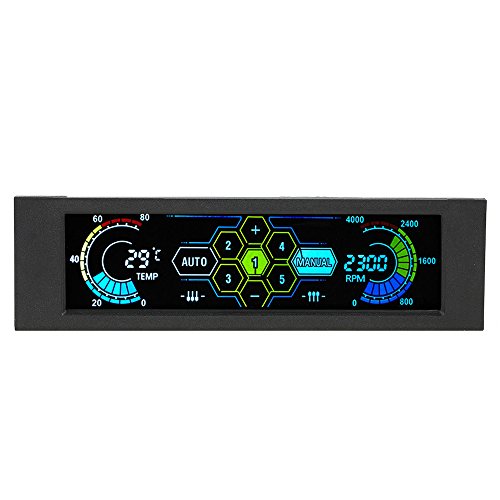
Wscoficey 5-Channel Touch Fan Controller
Best for: 5-fan setups needing physical touch control
- Dimensions
- 5.91 × 3.15 × 1.65 inches
- Weight
- 10.9 ounces
View on Amazon: Wscoficey 5-Channel Touch Fan Controller Affiliate link
This Wscoficey fan controller features a 5.25-inch front panel with a touch screen for easy monitoring and control. It supports five independent channels, each delivering up to 10W to drive demanding fans. The device offers automatic temperature-based speed adjustment and manual overrides. An audible alarm warns you if temperatures exceed preset limits, protecting your PC from overheating while you maintain complete fan control.
Pros
- Five independent channels support up to 10W per fan
- Touch screen interface for intuitive manual and automatic control
- Audible alarm activates when preset temperature limits are exceeded
- Automatic mode intelligently adjusts fan speeds based on probe readings
Cons
- Only supports five fan channels
- Requires 5.25-inch drive bay installation
- No remote control or mobile app listed
Good fit if
- You need to monitor and adjust up to five fans directly from the case front
- You want audible warnings for overheating without checking software
- You prefer a physical touch screen over software-only control
Skip if
- You require more than five fan control channels
- You prefer software-based control without a front panel display
- You need a compact controller that fits smaller bays
Verdict: Wscoficey 5-Channel Touch Fan Controller fits builders who need direct physical control and audible overheating alerts for up to five fans. It suits those who want a dedicated front panel solution rather than software management.
Specifications side by side
| Spec | Wscoficey 5-Channel Touch Fan Controller |
|---|---|
| Dimensions | 5.91 × 3.15 × 1.65 inches |
| Weight | 10.9 ounces |
| Color | black |
| Model | UZM4004964300995NI |
Frequently asked questions
Does this controller support RGB lighting control?
The published specifications for the Wscoficey 5-Channel Touch Fan Controller do not mention any RGB or addressable LED lighting capabilities. The device focuses on fan speed management and temperature monitoring. You should expect it to handle motor power for up to five fans rather than managing light strips. If you need lighting synchronization, this unit may not be the right fit for your build.
How does the touch interface work?
The unit features a touch screen interface that allows you to adjust fan speeds directly. You can control each of the five channels independently or group them for synchronized operation. This physical control method eliminates the need for software installation. It provides a straightforward way to manage airflow without navigating through operating system menus or complex configuration tools.
What is the maximum power output per channel?
Each of the five channels can deliver ten watts of power. This specification covers most standard case fans found in modern PC builds. You can connect up to five fans to this single unit. The power distribution allows for independent speed control per channel, ensuring that high-performance fans do not overload the controller's capabilities.
Is this device compatible with all PC cases?
The controller is designed to fit into a standard 5.25-inch drive bay. Its dimensions are 5.91 inches in length, 3.15 inches in width, and 1.65 inches in height. This form factor matches most mid-tower and full-tower cases. You must verify that your chassis has an empty drive bay to mount this unit securely without modification.
Does it include temperature sensors?
The product name and description indicate it functions as a temperature monitor. While specific sensor models are not listed in the provided data, the device is designed to track thermal conditions. It provides audible alerts for overheating, allowing you to react quickly to rising temperatures. You should check the included documentation for sensor compatibility details.
Can I use this with PWM fans?
The controller supports five independent channels, each delivering ten watts. This power output is suitable for standard case fans, including PWM models. You can manage each fan's speed individually. The touch interface allows for precise adjustments. Ensure your fans connect properly to the controller's output ports for optimal performance and speed regulation.