Vetroo Black AL800 Mid Tower Review: Specs, Pros and Cons
As an Amazon Associate we earn from qualifying purchases. Links on this page are affiliate links.
This vetroo black al800 mid tower review examines a budget-friendly chassis designed for standard gaming builds. The case supports ATX, Micro-ATX, and Mini-ITX motherboards, offering flexibility for various system sizes. A key defining spec is its 340mm maximum GPU length, allowing room for large graphics cards. It also accommodates up to a 360mm liquid cooling radiator in the front. The tempered glass side panel showcases internal components, while the mesh front promotes airflow. With dimensions of 17.6 inches in height, it fits most standard desks. This listing outlines the core specifications for potential buyers.
What stands out
- Supports ATX, M-ATX, and ITX motherboards
- Accommodates GPUs up to 340mm in length
- Fits 360mm front-mounted radiators
- 4mm tempered glass side panel
- USB-C and USB 3.0 I/O ports
Who it fits
Good fit for
This case suits builders who want a standard mid-tower form factor without excessive bulk. It is ideal for users planning to install large graphics cards or AIO coolers, given the 340mm clearance and 360mm radiator support. Gamers who value visible internal lighting will appreciate the tempered glass side panel. The inclusion of USB-C connectivity makes it a practical choice for modern peripherals. It is a solid option for those building an ATX or Micro-ATX system on a budget.
Who should skip it
You should look at another option if you need a full-tower case for extreme component spacing. This chassis is limited to a mid-tower size, so it will not fit E-ATX motherboards or exceptionally large components that require more vertical space. If you require a case with no tempered glass for maximum durability, this model is not suitable. Users needing extensive fan mounting options beyond the standard mesh front may find the airflow configuration limiting. It is not designed for silent PC builds due to the open mesh design.
Verdict: The Vetroo AL800 offers solid compatibility for ATX and Micro-ATX builds with good clearance for large GPUs and radiators. It is a practical, spec-driven choice for standard gaming PCs.
Vetroo AL800 Key Specs Explained
Case Type: Mid Tower
This size fits standard ATX motherboards while leaving room for extra storage and cooling. It balances interior space with a smaller footprint on your desk. You get enough room for large components without taking up too much floor space, making it a practical choice for most gaming setups.
Motherboard Support: ATX, M-ATX, ITX
The chassis accommodates three distinct motherboard form factors. You can install a full-sized ATX board for maximum expansion or switch to the smaller M-ATX or ITX sizes for more compact builds. This flexibility ensures the case works with a wide range of system configurations and budget levels.
Max GPU Length: 340mm
This limit allows you to install very large graphics cards without hitting the back wall. Many high-end RTX series cards exceed 300mm, so this clearance provides necessary breathing room. You can upgrade your video card later without worrying about physical interference with the case structure or other components.
Radiator Support: 360mm
You can mount a large three-fan liquid cooling radiator in the front panel. This setup helps dissipate heat from high-performance CPUs effectively. The mesh front design supports this airflow strategy, keeping your processor cool during intense gaming sessions or heavy rendering tasks while maintaining a clean interior layout.
Side Panel: Tempered Glass
This transparent panel lets you view your internal components and lighting clearly. You can showcase your custom cable management and RGB fans without opening the case. The 4mm thickness provides durability against accidental bumps, ensuring your display remains intact while protecting the hardware inside from dust and external damage.
Design and Build Quality
The Vetroo AL800 presents a straightforward mid tower design. Its exterior features a black finish with a mesh front panel. This mesh construction is not just for style; it allows maximum airflow to reach your components. According to the listing, this helps keep your system cool during long gaming sessions. The side panel is made of 4mm thick tempered glass. This material is sturdy enough to show off your internal ARGB lighting and hardware without adding excessive weight. You can see everything inside clearly.
In terms of dimensions, the case measures 17.6 inches in height, 15.2 inches in length, and 8.58 inches in width. It weighs 12.4 pounds. This weight suggests a solid build that will stay stable on your desk. The layout prioritizes ease of use. A convenient door opening design is included to make assembling your PC interior easier. You do not need to struggle with tight spaces when installing parts. Cable management is handled by two soft silicone cord grommets. These let you route wires neatly behind the motherboard tray, keeping your build tidy.
The I/O panel sits at the top for quick access. It includes a Type-C port, two USB 3.0 ports, and a microphone/headphone combo jack. There is also a reset button. These controls are positioned for convenience. You can reach them without bending down. The overall design focuses on practical functionality for standard gaming builds.
Setup and Daily Use Overview
Setting up the Vetroo AL800 begins with removing the tempered glass side panel. The listing notes a convenient door opening design, which simplifies accessing the interior for component installation. You can install motherboards in ATX, M-ATX, or ITX formats. The case supports graphics cards up to 340mm in length, ensuring compatibility with high-end models, including the RTX 50 series. For cooling, you can mount a 360mm radiator at the front or utilize up to eight 120mm fans throughout the chassis.
Cable management relies on two soft silicone cord grommets. These allow you to route wires cleanly behind the motherboard tray, keeping the interior tidy. The I/O panel sits at the top, offering a Type-C port, two USB 3.0 ports, a combined microphone/headphone jack, and a reset button. This layout places essential connections within easy reach during setup or daily use.
For everyday operation, the mesh front panel provides consistent airflow to maintain component temperatures. If you choose to use ARGB fans, they can synchronize with your motherboard via a 5V 3-pin interface. The ARGB LED strip adds visual customization, which remains visible through the 4mm thick tempered glass. The black finish and modern mesh design keep the aesthetic clean. The case weighs 12.4 pounds and measures 17.6 inches in height, providing a stable base for your gaming rig. This configuration supports standard gaming builds without requiring excessive desk space.
Before You Buy The Vetroo AL800
Before you buy this Vetroo AL800, verify your component dimensions. The listing supports GPUs up to 340mm, which fits most RTX 50 series cards, but you must measure your specific model. Check that your CPU cooler does not exceed the 360mm radiator support limit in the front. You need to ensure your motherboard is ATX, M-ATX, or ITX compatible. This case includes ARGB fans, but you must have a motherboard with a 5V 3-pin header to sync them. If your board lacks this, you cannot use the synchronized lighting. The I/O panel offers USB 3.0 and Type-C, so verify your cable lengths reach the front. Keep the tempered glass clean with a microfiber cloth to maintain visibility. This mid-tower option suits builders who want airflow and glass aesthetics without complex features. It sits alongside other budget-friendly choices, offering a practical balance of space and cooling for standard gaming rigs.
Check before you buy
- Verify GPU length is under 340mm for your specific card.
- Check motherboard has 5V 3-pin ARGB header for fan sync.
- Confirm CPU cooler fits within 360mm front radiator space.
- Ensure ATX, M-ATX, or ITX board matches your needs.
The product at a glance
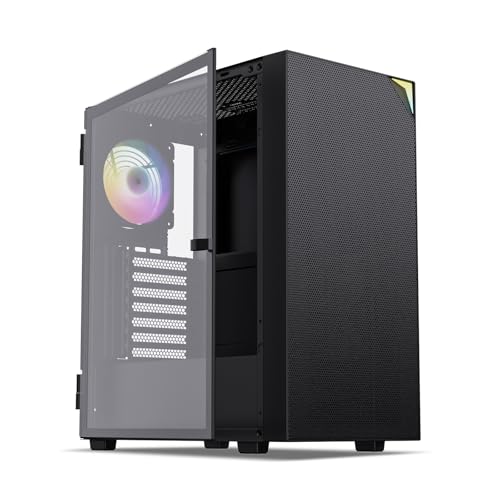
Vetroo AL800 Black Mid Tower
Best for: ATX gamers wanting mesh airflow and glass panels
- Motherboard Support
- ATX, M-ATX, ITX
- Case Type
- Mid Tower
- Side Panel
- Tempered Glass
- Radiator Support
- 360mm
- Max GPU Length
- 340mm
- Use
- Gaming
View on Amazon: Vetroo AL800 Black Mid Tower Affiliate link
The Vetroo AL800 is a mid-tower case with a tempered glass side panel and mesh front. It supports ATX, M-ATX, and ITX boards, plus 360mm radiators. The front panel fits GPUs up to 340mm long. You get USB-C, USB 3.0, and audio jacks on the I/O panel. ARGB fans sync via a 5V 3-pin header. This case suits gamers who want airflow and visible lighting.
Pros
- Tempered glass side panel for component visibility
- Mesh front panel for high airflow
- Supports 360mm liquid cooling radiators
- USB-C and USB 3.0 ports on I/O panel
- ARGB fans sync with motherboard via 5V 3-pin
Cons
- Heavier build at 12.4 pounds
- No mention of included fans beyond ARGB
- Limited to 5V 3-pin ARGB sync
Good fit if
- You want a mid-tower with a glass side panel
- You need support for large GPUs up to 340mm
- You prefer mesh front panels for airflow
Skip if
- You require a full-tower chassis
- You need USB-C with higher data speeds than standard
- You want a case without tempered glass
Verdict: The Vetroo AL800 Mid Tower offers solid airflow and ARGB support for gamers building with ATX or smaller motherboards. It fits users who value visible components and standard connectivity.
Specifications side by side
| Spec | Vetroo AL800 Black Mid Tower |
|---|---|
| Motherboard Support | ATX, M-ATX, ITX |
| Case Type | Mid Tower |
| Side Panel | Tempered Glass |
| Radiator Support | 360mm |
| Max GPU Length | 340mm |
| Tower Size | Mid-Tower |
| Use | Gaming |
| Lighting | ARGB |
| Bearing Type | Fluid Dynamic Bearing |
| Dimensions | 15.2 × 8.58 × 17.6 inches |
| Weight | 12.4 pounds |
| Color | Black |
| Model | VT-CASE-AL800-BK (FBA) |
Frequently asked questions
Does the Vetroo AL800 support ATX motherboards?
Yes, this mid tower case is designed to support ATX motherboards. It also accommodates smaller Micro-ATX and Mini-ITX boards, giving you flexibility in component selection. This makes it suitable for standard gaming builds without requiring a larger chassis footprint.
What are the external dimensions of this case?
The Vetroo AL800 measures 17.6 inches in height, 15.2 inches in length, and 8.58 inches in width. These dimensions define its mid tower form factor. You can use these measurements to ensure the case fits comfortably on your desk or inside your current enclosure space.
How much does the Vetroo AL800 weigh?
The case weighs 12.4 pounds. This weight suggests a sturdy build that resists flexing during component installation. It is heavy enough to stay stable on your desk but manageable for moving between locations or upgrading your setup location.
Is the Vetroo AL800 suitable for gaming?
Yes, this chassis is specifically marketed for gaming use. It features a mesh front panel to promote airflow, which helps keep gaming components cool during intense sessions. The design also includes ARGB support to enhance the visual appeal of your gaming rig.
What color options are available for this model?
The Vetroo AL800 is available in a black finish. This neutral color pairs well with most component aesthetics and desk setups. The black mesh front panel complements the tempered glass side panel, creating a cohesive look for your PC build.
What is the specific model number for this case?
The model number is VT-CASE-AL800-BK. This identifier helps you locate the exact product in online listings and verify compatibility with accessories. It distinguishes this black mid tower variant from other potential models in the Vetroo lineup.