Thermaltake vs Okinos PC Cases: Which Brand Fits You?
As an Amazon Associate we earn from qualifying purchases. Links on this page are affiliate links.
Choosing between a thermaltake vs okinos PC case depends on your build size and cooling needs. Both brands offer black chassis with modern connectivity options like USB 3.0 ports. The main difference lies in motherboard support. Thermaltake supports standard ATX boards in a mid-tower form factor. Okinos targets smaller Micro-ATX and ITX builds with a compact design. Your choice hinges on whether you prioritize expansion space or compact aesthetics.
Key differences
| Aspect | Thermaltake Versa H21 ATX Mid Tower | Okinos Aqua 3 Panoramic Micro-ATX Case |
|---|---|---|
| Motherboard Support | ATX | MATX, ITX |
| Tower Size | Mid Tower | Micro ATX |
| Side Panel Material | Perforated metal mesh | Tempered Glass |
| Pre-installed Fans | Not listed | 3x 120mm 3-Pin ARGB |
| Front Connectivity | USB 3.0, USB 2.0, Audio | USB 3.0, USB Type-C, Audio |
Which one should you choose?
Choose Thermaltake Versa H21 ATX Mid Tower if
- You need to install a full-size ATX motherboard.
- You prefer a traditional mid-tower layout for maximum component compatibility.
- You want a case focused on airflow with perforated mesh panels.
Choose Okinos Aqua 3 Panoramic Micro-ATX Case if
- You are building with a Micro-ATX or ITX motherboard.
- You want pre-installed ARGB fans and a built-in controller.
- You prefer a compact chassis with panoramic tempered glass visibility.
Verdict: The Thermaltake Versa H21 is the practical choice for builders using standard ATX motherboards who need a spacious mid-tower. The Okinos Aqua 3 suits smaller Micro-ATX or ITX builds, offering pre-installed ARGB lighting and a glass side panel for display. Select based on your motherboard size and visual preferences.
Thermaltake vs Okinos Case Comparison
Motherboard Support
The Okinos Aqua 3 supports Micro-ATX and ITX motherboards, making it a compact choice for smaller builds. In contrast, the Thermaltake Versa H21 accommodates standard ATX motherboards, offering more room for larger components. If you plan to use a full-size ATX board, the Thermaltake is the necessary choice. However, if you prefer a tighter footprint with Micro-ATX or ITX, the Okinos provides that flexibility. This difference defines the core size of your potential build, so match your motherboard first.
Tower Size
The Thermaltake Versa H21 is a mid-tower case with dimensions of 18.7 inches in length, 8.2 inches in width, and 16.9 inches in height. The Okinos Aqua 3 is smaller, measuring 13.8 inches in length, 8.27 inches in width, and 15.4 inches in height. The Thermaltake offers a larger internal volume, which can help with cable management and airflow for larger components. The Okinos is more compact, fitting easily on smaller desks or in tighter spaces. Your available desk space and component size will dictate which form factor suits you best.
Included Fans
The Okinos Aqua 3 comes with three 120mm 3-pin ARGB fans pre-installed: two at the top and one at the rear. This setup provides immediate vertical airflow and lighting without extra purchases. The Thermaltake Versa H21 data does not list pre-installed fans, meaning you may need to buy them separately to achieve similar cooling. The Okinos gives you a head start on cooling and aesthetics right out of the box. If you want immediate fan coverage, the Okinos has the advantage here.
Side Panel
The Okinos Aqua 3 features a panoramic view with fully glass-covered front and side panels, offering a 270-degree wide-angle view of your internal hardware. The Thermaltake Versa H21 uses a perforated metal mesh front and top panel for ventilation, but the data does not specify a glass side panel. If you want to showcase your components and RGB lighting, the Okinos glass design is superior. The Thermaltake prioritizes airflow over visibility with its mesh construction. Choose based on whether you value aesthetics or raw ventilation.
Connectivity
The Okinos Aqua 3 includes a versatile I/O panel with two USB 3.0 ports, audio jacks, and a USB Type-C 3.2 Gen 2 interface for fast data transfer. The Thermaltake Versa H21 offers one USB 3.0 port, one USB 2.0 port, and audio jacks. The Okinos provides the modern Type-C connection, which is useful for newer devices and faster transfers. The Thermaltake relies on standard USB 3.0 and 2.0 ports. If you need Type-C connectivity, the Okinos is the better option for your daily connections.
Thermaltake Versa H21 vs Okinos Aqua 3
ATX builders needing large component support
The Thermaltake Versa H21 supports standard ATX motherboards, providing ample space for larger components. Its mid-tower design accommodates long graphics cards and tall CPU coolers. The perforated mesh panels enhance airflow, making it a practical choice for high-performance ATX builds that require robust ventilation and expansion options.
Compact builders wanting panoramic glass views
The Okinos Aqua 3 fits Micro-ATX and ITX boards in a compact footprint. Its 270-degree panoramic glass panels showcase your hardware clearly. The included ARGB fans and controller allow for customizable lighting. This case is ideal for smaller builds where visual appeal and efficient vertical airflow are top priorities.
Users valuing modern Type-C connectivity
The Okinos Aqua 3 includes a Type-C 3.2 Gen 2 port for fast data transfer alongside dual USB 3.0 ports. The Thermaltake Versa H21 offers one USB 3.0 and one USB 2.0 port. If you frequently connect high-speed peripherals, the Okinos provides more modern and versatile front-panel connectivity options.
The products compared
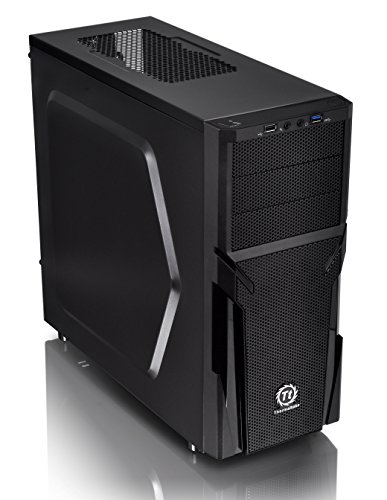
Thermaltake Versa H21 ATX Mid Tower
Best for: ATX builders needing strong airflow and tool-free setup
- Motherboard Support
- ATX
- Case Type
- Mid Tower
- Dimensions
- 18.7 × 8.2 × 16.9 inches
- Weight
- 9.3 pounds
View on Amazon: Thermaltake Versa H21 ATX Mid Tower Affiliate link
The Thermaltake Versa H21 is a black ATX mid tower case designed for straightforward builds. It features a perforated metal mesh front and top panel to support rapid air intake and heat dissipation. The chassis includes tool-free installation for easier assembly and pre-mounting holes for standard ATX motherboards. It also supports long graphics cards and liquid cooling systems. This case suits users who prioritize ventilation and simple setup.
Pros
- Perforated metal mesh front and top panels for optimized ventilation
- Tool-free installation design for easier component mounting
- Pre-mounting holes support standard ATX motherboards
- Includes USB 3.0, USB 2.0, and audio jacks on the front panel
- Heightened foot stands enhance bottom airflow
Cons
- Only supports ATX motherboards, excluding Micro ATX and Mini ITX
- No mention of included case fans in the specifications
- Standard ATX support limits compatibility with smaller form factors
Good fit if
- You need a case that supports full-size ATX motherboards
- You want a design with strong passive airflow via mesh panels
- You prefer tool-free installation for quick assembly
Skip if
- You plan to use a Micro ATX or Mini ITX motherboard
- You require a case with pre-installed fans
- You are building a compact ITX setup
Verdict: The Thermaltake Versa H21 ATX Mid Tower is a practical mid-tower chassis for builders who need full ATX support and strong airflow. It fits users who value straightforward assembly and mesh ventilation over compact form factors.

Okinos Aqua 3 Panoramic Micro-ATX Case
Best for: compact MATX builds with glass focus
- Motherboard Support
- MATX, ITX
- Case Type
- Micro ATX
- Side Panel
- Tempered Glass
- Included Fans
- 3x 120mm ARGB
- Max GPU Length
- 320mm
- Connectivity
- Type-C
View on Amazon: Okinos Aqua 3 Panoramic Micro-ATX Case Affiliate link
The Okino Aqua 3 is a Micro ATX case featuring a panoramic tempered glass design. It includes three 120mm ARGB fans for vertical airflow and supports GPUs up to 320mm. The front panel offers USB 3.0 and Type-C ports. This chassis suits builders wanting a compact build with strong lighting visibility. It fits ITX and MATX motherboards efficiently.
Pros
- 270-degree panoramic tempered glass panels
- Three 120mm ARGB fans pre-installed
- Type-C 3.2 Gen 2 connectivity port
- Supports GPUs up to 320mm length
Cons
- Limited to Micro ATX and ITX motherboards
- No mention of included fan controller hub
- Smaller interior than standard ATX cases
Good fit if
- You need a compact case for MATX builds
- You want extensive side and front glass views
- You prefer pre-installed ARGB lighting
Skip if
- You require full ATX motherboard support
- You need a larger GPU clearance
- You prefer minimal glass exposure
Verdict: The Okino Aqua 3 Micro ATX ARGB Case delivers a sleek, glass-heavy aesthetic for smaller builds. It is a solid option if you prioritize visual impact and compact dimensions over maximum expansion space.
Specifications side by side
| Spec | Thermaltake Versa H21 ATX Mid Tower | Okinos Aqua 3 Panoramic Micro-ATX Case |
|---|---|---|
| Motherboard Support | ATX | MATX, ITX |
| Case Type | Mid Tower | Micro ATX |
| Side Panel | not stated | Tempered Glass |
| Included Fans | not stated | 3x 120mm ARGB |
| Max GPU Length | not stated | 320mm |
| Tower Size | Mid-Tower | not stated |
| Fan Size | not stated | 120mm |
| Lighting | not stated | ARGB |
| Connectivity | not stated | Type-C |
| Connector Type | not stated | 3-Pin |
| Dimensions | 18.7 × 8.2 × 16.9 inches | 13.8 × 8.27 × 15.4 inches |
| Weight | 9.3 pounds | 9.19 pounds |
| Size | H21 | not stated |
| Color | Black | Black |
| Model | CA-1B2-00M1NN-00 | OKICC-AQUA3-MATXB-H3BA |
Frequently asked questions
Which case is better for airflow?
The Thermaltake Versa H21 prioritizes airflow. Its mesh panels allow more air to flow through the chassis. The Okinos Aqua 3 focuses on aesthetics with tempered glass. This design limits ventilation compared to mesh options. If cooling is your main goal, the Thermaltake mid-tower is the better choice for air circulation.
Can I fit an ATX motherboard in the Okinos case?
No, the Okinos Aqua 3 does not support ATX motherboards. It is designed for Micro-ATX and ITX boards. The Thermaltake Versa H21 supports standard ATX motherboards. You must choose the Thermaltake case if you plan to build with a full-size ATX board. The Okinos case is strictly for smaller form factors.
Does the Okinos case have USB Type-C?
Yes, the Okinos Aqua 3 includes USB Type-C connectivity. This allows for faster data transfer and modern device charging. The Thermaltake Versa H21 does not list Type-C in its specifications. It focuses on traditional USB ports. If you need Type-C, the Okinos case is the only option in this comparison.
Which case is smaller in size?
The Okinos Aqua 3 is the smaller case. It measures 13.8 inches in length and is a Micro-ATX mid-tower. The Thermaltake Versa H21 is larger at 18.7 inches long. It is a standard mid-tower designed for ATX boards. You should choose the Okinos model if you have limited desk space or want a compact build.
Does the Okinos case support fans?
Yes, the Okinos Aqua 3 supports 120mm fans. It uses a 3-pin connector for fan control. This allows you to add case fans for better airflow. The Thermaltake Versa H21 also supports fans but does not list specific connector types in the data. Both cases allow you to install fans for cooling your components.
Is the Thermaltake case tool-free?
Yes, the Thermaltake Versa H21 is designed for tool-free setup. This makes assembly easier for beginners. The Okinos Aqua 3 does not explicitly mention tool-free features. It focuses on a sleek glass design. If you prefer quick assembly without screws, the Thermaltake case is the more practical choice for your build.
Which case has ARGB lighting?
The Okinos Aqua 3 features ARGB lighting. It uses 3-pin connectors for addressable RGB effects. The Thermaltake Versa H21 does not list ARGB support in its specifications. It is a more utilitarian case. If you want customizable lighting effects, the Okinos case is the better option for your build.