Thermaltake vs NZXT PC Cases: Which Brand Fits You?
As an Amazon Associate we earn from qualifying purchases. Links on this page are affiliate links.
When you compare a thermaltake vs NZXT PC case, you look at how each handles airflow, connectivity, and build space. Both are ATX mid-tower chassis designed for gaming builds, but they take different approaches to internal layout and external ports. Thermaltake emphasizes tool-free assembly and mesh ventilation, while NZXT focuses on streamlined cable management and modern connectivity like USB Type-C. Your choice depends on whether you prioritize easy installation or a cleaner internal workflow.
Key differences
| Aspect | Thermaltake Versa H21 ATX Mid Tower | NZXT H510 ATX Mid-Tower Case with USB-C |
|---|---|---|
| Motherboard Support | ATX | Mini-ITX, MicroATX, and ATX |
| Side Panel | Not listed | Tempered Glass |
| Front Connectivity | USB 3.0 and USB 2.0 | USB Type-C |
| Included Fans | Not listed | Two Aer F120mm fans |
| Weight | 9.3 pounds | 14.6 pounds |
Which one should you choose?
Choose Thermaltake Versa H21 ATX Mid Tower if
- You want a lighter chassis that weighs 9.3 pounds.
- You prefer tool-free installation for quick assembly.
- You need a perforated mesh front for direct air intake.
Choose NZXT H510 ATX Mid-Tower Case with USB-C if
- You want a USB Type-C port for modern device connectivity.
- You plan to install Mini-ITX or MicroATX motherboards.
- You value pre-installed cable management channels and straps.
Verdict: Choose the Thermaltake Versa H21 if you prioritize lightweight construction and straightforward, tool-free assembly. Pick the NZXT H510 if you need flexible motherboard support, modern USB-C connectivity, and a tempered glass side panel for showcasing your build.
Thermaltake Versa H21 vs NZXT H510
Motherboard support
The NZXT H510 supports Mini-ITX, MicroATX, and ATX motherboards, giving you flexibility for smaller or standard builds. The Thermaltake Versa H21 is listed as supporting ATX mid-tower boards only. If you plan to use a smaller form factor board, the NZXT option is the clear choice. For standard ATX builds, both cases work, but the NZXT offers broader compatibility. This matters if you want to upgrade from a smaller board later without changing cases.
Connectivity
Connectivity differs significantly between these two chassis. The NZXT H510 includes a USB Type-C port on the front I/O, which is useful for modern devices and high-speed data transfer. The Thermaltake Versa H21 provides a USB 3.0 port and a USB 2.0 port, along with audio jacks. While the Versa H21 has standard USB 3.0, the lack of Type-C on the front panel may be a drawback for newer peripherals. The NZXT H510 wins here for future-proofing your connections.
Side panel
The NZXT H510 features a tempered glass side panel, allowing you to showcase your internal components and lighting. The Thermaltake Versa H21 does not list a tempered glass panel in its specifications, implying a standard metal side panel. If you want to display your build, the NZXT H510 is the superior option. The tempered glass adds a premium look and allows for better visibility of your hardware setup.
Radiator support
Cooling options vary between the two cases. The NZXT H510 includes a removable bracket designed for radiators up to 240mm, simplifying the installation of closed-loop or custom-loop water cooling. The Thermaltake Versa H21 mentions support for liquid cooling systems but does not specify maximum radiator sizes or include a dedicated bracket. The NZXT H510 provides clearer guidance and dedicated hardware for liquid cooling enthusiasts.
Weight
The Thermaltake Versa H21 weighs 9.3 pounds, while the NZXT H510 weighs 14.6 pounds. The lighter weight of the Thermaltake case may make it easier to move or install, especially if you handle the chassis frequently. The heavier NZXT H510 may feel more solid due to its tempered glass panel and metal construction. For ease of handling, the Thermaltake Versa H21 has the advantage.
Choose Your Case Based on Needs
Users wanting easy assembly and airflow
The Thermaltake Versa H21 offers tool-free installation, which simplifies the building process. Its perforated metal mesh front and top panels, along with heightened foot stands, are designed for rapid air intake and heat dissipation. This setup is practical if you prioritize straightforward construction and strong ventilation for your components.
Users needing flexible motherboard sizes
The NZXT H510 supports Mini-ITX, MicroATX, and ATX motherboards. This gives you flexibility to choose smaller or standard boards. The Thermaltake Versa H21 is listed for ATX only. If you plan to use a smaller form factor board or want broader compatibility, the NZXT option provides the necessary support.
Users preferring modern connectivity options
The NZXT H510 includes a front I/O USB Type-C port. The Thermaltake Versa H21 provides USB 3.0 and USB 2.0 ports instead. If you need the faster data transfer and convenience of USB-C for modern peripherals, the NZXT case meets that requirement directly through its front panel configuration.
Users seeking streamlined cable management
The NZXT H510 features a patented cable routing kit with pre-installed channels and straps. This design makes wiring intuitive and keeps cables organized. The Thermaltake Versa H21 mentions advanced cable management but does not specify this integrated routing system. If you want a structured approach to cable hiding, the NZXT design helps.
The products compared
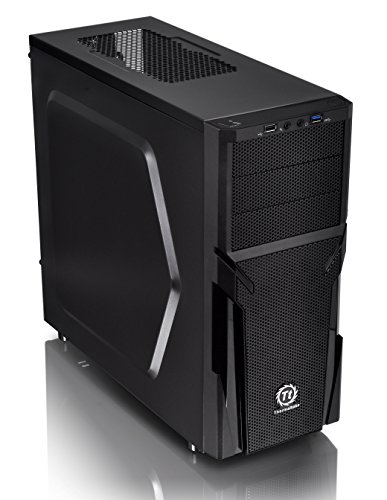
Thermaltake Versa H21 ATX Mid Tower
Best for: Standard ATX builds needing airflow
- Motherboard Support
- ATX
- Case Type
- Mid Tower
- Dimensions
- 18.7 × 8.2 × 16.9 inches
- Weight
- 9.3 pounds
View on Amazon: Thermaltake Versa H21 ATX Mid Tower Affiliate link
The Thermaltake Versa H21 is an ATX mid-tower chassis designed for straightforward builds. It features a perforated metal mesh front and top panel to aid airflow, along with heightened foot stands. You get tool-free installation and pre-mounted holes for standard ATX boards and CPU coolers. The front I/O includes a USB 3.0 port, USB 2.0, and audio jacks. It supports long graphics cards and liquid cooling systems.
Pros
- Perforated mesh front and top panels for ventilation
- Tool-free installation design
- USB 3.0 and USB 2.0 front ports
- Supports ATX motherboards and long GPUs
- Heightened foot stands enhance airflow
Cons
- Only supports standard ATX, not E-ATX
- No mention of included case fans
- No side window included in data
Good fit if
- You need a budget-friendly ATX mid-tower
- You prefer tool-free assembly
- You want mesh panels for airflow
Skip if
- You require E-ATX motherboard support
- You need a tempered glass side panel
- You want pre-installed RGB fans
Verdict: Thermaltake Versa H21 ATX Mid Tower is a practical mid-tower for standard ATX builds. It suits users who prioritize airflow and easy assembly over premium aesthetics or extra expansion support.
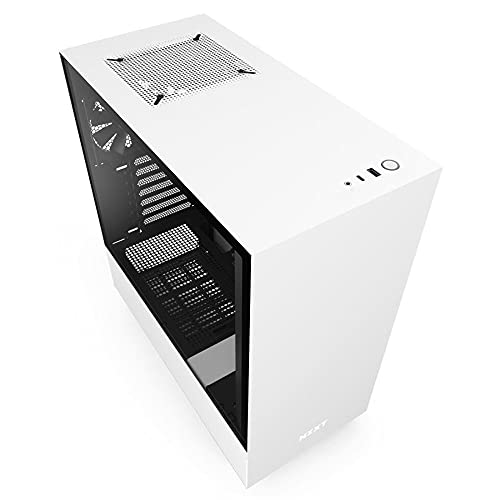
NZXT H510 ATX Mid-Tower Case with USB-C
Best for: Organized builds with USB Type-C needs
- Motherboard Support
- Mini-ITX, MicroATX, ATX
- Case Type
- Mid Tower
- Side Panel
- Tempered Glass
- Radiator Support
- 240mm
- Max GPU Length
- Up to 381mm
- Use
- Gaming
View on Amazon: NZXT H510 ATX Mid-Tower Case with USB-C Affiliate link
The NZXT H510 is a compact ATX mid-tower case featuring a tempered glass side panel and a front I/O USB Type-C port. It supports Mini-ITX, MicroATX, and ATX motherboards. The chassis includes two 120mm fans and a removable bracket for radiators up to 240mm. It offers 381mm of GPU clearance without a front water cooler. This design suits builders who value organized cable management and modern connectivity.
Pros
- Includes front I/O USB Type-C port
- Tempered glass side panel with single screw installation
- Patented cable routing kit with pre-installed channels
- Supports radiators up to 240mm in the front
Cons
- GPU clearance drops to 325mm with front water cooler installed
- CPU cooler height limited to 165mm
- Weighs 14.6 pounds, adding bulk compared to lighter chassis
Good fit if
- You need a USB Type-C port on the front panel
- You want a clean interior with pre-installed cable management channels
- You plan to install a 240mm radiator in the front
Skip if
- You require a larger GPU clearance than 381mm
- You need to mount a CPU cooler taller than 165mm
- You prefer a case without a glass side panel
Verdict: The NZXT H510 White ATX Mid Tower provides a streamlined build experience with its cable routing kit and USB Type-C port. It fits builders who prioritize tidy wiring and modern front panel connectivity over maximum component clearance.
Specifications side by side
| Spec | Thermaltake Versa H21 ATX Mid Tower | NZXT H510 ATX Mid-Tower Case with USB-C |
|---|---|---|
| Motherboard Support | ATX | Mini-ITX, MicroATX, ATX |
| Case Type | Mid Tower | Mid Tower |
| Side Panel | not stated | Tempered Glass |
| Radiator Support | not stated | 240mm |
| Max GPU Length | not stated | Up to 381mm |
| Tower Size | Mid-Tower | Mid-Tower |
| Use | not stated | Gaming |
| Connectivity | not stated | Type-C |
| Dimensions | 18.7 × 8.2 × 16.9 inches | 16.9 × 8.27 × 18.1 inches |
| Weight | 9.3 pounds | 14.6 pounds |
| Size | H21 | base |
| Color | Black | White |
| Model | CA-1B2-00M1NN-00 | CA-H510B-W1 |
Frequently asked questions
Which case has a USB-C port?
The NZXT H510 includes a USB Type-C port on the front panel. This feature allows you to connect modern devices directly without adapters. The Thermaltake Versa H21 does not list USB-C connectivity in its specifications, focusing instead on standard airflow and tool-free assembly for ATX builds.
Does the NZXT H510 have a glass side panel?
Yes, the NZXT H510 features a tempered glass side panel. This design choice highlights internal components and RGB lighting for gaming aesthetics. In contrast, the Thermaltake Versa H21 prioritizes practical airflow with perforated metal panels, offering a more utilitarian look compared to the sleek, transparent side of the NZXT model.
Which case is lighter?
The Thermaltake Versa H21 weighs 9.3 pounds, making it lighter than the NZXT H510. The NZXT H510 tips the scale at 14.6 pounds, likely due to its tempered glass panel and additional structural elements. If you prioritize a lighter chassis for easier transport or mounting, the Thermaltake option is the lighter choice.
Can I install Mini-ITX boards in the Thermaltake Versa H21?
The Thermaltake Versa H21 is listed as supporting ATX motherboards only. It may not accommodate Mini-ITX or MicroATX boards depending on internal clearance. The NZXT H510 explicitly supports Mini-ITX, MicroATX, and ATX sizes, providing greater flexibility if you plan to use smaller form factor components in your build.
What are the dimensions of the NZXT H510?
The NZXT H510 measures 8.27 inches in width, 18.1 inches in height, and 16.9 inches in length. These dimensions define its mid-tower footprint, ensuring it fits standard desktop setups. The Thermaltake Versa H21 is slightly shorter at 16.9 inches in length but shares a similar width, offering comparable desk space requirements.
Which case is better for organized cable management?
The NZXT H510 is designed for organized builds, featuring a dedicated cable routing kit. This helps you manage wires neatly for a clean interior. While the Thermaltake Versa H21 supports easy assembly, it does not highlight specific cable management kits in its specs, making the NZXT H510 the stronger choice for tidy wiring.