Thermaltake or MUSETEX? PC Cases Compared in 2026
As an Amazon Associate we earn from qualifying purchases. Links on this page are affiliate links.
When you compare thermaltake vs MUSETEX PC case options, both brands offer ATX mid-tower chassis designed for gaming builds. They share similar external dimensions and support standard motherboard sizes. The main difference lies in their feature sets. The Thermaltake Versa H21 focuses on basic ventilation and tool-free installation with a simple mesh front. The MUSETEX model emphasizes aesthetics and airflow with a side-opening tempered glass door and pre-installed ARGB fans.
Key differences
| Aspect | Thermaltake Versa H21 ATX Mid Tower | MUSETEX ATX Mid-Tower with Magnetic Glass Door |
|---|---|---|
| Side Panel | Perforated metal mesh | Tempered glass with magnetic opening |
| Included Fans | Not listed | 6 PWM ARGB fans |
| Radiator Support | Not listed | Up to 280mm |
| Lighting | Not listed | ARGB support |
Which one should you choose?
Choose Thermaltake Versa H21 ATX Mid Tower if
- You prefer a minimalist design with a perforated mesh front for direct airflow.
- You want a case with tool-free installation for easy component swaps.
Choose MUSETEX ATX Mid-Tower with Magnetic Glass Door if
- You want pre-installed ARGB fans for immediate lighting effects.
- You value easy access to internal components via a side-opening glass panel.
Verdict: Choose the Thermaltake Versa H21 if you prioritize simple ventilation and straightforward tool-free assembly. Pick the MUSETEX case if you want built-in ARGB lighting and the convenience of a side-opening glass panel for maintenance. Both cases fit standard ATX motherboards effectively.
Thermaltake vs MUSETEX Case Specs
Side panel design
The MUSETEX NN8 features a tempered glass side panel with a magnetic opening mechanism. This allows you to remove the panel without tools for easier access to internal components and cleaning. The Thermaltake Versa H21 does not list a glass side panel in its specifications. You will likely find a standard metal side panel on the Thermaltake, which offers durability but lacks the visual showcase of the MUSETEX design. The magnetic door on the MUSETEX also aids in airflow management by allowing quick access.
Included fans
The MUSETEX NN8 comes pre-installed with six PWM ARGB fans. These fans offer adjustable speeds and customizable lighting, providing immediate cooling and aesthetic value out of the box. The Thermaltake Versa H21 specifications do not list any included fans. You will need to purchase and install fans separately to achieve optimal airflow. This makes the MUSETEX a more complete solution for immediate assembly, while the Thermaltake offers a blank slate for custom fan configuration.
Connectivity options
The Thermaltake Versa H21 includes a SuperSpeed USB 3.0 port, a standard USB 2.0 port, and HD microphone and headset jacks on its I/O panel. The MUSETEX NN8 provides two USB 3.0 ports but does not list audio jacks in its key specifications. If you frequently connect audio peripherals directly to the case, the Thermaltake offers more versatile audio connectivity. The MUSETEX focuses on data transfer speeds with dual USB 3.0 ports.
Radiator support
The MUSETEX NN8 explicitly supports radiators up to 280mm in size, making it suitable for liquid cooling setups. The Thermaltake Versa H21 mentions support for liquid cooling systems but does not specify maximum radiator dimensions in the provided data. You can install a 280mm radiator in the MUSETEX with confidence. For the Thermaltake, you may need to check specific clearance details separately, as the data does not confirm if it accommodates larger liquid cooling loops.
Motherboard compatibility
Both the Thermaltake Versa H21 and the MUSETEX NN8 support ATX motherboards. They are both classified as mid-tower cases, providing similar internal space for standard components. This means you can use either case for a standard ATX build without concerns about motherboard fit. The tower size and motherboard support are identical, offering a tie in this category. You can choose based on other features without worrying about basic compatibility.
Which case fits your build needs
User wanting pre-installed RGB cooling fans
The MUSETEX NN8 includes six PWM ARGB fans right out of the box. These fans offer adjustable speeds for better silence and cooling. You get 16.8 million color options if your motherboard supports 3-pin RGB. This setup saves you the cost and effort of buying fans separately, ensuring immediate airflow and visual customization for your gaming rig.
Builder prioritizing simple tool-free maintenance
The Thermaltake Versa H21 emphasizes tool-free installation for basic component swaps. It features a perforated mesh front and top panel for direct air intake. This design helps with rapid heat dissipation without complex disassembly. If you prefer a straightforward chassis that relies on mesh ventilation rather than glass panels, this model offers a practical, no-fuss approach to airflow management.
User needing easy side panel access
The MUSETEX case uses a magnetic tempered glass side door that opens easily without screws. This allows quick access to the interior for cleaning radiators or dusting graphics cards. The side-opening design is claimed to improve cooling efficiency compared to traditional fixed panels. You can view your internal hardware clearly while maintaining convenient access for routine maintenance tasks.
The products compared
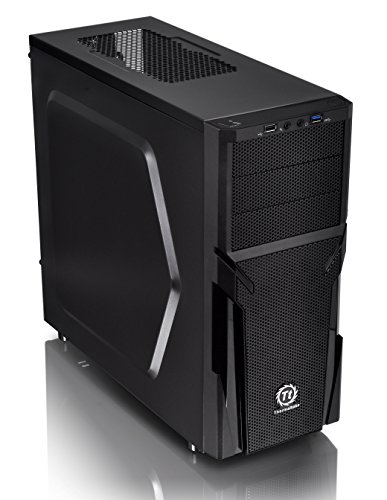
Thermaltake Versa H21 ATX Mid Tower
Best for: Standard ATX builds needing tool-free assembly
- Motherboard Support
- ATX
- Case Type
- Mid Tower
- Dimensions
- 18.7 × 8.2 × 16.9 inches
- Weight
- 9.3 pounds
View on Amazon: Thermaltake Versa H21 ATX Mid Tower Affiliate link
The Thermaltake Versa H21 is an ATX mid tower chassis designed for airflow. It features a perforated metal mesh front and top panel to aid heat dissipation. The case includes tool-free installation and optimized ventilation. It supports standard ATX motherboards and long graphics cards. With dimensions of 16.9 by 18.7 inches, it offers a practical build space for your components.
Pros
- Perforated mesh front and top panel for rapid air intake
- Tool-free installation for easier assembly
- Supports ATX motherboards and long graphics cards
- Includes USB 3.0 and USB 2.0 ports on front panel
Cons
- No pre-installed case fans included in the data
- Mid tower size limits support for E-ATX motherboards
- Does not mention liquid cooling radiator support sizes
Good fit if
- You need a mid tower for standard ATX builds
- You want tool-free installation for easier assembly
- You prioritize airflow with a mesh front panel
Skip if
- You require pre-installed fans for immediate airflow
- You need support for E-ATX motherboards
- You want a compact mini-ITX form factor
Verdict: Thermaltake Versa H21 ATX Mid Tower is a solid choice for builders needing a spacious ATX case with strong airflow options. It suits those who prefer tool-free assembly and standard mid tower dimensions.

MUSETEX ATX Mid-Tower with Magnetic Glass Door
Best for: ATX builds with 280mm radiators and ARGB lighting
- Motherboard Support
- ATX
- Case Type
- Mid-Tower
- Side Panel
- Tempered Glass
- Included Fans
- 6 PWM ARGB Fans
- Radiator Support
- 280
- Use
- Gaming
View on Amazon: MUSETEX ATX Mid-Tower with Magnetic Glass Door Affiliate link
This MUSETEX NN8 is an ATX mid-tower case featuring a side-opening tempered glass panel and six pre-installed PWM ARGB fans. The mesh front panel aids airflow, while the magnetic glass door allows easy access for cleaning or component swaps. It supports up to a 280mm radiator and offers ample space for cable management. You get USB 3.0 connectivity and flexible storage options for SSDs and HDDs.
Pros
- Six pre-installed PWM ARGB fans for customizable lighting and adjustable speeds
- Side-opening tempered glass panel with magnetic latch for easy access
- Supports up to 280mm radiators and multiple SSD/HDD configurations
- Diamond mesh front panel designed for improved airflow
Cons
- No mention of included RGB hub or controller for fan/lighting synchronization
- Heavy build at 12.6 pounds may complicate installation in tight spaces
- Limited to ATX motherboards, excluding smaller ITX or E-ATX boards
Good fit if
- You want pre-installed fans and ARGB lighting without extra purchases
- You need easy access to the interior for cleaning or upgrades
- You plan to use a 280mm radiator and ATX motherboard
Skip if
- You prefer a smaller form factor like Micro-ATX or Mini-ITX
- You require a side panel that opens without magnets or latches
- You need support for E-ATX motherboards or larger radiators
Verdict: MUSETEX NN8 ATX Mid-Tower with 6 ARGB Fans suits builders who value convenience with pre-installed cooling and easy interior access. It is ideal for those using ATX boards and 280mm radiators who want a mesh-front design for airflow.
Specifications side by side
| Spec | Thermaltake Versa H21 ATX Mid Tower | MUSETEX ATX Mid-Tower with Magnetic Glass Door |
|---|---|---|
| Motherboard Support | ATX | ATX |
| Case Type | Mid Tower | Mid-Tower |
| Side Panel | not stated | Tempered Glass |
| Included Fans | not stated | 6 PWM ARGB Fans |
| Radiator Support | not stated | 280 |
| Tower Size | Mid-Tower | Mid-Tower |
| Use | not stated | Gaming |
| Lighting | not stated | ARGB |
| Connectivity | not stated | USB 3.0 |
| Dimensions | 18.7 × 8.2 × 16.9 inches | 15.8 × 8.07 × 19 inches |
| Weight | 9.3 pounds | 12.6 pounds |
| Size | H21 | 18.98" x 15.75" x 8.07" |
| Color | Black | Black |
| Model | CA-1B2-00M1NN-00 | NN8 |
Frequently asked questions
Does the Thermaltake Versa H21 support large graphics cards?
The Thermaltake Versa H21 is an ATX mid-tower case with internal dimensions of 18.7 inches in length. This length allows you to install standard mid-size graphics cards. You should verify that your specific GPU length does not exceed this internal space before purchasing to ensure a proper fit within the chassis.
What motherboard sizes fit in the MUSETEX NN8?
The MUSETEX NN8 supports ATX motherboards. It is designed as an ATX mid-tower case, which means it accommodates standard ATX boards. You cannot install larger E-ATX boards in this chassis. The internal layout is optimized for standard ATX dimensions, ensuring secure mounting for your mainboard.
How heavy is the MUSETEX ATX Mid-Tower with Magnetic Glass Door?
The MUSETEX NN8 weighs 12.6 pounds. This weight comes from its construction materials, including tempered glass and metal components. The Thermaltake Versa H21 is lighter at 9.3 pounds. You should consider the weight when moving the case or placing it on a desk stand.
Does the MUSETEX case come with fans installed?
Yes, the MUSETEX NN8 includes six pre-installed ARGB fans. These fans are designed to provide immediate airflow and lighting effects out of the box. The Thermaltake Versa H21 does not list pre-installed fans in its specifications. You may need to purchase separate fans for the Thermaltake model.
What is the external width of the Thermaltake Versa H21?
The Thermaltake Versa H21 has an external width of 8.2 inches. This measurement helps you determine if the case fits in your designated space. The MUSETEX NN8 is slightly narrower at 8.07 inches. Both cases have similar footprints, making them suitable for standard desk setups.
Can I use a 280mm radiator in the MUSETEX case?
The MUSETEX NN8 is best for builds with 280mm radiators. Its mesh-front design supports airflow for such cooling solutions. The Thermaltake Versa H21 focuses on basic ventilation and does not highlight radiator compatibility. You should check the manual for the Thermaltake case if you plan to use large radiators.
Does the MUSETEX NN8 have USB 3.0 ports?
Yes, the MUSETEX NN8 features USB 3.0 connectivity on the top panel. This allows you to connect high-speed peripherals easily. The Thermaltake Versa H21 does not list USB 3.0 in its provided attributes. You should verify the I/O panel specifications for the Thermaltake case if this feature is essential.