Thermaltake vs HAVN: PC Cases Compared by Specs
As an Amazon Associate we earn from qualifying purchases. Links on this page are affiliate links.
This thermaltake vs HAVN PC case comparison focuses on two ATX mid-tower options. Both cases support standard ATX motherboards and fit within a similar footprint, but their internal designs differ significantly. The Thermaltake Versa H21 uses a traditional single-chamber layout with a mesh front for airflow. The HAVN HS 420 VGPU features a dual-chamber design that separates the GPU from the rest of the components. You need to decide which airflow strategy fits your build.
Key differences
| Aspect | Thermaltake Versa H21 ATX Mid Tower | HAVN HS 420 VGPU Mid-Tower ATX Case |
|---|---|---|
| Motherboard Support | ATX | ATX |
| Tower Size | Mid Tower | Mid Tower |
| Side Panel | not listed | Tempered Glass |
| Fan Size | not listed | 140mm |
| Radiator Support | not listed | 420mm |
| Weight | 9.3 pounds | 41.9 pounds |
Which one should you choose?
Choose Thermaltake Versa H21 ATX Mid Tower if
- You want a lighter case that is easier to move and install.
- You prefer a traditional single-chamber layout with a perforated front panel for intake.
- You need direct access to USB 3.0 and audio jacks on the top panel.
Choose HAVN HS 420 VGPU Mid-Tower ATX Case if
- You want to showcase a vertically mounted GPU with a PCIe 5.0 riser cable.
- You need support for up to eleven 140mm fans or 420mm radiators.
- You want a dual-chamber design that directs cool air specifically to the GPU.
Verdict: Choose the Thermaltake Versa H21 if you prefer a lightweight, traditional mid-tower with straightforward tool-free installation and top-panel connectivity. Pick the HAVN HS 420 VGPU if you prioritize advanced cooling for high-end GPUs, vertical mounting, and extensive fan support in a heavier, dual-chamber chassis.
Thermaltake vs HAVN Case Specs
Motherboard support
Both the Thermaltake Versa H21 and the HAVN HS 420 VGPU support standard ATX motherboards. This means you can install the same range of mid-tower boards in either chassis. There is no difference in compatibility here. You can proceed with your choice of motherboard without worrying about physical fitment constraints related to the board size itself. Both cases are designed to accommodate the ATX form factor as their primary support standard.
Tower size
Both cases are classified as mid-tower chassis. The Thermaltake Versa H21 measures 16.9 inches in height, while the HAVN HS 420 VGPU is taller at 21.5 inches. The HAVN case is also wider at 10.2 inches compared to the Thermaltake’s 8.2 inches, and deeper at 21.3 inches versus 18.7 inches. These dimensions suggest the HAVN has a larger external footprint, which may impact desk or floor space requirements. The Thermaltake offers a more compact profile for smaller setups.
Radiator support
The HAVN HS 420 VGPU supports radiators up to 420mm in length on both the top and right side panels. The Thermaltake Versa H21 data does not list specific radiator support sizes. This makes the HAVN the clear choice if you plan to use large liquid cooling loops. The dual-chamber design of the HAVN further aids in directing cool air from the bottom intake onto the GPU, enhancing cooling performance for high-end components.
Side panel
The HAVN HS 420 VGPU features a heat-formed uni-sheet tempered glass side panel designed to provide a panoramic view with minimal visual distortion. The Thermaltake Versa H21 data does not specify the material or type of side panel used. If you want to showcase your internal hardware, the HAVN offers a dedicated glass solution. The Thermaltake may use a different material, but without specific data, the HAVN provides a verified aesthetic advantage for visibility.
Connectivity
The Thermaltake Versa H21 includes a front I/O panel with a SuperSpeed USB 3.0 port, a standard USB 2.0 port, and HD microphone and headset jacks. The HAVN HS 420 VGPU data does not list front panel connectivity options. For users who need frequent access to USB ports and audio jacks, the Thermaltake offers a convenient built-in solution. The HAVN may include similar ports, but the Thermaltake explicitly confirms their presence and placement.
Fan slots
The HAVN HS 420 VGPU supports up to eleven 140mm fans across its chassis. The Thermaltake Versa H21 data does not list specific fan slot counts or sizes. This allows for significantly more airflow customization and cooling capacity in the HAVN case. You can install a comprehensive fan array to manage heat in a high-performance build. The Thermaltake likely supports fewer fans, but without exact numbers, the HAVN demonstrates superior ventilation potential.
Which PC Case Suits Your Build
Budget builders seeking simple tool-free assembly
The Thermaltake Versa H21 features tool-free installation and a perforated metal mesh front panel. This design allows quick heat dissipation and rapid air intake for maximum ventilation. It includes a SuperSpeed USB 3.0 port and standard USB 2.0 port for direct access. The heighten foot-stands further enhance airflow without requiring complex setup steps.
Enthusiasts prioritizing GPU cooling and cable management
The HAVN HS 420 VGPU uses a dual-chamber design to direct cool air from the bottom intake onto the centrally positioned GPU. It includes a SimpliCable routing system with top-to-bottom grooved guides for clean cable management. The case supports eleven 140mm fans and includes a PCIe 5.0 riser cable to showcase hardware vertically without performance loss.
Users wanting premium glass aesthetics and radiator support
The HAVN HS 420 VGPU features a heat-formed UniSheet glass panel with a small curve radius for a clear, continuous view. It supports up to 420mm radiators on the top and right side. The design also includes a VESA display mount for portable displays and flexible rubber pads on fan brackets to isolate vibration and avoid resonance.
The products compared
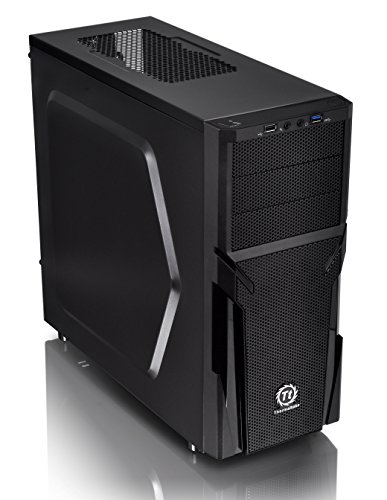
Thermaltake Versa H21 ATX Mid Tower
Best for: ATX builds prioritizing airflow and tool-free assembly
- Motherboard Support
- ATX
- Case Type
- Mid Tower
- Dimensions
- 18.7 × 8.2 × 16.9 inches
- Weight
- 9.3 pounds
View on Amazon: Thermaltake Versa H21 ATX Mid Tower Affiliate link
The Thermaltake Versa H21 is a black ATX mid-tower chassis designed for straightforward assembly and cooling. It features a perforated metal mesh front and top panel to maximize airflow. The case includes tool-free installation and pre-mounted holes for motherboards up to standard ATX size. It supports long graphics cards and liquid cooling systems. This case suits builders who prioritize ventilation and easy access to I/O ports.
Pros
- Perforated mesh front and top panels for rapid air intake
- Tool-free installation for simplified assembly
- SuperSpeed USB 3.0 and USB 2.0 ports on the front panel
- Pre-mounted holes for ATX motherboards and CPU coolers
Cons
- Limited to ATX motherboard support, excluding E-ATX
- No PCIe 5.0 support listed in specifications
- Single 120mm fan slot implied by mesh design, no included fans listed
Good fit if
- You need a mid-tower case with strong front airflow
- You prefer tool-free assembly for quick builds
- You want direct access to USB 3.0 and audio jacks
Skip if
- You require support for E-ATX motherboards
- You need PCIe 5.0 compatibility for future GPUs
- You want a case with pre-installed high-static pressure fans
Verdict: Thermaltake Versa H21 ATX Mid Tower is a practical mid-tower for builders who value airflow and easy assembly. It fits users needing ATX support and front I/O access, but not those requiring E-ATX or PCIe 5.0.

HAVN HS 420 VGPU Mid-Tower ATX Case
Best for: Airflow and vertical GPU display
- Motherboard Support
- ATX
- Case Type
- Mid Tower
- Side Panel
- Tempered Glass
- Radiator Support
- 420mm
- Fan Size
- 140mm
- Compatible Device
- Radiator
View on Amazon: HAVN HS 420 VGPU Mid-Tower ATX Case Affiliate link
The HAVN HS 420 VGPU is a white ATX mid tower with a dual-chamber design. It supports 420mm radiators and holds eleven 140mm fans. The included PCIe 5.0 riser cable enables vertical GPU mounting. Tempered glass panels offer a clear view of your build. This case suits users who prioritize airflow and cable management for high-end hardware.
Pros
- Dual-chamber design directs cool air to the GPU
- Supports up to eleven 140mm fans
- Includes PCIe 5.0 riser cable for vertical mounting
- SimpliCable routing system with top-to-bottom guides
Cons
- Heavy at 41.9 pounds
- Limited to ATX motherboards
- No mention of front USB-C ports
Good fit if
- You want to showcase a high-end GPU vertically
- You need extensive radiator support for liquid cooling
- You prefer organized cable routing without extra tools
Skip if
- You require support for E-ATX motherboards
- You prefer a compact ITX form factor
- You need a case under 30 pounds for easy moving
Verdict: HAVN HS 420 VGPU White Mid Tower is a robust option for builders who need strong airflow and clean cable management. It fits users with large GPUs and liquid cooling setups who want a clear view of their components.
Specifications side by side
| Spec | Thermaltake Versa H21 ATX Mid Tower | HAVN HS 420 VGPU Mid-Tower ATX Case |
|---|---|---|
| Motherboard Support | ATX | ATX |
| Case Type | Mid Tower | Mid Tower |
| Side Panel | not stated | Tempered Glass |
| Radiator Support | not stated | 420mm |
| Tower Size | Mid-Tower | Mid-Tower |
| Fan Size | not stated | 140mm |
| Compatible Device | not stated | Radiator |
| Dimensions | 18.7 × 8.2 × 16.9 inches | 21.3 × 10.2 × 21.5 inches |
| Weight | 9.3 pounds | 41.9 pounds |
| Size | H21 | 14 in. (Max) |
| Color | Black | White |
| Model | CA-1B2-00M1NN-00 | HVN-CA-HS420-07 |
Frequently asked questions
Which case is better for airflow?
The Thermaltake Versa H21 prioritizes ventilation with a perforated metal mesh front panel. This design allows rapid air intake and heat dissipation. The HAVN HS 420 VGPU also supports strong airflow, featuring a tempered glass side panel and compatibility with radiators. Both cases suit builders who need effective cooling for their components.
Can I install a vertical GPU in the HAVN case?
Yes, the HAVN HS 420 VGPU is designed for vertical GPU display. It includes a clear tempered glass side panel to showcase your hardware. The case also supports radiators, making it suitable for liquid cooling setups. This layout allows you to keep your components visible while maintaining a clean cable management system.
Is the Thermaltake Versa H21 tool-free?
Yes, the Thermaltake Versa H21 features tool-free installation. This allows for quick assembly without needing additional hardware. The case also includes a SuperSpeed USB port for convenient data transfer. This design suits builders who value ease of use and rapid component access during the build process.
What are the dimensions of the HAVN HS 420?
The HAVN HS 420 VGPU measures 10.2 inches in width, 21.5 inches in height, and 21.3 inches in length. It weighs 41.9 pounds. The case supports GPUs up to 14 inches in size. These dimensions ensure compatibility with standard ATX motherboards and larger graphics cards.
How heavy is the Thermaltake Versa H21?
The Thermaltake Versa H21 weighs 9.3 pounds. It measures 8.2 inches in width, 16.9 inches in height, and 18.7 inches in length. This mid-tower chassis is lighter than the HAVN option. The compact size makes it easier to handle during installation while still supporting standard ATX motherboards.
Does the HAVN case support liquid cooling?
Yes, the HAVN HS 420 VGPU is compatible with radiators. It supports 140mm fans, which can be used for air or liquid cooling setups. The case is designed for builders who need strong airflow and clean cable management. This makes it a robust option for systems with large GPUs and cooling loops.