What Is Side Panel? A Guide for PC Cases Buyers (2026)
As an Amazon Associate we earn from qualifying purchases. Links on this page are affiliate links.
Side Panel Explained for Buyers
The side panel is the physical cover on the left or right of your PC case. It serves two main purposes. First, it protects internal components from dust and accidental contact. Second, it hides or displays your hardware. Today, most buyers choose between tempered glass and panoramic glass. These options define what you see when you look at your machine.
Tempered glass is the standard choice for many cases. It is a type of safety glass that is stronger than regular glass. If it breaks, it shatters into small, dull pieces rather than sharp shards. This makes it safer for home use. The surface is usually flat and smooth. It reflects light clearly, showing off your RGB fans and custom water cooling loops. However, it can be heavier than acrylic alternatives. You need to handle it with care during installation to avoid stress cracks.
Panoramic glass is a newer design trend. It often features a curved or extended surface. This style wraps around the front or top of the case. It gives you a wider view of the interior. The glass may curve slightly to follow the case’s shape. This creates a more immersive look. It highlights the depth of your build. The material is still tempered glass, so it shares the same safety benefits. The main difference is the shape and the amount of visible area.
When you shop, listings will label these materials clearly. Look for "tempered glass" or "panoramic" in the specs. This is part of side panel explained in simple terms. Your choice depends on how you want your PC to look. Do you prefer a classic flat view or a modern curved display? Both options protect your components well. The decision comes down to aesthetics and how much of your hardware you want to showcase. Consider your desk setup and lighting. Glass reflects ambient light, so placement matters. Choose the panel that best fits your visual style and build size.
Tempered Glass vs Panoramic Glass
Tempered Glass
Tempered glass offers a standard transparent look with high durability. It resists scratches and impacts better than standard glass. You see your components clearly without distortion. This option suits builders who want a clean, professional appearance. It hides cables while showing off the hardware. Phanteks and NZXT use this material in their full and mid-tower cases. The trade-off is that it may not provide the widest possible viewing angle. It is a reliable choice for everyday use. You get a balance of protection and visibility. It fits well in most desk setups. The material is sturdy and safe for daily handling. It does not warp over time. This makes it a practical default for many PC cases.
Panoramic Glass
Panoramic glass provides a wider, more immersive view of your build. It often wraps around the side and top or front. You see more of your components from multiple angles. This option suits users who want a showcase effect. It highlights RGB lighting and custom loops effectively. HYTE and MOROVOL offer cases with this feature. The trade-off is that it may require more careful handling. The larger surface area can be more fragile. It also takes up more space on your desk. You need a larger footprint to accommodate the wider panel. This style is ideal for gamers and enthusiasts. It turns your PC into a centerpiece. The visibility is superior to standard side panels. It offers a modern, sleek aesthetic for high-end builds.
Is Glass Worth the Upgrade?
Who needs it
You should prioritize tempered or panoramic glass if visual appeal is a primary goal for your build. These materials offer superior clarity and durability compared to standard acrylic or mesh panels. Tempered glass resists scratches and impacts well, ensuring your components remain visible and protected. Panoramic glass provides an even wider, distortion-free view, ideal for showcasing custom water cooling loops or high-end graphics cards. If you want a clean, professional appearance that highlights your hardware choices, this spec matters. The transparency allows you to monitor your system’s aesthetics without opening the case. For enthusiasts who treat their PC as a display piece, the investment in quality glass enhances the overall experience. It turns a functional box into a showcase.
Who can skip it
You can ignore glass side panels if you prioritize airflow and acoustic performance over aesthetics. Mesh panels typically allow better air circulation, keeping components cooler under heavy loads. They also tend to be more durable against accidental bumps and do not shatter. If you plan to place your case inside a cabinet or desk with limited visibility, the glass offers no practical benefit. Buyers who focus on pure performance, such as overclockers or workstation users, may prefer solid panels for maximum stability. Additionally, if you are building on a tight budget, skipping glass allows you to allocate funds to better cooling fans or a more powerful CPU. In these scenarios, functionality outweighs form, making glass an unnecessary expense.
Side Panel Glossary
Tempered Glass
Heat-treated safety glass that resists scratches and impacts better than standard options. It provides clear visibility of internal components without distortion or yellowing over time.
Panoramic Glass
Extended glass panels that cover multiple sides of the case. This design offers a wider viewing angle of your build, showcasing hardware from different perspectives simultaneously.
Mesh Panel
A perforated metal or plastic cover that prioritizes airflow over visibility. Mesh panels allow more air to enter the case, helping to keep components cool during heavy loads.
Acrylic Panel
A lightweight plastic alternative to glass. Acrylic is easier to cut and shape but scratches more easily and may cloud or yellow with age and UV exposure.
Side Panel Mount
The mechanism securing the cover to the case frame. Common types include thumbscrews for tool-free removal or standard screws that require a screwdriver for installation and removal.
Dust Filter
A removable screen placed behind or near the side panel intake. It traps dust particles before they settle on components, reducing cleaning frequency and maintaining airflow efficiency.
Panel Clearance
The space required between the side panel and internal components. Large graphics cards or air coolers may exceed this clearance, preventing the panel from closing properly.
Acoustic Dampening
Materials like foam or rubber strips attached to panels. These absorb sound vibrations from fans and hard drives, reducing overall case noise levels during operation.
Quick picks
| # | Product | Best for | Price |
|---|---|---|---|
| 1 | Phanteks Enthoo Pro Full Tower Tempered Glass | Full tower builds needing expansion space | Check price of Phanteks Enthoo Pro Full Tower Tempered Glass on Amazon |
| 2 | MOROVOL Micro-ATX Panoramic Glass PC Case | Compact Micro-ATX builds with high visibility | Check price of MOROVOL Micro-ATX Panoramic Glass PC Case on Amazon |
| 3 | Thermaltake Versa H18 Tempered Glass Micro-ATX Case | Compact Micro ATX builds with glass panels | Check price of Thermaltake Versa H18 Tempered Glass Micro-ATX Case on Amazon |
| 4 | HYTE Y70 Panoramic Glass Mid-Tower | large builds with vertical GPU mounts | Check price of HYTE Y70 Panoramic Glass Mid-Tower on Amazon |
| 5 | NZXT H510 ATX Mid-Tower Case with USB-C | Clean cable management and USB-C access | Check price of NZXT H510 ATX Mid-Tower Case with USB-C on Amazon |
| 6 | Corsair iCUE Link 3500X RGB Mid-Tower | Reverse-connection motherboard builds | Check price of Corsair iCUE Link 3500X RGB Mid-Tower on Amazon |
Our 6 picks

Phanteks Enthoo Pro Full Tower Tempered Glass
Best for: Full tower builds needing expansion space
- Side Panel
- Tempered Glass (what this guide is about)
- Case Type
- Full Tower
- Motherboard Support
- ATX
- Lighting
- RGB
- Dimensions
- 21.7 × 9.25 × 21.1 inches
- Weight
- 24.3 pounds
View on Amazon: Phanteks Enthoo Pro Full Tower Tempered Glass Affiliate link
The Phanteks Enthoo Pro is a full tower ATX chassis featuring a tempered glass side panel. It measures 21.7 inches long and weighs 24.3 pounds. The design includes brushed aluminum aesthetics and integrated RGB lighting. You get easy access to fans and dust filters, along with reservoir mounts. This case suits builders who need extensive expansion space and clean cable management.
Pros
- Full tower size for maximum component compatibility
- Tempered glass side panel for visibility
- Integrated RGB lighting compatible with motherboards
- Front I/O includes USB-C Gen 2 and USB 3.0
- Hidden PSU and HDD design for a clean interior
Cons
- Heavy at 24.3 pounds
- Large footprint requires ample desk or floor space
- No mention of pre-installed case fans
Good fit if
- You need a full tower for large components
- You want a tempered glass side panel
- You prefer a clean interior with hidden cables
Skip if
- You need a compact or micro-ATX case
- You are limited on desk space
- You prefer a lighter chassis for easy moving
Verdict: Phanteks Enthoo Pro Full Tower is a spacious full tower with a tempered glass side panel. It fits builders who prioritize expansion room and a clean, hidden cable layout over portability.

MOROVOL Micro-ATX Panoramic Glass PC Case
Best for: Compact Micro-ATX builds with high visibility
- Side Panel
- Tempered Glass, Panoramic Glass (what this guide is about)
- Motherboard Support
- Micro-ATX
- Case Type
- Mid-Tower
- Included Fans
- 3 Fans
- Use
- Gaming
- Connectivity
- USB 3.0
View on Amazon: MOROVOL Micro-ATX Panoramic Glass PC Case Affiliate link
This MOROVOL mid-tower case features a 270-degree panoramic tempered glass design. It supports Micro-ATX motherboards, keeping the footprint compact at 13.4 x 10.9 x 12.4 inches. Three fans are pre-installed for immediate airflow. You get a front USB 3.0 port for connectivity. The all-black finish offers a clean look for gaming builds.
Pros
- 270-degree panoramic tempered glass side panels
- Three fans pre-installed for cooling
- Front USB 3.0 connectivity port
- Micro-ATX motherboard support
Cons
- Limited to Micro-ATX motherboards only
- No mention of RGB lighting control
- No side panel window for rear components
Good fit if
- You are building a compact Micro-ATX gaming PC
- You want maximum visibility of your internal components
- You prefer a case with fans already installed
Skip if
- You need support for full-size ATX motherboards
- You require extensive RGB customization options
- You want to view components from multiple angles
Verdict: MOROVOL Micro-ATX Panoramic Case is a compact build for gamers who prioritize component visibility. It fits users who want pre-installed cooling and a sleek black aesthetic in a small footprint.

Thermaltake Versa H18 Tempered Glass Micro-ATX Case
Best for: Compact Micro ATX builds with glass panels
- Side Panel
- Tempered Glass (what this guide is about)
- Motherboard Support
- Micro ATX
- Radiator Support
- 280mm
- Use
- Gaming
- Dimensions
- 15.4 × 8.07 × 15 inches
- Weight
- 10.2 pounds
View on Amazon: Thermaltake Versa H18 Tempered Glass Micro-ATX Case Affiliate link
This Micro ATX case features a tempered glass side panel and a mesh front with a blue LED strip. It supports motherboards up to Micro ATX size and radiators up to 280mm. The compact design includes a full-length PSU cover and hidden drive bays. It suits builders who need a small footprint with visible internals and basic I/O ports.
Pros
- Tempered glass side panel for visibility
- Mesh front panel with blue LED strip
- Supports up to 280mm radiators
- Full-length PSU cover included
- Hidden 2.5 and 3.5 inch drive bays
Cons
- Micro ATX support limits motherboard options
- No panoramic glass like other list items
- Limited I/O with only one USB 3.0 port
Good fit if
- You are building a compact Micro ATX system
- You want a visible tempered glass side panel
- You need support for 280mm AIO coolers
Skip if
- You require ATX or E-ATX motherboard support
- You prefer panoramic glass side panels
- You need multiple USB 3.0 ports
Verdict: Thermaltake Versa H18 Micro ATX fits users who prioritize a compact Micro ATX build with a tempered glass side panel and basic mesh front aesthetics. It is not suitable for those needing larger motherboard support or modern I/O configurations.
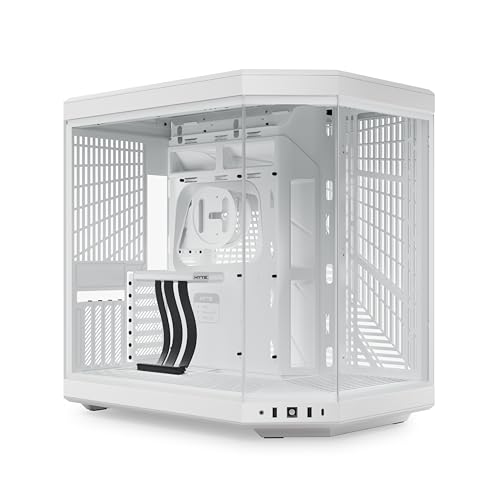
HYTE Y70 Panoramic Glass Mid-Tower
Best for: large builds with vertical GPU mounts
- Side Panel
- Panoramic Glass (what this guide is about)
- Case Type
- Mid-Tower
- Radiator Support
- 360mm
- Motherboard Support
- ATX
- Use
- Gaming
- Dimensions
- 18.5 × 12.5 × 18.5 inches
View on Amazon: HYTE Y70 Panoramic Glass Mid-Tower Affiliate link
The HYTE Y70 is a mid-tower ATX case featuring a three-piece panoramic glass side panel. It offers high airflow with support for a 360mm side radiator and extensive cooling options below. The design includes a vertical GPU mount with a riser cable. Its large dimensions and heavy weight suit builders prioritizing visual impact and thermal capacity over compact footprints.
Pros
- Three-piece panoramic glass side panel
- Support for 360mm side radiator
- Includes PCIe 4.0 x16 riser cable
- Dual chamber interior design
- Tool-less panel access
Cons
- Heavy at 24.3 pounds
- Large footprint requires ample desk space
- No mention of RGB lighting control
Good fit if
- You want a unified modern aesthetic with glass on the side
- You plan to use a vertical GPU mount
- You need high airflow for large radiators
Skip if
- You need a compact micro-ATX or mini-ITX build
- You prefer a smaller case footprint
- You want a lighter case for frequent moving
Verdict: HYTE Y70 Panoramic Glass ATX Case is a spacious mid-tower for builders who prioritize panoramic visibility and vertical GPU mounting. It fits those with large desks and high-end cooling needs.
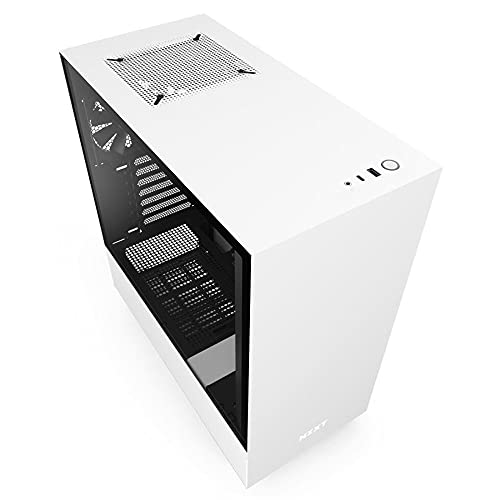
NZXT H510 ATX Mid-Tower Case with USB-C
Best for: Clean cable management and USB-C access
- Side Panel
- Tempered Glass (what this guide is about)
- Motherboard Support
- Mini-ITX, MicroATX, ATX
- Case Type
- Mid Tower
- Radiator Support
- 240mm
- Max GPU Length
- Up to 381mm
- Use
- Gaming
View on Amazon: NZXT H510 ATX Mid-Tower Case with USB-C Affiliate link
The NZXT H510 is a compact ATX mid-tower case featuring a tempered glass side panel. It includes two Aer F120mm fans and a front I/O USB Type-C port. The case supports motherboards up to ATX size and GPUs up to 381mm long. It is designed for users who want streamlined cable management and a clean aesthetic in a smaller footprint.
Pros
- Tempered glass side panel for visibility
- Front I/O USB Type-C port
- Patented cable routing kit with pre-installed channels
- Supports ATX, MicroATX, and Mini-ITX boards
Cons
- Mid-tower size may limit extreme component builds
- No panoramic glass like some competitors
- Limited to 240mm radiator support in front
Good fit if
- You want a clean, cable-managed interior
- You need a USB Type-C port
- You build with standard ATX components
Skip if
- You need panoramic glass views
- You require large radiator support
- You prefer a full-tower chassis
Verdict: NZXT H510 White Mid-Tower offers excellent cable management and a USB Type-C port for users prioritizing organization over maximum expansion space.

Corsair iCUE Link 3500X RGB Mid-Tower
Best for: Reverse-connection motherboard builds
- Side Panel
- Tempered Glass, Panoramic Glass (what this guide is about)
- Motherboard Support
- Mini-ITX to EATX
- Case Type
- Mid-Tower
- Included Fans
- 3x RX120 RGB
- Dimensions
- 19.9 × 9.45 × 18.1 inches
- Weight
- 20.3 pounds
View on Amazon: Corsair iCUE Link 3500X RGB Mid-Tower Affiliate link
This mid-tower case features a panoramic tempered glass side panel for a clear view of your build. It supports motherboards from Mini-ITX to EATX and includes three pre-installed RX120 RGB fans. The design validates reverse-connection motherboards to hide cables. You get a spacious interior with mounting points for up to 10 fans. This case suits builders who want high airflow and a clean aesthetic without complex wiring.
Pros
- Panoramic tempered glass side panel
- Supports Mini-ITX to EATX motherboards
- Validated for reverse-connection motherboards
- Includes three RX120 RGB fans
Cons
- Heavier than competitors at 20.3 pounds
- Requires iCUE Link ecosystem for full control
- No standard fans included beyond the three pre-installed
Good fit if
- You want a panoramic glass view
- You use reverse-connection motherboards
- You need EATX support
Skip if
- You prefer a compact Mini-ITX only case
- You want to avoid proprietary hubs
- You need a lighter build under 15 pounds
Verdict: Corsair iCUE Link 3500X RGB is a spacious mid-tower for users prioritizing cable management and airflow. It fits those using reverse-connection boards who want a premium glass showcase.
Specifications side by side
| Spec | Phanteks Enthoo Pro Full Tower Tempered Glass | MOROVOL Micro-ATX Panoramic Glass PC Case | Thermaltake Versa H18 Tempered Glass Micro-ATX Case | HYTE Y70 Panoramic Glass Mid-Tower | NZXT H510 ATX Mid-Tower Case with USB-C | Corsair iCUE Link 3500X RGB Mid-Tower |
|---|---|---|---|---|---|---|
| Motherboard Support | not stated | Micro-ATX | Micro ATX | not stated | Mini-ITX, MicroATX, ATX | Mini-ITX to EATX |
| Case Type | Full Tower | Mid-Tower | not stated | Mid-Tower | Mid Tower | Mid-Tower |
| Side Panel | Tempered Glass | Tempered Glass | Tempered Glass | Panoramic Glass | Tempered Glass | Tempered Glass |
| Included Fans | not stated | 3 Fans | not stated | not stated | not stated | 3x RX120 RGB |
| Radiator Support | not stated | not stated | 280mm | 360mm | 240mm | not stated |
| Max GPU Length | not stated | not stated | not stated | not stated | Up to 381mm | not stated |
| Tower Size | not stated | not stated | not stated | Mid-Tower | Mid-Tower | Mid-Tower |
| Use | not stated | Gaming | Gaming | Gaming | Gaming | not stated |
| Lighting | RGB | not stated | not stated | not stated | not stated | RGB |
| Connectivity | not stated | USB 3.0 | not stated | not stated | Type-C | not stated |
| Dimensions | 21.7 × 9.25 × 21.1 inches | 13.4 × 10.9 × 12.4 inches | 15.4 × 8.07 × 15 inches | 18.5 × 12.5 × 18.5 inches | 16.9 × 8.27 × 18.1 inches | 19.9 × 9.45 × 18.1 inches |
| Weight | 24.3 pounds | 10.7 pounds | 10.2 pounds | 24.3 pounds | 14.6 pounds | 20.3 pounds |
| Size | Full Tower" | 13.39"D x 10.87"W x 12.44"H | H18 | not stated | base | iCUE LINK 3500X RGB |
| Color | Black | Black | Black | Snow White | White | Black |
| Model | PH-ES614PTG_BK | V3 | CA-1J4-00S1WN-01 | CS-HYTE-Y70-WW | CA-H510B-W1 | CC-9011280-WW |
Frequently asked questions
Does a panoramic glass side panel cover more area than tempered glass?
Yes. Panoramic glass extends across multiple sides of the case, offering wider visibility. The HYTE Y70 uses this design to showcase vertical GPU mounts. Tempered glass typically covers only one side, providing a standard transparent look. You choose panoramic glass if you want maximum component visibility from different angles.
Can I install a full tower motherboard in a case with a tempered glass side panel?
Yes, if the case supports it. The Phanteks Enthoo Pro is a full tower that accommodates ATX motherboards behind its tempered glass panel. It provides ample expansion space for larger builds. You must check the motherboard support specification, as some glass cases only fit Micro-ATX boards.
Is tempered glass durable enough for daily use?
It is heat-treated for higher durability. This process helps it resist scratches and impacts better than standard glass. You get clear visibility without distortion. The MOROVOL and Thermaltake cases use this material to protect internal components while maintaining a clean aesthetic for your desk setup.
Do panoramic glass cases support ATX motherboards?
Some do. The HYTE Y70 is a mid-tower that supports ATX boards with panoramic glass. You get both large motherboard compatibility and wide visibility. However, other panoramic cases like the MOROVOL V3 are designed for Micro-ATX boards. Always verify the specific motherboard support for your chosen model.
Does a glass side panel affect cable management visibility?
It can hide or show cables depending on your setup. The NZXT H510 uses tempered glass to display its clean cable management. The Phanteks Enthoo Pro hides cables for a tidy look. You can choose a glass panel that either showcases your organization or conceals it for a cleaner appearance.
What is the weight difference between glass and other panels?
Glass adds significant weight to the case. The Phanteks Enthoo Pro weighs 24.3 pounds, while the lighter MOROVOL V3 weighs 10.7 pounds. Heavier cases like the HYTE Y70 also weigh 24.3 pounds. You should consider desk stability if you choose a case with heavy glass panels.