OwlTree 4 Pin PWM Controller vs OwlTree 4 Pin 12V PWM (2026): Key Differences
As an Amazon Associate we earn from qualifying purchases. Links on this page are affiliate links.
When comparing the owltree 4 pin pwm controller vs 4 pin 12v pwm options, you face two distinct approaches to fan management. Both units control 4-pin 12V PWM fans and exclude 2-pin or 3-pin models. The primary difference lies in their power delivery and expansion capabilities. One model uses a USB-C input with a built-in boost circuit and includes a 5-way splitter hub. The other relies on SATA or DC power and supports up to six fans directly. Your choice depends on your power source and fan count.
Key differences
| Aspect | OwlTree 4 Pin PWM Controller with Hub | OwlTree 6-Fan PWM Controller |
|---|---|---|
| Power Input | 5V via Type-C | 12V via SATA or DC 5525 |
| Fan Support | 4 fans (via 5-way hub) | 6 fans (direct connection) |
| Max Output Power | Limited by charger | 60W (5A@12V) |
| PWM Range | 0-100% | 1-99% |
| Included Accessories | USB-C cable and 5-way hub | Controller only |
Which one should you choose?
Choose OwlTree 4 Pin PWM Controller with Hub if
- You prefer flexible power from a standard USB-C charger
- You want a complete kit with a fan splitter hub included
- You are running fewer than five fans
Choose OwlTree 6-Fan PWM Controller if
- You need to control up to six fans simultaneously
- You have SATA or DC power available in your case
- You require a higher guaranteed 60W output capacity
Verdict: Choose the first model if you value the convenience of USB-C power and need a splitter hub for a small fan setup. Pick the second model if you have SATA power and need to manage a larger array of six fans with a dedicated 60W output.
OwlTree Controller vs 12V PWM Comparison
Power source
The OwlTree 4 Pin PWM Controller with Hub relies on a Type-C input. It uses an internal DC-DC boost circuit to convert 5V from a USB charger into 12V for the fans. This means you need a compatible USB power adapter. The OwlTree 6-Fan PWM Controller takes a different approach. It accepts direct 12V input via a SATA connector or a DC 5525 jack. This option does not require voltage boosting from a low-voltage source. You must ensure your power supply provides the necessary 12V rail. This distinction affects how you route cables and what power sources you can use in your build.
Fan capacity
Expansion capabilities differ significantly between these two units. The OwlTree 4 Pin PWM Controller with Hub includes a 4-pin 5-way fan splitter hub. This allows you to connect up to five fans to the single controller unit. The OwlTree 6-Fan PWM Controller supports six fans directly. It does not include a splitter hub in the package, but its design accommodates six connections natively. If you need to manage five fans, the first option provides the necessary hardware. For six fans, the second option offers a higher native capacity without needing additional splitters. Both exclude 2-pin and 3-pin fans.
Power limits
Maximum power output is a critical specification for cooling performance. The OwlTree 6-Fan PWM Controller specifies a maximum total power output of 60W. This equals 5A at 12V, with each port supporting up to 2A. The total combined current must not exceed 5A. The OwlTree 4 Pin PWM Controller with Hub does not list a specific wattage limit. Its maximum output depends entirely on your charger's 5V output capability. You must ensure the charger exceeds the total fan power for full speed. The second product provides clear, fixed power boundaries, while the first relies on your external power source.
Control range
Both controllers adjust fan speed via PWM duty cycle, but the ranges vary. The OwlTree 4 Pin PWM Controller with Hub allows for a duty cycle adjustment from 0% to 100%. This provides a full range from completely off to maximum speed. The OwlTree 6-Fan PWM Controller offers an adjustable PWM duty cycle from 1% to 99%. This range excludes the absolute minimum and maximum percentages. For most users, both ranges provide sufficient control. However, the first option offers slightly broader boundaries. You can achieve complete shutdown at 0% and full throttle at 100% with the first product.
Included hardware
What you receive in the box impacts your setup process. The OwlTree 4 Pin PWM Controller with Hub package includes the fan speed controller, a USB Type-C cable, and a 4-pin 5-way fan hub. This is an all-in-one solution that handles power and expansion. The OwlTree 6-Fan PWM Controller package includes only the 4-pin 12V PWM fan speed controller. It does not come with a splitter hub or additional cables. You may need to purchase splitters separately if you want to connect more fans than the native ports allow. The first option provides more immediate utility out of the box.
Which controller fits your setup
Users wanting plug-and-play USB power
This model includes a Type-C cable and a 5-way splitter hub. It boosts 5V input to 12V output for your fans. You get an all-in-one solution with integrated power and speed control. The package includes the controller, cable, and hub, making it ready for immediate use without needing extra adapters or internal power connections.
Users needing high fan capacity
This unit supports up to six 4-pin PWM fans. It offers flexible power input via SATA or DC 5.5x2.5mm connectors. The maximum output is 60W at 5A, with each port handling up to 2A. It provides a wider adjustment range of 1% to 99% PWM duty cycle. This option is ideal if you require more fan connections.
Users preferring compact external setups
This controller weighs 2.89 ounces and relies on a standard Type-C port. It is designed for DIY cooling applications like routers or small hosts. The built-in DC-DC boost circuit handles the voltage conversion. You can connect multiple fans simultaneously using the included 5-way hub. This makes it suitable for external cooling projects where internal power is not available.
Users already using internal PSU power
This controller connects directly to your power supply using SATA or DC 5525 inputs. It does not require a USB charger or boost circuit. The 60W total power limit allows for robust fan operation. You control speed via PWM signals with a 1% to 99% range. This is the better choice if you want to draw power directly from your PC's internal power supply.
The products compared

OwlTree 4 Pin PWM Controller with Hub
Best for: controlling up to five 12V PWM fans
- Connectivity
- Type-C
- Connector Type
- 4-Pin
- Weight
- 2.89 ounces
View on Amazon: OwlTree 4 Pin PWM Controller with Hub Affiliate link
This OwlTree unit controls fan speed via a 4-pin 12V PWM signal. It uses a USB Type-C input to power a built-in DC-DC boost circuit, raising 5V to 12V for your fans. The package includes a 5-way splitter hub, letting you manage up to five fans at once. You get a 0-100% duty cycle adjustment range. It is a practical choice for users who need a standalone controller with integrated power delivery.
Pros
- Integrates power supply and speed control in one unit
- Includes a 4-pin 5-way fan splitter hub
- Adjusts PWM duty cycle from 0% to 100%
- Uses a standard USB Type-C input for power
Cons
- Requires a charger that exceeds the total fan power for full speed
- Incompatible with 3-pin or 2-pin fans
- Output power is limited by your charger's 5V capability
Good fit if
- You need to control multiple 12V PWM fans from a single point
- You have a USB Type-C port or charger available
- You want a compact solution without separate power bricks
Skip if
- You use 3-pin or 2-pin fans
- You need to control fan speed via software or an app
- Your USB charger cannot provide enough amperage for all fans
Verdict: OwlTree 4 Pin PWM Controller is a solid option for users who need to manage up to five 12V PWM fans using a single USB Type-C power source.
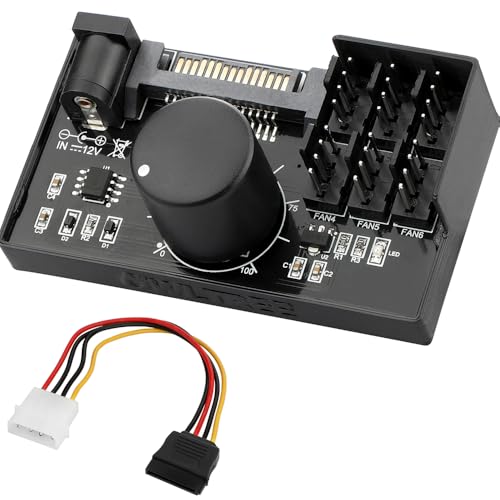
OwlTree 6-Fan PWM Controller
Best for: manual control of six 4-pin PWM fans
- Connector Type
- 4-Pin
- Dimensions
- 2.7 × 1.6 × 0.7 inches
View on Amazon: OwlTree 6-Fan PWM Controller Affiliate link
This OwlTree controller manages up to six 4-pin PWM fans. It accepts SATA or DC 5.5x2.5mm power inputs. The unit delivers 60W total power at 12V. You can adjust the PWM duty cycle from 1% to 99%. It measures 2.7 inches long and 1.6 inches wide. This compact black hub suits builders needing manual fan speed control for multiple fans.
Pros
- Supports 6 fans simultaneously
- Dual power input options
- Adjustable 1% to 99% PWM duty cycle
- Compact 2.7-inch length
Cons
- Requires manual adjustment of fan speeds
- Not compatible with 3-pin or 2-pin fans
- Fans are not included
Good fit if
- You need to control six 4-pin fans
- You prefer manual speed adjustment over software
- You have SATA or DC 5525 power available
Skip if
- You only have 3-pin fans
- You want automatic software-based control
- You need more than six fan connections
Verdict: OwlTree 4 Pin 12V PWM Fan Controller fits users who need manual control over six 4-pin fans using standard power inputs. It is a practical solution for cases with limited motherboard headers.
Specifications side by side
| Spec | OwlTree 4 Pin PWM Controller with Hub | OwlTree 6-Fan PWM Controller |
|---|---|---|
| Connectivity | Type-C | not stated |
| Connector Type | 4-Pin | 4-Pin |
| Weight | 2.89 ounces | not stated |
| Dimensions | not stated | 2.7 × 1.6 × 0.7 inches |
| Color | Black | Black |
| Model | PC039b | PC042 |
Frequently asked questions
Does the 4-pin PWM controller with hub support 3-pin fans?
No, this controller is designed strictly for 4-pin 12V PWM fans. It does not support 2-pin or 3-pin models. You must ensure your fans have the four-pin connector to work with this device. The unit relies on the PWM signal for speed control, which 3-pin fans lack.
How many fans can the B0DPZM7T3Q model control simultaneously?
The OwlTree 4 Pin PWM Controller with Hub can manage up to five 12V PWM fans at once. It includes a 5-way splitter hub to distribute the connection. This allows you to centralize control for multiple fans using a single USB Type-C power source for a streamlined setup.
What power source does the first controller use?
It uses a USB Type-C input for power. The device contains an internal DC-DC boost circuit that converts 5V from a USB charger into 12V for the fans. This design lets you power the entire fan array from a standard USB port without needing a separate internal power connector.
Can the second controller handle more than five fans?
Yes, the OwlTree 6-Fan PWM Controller supports six 4-pin fans. It provides manual control over each fan or groups of fans. This makes it suitable for setups with limited motherboard headers where you need to manage a higher number of fans than the five-way splitter allows.
Is the second controller compatible with motherboard headers?
The second controller is a standalone unit that does not rely on motherboard headers. It offers manual control via its own interface. This is practical for cases where motherboard fan headers are insufficient or already in use, allowing you to bypass the motherboard for direct fan management.
What is the weight of the first controller unit?
The OwlTree 4 Pin PWM Controller with Hub weighs 2.89 ounces. This lightweight design makes it easy to mount or place within your case. The compact size ensures it does not take up significant space while providing the necessary power and control for your connected PWM fans.
Does the first controller include a cable?
Yes, the package includes a Type-C cable. This cable connects the controller to a power source, such as a USB charger or port. Having the cable included means you get an all-in-one solution with integrated power and speed control, ready to use without needing to purchase additional accessories.
Which controller is better for manual adjustment?
The OwlTree 6-Fan PWM Controller is better for manual adjustment. It is designed for users who need direct manual control over six 4-pin fans. The first model relies on USB power and a hub, while the second offers a more traditional manual interface for adjusting fan speeds independently.