Okinos vs NZXT PC Cases: Which Brand Fits You?
As an Amazon Associate we earn from qualifying purchases. Links on this page are affiliate links.
You are comparing the okinos vs NZXT PC case options to find the right fit for your build. Both models feature tempered glass side panels and USB Type-C connectivity for modern convenience. The primary difference lies in their form factor and motherboard support. The Okinos Aqua 3 is a compact Micro-ATX case, while the NZXT H510 is a larger Mid-Tower. This distinction affects internal space, cooling options, and overall system compatibility for your specific hardware needs.
Key differences
| Aspect | Okinos Aqua 3 Panoramic Micro-ATX Case | NZXT H510 ATX Mid-Tower Case with USB-C |
|---|---|---|
| Motherboard Support | Micro-ATX, ITX | Mini-ITX, Micro-ATX, ATX |
| Tower Size | Micro ATX | Mid Tower |
| Included Fans | 3x 120mm ARGB | 2x Aer F 120mm |
| Max GPU Length | 320mm | 381mm |
| Radiator Support | not listed | 240mm |
| Lighting Control | Built-in 4-port ARGB controller | not listed |
Which one should you choose?
Choose Okinos Aqua 3 Panoramic Micro-ATX Case if
- You need a compact case for Micro-ATX or ITX motherboards.
- You want pre-installed ARGB fans with a dedicated controller.
- You prefer a smaller footprint for tighter spaces.
Choose NZXT H510 ATX Mid-Tower Case with USB-C if
- You plan to use a standard ATX motherboard.
- You require longer GPU clearance up to 381mm.
- You intend to install a 240mm liquid cooling radiator.
Verdict: Choose the Okinos Aqua 3 if you are building a smaller system with Micro-ATX components and value integrated ARGB lighting control. Select the NZXT H510 if you need the flexibility of ATX support, greater GPU length clearance, and dedicated radiator mounting options.
Okinos vs NZXT Case Specs
Motherboard support
The Okinos Aqua 3 is designed specifically for Micro-ATX and Mini-ITX motherboards. This makes it a compact choice for smaller builds where space is limited. In contrast, the NZXT H510 supports Mini-ITX, Micro-ATX, and full-size ATX boards. This broader compatibility allows you to install larger standard ATX motherboards without restriction. If you plan to use a standard ATX board, the NZXT H510 is the only viable option. The Okinos limits your motherboard choices to smaller form factors, which may not suit every build requirement.
Tower size
Physical dimensions significantly impact how a case fits in your room. The Okinos Aqua 3 measures 13.8 inches in length, 8.27 inches in width, and 15.4 inches in height. It weighs 9.19 pounds. The NZXT H510 is larger, measuring 16.9 inches in length, 8.27 inches in width, and 18.1 inches in height. It weighs 14.6 pounds. The NZXT H510 requires more desk or floor space. The Okinos Aqua 3 offers a more compact footprint. You should measure your available space before deciding which size fits your setup best.
GPU compatibility
Graphics card length is a critical specification for modern builds. The Okinos Aqua 3 supports GPUs up to 320mm in length. This accommodates many standard high-performance cards, including the RTX 4070. The NZXT H510 supports GPUs up to 381mm in length when no front water cooler is installed. This provides significantly more room for very large graphics cards. If you are using a massive triple-fan GPU, the NZXT H510 offers greater clearance. The Okinos may require you to check your specific card dimensions more carefully.
Included fans
Both cases include fans to help manage internal temperatures. The Okinos Aqua 3 comes with three 120mm ARGB fans pre-installed. It features two fans at the top and one at the rear for vertical airflow. The NZXT H510 includes two 120mm Aer F fans. These are designed for optimal internal airflow. The Okinos provides an extra fan out of the box, which can help with cooling performance immediately. However, the NZXT fans are specifically tuned for airflow efficiency. You may need to purchase additional fans for the NZXT to match the Okinos airflow configuration.
Radiator support
Liquid cooling options differ between the two cases. The NZXT H510 features a removable bracket designed for radiators up to 240mm. This simplifies the installation of closed-loop or custom-loop water cooling systems. The product data for the Okinos Aqua 3 does not list specific radiator support dimensions or mounting points. While it supports CPU coolers up to 164mm tall, explicit liquid cooling radiator compatibility is not detailed. If you plan to use a 240mm AIO or custom loop, the NZXT H510 offers a clear advantage with its dedicated mounting hardware.
Which Okinos or NZXT Case Fits You
Compact Micro-ATX builders seeking sleek design
The Okinos Aqua 3 fits Micro-ATX boards with a 270-degree panoramic glass view. It includes three 120mm ARGB fans and a rear fan for vertical airflow. The front features a Type-C port and USB 3.0 connections. Its 1.2mm steel mesh aids cooling while keeping the build small and visually striking for tight spaces.
Full-size ATX users needing extensive cable management
The NZXT H510 supports full ATX motherboards, offering more room for larger components. It includes a patented cable routing kit with pre-installed channels and straps. This feature simplifies wiring for cleaner builds. The case also supports radiators up to 240mm, making it ideal for water cooling setups within a standard mid-tower footprint.
Gamers with long graphics cards and tall coolers
The NZXT H510 accommodates graphics cards up to 381mm in length without a front water cooler. It supports CPU coolers up to 165mm tall. This extra clearance handles large hardware easily. The Okinos limits GPU length to 320mm, which may restrict some high-end cards, making the NZXT a better choice for spacious internal layouts.
The products compared

Okinos Aqua 3 Panoramic Micro-ATX Case
Best for: Compact builds with clear component visibility
- Motherboard Support
- MATX, ITX
- Case Type
- Micro ATX
- Side Panel
- Tempered Glass
- Included Fans
- 3x 120mm ARGB
- Max GPU Length
- 320mm
- Connectivity
- Type-C
View on Amazon: Okinos Aqua 3 Panoramic Micro-ATX Case Affiliate link
The Okinos Aqua 3 is a Micro ATX case with a 270-degree panoramic glass design. It includes three 120mm 3-pin ARGB fans and supports GPUs up to 320mm long. The front I/O offers USB 3.0 and Type-C ports. This compact chassis suits builders who want a clear view of their components without needing full ATX space.
Pros
- 270-degree panoramic tempered glass panels
- Three pre-installed 120mm ARGB fans
- USB 3.0 and Type-C front ports
- Supports GPUs up to 320mm
Cons
- Only supports Micro ATX and ITX motherboards
- Fans use 3-pin connectors, limiting speed control
- No mention of included RGB controller for non-motherboard sync
Good fit if
- You want a clear view of your build
- You use Micro ATX motherboards
- You need USB Type-C connectivity
Skip if
- You require Full ATX motherboard support
- You need 4-pin PWM fan control
- You prefer a solid front panel
Verdict: The Okinos Aqua 3 Micro ATX Case offers a unique 270-degree view for small builds. It fits users who prioritize aesthetics and compact dimensions over maximum expansion space.
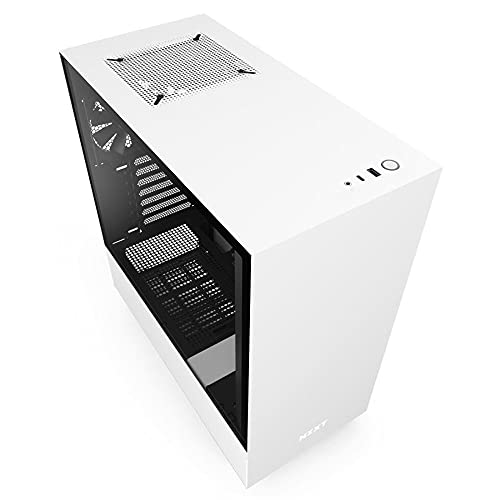
NZXT H510 ATX Mid-Tower Case with USB-C
Best for: Standard ATX builds with USB-C needs
- Motherboard Support
- Mini-ITX, MicroATX, ATX
- Case Type
- Mid Tower
- Side Panel
- Tempered Glass
- Radiator Support
- 240mm
- Max GPU Length
- Up to 381mm
- Use
- Gaming
View on Amazon: NZXT H510 ATX Mid-Tower Case with USB-C Affiliate link
The NZXT H510 is a compact ATX mid-tower case in white. It features a tempered glass side panel and a front I/O USB Type-C port. The case includes two 120mm fans and supports radiators up to 240mm. It fits motherboards from Mini-ITX to ATX. You will appreciate the streamlined cooling and cable management channels if you build a standard gaming PC.
Pros
- Front I/O USB Type-C port
- Tempered glass side panel
- Supports ATX, MicroATX, and Mini-ITX boards
- Includes two 120mm fans
- Radiator support up to 240mm
Cons
- GPU clearance drops to 325mm with front watercooler installed
- Base size limits expansion options
- No mention of fan controllers or hubs
Good fit if
- You want a clean, minimalist white build
- You need USB Type-C connectivity on the front
- You are building with ATX or MicroATX motherboards
Skip if
- You plan to use a large GPU with a front radiator
- You prefer a full-tower for maximum expansion
- You need extensive fan control hardware included
Verdict: NZXT H510 White ATX Mid-Tower offers a balanced design with USB Type-C and tempered glass. It suits builders who prioritize aesthetics and standard ATX compatibility over extreme expansion.
Specifications side by side
| Spec | Okinos Aqua 3 Panoramic Micro-ATX Case | NZXT H510 ATX Mid-Tower Case with USB-C |
|---|---|---|
| Motherboard Support | MATX, ITX | Mini-ITX, MicroATX, ATX |
| Case Type | Micro ATX | Mid Tower |
| Side Panel | Tempered Glass | Tempered Glass |
| Included Fans | 3x 120mm ARGB | not stated |
| Radiator Support | not stated | 240mm |
| Max GPU Length | 320mm | Up to 381mm |
| Tower Size | not stated | Mid-Tower |
| Fan Size | 120mm | not stated |
| Use | not stated | Gaming |
| Lighting | ARGB | not stated |
| Connectivity | Type-C | Type-C |
| Connector Type | 3-Pin | not stated |
| Dimensions | 13.8 × 8.27 × 15.4 inches | 16.9 × 8.27 × 18.1 inches |
| Weight | 9.19 pounds | 14.6 pounds |
| Color | Black | White |
| Model | OKICC-AQUA3-MATXB-H3BA | CA-H510B-W1 |
| Size | not stated | base |
Frequently asked questions
Which case is better for a small desk setup?
The Okinos Aqua 3 is the better choice for tight spaces. It measures 8.27 inches wide and 13.8 inches long, making it significantly shorter than the NZXT H510. Its Micro-ATX form factor keeps the footprint minimal while still offering a panoramic glass view for your components.
Does the Okinos case support RGB lighting?
Yes, the Okinos Aqua 3 includes ARGB lighting. It uses 3-pin connectors to sync with compatible motherboards. This allows you to customize the color and effects of the fans to match your build’s aesthetic without needing separate controllers or complex wiring.
Can I use a full-size ATX motherboard in the Okinos case?
No, the Okinos Aqua 3 is designed exclusively for Micro-ATX motherboards. If you need to install a full-size ATX board, you must choose the NZXT H510. It supports Mini-ITX, Micro-ATX, and ATX formats, giving you much more flexibility for larger components.
What type of front panel port does the NZXT H510 have?
The NZXT H510 features a USB Type-C port on the top I/O panel. This provides high-speed connectivity for modern devices like external SSDs or smartphones. It matches the connectivity options found on the Okinos Aqua 3, ensuring convenience for both builds.
Which case weighs less for easier transport?
The Okinos Aqua 3 is lighter, weighing 9.19 pounds. The NZXT H510 is heavier at 14.6 pounds due to its larger mid-tower chassis and steel construction. If you plan to move your PC frequently, the Okinos model will be easier to carry.
Is the side panel made of tempered glass on both?
Yes, both cases feature tempered glass side panels. The Okinos Aqua 3 offers a 270-degree panoramic view, showcasing more of your internal components. The NZXT H510 provides a standard side view. Both materials offer durability and a clear look at your hardware.
Which case is better for gaming aesthetics?
The Okinos Aqua 3 stands out with its unique 270-degree glass angle and ARGB fans. It prioritizes visual impact in a compact form. The NZXT H510 offers a clean, standard white aesthetic. Choose Okinos for a bold look or NZXT for a classic mid-tower style.
Do both cases include USB-C connectivity?
Yes, both the Okinos Aqua 3 and the NZXT H510 include USB Type-C ports. This ensures you have access to fast data transfer and modern charging capabilities. It is a standard feature on both models, catering to users who need convenient front-panel access.