Okinos MiniArt 4 Compact Micro Review: Who It Fits and Who Should Skip It
As an Amazon Associate we earn from qualifying purchases. Links on this page are affiliate links.
This okinos miniart 4 micro atx PC case review focuses on a compact 24.5-liter chassis designed for micro ATX builds. It features a minimalist aesthetic with full-mesh panels and a walnut wood logo badge. The case comes pre-installed with three 120mm 3-pin fans, including two reverse rotation units at the bottom. Its defining specs are its small footprint and front-mounted power supply design, which helps keep the interior clean. You get a sturdy mesh side panel for visibility and airflow.
What stands out
- 24.5 L case volume for micro ATX motherboards
- Pre-installed 3x 120mm 3-pin fans (2 reverse)
- Front-mounted PSU design with 10A extension cable
- Tool-free top and side mesh panels
- 240mm top radiator support
Who it fits
Good fit for
This case suits users building small, efficient micro ATX systems who prioritize airflow and a clean look. The front-mounted PSU design is ideal for those who want a clutter-free interior and easier cable management. If you plan to use a 240mm radiator for cooling, the top mount works well here. The tool-free panels make it easy for you to access components without needing extra hardware. It is a practical choice for minimalist desktop setups.
Who should skip it
You should look at another option if you need a larger ATX or E-ATX motherboard, as this case only supports micro ATX. Users requiring extensive GPU clearance may find the 330mm limit restrictive, especially with longer power supplies. If you prefer PWM fan control for precise speed management, note that the pre-installed fans are 3-pin only. The front USB ports are for data transfer and do not support high-current charging, so do not rely on them for fast device charging.
Verdict: The Okinos MiniArt 4 is a compact, airflow-focused micro ATX case that simplifies building with its front-mounted PSU and tool-free design. It is a solid choice for small builds that value clean aesthetics and efficient cooling.
Key specs explained for you
Case Volume: 24.5 L
This volume indicates the internal space available for your components. A 24.5-liter chassis is classified as compact, making it ideal for small desks or limited workspace. You get a smaller footprint without sacrificing too much room for essential parts. If you prioritize desk space over massive expansion slots, this size offers a practical balance for standard builds.
Motherboard Support: Micro ATX
This specification defines the maximum motherboard size the case can accommodate. Micro ATX boards are smaller than standard ATX, fitting neatly into this compact chassis. You save space on the desk but may have fewer expansion slots for add-on cards. This is suitable for users who do not require multiple high-end GPUs or extensive storage controllers.
Included Fans: 3x 120mm
The case arrives with three pre-installed 120mm fans, reducing the need for immediate additional purchases. These fans help establish a basic airflow pattern right out of the box. You benefit from immediate cooling without extra assembly time. When shopping, check if the included fans are PWM or DC, as this affects speed control and noise levels during operation.
Max GPU Length: 330mm
This limit tells you the longest graphics card that will fit inside the case. A 330mm clearance supports most standard-sized modern graphics cards. You can install a powerful GPU without worrying about physical interference with the front panel or power supply. Always measure your specific card before buying to ensure it stays within this safe operational length.
Radiator Support: 240mm
This spec indicates the case can hold a liquid cooling radiator up to 240mm in size. You can choose a 240mm AIO for better thermal performance than air cooling alone. This fits well in compact builds where space is tight. Verify that your chosen radiator height does not interfere with the top mesh panel or installed fans during installation.
Design and build analysis
The Okinos MiniArt 4 measures 15.6 by 13.5 by 7.87 inches and weighs 8.82 pounds. According to the listing, the side panel is constructed from fine mesh with a 1.2 mm thickness. This design choice prioritizes ventilation over solid panel aesthetics. The full-mesh front and top panels further support this airflow-first approach. A walnut wood logo badge provides a minimalist accent on the compact chassis. You can choose between black or white finishes, depending on your desk setup.
The layout features a front-mounted power supply design, which supports units up to 150 mm in length. This placement helps keep the interior clean and improves cable routing. The case includes defined cable management zones, offering 25 mm of space in the main channel and 8 mm behind the motherboard tray. You can install up to five fans, with three 120mm 3-pin fans pre-installed at the bottom and rear. A 240mm radiator fits on the top panel.
Controls are located in a multi-function front I/O zone. You get a power button, USB Type-C 3.2 Gen 2, USB 3.1, and a headphone/mic combo jack. The listing notes that the USB ports support up to 5V output and are intended for data transfer, not device charging. Tool-free top and side panels make maintenance easier without compromising the mesh ventilation structure.
Setup and everyday use
Setting up this compact case involves careful planning due to its tight internal dimensions. You must verify component lengths before installation, as GPU clearance depends heavily on your power supply choice. If you use a power supply shorter than 140 millimeters, you can fit graphics cards up to 330 millimeters long. Longer power supplies reduce that limit to 280 millimeters. The listing notes a 10A extension cable is included to help with routing in the front-mounted PSU design, which supports units up to 150 millimeters without cables.
Cable management requires attention to the defined zones. The main channel offers 25 millimeters of routing space, while the area behind the motherboard tray provides 8 millimeters. You will need to keep cables within these limits to maintain airflow and avoid clutter. The front I/O panel includes a power button, USB Type-C 3.2 Gen 2 port, USB 3.1 port, and a headphone-mic combo jack. The USB ports support up to 5V output and are designed for data transfer rather than charging devices.
Daily use benefits from the tool-free top and side panels. You can remove them without hardware to access components or clean the mesh filters. The pre-installed fans provide immediate airflow, and the multi-zone mesh vents help maintain stable temperatures. You can add up to two more fans or install a 240-millimeter radiator on the top if needed. The minimalist design with full-mesh panels ensures dust buildup is manageable while keeping the interior accessible for routine maintenance.
Before You Buy This Case
Owning this compact case requires you to verify component compatibility before purchasing. You must check that your power supply is under 140 millimeters if you plan to install a graphics card longer than 280 millimeters. The listing notes that GPU clearance drops to 280 millimeters with longer power supplies. You should also measure your CPU cooler height against the internal dimensions. The pre-installed fans are 3-pin, meaning you may need a fan hub or motherboard headers that support non-PWM speeds. Upkeep involves cleaning the fine mesh panels regularly to maintain airflow efficiency. This case fits well alongside other micro ATX options if you prioritize ventilation and a minimalist look with wood accents. It is less suitable for large builds or those requiring extensive RGB control, as the focus here is on clean airflow and simple tool-free access. You get a sturdy chassis that demands careful planning but rewards you with efficient cooling.
Check before you buy
- Verify GPU length against your power supply size.
- Confirm CPU cooler fits within internal height limits.
- Check motherboard headers for 3-pin fan support.
- Measure PSU length to ensure it is under 140mm.
The product at a glance
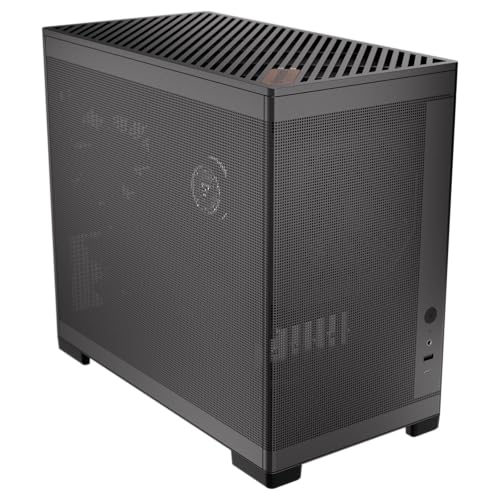
Okinos MiniArt 4 Compact Micro ATX Case
Best for: compact micro ATX builds with mesh airflow
- Motherboard Support
- Micro ATX
- Side Panel
- Mesh
- Included Fans
- 3x 120mm
- Radiator Support
- 240mm
- Max GPU Length
- 330mm
- Case Volume
- 24.5 L
View on Amazon: Okinos MiniArt 4 Compact Micro ATX Case Affiliate link
The Okinos MiniArt 4 is a compact 24.5-liter micro ATX case featuring full-mesh panels and a refined walnut logo badge. It comes pre-installed with three 120mm 3-pin fans and supports up to five total fans or a 240mm top radiator. The front-mounted PSU design and multi-zone mesh vents aim to improve airflow while keeping the interior clean. It suits builders seeking minimalist aesthetics in a small footprint.
Pros
- Pre-installed with three 120mm 3-pin fans for immediate airflow.
- Full-mesh side and top panels maximize ventilation efficiency.
- Front-mounted PSU design allows for cleaner cable routing.
- Supports 240mm radiators on the top panel.
Cons
- Pre-installed fans are 3-pin only, lacking PWM speed control.
- Front USB ports are not recommended for device charging.
- GPU clearance drops to 280mm with longer power supplies.
Good fit if
- You want a compact micro ATX build with strong airflow.
- You prefer tool-free access to top and side panels.
- You plan to use a front-mounted power supply.
Skip if
- You need support for standard ATX motherboards.
- You require PWM fan control for the pre-installed fans.
- You want high-speed USB ports for charging devices.
Verdict: Okinos MiniArt 4 Micro ATX Case fits builders who prioritize compact dimensions and mesh ventilation over high-speed charging ports. It is a solid option for small form factor builds using micro ATX boards.
Specifications side by side
| Spec | Okinos MiniArt 4 Compact Micro ATX Case |
|---|---|
| Motherboard Support | Micro ATX |
| Side Panel | Mesh |
| Included Fans | 3x 120mm |
| Radiator Support | 240mm |
| Max GPU Length | 330mm |
| Case Volume | 24.5 L |
| Connector Type | 3-Pin |
| Compatible Device | Radiator |
| Dimensions | 15.6 × 13.5 × 7.87 inches |
| Weight | 8.82 pounds |
| Color | Black |
Frequently asked questions
What motherboard form factor does the Okinos MiniArt 4 support?
This case supports Micro-ATX motherboards. It is not compatible with standard ATX or Mini-ITX boards. You must ensure your motherboard fits the Micro-ATX specification to install it in this chassis. This limits your options to smaller boards, which helps keep the overall system footprint compact.
Does the Okinos MiniArt 4 come with fans installed?
Yes, the case includes pre-installed fans. The listing specifies that it comes with three 120mm fans. These fans use a 3-pin connector type. This means you will need to connect them to your motherboard headers for proper speed control and airflow management right out of the box.
Can I use liquid cooling in this case?
The product data lists a radiator as a compatible device. This suggests the case is designed to support liquid cooling solutions. You can likely mount radiators within the chassis to dissipate heat from your CPU. Check the specific radiator sizes to ensure they fit within the compact internal dimensions of the 24.5-liter volume.
What are the external dimensions of the Okinos MiniArt 4?
The case measures 15.6 inches in length, 13.5 inches in width, and 7.87 inches in height. These dimensions define its physical footprint on your desk. The compact size makes it suitable for tight spaces, but you should verify that your desk area can accommodate these specific measurements comfortably.
What color is the Okinos MiniArt 4 case?
The case is available in a black color. This finish contributes to its minimalist aesthetic. The black exterior pairs with the full-mesh panels to provide a clean look. You can expect a uniform black appearance across the chassis unless specified otherwise by specific variant listings.
How heavy is the Okinos MiniArt 4 case?
The case weighs 8.82 pounds. This weight reflects the materials used in its construction. You can move it with relative ease, but it is substantial enough to remain stable on your desk. The weight also suggests a solid build that can protect your components during transport or daily use.