Okinos Aqua 3 Panoramic Micro-ATX vs Okinos MiniArt 4 Compact Micro: Spec Comparison
As an Amazon Associate we earn from qualifying purchases. Links on this page are affiliate links.
When comparing the okinos aqua 3 vs miniart 4 micro atx PC case, you face two distinct designs. Both support Micro-ATX motherboards and include three 120mm fans. The primary difference lies in their structure and visibility. The Aqua 3 offers a panoramic tempered glass view with a vertical tower layout. The MiniArt 4 uses a compact, full-mesh horizontal design focused on airflow and minimal aesthetics.
Key differences
| Aspect | Okinos Aqua 3 Panoramic Micro-ATX Case | Okinos MiniArt 4 Compact Micro ATX Case |
|---|---|---|
| Side Panel | Tempered Glass (Panoramic) | Full Mesh |
| Dimensions | 13.8 x 8.27 x 15.4 inches | 15.6 x 13.5 x 7.87 inches |
| Max GPU Length | 320mm | 330mm |
| Radiator Support | Not listed | 240mm Top |
| Front I/O | USB-C 3.2 Gen 2, USB 3.0 | USB-C 3.2 Gen 2, USB 3.1 |
Which one should you choose?
Choose Okinos Aqua 3 Panoramic Micro-ATX Case if
- You want a clear view of your ARGB lighting and components.
- You prefer a traditional vertical tower layout for your build.
- You prioritize a sleek, glass-fronted aesthetic for your desk.
Choose Okinos MiniArt 4 Compact Micro ATX Case if
- You need maximum airflow for high-heat components.
- You require a horizontal footprint to fit smaller desks.
- You plan to install a 240mm top radiator for liquid cooling.
Verdict: Choose the Aqua 3 if you value visual appeal and glass panels for showcasing your hardware. Select the MiniArt 4 if you prioritize cooling efficiency, horizontal space savings, and radiator support.
Aqua 3 vs MiniArt 4 Specs
Side Panel Design
The Okinos Aqua 3 features a panoramic tempered glass side panel, offering a 270-degree wide-angle view of your internal components. This design prioritizes aesthetics, showcasing your hardware with diamond-cut angles for a transparent display. In contrast, the MiniArt 4 uses a full-mesh side panel. This minimalist approach emphasizes airflow over visibility, hiding the internal components behind a refined mesh structure. If you want to show off your RGB lighting and clean cable management, the Aqua 3 is the clear choice. If you prefer a utilitarian look that hides dust and focuses on function, the MiniArt 4 suits you better.
Radiator Support
Cooling options differ significantly between these two cases. The MiniArt 4 explicitly supports a 240mm radiator on the top panel, making it suitable for liquid cooling setups. It also allows for up to five fans total. The Aqua 3 data does not list specific radiator support, focusing instead on its vertical airflow design with pre-installed fans. While the Aqua 3 has a spacious interior, you cannot confirm if it fits a 240mm radiator from the provided specs. For builders planning to use liquid cooling, the MiniArt 4 provides the necessary clearance and mounting points that the Aqua 3 lacks in its specification sheet.
GPU Compatibility
Graphics card length is a critical factor for many builders. The MiniArt 4 supports GPUs up to 330mm in length, provided you use a power supply under 140mm. This gives you more flexibility for larger cards. The Aqua 3 supports cards up to 320mm, which still accommodates high-end models like the RTX 4070. The MiniArt 4 offers a 10mm advantage in maximum length. If you are using a very long graphics card, the MiniArt 4 provides a bit more room. However, both cases handle standard mid-range to high-end cards well, with the MiniArt 4 having a slight edge in raw length capacity.
Connectivity Options
Both cases offer modern connectivity on the front I/O panel. The Aqua 3 includes two USB 3.0 ports, audio jacks, and a Type-C 3.2 Gen 2 port with 10Gbps speed. The MiniArt 4 also features a Type-C 3.2 Gen 2 port at 10Gbps, but adds a USB 3.1 port alongside the audio jacks. The MiniArt 4 provides an extra USB port for connecting peripherals without using your motherboard headers. This makes it slightly more versatile for everyday use. If you need multiple USB connections for mice, keyboards, and drives, the MiniArt 4 offers more ports right at your fingertips.
Build Material
The construction materials highlight the different priorities of each case. The Aqua 3 uses a 1.2mm steel mesh on the front, which is finer than traditional 3.0mm mesh, offering better dust resistance while maintaining airflow. It also features tempered glass for the panoramic view. The MiniArt 4 also uses 1.2mm fine mesh for its side and top panels, ensuring strong ventilation. Both cases share this fine mesh quality, which helps reduce dust buildup. The Aqua 3 adds glass for visual appeal, while the MiniArt 4 sticks to all-mesh for maximum airflow. Both are well-built with durable materials.
Which Okinos Case Fits You
Users wanting to show off internal hardware
The Aqua 3 features a 270-degree panoramic tempered glass side panel. This design provides a clear view of your components with diamond-cut angles. You get a unique visual effect that highlights your build. The full glass coverage ensures your internal hardware remains the focal point of your desk setup.
Builders needing maximum GPU clearance
The MiniArt 4 supports graphics cards up to 330mm in length. This is longer than the Aqua 3's 320mm limit. If you plan to install a large graphics card, this extra space provides better compatibility. The mesh design also aids in maintaining stable temperatures for high-end components.
Those preferring minimalist aesthetic over glass
The MiniArt 4 uses a clean full-mesh design with a walnut wood logo badge. This offers a minimalist look that differs from the glass-heavy Aqua 3. The refined aesthetic suits users who prefer a subtle appearance. The mesh panels also provide strong ventilation while reducing visible dust buildup.
The products compared

Okinos Aqua 3 Panoramic Micro-ATX Case
Best for: panoramic Micro-ATX builds needing fast USB-C
- Motherboard Support
- MATX, ITX
- Case Type
- Micro ATX
- Side Panel
- Tempered Glass
- Included Fans
- 3x 120mm ARGB
- Max GPU Length
- 320mm
- Connectivity
- Type-C
View on Amazon: Okinos Aqua 3 Panoramic Micro-ATX Case Affiliate link
The Okinos Aqua 3 is a micro-ATX chassis built with a 270-degree panoramic tempered glass view and toolless quick-release panels. It comes with three 120mm 3-pin ARGB fans, a built-in lighting controller, and front Type-C 10Gbps connectivity. You get 320mm of graphics card clearance and 164mm for CPU coolers, suiting compact desktop builds that showcase internal hardware.
Pros
- Includes three 120mm ARGB fans and a built-in 4-port controller
- Front I/O features a fast 10Gbps USB-C 3.2 Gen 2 port
- Screwless quick-release front glass panel for straightforward access
- Accommodates CPU air coolers up to 164mm tall
Cons
- Maximum graphics card clearance is limited to 320mm
- Included fans use fixed 3-pin connectors rather than 4-pin PWM control
- Chassis does not accommodate full-size ATX motherboards
Good fit if
- You want a 270-degree panoramic glass view for your components.
- You need high-speed USB-C connectivity directly on your front panel.
- You plan to assemble a Micro-ATX or Mini-ITX configuration.
Skip if
- You plan to install a graphics card longer than 320mm.
- You require support for a standard ATX motherboard.
- You want out-of-the-box 4-pin PWM fan speed control.
Verdict: Okinos Aqua 3 Panoramic Micro-ATX Case suits builders assembling a compact Micro-ATX system who prioritize seamless tempered glass visuals and integrated USB-C connectivity over full-size component clearance.
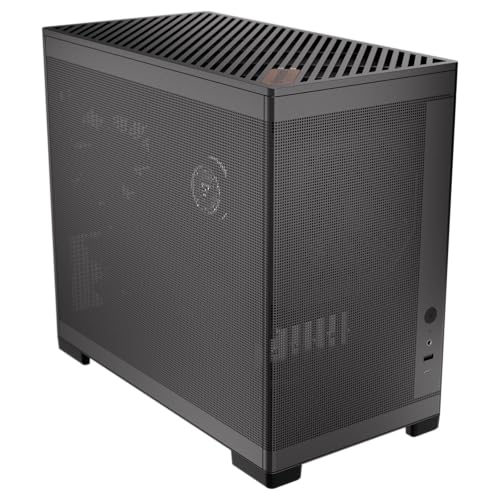
Okinos MiniArt 4 Compact Micro ATX Case
Best for: Compact builds needing strong airflow and tool-free access
- Motherboard Support
- Micro ATX
- Side Panel
- Mesh
- Included Fans
- 3x 120mm
- Radiator Support
- 240mm
- Max GPU Length
- 330mm
- Case Volume
- 24.5 L
View on Amazon: Okinos MiniArt 4 Compact Micro ATX Case Affiliate link
The Okinos MiniArt 4 is a 24.5 L micro ATX case with a mesh side panel and pre-installed 120mm fans. It supports up to a 330mm GPU and a 240mm top radiator. The front I/O includes USB-C and USB 3.1 ports. You get tool-free panels and defined cable management zones. This compact build suits users who want strong airflow in a small footprint.
Pros
- Pre-installed 3x 120mm 3-pin fans for immediate airflow
- Supports GPUs up to 330mm with shorter power supplies
- Tool-free top and side mesh panels for easy access
- Front I/O features USB Type-C 3.2 Gen 2 port
Cons
- Max GPU length drops to 280mm with longer power supplies
- USB ports are not recommended for device charging
- Limited to 240mm radiator support on the top
Good fit if
- You need a compact case with strong mesh ventilation
- You prefer tool-free panel removal for maintenance
- You want USB-C connectivity on the front I/O
Skip if
- You require full ATX motherboard support
- You need to install GPUs longer than 330mm
- You plan to use large power supplies over 140mm
Verdict: The Okinos MiniArt 4 Micro ATX Case offers efficient cooling and easy assembly for compact builds. It fits users who prioritize airflow and tool-free access in a small 24.5 L chassis.
Specifications side by side
| Spec | Okinos Aqua 3 Panoramic Micro-ATX Case | Okinos MiniArt 4 Compact Micro ATX Case |
|---|---|---|
| Motherboard Support | MATX, ITX | Micro ATX |
| Case Type | Micro ATX | not stated |
| Side Panel | Tempered Glass | Mesh |
| Included Fans | 3x 120mm ARGB | 3x 120mm |
| Radiator Support | not stated | 240mm |
| Max GPU Length | 320mm | 330mm |
| Case Volume | not stated | 24.5 L |
| Fan Size | 120mm | not stated |
| Lighting | ARGB | not stated |
| Connectivity | Type-C | not stated |
| Connector Type | 3-Pin | 3-Pin |
| Compatible Device | not stated | Radiator |
| Dimensions | 13.8 × 8.27 × 15.4 inches | 15.6 × 13.5 × 7.87 inches |
| Weight | 9.19 pounds | 8.82 pounds |
| Color | Black | Black |
| Model | OKICC-AQUA3-MATXB-H3BA | not stated |
Frequently asked questions
Does the Okinos Aqua 3 support ATX motherboards?
No, the Okinos Aqua 3 is designed exclusively for Micro-ATX motherboards. It does not support larger ATX or E-ATX boards. You must choose a Micro-ATX motherboard to fit within its chassis. This limitation keeps the case compact while still offering a panoramic glass design for your components.
What are the external dimensions of the Okinos MiniArt 4?
The Okinos MiniArt 4 measures 13.5 inches in width, 7.87 inches in height, and 15.6 inches in length. These dimensions create a compact footprint suitable for smaller desks. The case weighs 8.82 pounds, making it relatively lightweight for easy transport or relocation within your setup.
Does the Okinos Aqua 3 include fans?
Yes, the Okinos Aqua 3 comes with included fans. It supports 120mm fan sizes, allowing you to install standard cooling units. The case features ARGB lighting, which integrates with the included fans to showcase your hardware. This setup helps you display your build without needing to buy fans separately.
How much does the Okinos Aqua 3 weigh?
The Okinos Aqua 3 weighs 9.19 pounds. This weight reflects the tempered glass side panel and the overall structural materials used in its construction. The dimensions are 8.27 inches wide, 15.4 inches high, and 13.8 inches long, providing a stable base for your Micro-ATX components.
Is there USB Type-C connectivity on the Aqua 3?
Yes, the Okinos Aqua 3 includes USB Type-C connectivity on the top panel. This port allows for faster data transfer and convenient charging of devices. The case also uses 3-pin connectors for its lighting and fan systems, ensuring compatibility with standard motherboard headers for ARGB control.
Can I install a radiator in the MiniArt 4?
Yes, the Okinos MiniArt 4 is compatible with radiators. This feature supports liquid cooling solutions for your CPU. The case is designed to handle the additional hardware while maintaining efficient airflow. Its compact 24.5-liter volume still accommodates these cooling components for users prioritizing thermal performance in a small form factor.