Noctua Redux 80mm PWM Fan Review: Who It Fits and Who Should Skip It
As an Amazon Associate we earn from qualifying purchases. Links on this page are affiliate links.
This noctua nf r8 redux 1800 review focuses on a compact 80mm fan designed for specific ventilation needs. The unit measures 80x80x25 mm and operates with a 4-pin PWM connector. It reaches a maximum speed of 1800 RPM, which allows for strong airflow when needed. At full load, the noise level stays at 17.1 dB(A), keeping operation quiet. The fan weighs 4.8 ounces and comes in a grey color. It is built for chassis ventilation or cooling fan replacement in NAS devices. You get a reliable component that balances performance with low noise levels.
What stands out
- 80x80x25 mm size fits tight spaces
- 1800 RPM max speed for strong airflow
- 17.1 dB(A) noise level for quiet operation
- 4-pin PWM connector for motherboard control
- 150,000 hour MTTF for long life
Who it fits
Good fit for
You should choose this fan if you need a small 80mm unit for a NAS or compact chassis. The 4-pin PWM support lets your motherboard adjust speed automatically, keeping things silent at idle. If you require high static pressure in a small form factor, this model delivers. The low noise rating ensures it does not distract during quiet computing sessions. It is also suitable for replacing older fans in devices that use 80mm mounts. The included accessories like anti-vibration mounts help reduce resonance in sensitive setups.
Who should skip it
Skip this option if you need a larger 120mm or 140mm fan for standard ATX cases. The 80mm size limits airflow potential compared to bigger units. If you require silent operation below 17.1 dB(A) at all times, this fan may be too loud at higher speeds. Users needing RGB lighting will find no visual effects here, as it is grey and functional. If you do not have a 4-pin PWM header available, you must check compatibility. This is a specialized tool, not a general-purpose upgrade for all builds.
Verdict: This fan offers proven quiet performance in a small 80mm package. It is ideal for NAS systems and compact chassis where space is limited.
Key specs explained
Fan Size: 80mm
This dimension defines the physical footprint of the fan. You need a case or device with an 80mm mounting hole pattern to use it. It is smaller than standard 120mm or 140mm fans, making it suitable for tight spaces like small form factor cases or NAS units. Check your chassis specifications to ensure compatibility before purchasing.
Max Fan Speed: 1800 RPM
Revolutions per minute indicate how fast the blades spin. At 1800 RPM, this fan moves a significant volume of air. Higher speeds generally mean better cooling performance but also more noise. This speed is ideal for active cooling needs where maximum airflow is required, rather than passive idle scenarios.
Noise Level: 17.1 dB(A)
Decibels measure sound pressure. At 17.1 dB(A), this fan is very quiet during operation. You will likely hear it only in a silent room. This level is suitable for environments where noise sensitivity is high. Compare this figure with other fans to ensure it meets your acoustic standards for a quiet PC build.
Connector Type: 4-pin PWM
Pulse Width Modulation allows your motherboard to control fan speed automatically. A 4-pin connector provides power and a signal for dynamic adjustment. This ensures the fan runs slower when idle and faster under load. It offers better thermal management and efficiency compared to older 3-pin DC fan connections.
Build quality and physical layout
The unit measures 80x80x25 mm according to the listing. This compact footprint fits tight spaces where larger fans cannot go. The grey color matches standard internal components. The fan weighs 4.8 ounces. This light weight reduces stress on mounting points and brackets. You should verify that your chassis or device supports this specific 80mm hole pattern before installation.
It uses a 4-pin PWM connector. This allows your motherboard to control speed automatically. The listing notes that this enables powerful airflow when needed and quiet operation at idle. The maximum speed reaches 1800 RPM. This speed generates up to 17.1 dB(A) of noise. You will need to ensure your case allows for this noise level in your specific environment.
The design is described as streamlined. This edition offers proven quality at a lower price point. The listing mentions optional accessories like anti-vibration mounts and S-ATA adaptors. These add flexibility for different mounting scenarios. The grey finish is practical for blending into dark interiors. You get a straightforward component without extra features. This makes it suitable for basic ventilation tasks where simplicity matters.
Setup and everyday use
Installing this fan requires a mounting area with an 80mm hole pattern. The unit comes with optional anti-vibration mounts to secure it firmly. You connect the 4-pin PWM cable to your motherboard. This connector allows the system to control the speed automatically. The fan reaches 1800 RPM when full power is applied. This speed provides maximum airflow for cooling tasks. At idle, the fan runs much slower and quieter. The noise level is listed at 17.1 dB(A) at maximum speed. This specification indicates a relatively quiet operation even under load. The 4-pin interface ensures compatibility with modern motherboards that support PWM control. You do not need external controllers for basic speed management. The fan weighs 4.8 ounces. This light weight makes it easy to handle during installation. The grey color blends with standard internal components. The listing notes a mean time to failure of over 150,000 hours. This suggests long-term reliability for continuous use. The streamlined redux edition focuses on proven performance without extra features. You can use it for chassis ventilation or as a replacement fan. The included accessories allow for flexible setup options. S-ATA adaptors and y-splitters are available separately. This fan suits users who need compact cooling with automatic speed adjustment. It fits well in tight spaces where larger fans cannot fit.
What To Check Before Buying
Before you buy, check your case or NAS for an 80mm mounting pattern. This fan fits tight spaces where 120mm units cannot go. You must verify your motherboard has a free 4-pin PWM header. The listing notes optional accessories like anti-vibration mounts and S-ATA adaptors. You may need these if your chassis lacks rubber grommets or if you require fan splitting. The 1800 RPM speed offers strong airflow for chassis ventilation or component cooling. Keep the area clear of dust to maintain the stated noise level of 17.1 dB(A). This model sits alongside larger fans in your build. Use it for specific spots like rear exhaust or small server racks. It pairs well with standard 120mm or 140mm fans elsewhere. Ensure your power supply can handle the load if you run multiple units. The grey finish blends with most internal components. This practical choice suits users needing compact, quiet cooling solutions without sacrificing performance.
Check before you buy
- Verify your case has an 80mm mounting hole pattern.
- Ensure your motherboard has a free 4-pin PWM header.
- Check if you need optional anti-vibration mounts for your chassis.
- Confirm the 17.1 dB(A) noise level fits your quietness needs.
The product at a glance
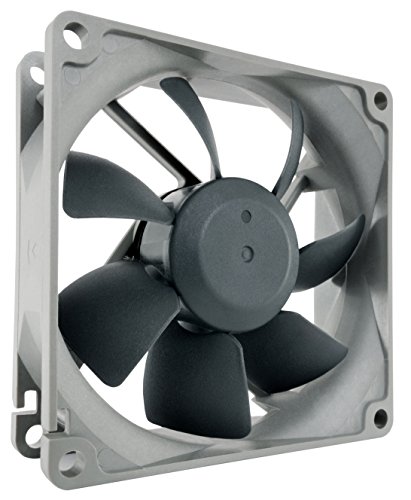
Noctua Redux 80mm PWM Fan
Best for: 80mm chassis ventilation and NAS cooling
- Fan Size
- 80mm
- Max Fan Speed
- 1800 RPM
- Noise Level
- 17.1 dB(A)
- Connector Type
- 4-pin PWM
- Dimensions
- 3.15 × 3.15 × 0.98 inches
- Weight
- 4.8 ounces
View on Amazon: Noctua Redux 80mm PWM Fan Affiliate link
This is a Noctua NF-R8 redux-1800 PWM fan designed for 80mm slots. It measures 80x80x25 mm and reaches a maximum speed of 1800 RPM. The 4-pin PWM connector allows for automatic motherboard speed control. It operates at a quiet 17.1 dB(A). This fan suits users needing reliable chassis ventilation or NAS cooling with proven longevity.
Pros
- 4-pin PWM connector for automatic speed control
- Maximum speed of 1800 RPM for strong airflow
- Quiet operation at 17.1 dB(A)
- MTTF rating exceeds 150,000 hours
Cons
- Only available in a single 25 mm thickness
- Limited to 80mm fan size
- Grey color option only
Good fit if
- You need a 80mm fan for chassis ventilation
- You require PWM speed control for quiet idle
- You are cooling a NAS or similar device
Skip if
- You need a 120mm or larger fan
- You require RGB lighting effects
- You need a fan thicker than 25 mm
Verdict: Noctua NF-R8 80mm PWM Fan fits users who need reliable 80mm cooling with quiet operation. It is ideal for chassis vents or NAS units where PWM control is essential.
Specifications side by side
| Spec | Noctua Redux 80mm PWM Fan |
|---|---|
| Fan Size | 80mm |
| Max Fan Speed | 1800 RPM |
| Noise Level | 17.1 dB(A) |
| Connector Type | 4-pin PWM |
| Dimensions | 3.15 × 3.15 × 0.98 inches |
| Weight | 4.8 ounces |
| Size | 80x80x25 mm |
| Color | Grey |
| Model | NF-R8 redux-1800 PWM |
Frequently asked questions
Does the Noctua NF-R8 redux-1800 PWM fit standard 120mm slots?
No, it does not fit standard 120mm slots. This fan measures 80x80x25 mm, which is significantly smaller than the common 120mm or 140mm dimensions. You must verify that your chassis or NAS unit has a specific 80mm mounting hole pattern. It is designed for tight spaces where larger fans cannot be installed.
What connector type does this fan use for speed control?
It uses a 4-pin PWM connector for speed control. This allows your motherboard to adjust the fan speed automatically based on system temperatures. You need a free 4-pin PWM header on your motherboard to utilize this feature. The unit operates at a maximum speed of 1800 RPM when running at full power.
Is this fan suitable for use in a NAS enclosure?
Yes, it is suitable for NAS enclosures. The compact 80mm size allows it to fit into smaller chassis or specialized ventilation areas. It provides reliable cooling with quiet operation, which is ideal for storage units. The PWM control ensures you can balance airflow and noise levels effectively for your specific setup needs.
How heavy is the Noctua NF-R8 redux fan?
The fan weighs 4.8 ounces. This light weight reduces stress on the mounting points of your case or device. It measures 3.15 inches in width and height, with a depth of 0.98 inches. The grey color helps it blend in with standard internal components without drawing attention to itself.
Can I install this fan without using anti-vibration mounts?
Yes, you can install it without anti-vibration mounts. The listing notes that these mounts are optional accessories. You can secure the fan directly if your mounting points allow for a firm fit. The anti-vibration mounts are available separately to help reduce noise and vibration if you choose to use them.
What is the maximum rotational speed of this fan?
The maximum rotational speed is 1800 RPM. This speed allows for strong airflow when your system requires maximum cooling performance. The PWM connector lets you lower the speed for quieter operation during idle periods. This range provides flexibility for different thermal requirements in your specific build or NAS setup.
Does this fan come with a SATA power adapter?
The listing notes that S-ATA adaptors are available as optional accessories. This means you can purchase them separately if you need to connect the fan to a power source other than the motherboard. Check the product page for availability. The primary connection remains the 4-pin PWM header for optimal speed control.