Montech vs Apevia: PC Cases Compared by Specs
As an Amazon Associate we earn from qualifying purchases. Links on this page are affiliate links.
This montech vs apevia PC case comparison looks at two distinct builds. Both offer tempered glass side panels and pre-installed RGB fans for visible airflow. The Montech X3 Mesh is a mid-tower designed for ATX motherboards, featuring six fixed RGB fans. The Apevia Prodigy targets Micro-ATX and Mini-ITX systems, including three RGB fans with multiple lighting modes. You need to choose based on your motherboard size and preferred lighting control.
Key differences
| Aspect | Montech X3 Mesh ATX Mid-Tower Case | Apevia Prodigy Micro-ATX Case |
|---|---|---|
| Motherboard Support | ATX | Micro-ATX, Mini-ITX |
| Tower Size | Mid-Tower | Micro-ATX |
| Included Fans | 6x Fixed RGB | 3x RGB |
| Lighting Control | Fixed (on/off button) | Multiple modes (16 modes, 30 options) |
| Radiator Support | Not listed | 120mm rear |
| Max GPU Length | Not listed | 350mm |
Which one should you choose?
Choose Montech X3 Mesh ATX Mid-Tower Case if
- You need a case for a standard ATX motherboard
- You want maximum fan count for high airflow
- You prefer simple on/off RGB control
Choose Apevia Prodigy Micro-ATX Case if
- You are building with Micro-ATX or Mini-ITX boards
- You want customizable RGB lighting modes
- You need explicit GPU length clearance specs
Verdict: Choose the Montech X3 Mesh if you are building a standard ATX system and want extensive pre-installed cooling. Pick the Apevia Prodigy if you are using smaller Micro-ATX or Mini-ITX motherboards and want more control over RGB lighting patterns.
Montech vs Apevia Case Specs
Motherboard Support
The Montech X3 Mesh is an ATX mid-tower case, designed to accommodate standard ATX motherboards. This form factor allows for larger components and more expansion slots. In contrast, the Apevia Prodigy supports Micro-ATX and Mini-ITX motherboards. This makes the Apevia suitable for smaller builds where space is limited. If you need a standard ATX board, the Montech is the clear choice. For compact builds, the Apevia offers the necessary compatibility. The difference in board support dictates the entire build size and component selection for your PC.
Tower Size
The Montech X3 Mesh measures 18.9 inches in height, 14.6 inches in length, and 8.3 inches in width. It is a mid-tower case that takes up more desk space but offers internal volume. The Apevia Prodigy is smaller, standing 15.6 inches high, 16.1 inches long, and 7.95 inches wide. Its compact footprint makes it easier to place on smaller desks. The Montech provides more room for large components, while the Apevia prioritizes a smaller physical presence. Your desk space and preference for case volume will determine which size fits your setup best.
Included Fans
The Montech X3 Mesh comes with six pre-installed 140mm fans. These fixed RGB fans provide substantial airflow intake and exhaust out of the box. The Apevia Prodigy includes three pre-installed RGB fans. The data specifies these fans support various lighting modes but does not list their specific size. The Montech offers double the fan count and larger 140mm units for better air movement. The Apevia has fewer fans, which may require you to purchase additional units for optimal cooling. The Montech wins on raw fan quantity and size.
Radiator Support
The Apevia Prodigy supports up to 120mm radiators on the rear panel. This allows for basic liquid cooling options on the back of the case. The Montech X3 Mesh data does not explicitly list radiator support specifications. While it has rear ventilation, the absence of stated radiator compatibility in the provided data means we cannot confirm its liquid cooling capabilities. The Apevia has a clear advantage here if you plan to use a rear-mounted AIO cooler. The Montech may support it, but the data does not confirm this feature.
GPU Clearance
The Apevia Prodigy supports video cards up to 350mm in length. This generous clearance allows for large graphics cards in a compact case. The Montech X3 Mesh data does not list a maximum GPU length. Without this specific measurement, we cannot compare the exact clearance limits. The Apevia provides a verified limit for long GPUs. If you have a large graphics card, the Apevia confirms it will fit. The Montech likely has ample space as a mid-tower, but the Apevia gives you the specific number to check against your hardware.
Which Case Fits Your Build
ATX builders wanting maximum airflow
The Montech X3 Mesh supports standard ATX motherboards, giving you room for larger components and more expansion slots. It includes six 140mm fans for high air intake. The triple front fan setup and top ventilation optimize cooling for high-performance parts in a mid-tower chassis.
Compact ITX or Micro-ATX users
The Apevia Prodigy supports Micro-ATX and Mini-ITX boards, fitting smaller builds. It accommodates GPUs up to 350mm long and CPU coolers up to 165mm tall. This compact mid-tower design offers flexibility for smaller components while still providing tempered glass and pre-installed RGB fans for aesthetics.
Users preferring customizable lighting modes
The Apevia Prodigy offers 30 total play-through options including RGB, breathing, and single color modes. You can control these via the top I/O panel. The Montech X3 Mesh has fixed RGB fans that only turn on or off, lacking the dynamic mode variety found in the Apevia.
The products compared

Montech X3 Mesh ATX Mid-Tower Case
Best for: ATX builds needing high airflow and fixed RGB
- Motherboard Support
- ATX
- Case Type
- Mid-Tower
- Side Panel
- Tempered Glass
- Included Fans
- 6x Fixed RGB
- Radiator Support
- 240mm
- Max GPU Length
- 305mm
View on Amazon: Montech X3 Mesh ATX Mid-Tower Case Affiliate link
The Montech X3 Mesh is a mid-tower ATX case featuring a panoramic tempered glass front and side. It includes six fixed RGB fans for high airflow intake. The side panel uses a zero-drill-hole swivel design for easier access and structural integrity. This case suits builders who want strong airflow and visible RGB lighting without addressable control complexity.
Pros
- Six pre-installed 140mm fixed RGB fans
- Tempered glass front and side panels
- Zero-drill-hole side panel swivel design
- Optimized front and rear ventilation
Cons
- RGB lighting is fixed, not addressable
- No mention of fan speed control
- Mid-tower limits large motherboard support
Good fit if
- You want high airflow with pre-mounted fans
- You prefer fixed RGB over addressable lighting
- You need easy side panel access
Skip if
- You require addressable RGB control
- You need E-ATX motherboard support
- You want silent operation with fewer fans
Verdict: Montech X3 Mesh Black ATX Case delivers solid airflow and visibility for standard ATX builds. It fits users who value pre-installed lighting and easy maintenance over customizable RGB effects.
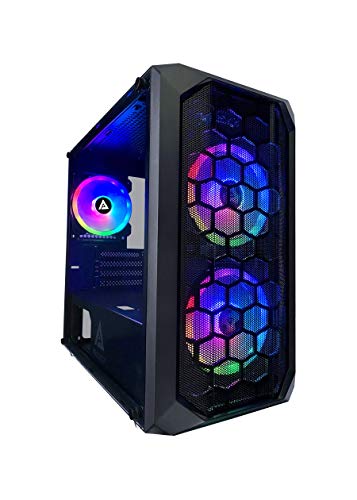
Apevia Prodigy Micro-ATX Case
Best for: Compact Mini-ITX and Micro-ATX gaming builds
- Motherboard Support
- Micro-ATX, Mini-ITX
- Case Type
- Micro-ATX
- Side Panel
- Tempered Glass
- Included Fans
- 3x RGB
- Radiator Support
- 120mm
- Max GPU Length
- 350mm
View on Amazon: Apevia Prodigy Micro-ATX Case Affiliate link
This Micro-ATX case offers a mesh front and tempered glass side panel. It includes three pre-installed RGB fans with customizable lighting modes. You get support for GPUs up to 350mm long and CPU coolers up to 165mm high. The design fits Mini-ITX and Micro-ATX motherboards. It is a compact option for smaller builds that want airflow and visible internals.
Pros
- Supports Micro-ATX and Mini-ITX motherboards
- Includes 3 pre-installed RGB fans
- Tempered glass side panel
- GPU support up to 350mm
Cons
- Limited to Micro-ATX and Mini-ITX form factors
- Radiator support limited to 120mm rear mount
- Proprietary RGB control limits fan compatibility
Good fit if
- You need a compact case for Mini-ITX or Micro-ATX builds
- You want pre-installed RGB lighting
- You prefer a mesh front for airflow
Skip if
- You require ATX motherboard support
- You plan to install large liquid cooling radiators
- You need standard fan mounting options
Verdict: Apevia PRODIGY Micro-ATX Case is a compact build for Mini-ITX and Micro-ATX enthusiasts who want RGB lighting and decent airflow in a small footprint.
Specifications side by side
| Spec | Montech X3 Mesh ATX Mid-Tower Case | Apevia Prodigy Micro-ATX Case |
|---|---|---|
| Motherboard Support | ATX | Micro-ATX, Mini-ITX |
| Case Type | Mid-Tower | Micro-ATX |
| Side Panel | Tempered Glass | Tempered Glass |
| Included Fans | 6x Fixed RGB | 3x RGB |
| Radiator Support | 240mm | 120mm |
| Max GPU Length | 305mm | 350mm |
| Tower Size | Mid-Tower | not stated |
| Use | not stated | Gaming |
| Lighting | RGB | RGB |
| Connectivity | USB 3.0 | USB 3.0 |
| Compatible Device | Radiator | not stated |
| Dimensions | 14.6 × 8.3 × 18.9 inches | 16.1 × 7.95 × 15.6 inches |
| Weight | 11.9 pounds | 13 pounds |
| Size | X3 MESH | PRODIGY BLACK |
| Color | X3-Black | Black |
| Model | X3 MESH | PRODIGY-BK |
Frequently asked questions
Which case is better for airflow, Montech or Apevia?
The Montech X3 Mesh offers superior airflow for standard ATX builds. It comes with six pre-installed 140mm fans to maximize air intake. The Apevia Prodigy is a compact Micro-ATX case. It provides decent airflow but is designed for smaller footprints rather than maximum cooling performance.
Can I fit an ATX motherboard in the Apevia Prodigy?
No, the Apevia Prodigy does not support ATX motherboards. It is designed specifically for Micro-ATX and Mini-ITX boards. If you need ATX support, the Montech X3 Mesh is the correct choice. It is built as an ATX mid-tower case to accommodate larger components.
Do both cases come with RGB lighting?
Yes, both cases include pre-installed RGB lighting. The Montech X3 Mesh features six fixed RGB fans for consistent illumination. The Apevia Prodigy also includes RGB fans to highlight its interior. Both options provide visible lighting effects without requiring additional purchases.
Which case is heavier and larger?
The Apevia Prodigy is slightly heavier at 13 pounds, while the Montech X3 Mesh weighs 11.9 pounds. In terms of dimensions, the Apevia is taller and deeper. The Montech is wider but shorter. You should check your desk space against these specific measurements.
Is the Montech X3 Mesh a mid-tower case?
Yes, the Montech X3 Mesh is classified as a mid-tower case. It measures 18.9 inches in height and 14.6 inches in length. This form factor provides ample room for standard ATX motherboards and larger graphics cards. It is a versatile choice for most desktop builds.
What motherboard sizes does the Apevia Prodigy support?
The Apevia Prodigy supports Micro-ATX and Mini-ITX motherboards. It is designed for compact builds that require a smaller footprint. It does not fit standard ATX boards. If you plan to use a smaller motherboard, this case offers a suitable and efficient enclosure.
Which case is best for beginners?
The Montech X3 Mesh is ideal for beginners building standard ATX systems. It offers easy maintenance and high airflow out of the box. The Apevia Prodigy suits those who prefer compact builds. Choose the Montech if you want a traditional mid-tower experience with straightforward assembly.