Lighting in PC Cases: What It Is and Is It Worth It?
As an Amazon Associate we earn from qualifying purchases. Links on this page are affiliate links.
Lighting Explained for PC Builders
You often see two main types of lighting in PC cases. These are ARGB and RGB. Understanding the difference helps you choose the right parts for your build. This guide covers lighting explained so you can make an informed decision.
RGB stands for Red, Green, and Blue. It uses a single wire to send data to all LEDs on a strip or fan. The controller on the motherboard or a hub mixes these colors. This allows for millions of shades. However, all LEDs on a single chain usually show the same color at the same time. You cannot easily make a gradient or have different colors on different LEDs in the same chain. This is known as static or synchronized lighting.
ARGB adds a third pin to the connector. The standard RGB header has three pins. The ARGB header has four. The extra pin sends individual data to each LED. This means you can control every single light separately. You can create flowing rainbows, specific patterns, or static colors on individual units. This is called addressable lighting. It offers much higher customization.
How do you know which one you need? Check the product specifications. Look for the connector type. ARGB headers are often labeled as 5V 3-pin. Standard RGB headers are 12V 4-pin. Using the wrong voltage can damage the lights. Always match the header on your motherboard to the cable on the case or fan.
Why does this matter to you? If you want simple, uniform color across all fans, RGB is fine. It is simpler to set up. If you want complex effects, gradients, or individual control, you need ARGB. Most modern cases support ARGB. Check your motherboard specs to see if it has an ARGB header. Without it, you may need a separate controller. This spec is key for aesthetics.
ARGB vs RGB Lighting Options
ARGB
Addressable RGB allows individual control of each LED on a strip or fan. You can create complex color gradients and synchronized effects across multiple components. This level of detail suits builders who want precise visual customization. The Montech XR Panoramic ATX Mid-Tower Case includes ARGB fans to showcase this capability in standard ATX builds. It appeals to gamers prioritizing visual appeal over extensive manual tweaking. However, ARGB requires specific headers on your motherboard. You must ensure compatibility before purchasing. This setup offers more creative freedom but demands correct wiring and software support for full functionality.
RGB
Standard RGB controls all LEDs on a strip or fan as a single unit. The entire component changes color simultaneously. This method is simpler to set up and often more reliable for consistent lighting effects. The ASUS ROG Strix Helios RGB Mid-Tower Case features pre-installed RGB fans for E-ATX builds. It fits users who need sturdy chassis support and straightforward lighting without complex programming. While less detailed than ARGB, RGB provides a bold, uniform look. It is ideal for builders who prefer ease of use. The trade-off is a lack of individual LED control, meaning you cannot create intricate patterns or gradients.
Is RGB Lighting Worth The Cost
Who needs it
You should consider ARGB lighting if visual customization is a primary goal for your build. Addressable RGB allows individual control of each LED, enabling complex gradients and synchronized effects across multiple components. This level of detail suits builders who want precise visual customization. If you enjoy tweaking software settings to create unique lighting profiles, ARGB provides the flexibility you need. It works well with cases that support addressable headers, allowing you to match colors with other peripherals. RGB lighting is also beneficial if you plan to showcase your PC in a well-lit room or share images online. The ability to change colors dynamically adds a personal touch that static lighting cannot match. For enthusiasts who view their PC as a centerpiece, the extra effort to configure ARGB is often justified by the aesthetic result.
Who can skip it
You can skip advanced lighting features if you prioritize performance, airflow, or noise reduction. Lighting does not improve cooling efficiency or system stability. Focus your budget on better fans, a more efficient power supply, or additional storage instead. Static RGB is sufficient if you only want a basic color without complex programming. Many builders find that simple white or black cases look cleaner and more professional. If you do not have software experience or prefer a minimalist setup, lighting adds unnecessary complexity. You can always add a single fan with basic RGB later if you change your mind. Prioritize case dimensions, motherboard compatibility, and cable management space first. These factors have a direct impact on build quality and longevity. Lighting is purely cosmetic and does not affect how your PC functions or how long it lasts. Save your time and money for components that matter.
PC Case Lighting Glossary
ARGB
Addressable RGB lets you control each LED individually. This enables complex gradients and precise color effects across fans or strips, offering detailed visual customization for your build.
RGB
Standard RGB changes the color of all LEDs on a strip simultaneously. You cannot control individual lights, resulting in uniform color blocks rather than detailed patterns or gradients.
Motherboard Header
A physical pin connector on your motherboard that sends data to lighting components. You need the correct type, such as 5V ARGB or 12V RGB, to ensure proper function.
Controller
A small device that connects fans or strips to power and your motherboard. It manages lighting effects and simplifies wiring by reducing the number of direct connections needed.
PWM
Pulse Width Modulation is a signal used to control fan speed. Many lighting fans use PWM for rotation while using separate headers for their RGB or ARGB illumination features.
Sync Software
Programs provided by motherboard makers to coordinate lighting across compatible components. You use this software to set colors, effects, and synchronization between fans, strips, and other peripherals.
Illumination
The general term for light emitted by case components. This includes LEDs in fans, mesh panels, or glass edges that enhance the visual appeal of your computer chassis.
Quick picks
| # | Product | Best for | Price |
|---|---|---|---|
| 1 | Montech XR Panoramic ATX Mid-Tower Case | showcasing ARGB lighting in standard ATX builds | Check price of Montech XR Panoramic ATX Mid-Tower Case on Amazon |
| 2 | ASUS ROG Strix Helios RGB Mid-Tower Case | E-ATX builds with RGB lighting needs | Check price of ASUS ROG Strix Helios RGB Mid-Tower Case on Amazon |
| 3 | Montech AIR 100 ARGB Micro-ATX Case | Compact MATX builds with integrated ARGB | Check price of Montech AIR 100 ARGB Micro-ATX Case on Amazon |
| 4 | Fractal Design Pop Air RGB ATX Case | Mid-tower builds with RGB focus | Check price of Fractal Design Pop Air RGB ATX Case on Amazon |
| 5 | MUSETEX ATX Mid-Tower with Magnetic Glass Door | builders wanting pre-installed ARGB fans and side access | Check price of MUSETEX ATX Mid-Tower with Magnetic Glass Door on Amazon |
| 6 | Lian Li Lancool 216 ARGB Mid-Tower | high-airflow setups with large graphics cards | Check price of Lian Li Lancool 216 ARGB Mid-Tower on Amazon |
Our 6 picks

Montech XR Panoramic ATX Mid-Tower Case
Best for: showcasing ARGB lighting in standard ATX builds
- Lighting
- ARGB (what this guide is about)
- Motherboard Support
- ATX
- Case Type
- Mid Tower
- Side Panel
- Tempered Glass
- Included Fans
- 3x 120mm ARGB PWM
- Radiator Support
- 360mm
View on Amazon: Montech XR Panoramic ATX Mid-Tower Case Affiliate link
This mid-tower case features a panoramic front and side tempered glass design to showcase your hardware. It includes three 120mm ARGB PWM fans, with two side-mounted reverse-blade units facing the interior for a cleaner look. The chassis supports ATX motherboards and up to a 420mm GPU. Removable magnetic filters simplify maintenance for your gaming build.
Pros
- Panoramic tempered glass front and side panels
- Three pre-installed 120mm ARGB PWM fans
- Two side-mounted reverse-blade fans for interior lighting
- 420mm GPU clearance for high-end graphics cards
- Removable magnetic filters on top, side, and bottom
Cons
- Only three fans included in the base configuration
- Supports only ATX motherboards, excluding smaller form factors
- No mention of software control for the ARGB lighting
Good fit if
- You want a clear view of your GPU and lighting
- You are building a standard ATX gaming PC
- You prefer pre-installed fans for immediate cooling
Skip if
- You need support for Micro ATX or Mini ITX boards
- You require extensive fan control software integration
- You prefer a mesh front panel for maximum airflow
Verdict: Montech XR Panoramic ATX Case offers a strong showcase design with included ARGB fans for standard ATX builds. It suits gamers who prioritize visual appeal and straightforward assembly over extensive customization options.
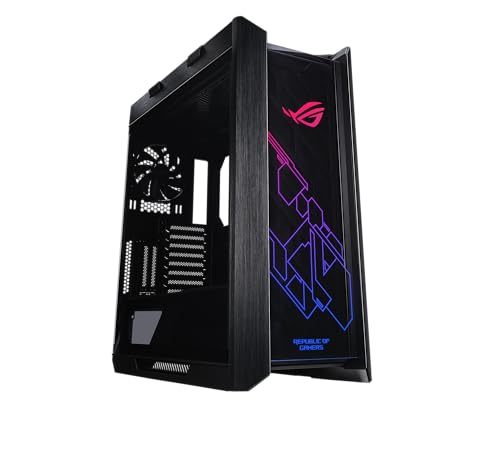
ASUS ROG Strix Helios RGB Mid-Tower Case
Best for: E-ATX builds with RGB lighting needs
- Lighting
- RGB (what this guide is about)
- Motherboard Support
- EATX
- Case Type
- Mid-Tower
- Side Panel
- Tempered Glass
- Included Fans
- 4x 140mm
- Radiator Support
- 420mm
View on Amazon: ASUS ROG Strix Helios RGB Mid-Tower Case Affiliate link
This mid-tower case supports E-ATX motherboards and features a metal chassis with 4mm-thick smoked tempered glass side panels. It includes four 140mm RGB fans and a built-in fan hub for lighting control. The design allows for vertical or horizontal GPU mounting and supports radiators up to 420mm. It suits users who want a robust build with integrated RGB lighting and extensive expansion options.
Pros
- Supports E-ATX motherboards for maximum compatibility
- Includes four 140mm RGB fans and a built-in hub
- Features 4mm-thick smoked tempered glass side panels
- Offers vertical and horizontal GPU mounting options
- Supports radiators up to 420mm in length
Cons
- Heavy at 39.7 pounds
- Only includes RGB fans, not ARGB
- No mention of software control for lighting
Good fit if
- You need an E-ATX motherboard fit
- You want pre-installed RGB fans
- You plan to mount GPUs vertically
Skip if
- You prefer ARGB lighting control
- You need a lightweight case
- You want a micro-ATX build
Verdict: ASUS ROG Strix Helios RGB EATX Mid-Tower fits builders who need E-ATX support and want pre-installed RGB fans with a sturdy metal chassis.
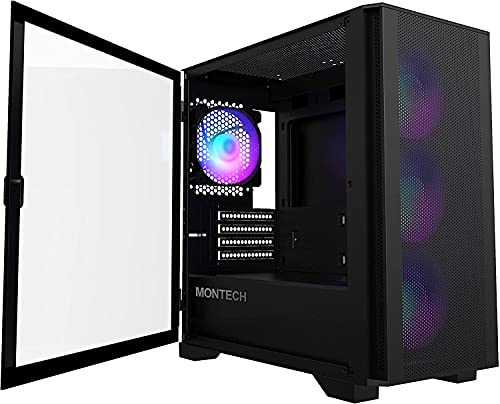
Montech AIR 100 ARGB Micro-ATX Case
Best for: Compact MATX builds with integrated ARGB
- Lighting
- ARGB (what this guide is about)
- Motherboard Support
- Micro-ATX, Mini-ITX
- Case Type
- Micro ATX
- Side Panel
- Tempered Glass
- Included Fans
- 4x 120mm ARGB
- Radiator Support
- 280mm
View on Amazon: Montech AIR 100 ARGB Micro-ATX Case Affiliate link
This compact Micro ATX case supports smaller motherboards in a 405 x 210 x 425mm chassis. It includes four pre-installed 120mm ARGB fans and a controller for immediate lighting and airflow. The sw tempered-glass panel reveals your build, while the mesh front allows easy cleaning. You get defined cable paths and dust filters. It suits builders who need ARGB lighting without the bulk of a full tower.
Pros
- Four pre-installed 120mm ARGB fans with included controller
- Swivel tempered-glass side panel for easy access
- Pre-installed cable loops and Velcro straps for organization
- Quick-release fine-mesh front panel for cleaning
Cons
- Smaller Micro ATX form factor limits motherboard options
- Maximum GPU length is 330mm, restricting large cards
- CPU cooler height limit is 161mm, excluding tall coolers
Good fit if
- You are building a Micro ATX or Mini-ITX PC
- You want pre-installed ARGB fans without buying extras
- You have limited desk space for a full tower
Skip if
- You need to install an ATX motherboard
- Your graphics card exceeds 330mm in length
- Your CPU cooler is taller than 161mm
Verdict: Montech Air 100 ARGB Micro ATX Case delivers integrated lighting and airflow in a small footprint. It fits users prioritizing compact dimensions and included ARGB fans over expansion room.
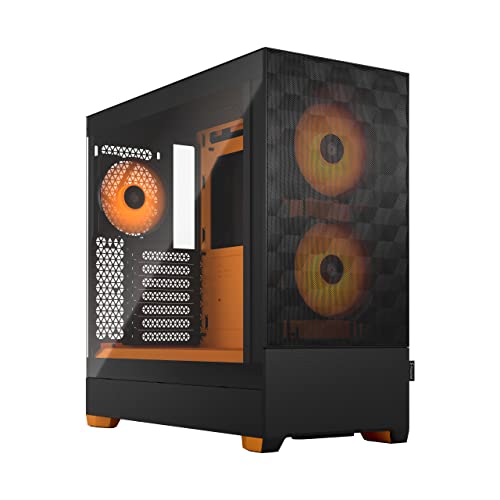
Fractal Design Pop Air RGB ATX Case
Best for: Mid-tower builds with RGB focus
- Lighting
- RGB (what this guide is about)
- Motherboard Support
- ATX / mATX / Mini ITX
- Side Panel
- Tempered Glass
- Radiator Support
- 280 mm front, 240 mm top, 120 mm rear
- Dimensions
- 18.6 × 8.46 × 17.9 inches
- Weight
- 19.2 pounds
View on Amazon: Fractal Design Pop Air RGB ATX Case Affiliate link
This ATX mid-tower case features a clear-tinted tempered glass side panel and an orange-accented interior. It includes three 120 mm Aspect 12 RGB fans and supports up to five total fans. The design accommodates ATX, mATX, and Mini ITX motherboards. You get front 280 mm and top 240 mm radiator support. It is a solid choice for builders who want pre-installed RGB lighting and a colorful aesthetic without complex setup.
Pros
- Includes three 120 mm Aspect 12 RGB fans
- Tempered glass side panel with clear tint
- Vividly colored interior accents and drive trays
- Supports ATX, mATX, and Mini ITX boards
- Front 280 mm and top 240 mm radiator support
Cons
- Heavier at 19.2 pounds compared to mesh-only peers
- Only three fans included, requiring purchase for full 5-fan capacity
- No mention of software control for RGB synchronization
Good fit if
- You want pre-installed RGB fans for immediate lighting
- You prefer a colorful interior aesthetic with orange accents
- You need support for ATX and smaller motherboards
Skip if
- You require XL-ATX motherboard support
- You prefer a lightweight case under 15 pounds
- You want a solid panel instead of tempered glass
Verdict: Fractal Design Pop Air RGB Orange ATX offers a balanced mix of RGB lighting and build flexibility. It fits users who value pre-installed fans and a distinct orange interior theme for their mid-tower build.

MUSETEX ATX Mid-Tower with Magnetic Glass Door
Best for: builders wanting pre-installed ARGB fans and side access
- Lighting
- ARGB (what this guide is about)
- Motherboard Support
- ATX
- Case Type
- Mid-Tower
- Side Panel
- Tempered Glass
- Included Fans
- 6 PWM ARGB Fans
- Radiator Support
- 280
View on Amazon: MUSETEX ATX Mid-Tower with Magnetic Glass Door Affiliate link
The MUSETEX NN8 is a black mid-tower case featuring a side-opening tempered glass panel and six pre-installed PWM ARGB fans. It supports ATX motherboards and up to a 280mm radiator. The diamond mesh front aids airflow, while the magnetic glass door allows easy access for maintenance. You get six fans for immediate lighting and cooling, though the I/O panel only includes two USB 3.0 ports.
Pros
- Six pre-installed PWM ARGB fans with 16.8 million color options
- Side-opening tempered glass panel with magnetic latch for easy access
- Supports up to 280mm radiators and multiple SSD/HDD configurations
Cons
- Only two USB 3.0 ports on the I/O panel
- Heavier at 12.6 pounds due to glass construction
- No mention of included RGB hub or controller in data
Good fit if
- You want six fans included for immediate ARGB lighting
- You prefer side-opening panels for easier component access
- You need an ATX mid-tower with strong airflow design
Skip if
- You require extensive USB 3.0 connectivity on the front
- You prefer a case without tempered glass side panels
- You need support for EATX motherboards
Verdict: MUSETEX NN8 ATX Mid-Tower with 6 ARGB Fans suits builders who prioritize included lighting and easy maintenance access over extensive front I/O options.

Lian Li Lancool 216 ARGB Mid-Tower
Best for: high-airflow setups with large graphics cards
- Lighting
- ARGB (what this guide is about)
- Motherboard Support
- E-ATX, ATX, Micro-ATX, Mini-ITX
- Case Type
- Mid-Tower
- Side Panel
- Tempered Glass
- Included Fans
- 2x 160mm ARGB, 1x 140mm
- Radiator Support
- 360mm
View on Amazon: Lian Li Lancool 216 ARGB Mid-Tower Affiliate link
This mid-tower case comes with two 160mm ARGB front fans and one non-lit 140mm rear exhaust fan. It supports E-ATX, ATX, Micro-ATX, and Mini-ITX motherboards, alongside graphics cards up to 392mm long. You get a 4.0mm tempered glass side panel and a fine mesh front panel engineered for airflow, suiting high-power builds needing large front-intake illumination.
Pros
- Two pre-installed 160mm ARGB intake fans
- Supports graphics cards up to 392mm in length
- Fits E-ATX motherboards up to 280mm wide
- Removable top radiator bracket with 360mm support
Cons
- Rear 140mm exhaust fan lacks ARGB lighting
- Heavy chassis weight of 23.1 pounds
Good fit if
- You want large 160mm ARGB intake fans for front illumination.
- You run an extra-long graphics card up to 392mm.
- You use an E-ATX motherboard up to 280mm in width.
Skip if
- You want matching ARGB lighting on the rear exhaust fan.
- You prefer a lightweight chassis under 20 pounds.
Verdict: Lian Li Lancool 216 ARGB Mid-Tower Case serves builders who need oversized front intake fans with ARGB lighting to cool high-wattage components. Its roomy interior fits large E-ATX boards and 392mm graphics cards without spacing conflicts.
Specifications side by side
| Spec | Montech XR Panoramic ATX Mid-Tower Case | ASUS ROG Strix Helios RGB Mid-Tower Case | Montech AIR 100 ARGB Micro-ATX Case | Fractal Design Pop Air RGB ATX Case | MUSETEX ATX Mid-Tower with Magnetic Glass Door | Lian Li Lancool 216 ARGB Mid-Tower |
|---|---|---|---|---|---|---|
| Motherboard Support | ATX | EATX | Micro-ATX, Mini-ITX | ATX / mATX / Mini ITX | ATX | E-ATX, ATX, Micro-ATX, Mini-ITX |
| Case Type | Mid Tower | Mid-Tower | Micro ATX | not stated | Mid-Tower | Mid-Tower |
| Side Panel | Tempered Glass | Tempered Glass | Tempered Glass | Tempered Glass | Tempered Glass | Tempered Glass |
| Included Fans | 3x 120mm ARGB PWM | 4x 140mm | 4x 120mm ARGB | not stated | 6 PWM ARGB Fans | 2x 160mm ARGB, 1x 140mm |
| Radiator Support | 360mm | 420mm | 280mm | 280 mm front, 240 mm top, 120 mm rear | 280 | 360mm |
| Max GPU Length | 420mm | 450mm | 330mm | not stated | not stated | 392mm |
| Tower Size | Mid-Tower | Mid-Tower | not stated | not stated | Mid-Tower | Mid-Tower |
| Fan Size | not stated | not stated | not stated | not stated | not stated | 140mm |
| Use | Gaming | Gaming | not stated | not stated | Gaming | not stated |
| Lighting | ARGB | RGB | ARGB | RGB | ARGB | ARGB |
| Connectivity | not stated | not stated | not stated | not stated | USB 3.0 | not stated |
| Compatible Device | Radiator | Radiator, Graphics Card | not stated | not stated | not stated | Radiator |
| Dimensions | 17.1 × 9 × 17.7 inches | 22.2 × 9.8 × 23.3 inches | 15.9 × 8.27 × 16.7 inches | 18.6 × 8.46 × 17.9 inches | 15.8 × 8.07 × 19 inches | 18.9 × 9.26 × 19.4 inches |
| Weight | 14.5 pounds | 39.7 pounds | 13.2 pounds | 19.2 pounds | 12.6 pounds | 23.1 pounds |
| Size | XR | GX601|Black | Air 100 Black | ATX | 18.98" x 15.75" x 8.07" | Mid-tower Case |
| Color | Black | Helios GX601|Black | Black | RGB Orange Core Tempered Glass Clear Tint | Black | Black |
| Model | XR-B | 90DC0020-B39000 | AIR 100 ARGB | 7340172703020 | NN8 | LANCOOL 216R-X |
Frequently asked questions
Does ARGB lighting require a special motherboard header?
Yes, ARGB fans typically use a 5-volt, 3-pin connector. You must connect this to a compatible header on your motherboard or a dedicated controller. This connection allows individual control of each LED. Without the correct header, you cannot manage the specific color effects or gradients that define addressable lighting.
Can I control ARGB fans without a motherboard?
You can use a dedicated lighting controller if your case includes one. Some cases, like the Montech XR Panoramic, come with pre-installed ARGB fans. These often link to a hub that simplifies control. This setup lets you manage effects without relying solely on motherboard software, which is useful for older systems.
Is RGB lighting better for simple color changes?
Standard RGB changes the color of all LEDs on a strip simultaneously. This makes it ideal for simple, uniform color schemes. You cannot control individual LEDs with standard RGB. It is a practical choice if you want a solid color look without the complexity of addressable gradients or synchronized effects.
Do pre-installed fans save time on lighting setup?
Cases with pre-installed fans, such as the ASUS ROG Strix Helios, include lighting out of the box. This saves you from buying and wiring separate fans. You simply connect the fan hub to the motherboard or controller. This approach is efficient for builders who prioritize visual appeal and straightforward assembly over extensive customization.
Does the case material affect lighting visibility?
Yes, side panel material plays a key role in visibility. Cases like the Fractal Design Pop Air RGB feature tempered glass panels. This material allows you to see the internal RGB lighting clearly. Solid metal panels may block or diffuse light. Choose glass if you want to showcase your lighting effects prominently.
Can I add ARGB fans to a non-ARGB case?
You can add fans if the case has mounting points and a fan header. However, you need a power source for the lighting. Many cases lack built-in ARGB headers. You may need to purchase a separate controller or hub. This adds complexity but allows you to upgrade lighting in cases like the Lian Li Lancool 216.