ID-COOLING 120mm Slim ARGB Fan Review: Who It Fits and Who Should Skip It
As an Amazon Associate we earn from qualifying purchases. Links on this page are affiliate links.
This id cooling no 12015 xt argb 120mm slim pwm review covers a compact cooling solution. The ID-COOLING 120mm Slim ARGB Fan measures just 15mm thick. This slim profile helps you fit fans into tight spaces where standard 25mm models will not work. It also delivers up to 54.6 CFM of airflow. These two specs define its role in small form factor builds. You get dynamic speed control via PWM. The lighting syncs with motherboards using a 5V 3-pin connector. It is built for performance in restricted areas.
What stands out
- 15mm thickness saves space in low-profile setups
- Max airflow of 54.6 CFM for its size
- PWM control adjusts speed from 500 to 2,000 rpm
- 5V 3-pin ARGB syncs with motherboard lighting
Who it fits
Good fit for
You should buy this fan if you are building an ITX case or an HTPC. The 15mm thickness is ideal for low-profile CPU coolers that have limited clearance. It also suits users who need extra case ventilation in tight spaces. If you want ARGB lighting that matches your motherboard, the 5V 3-pin connector helps you sync colors. The PWM feature lets you balance noise and airflow by adjusting the speed between 500 and 2,000 rpm.
Who should skip it
You should skip this fan if you need high static pressure for dense radiators. The slim 15mm design prioritizes airflow over pressure. It may not move air through thick filters or dense heatsinks effectively. If your case requires a standard 25mm fan for maximum cooling capacity, this slim model is too thin. You should also avoid it if your motherboard only supports 12V 4-pin RGB lighting, as this unit requires 5V 3-pin ARGB.
Verdict: This fan is a practical choice for tight builds that need slim dimensions and ARGB sync. It fits well in ITX cases or behind low-profile coolers where space is limited.
Key specs explained
Fan Size: 120mm
This dimension refers to the square footprint of the fan frame. You will need a mounting area that is exactly 120 millimeters wide and 120 millimeters tall. This is the most common standard for PC cases and CPU coolers. It ensures the fan fits into standard drive bays or radiator slots without requiring adapters. You can easily swap it with other 120mm fans found in most mid-tower and full-tower chassis.
Max Airflow: 54.6CFM
CFM stands for cubic feet per minute. This number tells you how much air the fan moves in one minute. A rating of 54.6 CFM is moderate for a 120mm fan. It provides steady airflow for general case ventilation. You should expect it to handle standard heat loads well. Compare this value with higher-end fans that often exceed 60 CFM if you need maximum cooling for high-performance components.
Noise Level: 13.8~31.2dB(A)
This range shows the sound output at different speeds. At low speeds, the fan runs quietly at 13.8 decibels. At maximum speed, it reaches 31.2 decibels. You will notice the noise increase as the fan speeds up to cool your system. This level is acceptable for most home offices. It is not silent, but it is manageable for daily use without causing distraction during work or gaming sessions.
Max Fan Speed: 2,000 rpm
RPM stands for revolutions per minute. This is the maximum speed the fan blades can spin. A top speed of 2,000 RPM allows the fan to move air quickly when your system is under heavy load. You get more cooling power when you need it. However, higher RPMs also generate more noise. This speed is typical for slim fans that prioritize a balance between airflow and physical space constraints.
Slim build and ARGB lighting
According to the listing, the ID-COOLING NO-12015-XT-ARGB fan measures 120 by 120 by 15 millimeters. This 15-millimeter thickness is the defining physical trait of this model. Standard case fans are typically 25 millimeters thick. You use this slim design when space is limited. It fits into low-profile CPU coolers, HTPC builds, and ITX cases where a standard fan would not mount. The frame is black. The listing notes a built-in light diffuser inside the frame. This component spreads the light evenly across the fan blades. You get uniform illumination rather than hot spots or dark gaps.
The fan weighs 3.53 ounces. This light weight is typical for a 120-millimeter unit with a slim profile. The listing describes the blades as being engineered for low-noise operation. They are paired with a PWM motor. This allows dynamic speed control between 500 rpm and 2,000 rpm. You adjust speed via your motherboard. The listing states the motor minimizes noise at lower speeds while maximizing airflow at higher speeds. You can push the fan to 54.6 CFM when needed.
Lighting is controlled via a 5V 3-pin ARGB connector. This matches modern motherboard headers. You sync the lighting with your system theme. The listing highlights superior build quality in the frame and blades. You get a compact, functional unit designed for tight spaces without sacrificing airflow control.
Setup and everyday use guide
Installing this fan requires connecting two distinct cables to your motherboard. The first is a PWM connector for speed control. You plug this into a 4-pin fan header on your motherboard. This connection allows the system to dynamically adjust the fan speed. The listing states the speed ranges from 500 rpm to 2,000 rpm. You can set the fan to run quietly at low speeds or push it to maximum airflow when needed. The second cable is for lighting. You must connect the 5V 3-pin ARGB cable to a compatible motherboard header. This syncs the addressable RGB lighting with your system’s software. The fan itself measures 4.72 inches wide and 0.63 inches thick. Its slim 15mm profile makes it suitable for low-profile CPU coolers, HTPCs, and ITX builds. You will need to ensure your case or cooler has a 120 by 120 millimeter mounting area. Daily operation relies on the PWM signal. The fan blades are engineered for low-noise operation. The noise level varies between 13.8 and 31.2 dB(A) depending on the current speed. The lighting diffuser is built into the frame. This design provides even illumination without hotspots. You do not need a separate controller for the lights if your motherboard supports 5V ARGB. The build quality focuses on even light diffusion and balanced airflow. This setup is straightforward if your motherboard has the required headers. You gain flexibility in tight spaces without sacrificing standard 120mm compatibility.
Check These Before Buying
Before you buy, verify your motherboard has an available 5V 3-pin ARGB header. This fan relies on that specific connection for lighting sync. You also need a standard 4-pin PWM header for speed control. The 15mm thickness is critical for low-profile CPU coolers, small form factor cases, or HTPC builds where space is tight. Standard 25mm fans will not fit in these restricted areas. Check your case’s fan mount depth to ensure the slim frame clears any nearby components. Upkeep is minimal, but keep dust filters clean to maintain the stated 54.6 CFM airflow. This model sits alongside other slim fans in our 1 options. It suits users prioritizing height clearance over maximum static pressure. If you need high airflow for dense radiators, consider thicker models. This fan is ideal for tight spaces where standard fans fail. Ensure your build plan accounts for the dual cable requirement. The slim design saves space but requires careful planning around nearby hardware.
Check before you buy
- Verify your motherboard has a 5V 3-pin ARGB header for lighting sync
- Confirm your case or cooler has 15mm clearance height for installation
- Ensure you have an available 4-pin PWM header for speed control
- Check if your build prioritizes low height over maximum static pressure
The product at a glance
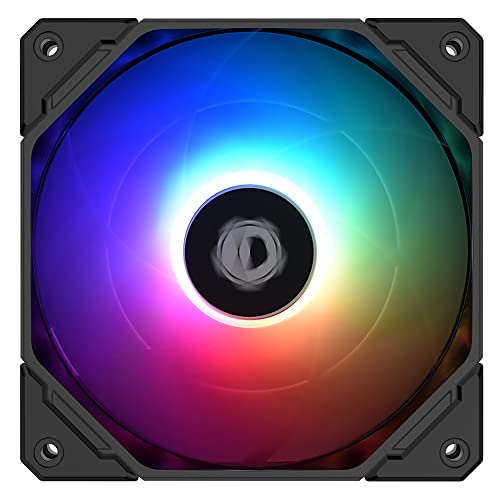
ID-COOLING 120mm Slim ARGB Fan
Best for: ITX builds and low-profile coolers
- Fan Size
- 120mm
- Max Fan Speed
- 2, 000 rpm
- Max Airflow
- 54.6CFM
- Noise Level
- 13.8~31.2dB(A)
- Connector Type
- PWM
- Lighting Type
- 5V 3PIN ARGB
View on Amazon: ID-COOLING 120mm Slim ARGB Fan Affiliate link
This 120mm fan is 15mm thick, making it ideal for tight spaces like low-profile coolers or ITX builds. It offers a PWM speed range of 500 to 2,000 rpm, balancing airflow and noise. The fan features 5V 3-pin ARGB lighting that syncs with motherboards. It delivers up to 54.6 CFM of airflow while keeping noise between 13.8 and 31.2 dB.
Pros
- Slim 15mm thickness saves space in compact builds
- PWM control adjusts speed from 500 to 2,000 rpm
- 5V 3-pin ARGB syncs with motherboard lighting
- High airflow of 54.6 CFM for its size
Cons
- Maximum speed of 2,000 rpm is lower than standard 120mm fans
- Noise level reaches 31.2 dB at high speeds
- Requires specific 5V 3-pin ARGB motherboard header
Good fit if
- You are building an ITX or HTPC with limited depth
- You need a fan for a low-profile CPU cooler
- You want RGB lighting that syncs with your motherboard
Skip if
- You need maximum airflow for high-end gaming rigs
- Your motherboard only supports 12V ARGB systems
- You prefer silent operation under all conditions
Verdict: ID-COOLING 120mm Slim ARGB Fan fits users with space constraints who need specific slim dimensions. It is a solid option for ITX builds where standard fans do not fit.
Specifications side by side
| Spec | ID-COOLING 120mm Slim ARGB Fan |
|---|---|
| Fan Size | 120mm |
| Max Fan Speed | 2, 000 rpm |
| Max Airflow | 54.6CFM |
| Noise Level | 13.8~31.2dB(A) |
| Connector Type | PWM |
| Lighting Type | 5V 3PIN ARGB |
| Lighting | ARGB |
| Dimensions | 4.72 × 4.72 × 0.63 inches |
| Weight | 3.53 ounces |
| Color | black |
| Model | NO-12015-XT-ARGB |
Frequently asked questions
Is the ID-COOLING 120mm Slim ARGB Fan compatible with standard 120mm mounts?
Yes, it uses a standard 120mm footprint. The frame measures 120 by 120 millimeters. This allows it to fit into most standard mounting holes found in PC cases and low-profile coolers. You only need to ensure the depth is sufficient, as this model is only 15mm thick. The physical width and length match the common 120mm standard used across the industry.
What is the exact thickness of this fan model?
The fan is exactly 15mm thick. This slim profile is its main feature, designed for tight spaces. Standard fans are usually 25mm thick. You can use this model where thicker fans would physically block nearby components. The reduced height helps you clear tall RAM sticks or other hardware in small form factor builds.
Does this fan support RGB lighting synchronization?
Yes, it features ARGB lighting. You must connect the lighting cable to a 5V 3-pin ARGB header on your motherboard. This connection allows your software to sync the colors with other compatible components. It does not use 12V RGB connectors. Ensure your motherboard has the correct 5V header available before installation.
How do you control the fan speed on this model?
You control the speed using the PWM connector. Plug the 4-pin cable into a fan header on your motherboard. This allows your system to adjust the RPMs automatically based on temperature. The fan supports dynamic speed changes. This ensures quiet operation when idle and higher airflow when cooling demands increase.
Who is the ideal user for this specific fan?
This fan is best for users with space constraints. It fits well in ITX builds where standard fans are too tall. It also works well with low-profile CPU coolers. If you need a 120mm fan that is only 15mm thick, this model is a solid option. It is not necessary for standard ATX cases with ample clearance.
What are the physical dimensions of the fan frame?
The frame measures 4.72 inches by 4.72 inches. The thickness is 0.63 inches. These dimensions convert to 120mm by 120mm by 15mm. The compact size allows for flexible installation in tight areas. You should verify your mounting area matches these square dimensions. The slim depth is the key constraint for fitting into low-profile setups.