Fractal Design or NZXT? PC Cases Compared in 2026
As an Amazon Associate we earn from qualifying purchases. Links on this page are affiliate links.
You are comparing a fractal design vs NZXT PC case to find the right fit for your build. Both options prioritize clean cable management and efficient airflow for modern components. The main difference lies in their form factor and size. The Fractal Design Core is a compact Micro ATX chassis, while the NZXT H510 is a larger mid-tower. This distinction affects motherboard compatibility, GPU clearance, and overall interior space for your specific hardware choices.
Key differences
| Aspect | Fractal Design Core Micro ATX Case | NZXT H510 ATX Mid-Tower Case with USB-C |
|---|---|---|
| Motherboard Support | Micro ATX only | Mini-ITX, MicroATX, and ATX |
| Tower Size | Compact | Mid Tower |
| Side Panel | Not listed | Tempered Glass |
| Max GPU Length | Up to 350mm | Up to 381mm |
| Connectivity | Not listed | USB Type-C Port |
Which one should you choose?
Choose Fractal Design Core Micro ATX Case if
- You need a compact Micro ATX case for a smaller desk setup
- You prioritize a lightweight chassis that weighs only 8 pounds
- You want a simple vertical HDD mounting solution with anti-vibration grommets
Choose NZXT H510 ATX Mid-Tower Case with USB-C if
- You require full ATX motherboard support for expandability
- You want to display internal components through a tempered glass side panel
- You need front I/O connectivity with a USB Type-C port
Verdict: Choose the Fractal Design Core if you are building a small form factor PC with Micro ATX parts and value a lightweight, compact footprint. Pick the NZXT H510 if you need the flexibility of ATX support, modern USB-C connectivity, and a tempered glass panel for showcasing your build. Your decision ultimately depends on whether you prioritize size constraints or expandability and aesthetics.
Fractal vs NZXT Case Specs
motherboard support
NZXT offers broader motherboard compatibility in its H510 model. It supports Mini-ITX, MicroATX, and full-size ATX boards. This gives you more flexibility if you plan to upgrade to a larger board later. The Fractal Design Core 1000 is a Micro ATX case. It only accepts Micro ATX motherboards. This limits your options to smaller form factors. If you need space for a standard ATX board, the NZXT is the only viable choice here. The Fractal design is strictly for compact builds.
tower size
The NZXT H510 is a mid-tower case with dimensions of 18.1 inches in height, 16.9 inches in length, and 8.27 inches in width. It is a larger chassis that takes up more desk space. The Fractal Design Core 1000 is significantly smaller. It measures 13.9 inches high, 16.5 inches long, and 6.8 inches wide. It is designed for tight spaces. If you have a small desk or limited room, the Fractal case is the better fit. The NZXT requires a larger footprint.
gpu compatibility
Graphics card clearance differs between the two cases. The NZXT H510 supports GPUs up to 381mm in length. This allows you to install very large, high-end graphics cards without issues. The Fractal Design Core 1000 has more restrictions. It supports cards up to 350mm only if you use the top HDD slot in the removable tray. If you use both HDD slots, that limit drops to 210mm. For users with long graphics cards, the NZXT provides more generous clearance.
side panel
The NZXT H510 features a tempered glass side panel. This allows you to see the internal components and lighting of your build. It adds a visual element to your setup. The Fractal Design Core 1000 data does not specify a tempered glass panel. It is a compact case focused on function over aesthetics. If you want to showcase your hardware, the NZXT is the clear choice. The Fractal case prioritizes compact performance over visual display.
connectivity
The NZXT H510 includes a front I/O USB Type-C port. This provides modern connectivity for newer devices that require USB-C. It is convenient for charging phones or transferring data quickly. The Fractal Design Core 1000 data does not list specific front panel connectivity options. It focuses on internal component support rather than external ports. If you need USB-C access, the NZXT is the superior option. The Fractal case lacks this specific modern feature in its listed specs.
radiator support
The NZXT H510 supports radiators up to 240mm in the front. This simplifies the installation of closed-loop or custom water cooling loops. It offers flexibility for liquid cooling setups. The Fractal Design Core 1000 data does not mention radiator support. It is a compact Micro ATX case that may not accommodate large radiators. If you plan to use liquid cooling, the NZXT provides a dedicated bracket and support. The Fractal case is likely limited to air cooling.
Which Case Suits Your Build
Compact Micro ATX builder
The Fractal Design Core 1000 fits Micro ATX boards in a small footprint. Its compact dimensions make it ideal for tight desks. You get efficient airflow without taking up much space. The removable HDD tray helps manage storage in this smaller chassis.
ATX gamer wanting USB-C
The NZXT H510 supports full-size ATX motherboards for more features. It includes a front USB Type-C port for modern devices. The tempered glass side panel showcases your internal components. This mid-tower design offers ample room for larger graphics cards and cooling setups.
Water cooling enthusiast
The NZXT H510 supports radiators up to 240mm in the front. This simplifies installing closed-loop or custom water cooling systems. The included fans aid airflow, and the cable management kit keeps wiring tidy. The Fractal Design Core 1000 lacks this specific radiator support in its compact design.
The products compared

Fractal Design Core Micro ATX Case
Best for: compact Micro ATX builds with long GPUs
- Motherboard Support
- Micro ATX
- Max GPU Length
- Up to 350mm (210mm with HDD tray)
- Dimensions
- 16.5 × 6.8 × 13.9 inches
- Weight
- 8 pounds
View on Amazon: Fractal Design Core Micro ATX Case Affiliate link
The Fractal Design Core 1000 is a compact Micro ATX case designed for performance in a small footprint. It supports graphics cards up to 350mm long, provided you use only the top drive slot. The removable HDD tray allows vertical mounting with anti-vibration grommets. It fits CPU coolers up to 135mm tall. This case suits builders prioritizing a smaller chassis without sacrificing GPU length.
Pros
- Supports Micro ATX motherboards
- Accommodates GPUs up to 350mm with single HDD slot
- Removable vertical HDD tray with anti-vibration grommets
- Fits CPU coolers up to 135mm tall
Cons
- Limited to Micro ATX motherboard support
- GPU length reduces to 210mm when using both drive slots
- No ATX motherboard compatibility
Good fit if
- You want a compact Micro ATX build
- You need space for long graphics cards
- You prefer vertical HDD mounting
Skip if
- You require full ATX motherboard support
- You need dual HDD slots with long GPUs
- You plan to use tall CPU coolers over 135mm
Verdict: The Fractal Design Core 1000 Micro ATX Case fits builders who need a compact chassis for Micro ATX boards and long GPUs. It is not suitable for those requiring full ATX support.
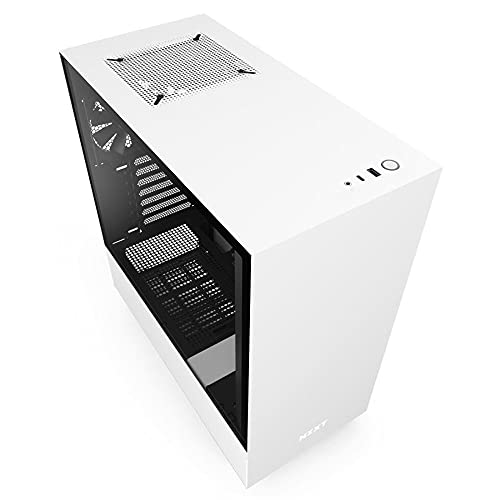
NZXT H510 ATX Mid-Tower Case with USB-C
Best for: Clean builds with USB-C and 240mm cooling
- Motherboard Support
- Mini-ITX, MicroATX, ATX
- Case Type
- Mid Tower
- Side Panel
- Tempered Glass
- Radiator Support
- 240mm
- Max GPU Length
- Up to 381mm
- Use
- Gaming
View on Amazon: NZXT H510 ATX Mid-Tower Case with USB-C Affiliate link
The NZXT H510 is a compact ATX mid-tower case featuring a tempered glass side panel. It supports motherboards from Mini-ITX to ATX and accommodates GPUs up to 381mm long. The front I/O includes a USB Type-C port. Two 120mm fans are included, and it supports radiators up to 240mm. This white model offers streamlined cable management with pre-installed channels. It suits builders who want a clean look with modern connectivity.
Pros
- Tempered glass side panel for single-screw installation
- Front I/O includes USB Type-C port
- Supports GPUs up to 381mm without front cooler
- Includes two 120mm Aer F fans for airflow
- Patented cable routing kit with pre-installed channels
Cons
- GPU clearance drops to 325mm with front water cooler installed
- Radiator support limited to 240mm maximum
- Base size model has fixed dimensions
Good fit if
- You want a clean mid-tower with a glass side panel
- You need a USB Type-C port on the front
- You are building with an ATX or smaller motherboard
Skip if
- You need support for radiators larger than 240mm
- You require a larger case for extreme GPU lengths
- You prefer a case without a glass side panel
Verdict: NZXT H510 White ATX Mid-Tower provides a clean aesthetic with USB Type-C connectivity. It fits builders who value streamlined cable management and moderate radiator support.
Specifications side by side
| Spec | Fractal Design Core Micro ATX Case | NZXT H510 ATX Mid-Tower Case with USB-C |
|---|---|---|
| Motherboard Support | Micro ATX | Mini-ITX, MicroATX, ATX |
| Case Type | not stated | Mid Tower |
| Side Panel | not stated | Tempered Glass |
| Radiator Support | not stated | 240mm |
| Max GPU Length | Up to 350mm (210mm with HDD tray) | Up to 381mm |
| Tower Size | not stated | Mid-Tower |
| Use | not stated | Gaming |
| Connectivity | not stated | Type-C |
| Dimensions | 16.5 × 6.8 × 13.9 inches | 16.9 × 8.27 × 18.1 inches |
| Weight | 8 pounds | 14.6 pounds |
| Color | Black | White |
| Model | FD-CA-CORE-1000-BL | CA-H510B-W1 |
| Size | not stated | base |
Frequently asked questions
Which case is better for clean cable management?
The NZXT H510 is designed for streamlined cable management. It features a clean aesthetic with USB Type-C connectivity for easy access. The Fractal Design Core also prioritizes efficient airflow and tidy builds. However, the NZXT model explicitly highlights its focus on a neat appearance and modern connectivity options for users who value a polished look.
Does the NZXT H510 support large graphics cards?
Yes, the NZXT H510 accommodates standard ATX components. Its dimensions are 8.27 inches wide, 18.1 inches high, and 16.9 inches long. This mid-tower size provides ample space for modern hardware. The case supports 240mm radiators, allowing you to install substantial cooling solutions without compromising on GPU clearance or overall component fit within the chassis.
Is the Fractal Design Core suitable for full ATX boards?
No, the Fractal Design Core is not suitable for full ATX boards. It is specifically built for Micro ATX builds. The compact dimensions of 6.8 inches wide, 13.9 inches high, and 16.5 inches long limit motherboard support. If you need to install a standard ATX motherboard, you will need to choose a larger chassis like the NZXT H510.
What connectivity options does the NZXT H510 offer?
The NZXT H510 includes USB Type-C connectivity. This modern port allows for fast data transfer and convenient device charging. It is positioned on the front panel for easy access. This feature is particularly useful for builders who frequently connect peripherals or external storage devices, ensuring you have the latest connection standards readily available on your case.
How much space does the Fractal Design Core take up?
The Fractal Design Core has a small footprint. It measures 6.8 inches wide, 13.9 inches high, and 16.5 inches long. Weighing only 8 pounds, it is lightweight and easy to move. This compact size makes it ideal for tight desks or small workspaces where space is limited. You get efficient airflow in a chassis that does not dominate your desk area.
Can I use tempered glass on the NZXT H510?
Yes, the NZXT H510 features a tempered glass side panel. This material provides a clear view of your internal components and builds. It adds to the clean aesthetic mentioned in its design. The glass side panel allows you to showcase your hardware choices, such as RGB lighting or clean cable routing, while maintaining a sturdy and modern structure for your gaming setup.