Fractal Design vs Apevia PC Cases: Which Brand Fits You?
As an Amazon Associate we earn from qualifying purchases. Links on this page are affiliate links.
When comparing a fractal design vs apevia PC case, you are looking at two compact Micro-ATX options. Both brands prioritize airflow and component clearance within a small footprint. The main difference lies in their features and aesthetics. Fractal Design focuses on utility and straightforward construction. Apevia includes tempered glass and pre-installed RGB fans for visual appeal. Your choice depends on whether you value minimalism or built-in lighting.
Key differences
| Aspect | Fractal Design Core Micro ATX Case | Apevia Prodigy Micro-ATX Case |
|---|---|---|
| Motherboard Support | Micro ATX | Micro-ATX, Mini-ITX |
| Side Panel | Not listed | Tempered Glass |
| Included Fans | Not listed | 3x RGB |
| CPU Cooler Clearance | 135mm | 165mm |
| Weight | 8 pounds | 13 pounds |
Which one should you choose?
Choose Fractal Design Core Micro ATX Case if
- You need a lightweight case that weighs only 8 pounds.
- You plan to use large CPU coolers under 135mm height.
- You prefer a no-frills design without pre-installed fans.
Choose Apevia Prodigy Micro-ATX Case if
- You want to see your components through a tempered glass window.
- You need support for Mini-ITX motherboards in addition to Micro-ATX.
- You desire built-in RGB lighting with multiple color modes.
Verdict: The Fractal Design Core is best for users who want a lightweight, utilitarian chassis with straightforward build options. The Apevia Prodigy suits builders who want visual flair with tempered glass and pre-installed RGB fans. Choose the Fractal Design for pure function, or the Apevia for style and included lighting.
Fractal Design vs Apevia Case Comparison
Motherboard Support
The Apevia Prodigy supports both Micro-ATX and Mini-ITX motherboards, offering flexibility for smaller builds. The Fractal Design Core 1000 supports only Micro-ATX boards. If you plan to use a Mini-ITX motherboard, the Apevia is the only viable option. For standard Micro-ATX builds, both cases work. The extra support in the Apevia gives it a slight advantage for versatility. You should choose based on your motherboard size.
CPU Cooler Height
The Apevia Prodigy supports CPU coolers up to 165mm in height. The Fractal Design Core 1000 supports coolers up to 135mm in height. This 30mm difference is significant for air cooling. Larger tower coolers often provide better performance. If you need a tall cooler, the Apevia allows it. The Fractal Design case restricts you to shorter coolers. This makes the Apevia better for high-performance air cooling builds.
Fan Capacity
The Apevia Prodigy has room for up to six 120mm fans. It comes with three RGB fans preinstalled. The Fractal Design Core 1000 does not list a maximum fan count in its specifications. It offers multiple cooling options but lacks explicit fan slot data. The Apevia provides clear expansion potential for airflow. You can easily add more fans later. The Fractal Design case is less clear on future fan upgrades.
Side Panel Material
The Apevia Prodigy features a tempered glass side panel. This allows you to see your internal components and RGB lighting. The Fractal Design Core 1000 does not list a tempered glass panel in its specs. It likely uses a standard metal or plastic panel. If you want to showcase your hardware, the Apevia is the better choice. The Fractal Design case is more utilitarian and hides its internals.
Radiator Support
The Apevia Prodigy supports up to a 120mm radiator on the rear panel. This allows for basic liquid cooling setups. The Fractal Design Core 1000 does not list radiator support in its specifications. It focuses on air cooling with its HDD tray design. If you plan to use an AIO liquid cooler, the Apevia offers a mounting option. The Fractal Design case may not support radiators.
Dimensions and Weight
The Fractal Design Core 1000 is smaller and lighter. It measures 6.8 inches wide, 13.9 inches high, and weighs 8 pounds. The Apevia Prodigy is larger and heavier. It measures 7.95 inches wide, 15.6 inches high, and weighs 13 pounds. The Fractal Design case fits in tighter spaces. The Apevia requires more desk or floor space. You should choose the Fractal Design for a compact footprint.
Choose Your Ideal Micro ATX Case
You want a tiny, lightweight, and quiet build
The Fractal Design Core 1000 weighs just 8 pounds and measures 6.8 inches wide. Its compact Micro ATX form factor fits small spaces easily. The vertical HDD tray uses anti-vibration silicone grommets to reduce noise. You get a straightforward, utility-focused design without extra bulk or lighting distractions.
You need Mini-ITX support and RGB lighting
The Apevia Prodigy supports both Micro ATX and Mini-ITX motherboards, offering more flexibility. It includes three pre-installed RGB fans with customizable lighting modes. You can control colors via the top I/O panel. The tempered glass side panel adds style, making it ideal for visible builds.
You prefer larger CPU coolers and airflow
The Apevia Prodigy supports CPU coolers up to 165mm in height, compared to the Fractal Design Core 1000’s 135mm limit. It also allows room for up to six 120mm fans and a 120mm radiator on the rear. The mesh front panel enhances airflow for better cooling performance.
The products compared

Fractal Design Core Micro ATX Case
Best for: Compact Micro ATX builds with vertical HDDs
- Motherboard Support
- Micro ATX
- Max GPU Length
- Up to 350mm (210mm with HDD tray)
- Dimensions
- 16.5 × 6.8 × 13.9 inches
- Weight
- 8 pounds
View on Amazon: Fractal Design Core Micro ATX Case Affiliate link
The Fractal Design Core 1000 is a compact Micro ATX case designed for performance. It supports CPU coolers up to 135mm in height. You can install graphics cards up to 350mm long by using only the top HDD slot. The removable HDD tray allows vertical mounting with anti-vibration grommets. This black case measures 16.5 x 13.9 x 6.8 inches and weighs 8 pounds. It suits builders who want a small footprint with flexible drive options.
Pros
- Supports Micro ATX motherboards
- Accepts GPUs up to 350mm long
- CPU cooler height limit of 135mm
- Removable vertical HDD tray with anti-vibration grommets
Cons
- GPU length drops to 210mm if both HDD slots are used
- Limited to Micro ATX form factor only
- No mention of included case fans
Good fit if
- You need a compact case for Micro ATX parts
- You want to mount a large GPU up to 350mm
- You prefer vertical HDD mounting with vibration dampening
Skip if
- You require ATX or E-ATX motherboard support
- You plan to use both HDD slots and need a long GPU
- You need a case with pre-installed fans
Verdict: Fractal Design Core 1000 Micro-ATX Case fits builders who prioritize a small footprint and vertical drive mounting. It works well if you need a 350mm GPU clearance and a 135mm CPU cooler limit.
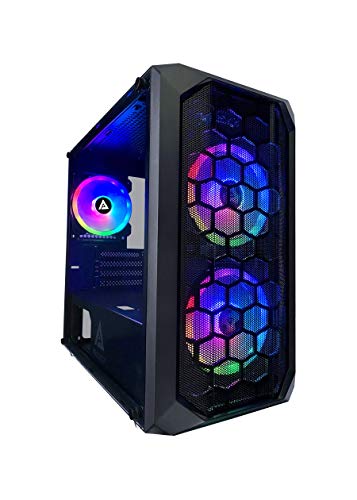
Apevia Prodigy Micro-ATX Case
Best for: Micro-ATX builds with visible RGB lighting
- Motherboard Support
- Micro-ATX, Mini-ITX
- Case Type
- Micro-ATX
- Side Panel
- Tempered Glass
- Included Fans
- 3x RGB
- Radiator Support
- 120mm
- Max GPU Length
- 350mm
View on Amazon: Apevia Prodigy Micro-ATX Case Affiliate link
The Apevia PRODIGY-BK is a Micro-ATX case with a tempered glass side panel and mesh front. It includes three pre-installed RGB fans and supports graphics cards up to 350mm long. You get room for up to six 120mm fans and a 120mm rear radiator. This build suits users who want visible RGB lighting and straightforward component clearance without needing E-ATX support.
Pros
- Three pre-installed RGB fans with 16 lighting modes
- Supports GPUs up to 350mm in length
- Tempered glass side panel for visibility
- Space for up to six 120mm fans
Cons
- Only supports Micro-ATX and Mini-ITX motherboards
- Radiator support limited to 120mm size
- RGB control relies on a proprietary button on the I/O panel
Good fit if
- You need a case for a Micro-ATX motherboard
- You want pre-installed RGB lighting for your build
- You plan to use a GPU under 350mm long
Skip if
- You require E-ATX motherboard support
- You need a large radiator larger than 120mm
- You prefer app-controlled lighting over physical buttons
Verdict: Apevia PRODIGY-BK Micro-ATX Case offers solid RGB features and clearance for mid-size GPUs, making it a practical option for Micro-ATX builders who value visible lighting effects.
Specifications side by side
| Spec | Fractal Design Core Micro ATX Case | Apevia Prodigy Micro-ATX Case |
|---|---|---|
| Motherboard Support | Micro ATX | Micro-ATX, Mini-ITX |
| Case Type | not stated | Micro-ATX |
| Side Panel | not stated | Tempered Glass |
| Included Fans | not stated | 3x RGB |
| Radiator Support | not stated | 120mm |
| Max GPU Length | Up to 350mm (210mm with HDD tray) | 350mm |
| Use | not stated | Gaming |
| Lighting | not stated | RGB |
| Connectivity | not stated | USB 3.0 |
| Dimensions | 16.5 × 6.8 × 13.9 inches | 16.1 × 7.95 × 15.6 inches |
| Weight | 8 pounds | 13 pounds |
| Color | Black | Black |
| Model | FD-CA-CORE-1000-BL | PRODIGY-BK |
| Size | not stated | PRODIGY BLACK |
Frequently asked questions
Is Fractal Design better than Apevia for small builds?
Fractal Design offers a lighter, more compact option if space is your main constraint. The Core 1000 weighs only 8 pounds and measures 6.8 inches wide. Apevia provides slightly more internal volume and RGB lighting features for those who prefer visible aesthetics over minimal weight.
Which case supports Mini-ITX motherboards?
The Apevia Prodigy supports both Micro-ATX and Mini-ITX motherboards. The Fractal Design Core 1000 is limited to Micro-ATX boards only. If you plan to use a Mini-ITX motherboard, the Apevia is the only viable choice between these two specific models.
Does the Fractal Design Core 1000 have RGB lighting?
The provided specifications for the Fractal Design Core 1000 do not list RGB lighting capabilities. It focuses on utility and straightforward construction. The Apevia Prodigy, by contrast, explicitly includes RGB lighting features, making it the better choice if you want visible light effects.
What is the maximum GPU length for these cases?
The Fractal Design Core 1000 provides 350mm of GPU clearance. The Apevia Prodigy supports mid-size GPUs but does not specify an exact maximum length in the provided data. You should measure your specific graphics card against the 350mm limit for the Fractal Design model.
How wide is the Fractal Design Core 1000?
The Fractal Design Core 1000 is 6.8 inches wide. This makes it narrower than the Apevia Prodigy, which is 7.95 inches wide. The smaller width allows the Fractal Design case to fit into tighter spaces, such as small desks or tight shelving units.
Can I mount hard drives vertically in the Apevia case?
The Fractal Design Core 1000 features a vertical HDD tray with anti-vibration mounting. The provided data for the Apevia Prodigy does not mention vertical drive mounting options. You should check the Apevia specifications for standard 3.5-inch or 2.5-inch drive bays if vertical mounting is required.
Which case is heavier?
The Apevia Prodigy weighs 13 pounds, while the Fractal Design Core 1000 weighs 8 pounds. The Apevia is significantly heavier, likely due to its larger dimensions and additional lighting components. The Fractal Design case is lighter and easier to move or install in tight spaces.
What is the CPU cooler height limit for the Fractal Design Core?
The Fractal Design Core 1000 has a CPU cooler height limit of 135mm. This constraint is important if you plan to use a large air cooler. The Apevia Prodigy does not list a specific CPU cooler height limit in the provided specifications.