Fancasee 10-Port 4-Pin PWM Fan Review (2026): A Spec-Based Look
As an Amazon Associate we earn from qualifying purchases. Links on this page are affiliate links.
This fancasee fan hub splitter extension review covers a simple way to add more case fans. The Fancasee 10-Port 4-Pin PWM Fan Hub gives you ten connection points from a single source. It draws power from a 15-pin SATA connector, which is common in most PC power supplies. The main interface connects to the CPU_FAN port on your motherboard via a dedicated cable. This allows you to run up to ten 4-pin or 3-pin fans without using extra motherboard headers. The unit is small, measuring 1.97 inches wide and 0.39 inches tall. It weighs just 0.71 ounces, making it easy to tuck away in your case.
What stands out
- Supports up to 10 fans via a 1 to 10 splitter design
- Compatible with both 4-pin and 3-pin PC case fans
- Powered by a standard 15-pin SATA connection for stable operation
- Compact dimensions of 1.97 x 0.39 x 3.94 inches for easy routing
Who it fits
Good fit for
This hub suits builders who need more fan connections than their motherboard provides. It is ideal for ATX cases with many drive bays or radiator mounts. You will appreciate the SATA power source, as it does not rely on motherboard headers for power. The compatibility with 3-pin and 4-pin fans makes it versatile for mixed cooling setups. If you want to add multiple case fans without buying a more complex controller, this simple splitter fits your needs.
Who should skip it
You should look at another option if you need independent speed control for each fan. This hub does not offer individual RPM adjustment or RGB lighting control. It is also not suitable if your power supply lacks a free 15-pin SATA connector. Users who prefer wireless management or mobile app integration will find no support here. It is a basic power distribution tool, not a smart controller. If you need per-fan customization, this simple cable will not meet your requirements.
Verdict: The Fancasee 10-Port Hub is a straightforward solution for expanding fan connectivity. It delivers reliable power distribution for basic cooling needs.
Key specs explained for this hub
10-Port 4-Pin PWM
This specification indicates the hub provides ten individual connection points for fans that use a four-pin interface. You can connect up to ten fans to a single motherboard header. The four-pin design allows for PWM speed control, letting your system adjust fan RPM based on temperature. This is useful if you have a large case with many fans but limited motherboard headers. Check your fans to ensure they match this connector type before buying.
15-Pin SATA Powered
The hub requires power from a 15-pin SATA connector, which is standard on most power supplies. This means it does not draw power solely from the motherboard header. Using a SATA cable ensures stable power delivery to all ten connected fans. You will need to route a SATA power cable from your PSU to the hub. Verify you have an available SATA power connector on your power supply before installation.
Black
The device is finished in black. This color choice helps the hub blend into the interior of most PC cases. It is a practical choice for builders who prefer a clean, uniform look. Black components are less likely to show dust or stand out against dark case panels. This is a minor aesthetic detail, but it contributes to a tidy build. It matches common cable and component colors found in many systems.
0.71 ounces
The hub weighs only 0.71 ounces. This light weight makes it easy to mount inside your case without adding significant bulk. You can secure it with zip ties or small screws without worrying about strain on cables or mounting points. The low mass is ideal for tight spaces or areas with limited airflow. It does not interfere with other components. This spec highlights the device is a simple, lightweight accessory rather than a heavy mechanical part.
Physical Design and Build Details
According to the listing, the Fancasee hub measures 3.94 inches in length, 1.97 inches in width, and 0.39 inches in height. It weighs 0.71 ounces. The unit is finished in black. These compact dimensions allow the hub to fit into tight spaces within an ATX case. The small footprint helps you route cables without blocking airflow or other components.
The connector type is listed as four-pin. This design supports both three-pin and four-pin case fans. The hub requires a 15-pin SATA power cable for operation. You must also connect the PWM interface to the CPU_FAN port on your motherboard using the included cable. This setup ensures proper speed control for your cooling fans.
The layout is straightforward. It acts as a splitter, providing ten separate ports from a single source. This configuration offers flexibility in cable management. You can place the hub near the motherboard or along a cable route. The simple plug-and-play nature means you do not need additional software. The physical build focuses on providing a stable power distribution solution for multiple internal case fans.
Setup and Everyday Use
Setting up this hub requires two specific connections. First, you must connect the 15-pin SATA power cable to your power supply. This provides the necessary electricity for all ten ports. Second, you connect the PWM interface cable to the CPU_FAN header on your motherboard. The listing notes that this dedicated cable is included in the package. This dual connection ensures the hub receives both power and speed control signals.
Once connected, the setup is plug-and-play. You simply plug your case fans into the ten available ports. The hub supports both 4-pin and 3-pin fans. This wide compatibility means you can mix fan types without issue. The 4-pin fans will use PWM for speed control. The 3-pin fans will run at a fixed speed determined by the motherboard header.
In daily use, the hub offers flexibility. It allows you to manage more fans than your motherboard headers provide. The compact size, measuring 3.94 by 1.97 by 0.39 inches, helps it fit into tight spaces inside an ATX case. You do not need to route cables to multiple motherboard pins. Instead, all fan wires gather at this single unit. This simplifies cable management. The black finish helps it blend with other internal components. You get ten connection points from one source, making it easier to cool your system without cluttering your motherboard.
Before you buy this hub
You need to verify your motherboard has an available CPU_FAN header. This hub requires that connection for PWM speed control. Without it, your fans will run at full speed or not at all. Check your power supply for an open SATA connector. The hub draws power directly from this port, so you must have one free. Ensure your case fans use four-pin connectors. The listing states it supports four-pin and three-pin fans, but four-pin is required for PWM functionality. You should also plan your cable management. Ten cables can clutter a small case. This hub fits alongside other options by offering high density. It is best for builds with many fans. If you only have two or three fans, a simpler splitter may be easier to manage. Keep the unit away from direct heat sources. Dust can accumulate on the connectors over time. A quick wipe with compressed air will keep it clean. This product is a practical solution for expansion.
Check before you buy
- Verify you have a free CPU_FAN header on your motherboard.
- Check that your power supply has an available SATA connector.
- Confirm your case fans use four-pin connectors for PWM control.
- Ensure you have enough space for ten fan cables in your case.
The product at a glance
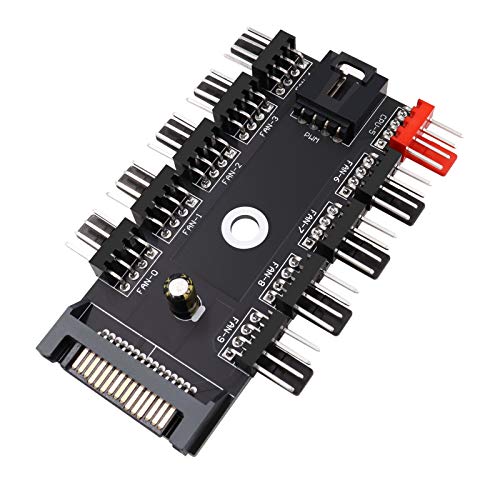
Fancasee 10-Port 4-Pin PWM Fan Hub
Best for: expanding fan count from one header
- Connector Type
- 4-Pin
- Dimensions
- 3.94 × 1.97 × 0.39 inches
- Weight
- 0.71 ounces
View on Amazon: Fancasee 10-Port 4-Pin PWM Fan Hub Affiliate link
This Fancasee splitter expands one motherboard fan header into ten ports. It draws power from a 15-pin SATA connector, freeing up your CPU_FAN header. The unit supports both 3-pin and 4-pin PWM fans. It measures 3.94 by 1.97 by 0.39 inches and weighs just 0.71 ounces. You get straightforward plug-and-play connectivity for managing multiple case fans.
Pros
- Expands one header to ten fan connections
- SATA-powered design saves motherboard headers
- Compatible with both 3-pin and 4-pin fans
Cons
- Requires a free SATA power connector
- Must connect PWM signal to CPU_FAN header
- No individual fan speed control per port
Good fit if
- You need to connect ten fans to one header
- You have available SATA power connectors
- You want simple plug-and-play expansion
Skip if
- You lack free SATA power connectors
- You need individual fan speed control
- You prefer direct motherboard header connections
Verdict: Fancasee 10-Port PWM Fan Hub fits builders who need to drive ten fans from a single header. It works well if you have SATA power available and want a simple expansion solution.
Specifications side by side
| Spec | Fancasee 10-Port 4-Pin PWM Fan Hub |
|---|---|
| Connector Type | 4-Pin |
| Dimensions | 3.94 × 1.97 × 0.39 inches |
| Weight | 0.71 ounces |
| Color | Black |
| Model | US-CAB-81 |
Frequently asked questions
Does this hub support ARGB lighting control?
No, the Fancasee 10-Port hub is designed strictly for 4-pin PWM fans. It does not include connectors for addressable RGB or 12V RGB lighting. You must use a separate RGB controller if you want to manage lighting effects on your case fans. This unit focuses solely on power distribution and fan speed regulation via the standard four-pin interface.
Can I connect non-PWM 3-pin fans to this hub?
Yes, you can connect 3-pin fans to the 4-pin ports. The hub provides constant power to all connected ports. However, the motherboard cannot adjust the speed of these fans via PWM signals. The fans will run at a fixed speed determined by the voltage provided, rather than dynamic control based on system temperatures.
What is the maximum current draw per port?
The product data does not specify the maximum amperage per port. It lists the connector type as 4-pin PWM and the total capacity for ten fans. You should check your individual fan specifications to ensure they stay within the limits of a standard SATA power supply rail. The hub relies on the SATA connection for its power source.
Does the hub allow individual fan speed control?
No, this hub does not provide individual speed control for each fan. All ten fans share the same PWM signal from the single motherboard header. They will all spin up and down together based on the CPU_FAN header settings. This design is intended for simple expansion rather than independent zone management for each fan.
Is the cable length specified in the listing?
The provided specifications do not list the cable length for the SATA power or the PWM interface cable. The data only details the physical dimensions of the hub unit itself, which measures 3.94 inches in length. You may need to measure your case layout to ensure the included cables reach your motherboard and power supply adequately.
Does this work with water cooling pumps?
This hub is designed for standard case fans, not necessarily for water cooling pumps. Pumps often require dedicated headers or different power profiles. The hub draws power from a SATA connector and connects to a CPU_FAN header. Using it for a pump might not provide the consistent power or control a pump typically needs for safe operation.