What Is Connector Type? A Guide for PC Cases Buyers (2026)
As an Amazon Associate we earn from qualifying purchases. Links on this page are affiliate links.
Understanding Connector Types for Fans
When you browse for PC case fans, you will encounter different connector types explained in various ways. The connector type is the physical plug that links a fan to your motherboard or a hub. It determines how the fan receives power and how your system controls its speed. You need to match this plug to the available headers on your hardware.
The most common standard is the 4-pin connector. This type uses four metal pins. It carries power for rotation and a separate signal line for Pulse Width Modulation (PWM). PWM allows your motherboard to adjust fan speed precisely. You get smooth control from low idle speeds to high airflow under load. This is the preferred choice for modern builds.
The 3-pin connector is older but still widely available. It provides power and a tachometer signal to report RPM. However, it lacks the dedicated PWM control line. If you plug a 3-pin fan into a 4-pin header, it usually runs at full speed or a fixed voltage. You lose the fine-tuned speed adjustment benefits. Some motherboards support voltage control for 3-pin fans, but it is less precise than PWM.
The 2-pin connector is rare in modern PC cases. It typically uses a Molex or Berg connector. These plug directly into the power supply unit. You get full voltage power, meaning the fan runs at maximum speed constantly. There is no speed control from the motherboard. This setup is quiet in terms of software management but loud in operation. It is mostly found in legacy systems or specific industrial applications.
Checking the connector type explained in product listings is essential. Ensure your motherboard has the matching headers. Mismatches can lead to poor performance or incompatibility. Always verify the pin count before purchasing. This simple check ensures your cooling solution integrates seamlessly with your system design.
Understanding Fan Connector Options
4-Pin
A 4-pin connector supports Pulse Width Modulation (PWM) for precise speed control. You can adjust fan RPM based on system temperature. This allows for quieter operation at low loads and maximum cooling under stress. Most modern motherboards provide 4-pin headers. It is the standard for performance builds. If your motherboard lacks these headers, you may need an adapter or a hub with 4-pin output. This type offers the best balance of automation and efficiency for most users.
3-Pin
A 3-pin connector uses voltage-based speed control. It is compatible with older motherboard headers. You can still adjust speeds, but with less precision than PWM. Many budget fans use this design. The Zalman 4-Port ARGB Controller Hub supports multiple 5V 3-pin ARGB devices. It provides physical button control for lighting and fan speed. This is ideal if your motherboard has scarce headers. It suits builders who want simple management without complex software. The trade-off is slightly less granular speed adjustment compared to 4-pin models.
2-Pin
A 2-pin connector provides fixed speed operation. It connects directly to a power source without speed control signals. The fan runs at its maximum rated speed continuously. This is rare in modern PC cases. It is mostly found in older equipment or specific industrial applications. You will rarely encounter this in current retail fans. It offers no ability to reduce noise or adjust airflow. Most users should avoid this type unless replacing legacy hardware. It lacks the flexibility of 3-pin or 4-pin options. Consider upgrading to a 3-pin fan for better control and compatibility.
Is This Connector Worth Your Time
Who needs it
You should pay close attention to connector types if you are building a system that requires precise thermal management. A 4-pin connector allows for Pulse Width Modulation, which lets your motherboard adjust fan speeds based on real-time temperature data. This results in quieter operation during light loads and maximum cooling when the system is under stress. If you plan to connect fans to a motherboard header, checking for 4-pin compatibility is essential. For 3-pin or 2-pin connectors, you will have limited control. A 3-pin fan runs at a fixed speed or relies on voltage regulation, which is less efficient. A 2-pin connector offers no speed control at all. If you want silent operation or optimal airflow without manual adjustments, the 4-pin specification is critical for your build.
Who can skip it
You can ignore detailed connector specifications if you are using a fan hub or controller that handles speed adjustments independently. Many modern hubs accept various inputs and provide unified PWM control regardless of the initial connector type. If you are building a temporary test bench or a simple office PC, fixed-speed fans are often sufficient. In these cases, the 3-pin or 2-pin options work perfectly well. You also do not need to worry about this spec if your motherboard lacks enough headers. You can rely on a dedicated controller box instead. Prioritize airflow performance and static pressure ratings over connector types in these scenarios. The physical plug is just an interface. The actual cooling performance depends on the fan design, blade count, and motor quality. Focus on those metrics for better results.
Fan Connector Glossary
4-Pin PWM
A standard connector allowing motherboard control of fan speed via Pulse Width Modulation. This enables precise, automatic adjustments based on system temperature for optimal cooling and noise levels.
3-Pin DC
A connector that controls fan speed by varying voltage. It is compatible with most motherboard headers but offers less precise speed regulation compared to PWM options for thermal management.
Molex
A legacy power connector providing direct voltage to the fan. It runs the fan at full speed without speed control, making it useful for simple, constant airflow needs in older systems.
SATA Power
A power connector used by some fan hubs or controllers. It draws power from the PSU directly, allowing multiple fans to run simultaneously without occupying limited motherboard fan headers.
Fan Hub
A device that splits one motherboard header into multiple outputs. It allows you to connect several fans to a single control point, simplifying cable management and speed synchronization.
ARGB
Addressable RGB connector carrying data for individual LED color control. It allows for complex lighting effects and patterns, distinct from standard 5V RGB which controls all LEDs uniformly.
Header
The physical socket on the motherboard where fan connectors plug in. It provides power and signal control, with the pin count determining whether the fan supports PWM or DC speed regulation.
Quick picks
| # | Product | Best for | Price |
|---|---|---|---|
| 1 | Zalman 4-Port ARGB Controller Hub | multiple 5V 3-pin ARGB devices | Check price of Zalman 4-Port ARGB Controller Hub on Amazon |
| 2 | Okinos Aqua 3 Panoramic Micro-ATX Case | Compact builds with 3-pin ARGB fans | Check price of Okinos Aqua 3 Panoramic Micro-ATX Case on Amazon |
| 3 | Okinos Oak Wood ATX Mid-Tower Case | Buyers seeking oak wood aesthetics | Check price of Okinos Oak Wood ATX Mid-Tower Case on Amazon |
| 4 | Okinos Walnut Wood Micro-ATX Case | Compact builds with 3-pin fan needs | Check price of Okinos Walnut Wood Micro-ATX Case on Amazon |
| 5 | Okinos MiniArt 4 Compact Micro ATX Case | Compact Micro ATX builds with 3-pin fans | Check price of Okinos MiniArt 4 Compact Micro ATX Case on Amazon |
| 6 | Okinos 314 ARGB Walnut Micro-ATX Case | Micro ATX air builds with 3-pin ARGB fans | Check price of Okinos 314 ARGB Walnut Micro-ATX Case on Amazon |
Our 6 picks

Zalman 4-Port ARGB Controller Hub
Best for: multiple 5V 3-pin ARGB devices
- Connector Type
- 3-Pin (what this guide is about)
- Lighting
- ARGB
- Dimensions
- 1.77 × 1.14 × 0.55 inches
View on Amazon: Zalman 4-Port ARGB Controller Hub Affiliate link
This Zalman hub manages four sets of 5V 3-pin ARGB devices. It connects to a SATA power source and uses a push button for pattern changes. You can also link it to a motherboard header for sync. The compact black unit features a magnetic base for flexible placement inside your case. It simplifies lighting control without needing complex software.
Pros
- Supports up to 4 sets of 5V 3-pin ARGB headers
- Includes a push button for direct pattern control
- Magnetic bottom allows flexible mounting inside the case
- Option to sync lighting with motherboard headers
Cons
- No software control or app integration listed
- Requires a SATA power connection
- Limited to 5V 3-pin ARGB devices only
Good fit if
- You have multiple 5V 3-pin ARGB fans or strips
- You prefer physical button control over software
- You need a compact hub with magnetic mounting
Skip if
- You use 12V 4-pin RGB devices
- You require software-based lighting synchronization
- You lack available SATA power connectors
Verdict: Zalman ARGB Controller 4-Port suits builders with multiple 5V 3-pin ARGB components who want simple, physical button control. It is ideal for cases where motherboard headers are scarce or inconvenient.

Okinos Aqua 3 Panoramic Micro-ATX Case
Best for: Compact builds with 3-pin ARGB fans
- Connector Type
- 3-Pin (what this guide is about)
- Motherboard Support
- MATX, ITX
- Case Type
- Micro ATX
- Side Panel
- Tempered Glass
- Included Fans
- 3x 120mm ARGB
- Max GPU Length
- 320mm
View on Amazon: Okinos Aqua 3 Panoramic Micro-ATX Case Affiliate link
The Okinos Aqua 3 is a Micro ATX case featuring a 270-degree panoramic tempered glass design. It includes three 120mm ARGB fans with 3-pin connectors for motherboard sync. The chassis supports motherboards up to Micro ATX size and graphics cards up to 320mm in length. A built-in 4-port ARGB controller manages lighting without extra purchases. This case suits builders who want a clear view of their 3-pin fan setups.
Pros
- Includes three 120mm 3-pin ARGB fans pre-installed
- 270-degree panoramic tempered glass side and front panels
- Built-in 4-port ARGB fan controller for lighting sync
- Supports motherboards up to Micro ATX and ITX
- Fits graphics cards up to 320mm in length
Cons
- Limited to Micro ATX and ITX motherboard sizes
- Graphics card length is capped at 320mm
- Fans use 3-pin connectors rather than PWM
Good fit if
- You are building a compact PC with a Micro ATX motherboard
- You want to showcase internal components through extensive glass panels
- You prefer 3-pin ARGB fans that sync with your motherboard
Skip if
- You need to install a full-size ATX motherboard
- You require support for graphics cards longer than 320mm
- You need PWM fans for precise speed control
Verdict: The Okinos Aqua 3 Micro ATX Case offers a distinctive panoramic view and pre-installed 3-pin ARGB fans for compact builds. It fits users who prioritize aesthetics and motherboard-synced lighting in a smaller form factor.

Okinos Oak Wood ATX Mid-Tower Case
Best for: Buyers seeking oak wood aesthetics
- Connector Type
- 3-Pin (what this guide is about)
- Motherboard Support
- ATX
- Case Type
- Mid-Tower
- Side Panel
- Tempered Glass
- Included Fans
- 4 x 120mm
- Max GPU Length
- ≤345mm
View on Amazon: Okinos Oak Wood ATX Mid-Tower Case Affiliate link
This mid-tower case features a genuine oak wood front panel and a tempered glass side window. It comes with four 120mm 3-pin non-PWM fans pre-installed for airflow. You get a Type-C port and two USB 3.0 ports on the I/O panel. The chassis supports ATX motherboards and high-end graphics cards up to 345mm. It suits buyers who want a unique wood aesthetic with standard 3-pin fan connectivity.
Pros
- Includes four 120mm 3-pin fans pre-installed
- Front panel uses genuine oak wood
- Features a Type-C 3.2 Gen 2 port
- Tempered glass side panel with thumbscrews
Cons
- Fans are 3-pin non-PWM, lacking speed control
- 10.8 pounds weight adds bulk
- Max GPU length is limited to 345mm
Good fit if
- You want a natural wood finish
- You use 3-pin case fans
- You need a Type-C port
Skip if
- You need PWM fan control
- You require a large GPU
- You prefer a lightweight build
Verdict: Okinos Oak Wood ATX Case with 3-Pin Fans offers a distinct wood look for your desktop. It fits users who value material texture and standard 3-pin fan setups over advanced speed control.

Okinos Walnut Wood Micro-ATX Case
Best for: Compact builds with 3-pin fan needs
- Connector Type
- 3-Pin (what this guide is about)
- Motherboard Support
- Micro ATX
- Case Type
- Micro ATX
- Side Panel
- Tempered Glass
- Included Fans
- 4x 120mm
- Max GPU Length
- 320mm
View on Amazon: Okinos Walnut Wood Micro-ATX Case Affiliate link
This Micro ATX case combines a walnut wood front panel with a tempered glass side panel. It comes pre-installed with four 120mm 3-pin non-PWM fans. The 3-pin connector type means fan speed is controlled by voltage, not PWM signals. You get a Type-C 3.2 Gen 2 port and USB 3.0 connectivity. It supports GPUs up to 320mm and CPU coolers up to 164mm. This setup suits users who want a compact build with integrated cooling and a distinct aesthetic.
Pros
- Pre-installed 4x 120mm 3-pin fans
- Walnut wood front panel decoration
- Type-C 3.2 Gen 2 port
- Three-sided mesh intake design
Cons
- Non-PWM 3-pin fans limit speed control options
- Micro ATX form factor restricts motherboard size
- No ARGB lighting on pre-installed fans
Good fit if
- You want a compact case with pre-installed fans
- You prefer a 3-pin fan control scheme
- You like natural wood accents on your PC
Skip if
- You need full ATX motherboard support
- You require PWM fan speed control
- You want addressable RGB lighting
Verdict: Okinos Walnut Wood MATX Case offers a unique aesthetic with pre-installed 3-pin fans. It fits users who value a compact build and specific connector types over advanced fan control.
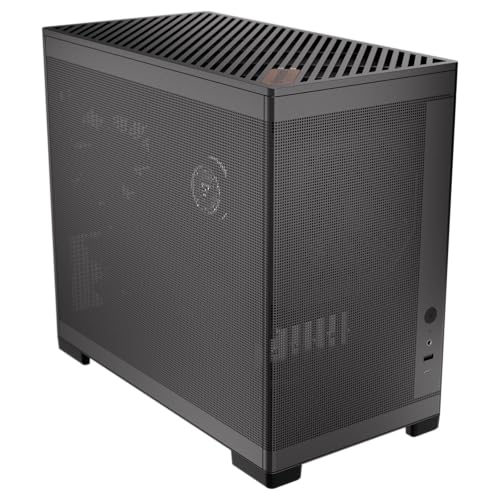
Okinos MiniArt 4 Compact Micro ATX Case
Best for: Compact Micro ATX builds with 3-pin fans
- Connector Type
- 3-Pin (what this guide is about)
- Motherboard Support
- Micro ATX
- Side Panel
- Mesh
- Included Fans
- 3x 120mm
- Radiator Support
- 240mm
- Max GPU Length
- 330mm
View on Amazon: Okinos MiniArt 4 Compact Micro ATX Case Affiliate link
This Micro ATX case holds 24.5 liters of volume. It comes with three 120mm 3-pin fans pre-installed. Two are reverse airflow units at the bottom, and one is a rear exhaust fan. The design includes a full-mesh front and side panel. It supports a 240mm radiator on the top. The front I/O includes a USB Type-C port. It suits builders who want a compact build with included 3-pin cooling.
Pros
- Pre-installed 3x 120mm 3-pin fans
- Full-mesh side and front panels
- USB Type-C 3.2 Gen 2 port
- Supports 240mm top radiator
- Tool-free top and side panels
Cons
- Smaller 24.5 L volume limits component choices
- Max GPU length drops to 280mm with long PSUs
- USB ports not recommended for charging devices
Good fit if
- You need a compact Micro ATX case
- You want pre-installed 3-pin fans
- You prefer a mesh design for airflow
Skip if
- You require ATX motherboard support
- You need large GPU clearance over 330mm
- You want a case with no pre-installed fans
Verdict: Okinos MiniArt 4 Micro ATX Case fits users who want a compact Micro ATX build with included 3-pin fans and mesh airflow. It is a practical option for small form factor systems.

Okinos 314 ARGB Walnut Micro-ATX Case
Best for: Micro ATX air builds with 3-pin ARGB fans
- Connector Type
- 3-Pin (what this guide is about)
- Motherboard Support
- Micro-ATX
- Included Fans
- 2x 140mm ARGB, 1x 120mm ARGB
- Max GPU Length
- 320mm
- Connectivity
- Type-C
- Dimensions
- 14.9 × 8.26 × 15.8 inches
View on Amazon: Okinos 314 ARGB Walnut Micro-ATX Case Affiliate link
This Micro ATX case includes three pre-installed 3-pin ARGB fans: two 140mm units at the front and one 120mm unit at the rear. It uses a 2.0mm round mesh front panel to support air cooling builds with up to 164mm CPU cooler height. The design features walnut wood accents and a Type-C port on the multi-function zone.
Pros
- Includes two 140mm and one 120mm 3-pin ARGB fans
- Walnut wood front LOGO panel for home decor
- Type-C 3.2 Gen1 port on the I/O panel
- 23mm depth cable routing area for management
Cons
- Air cooling only design; no radiator support
- Micro ATX motherboard support only
- Max GPU length limited to 320mm
Good fit if
- You want pre-installed 3-pin ARGB fans
- You build with Micro ATX motherboards
- You prefer walnut wood accents
Skip if
- You need ATX motherboard support
- You plan to use liquid cooling radiators
- You require support for GPUs longer than 320mm
Verdict: The Okinos 314 ARGB Micro ATX Case suits builders who want pre-installed 3-pin ARGB fans and walnut wood accents. It fits Micro ATX systems with air coolers up to 164mm tall.
Specifications side by side
| Spec | Zalman 4-Port ARGB Controller Hub | Okinos Aqua 3 Panoramic Micro-ATX Case | Okinos Oak Wood ATX Mid-Tower Case | Okinos Walnut Wood Micro-ATX Case | Okinos MiniArt 4 Compact Micro ATX Case | Okinos 314 ARGB Walnut Micro-ATX Case |
|---|---|---|---|---|---|---|
| Motherboard Support | not stated | MATX, ITX | ATX | Micro ATX | Micro ATX | Micro-ATX |
| Case Type | not stated | Micro ATX | Mid-Tower | Micro ATX | not stated | not stated |
| Side Panel | not stated | Tempered Glass | Tempered Glass | Tempered Glass | Mesh | not stated |
| Included Fans | not stated | 3x 120mm ARGB | 4 x 120mm | 4x 120mm | 3x 120mm | 2x 140mm ARGB, 1x 120mm ARGB |
| Radiator Support | not stated | not stated | not stated | not stated | 240mm | not stated |
| Max GPU Length | not stated | 320mm | ≤345mm | 320mm | 330mm | 320mm |
| Case Volume | not stated | not stated | not stated | not stated | 24.5 L | not stated |
| Tower Size | not stated | not stated | Mid-Tower | not stated | not stated | not stated |
| Fan Size | not stated | 120mm | 120mm | 120mm | not stated | 120mm, 140mm |
| Lighting | ARGB | ARGB | not stated | not stated | not stated | ARGB |
| Connectivity | not stated | Type-C | Type-C | Type-C | not stated | Type-C |
| Connector Type | 3-Pin | 3-Pin | 3-Pin | 3-Pin | 3-Pin | 3-Pin |
| Compatible Device | not stated | not stated | not stated | not stated | Radiator | not stated |
| Dimensions | 1.77 × 1.14 × 0.55 inches | 13.8 × 8.27 × 15.4 inches | 15.9 × 7.68 × 17.7 inches | 14.6 × 8.27 × 15.8 inches | 15.6 × 13.5 × 7.87 inches | 14.9 × 8.26 × 15.8 inches |
| Weight | not stated | 9.19 pounds | 10.8 pounds | 9.48 pounds | 8.82 pounds | 9.04 pounds |
| Color | Black | Black | Black | Black | Black | Walnut |
| Model | ZM-4PALC | OKICC-AQUA3-MATXB-H3BA | not stated | not stated | not stated | not stated |
Frequently asked questions
Can I use a 3-pin fan on a 4-pin motherboard header?
Yes, you can plug a 3-pin fan into a 4-pin motherboard header. The fourth pin for Pulse Width Modulation remains unused. The fan will run at full speed or rely on voltage control if the motherboard supports it. This setup is common for builders using older or budget components.
Do pre-installed case fans always match the connector type I need?
Not always, but many modern cases include specific connectors. For example, the Okinos Aqua 3 Micro ATX Case comes with pre-installed 3-pin ARGB fans. You must check the product attributes to confirm if the included fans match your motherboard headers or if you need an adapter or controller.
What is the difference between 3-pin and 4-pin fan connectors?
A 3-pin connector controls fan speed by varying voltage. A 4-pin connector uses Pulse Width Modulation for more precise speed adjustments. The 4-pin design allows the motherboard to make finer RPM changes based on temperature. This often results in quieter operation at low loads compared to voltage control.
How do I control ARGB fans without motherboard software?
You can use a dedicated controller hub. The Zalman 4-Port ARGB Controller Hub allows physical button control for multiple 5V 3-pin ARGB devices. This is useful if your motherboard lacks ARGB headers or if you prefer manual lighting adjustments. It connects directly to the fans for independent management.
Are 3-pin fans suitable for high-performance cooling builds?
They work, but 4-pin PWM fans offer better precision. However, many cases like the Okinos Oak Wood ATX Mid-Tower include 3-pin fans for standard setups. These fans rely on voltage control, which is less accurate than PWM. They are suitable if you prioritize aesthetics or simple airflow over fine-tuned thermal management.
What does 5V 3-pin ARGB mean for my build?
It refers to the power and data signal for addressable RGB lighting. The 5V pin provides power, while the data pin sends lighting instructions. You cannot mix 5V ARGB with 12V RGB connectors, as this may damage the LEDs. Ensure your controller or motherboard header matches this specific voltage standard.
Can I add more fans if my case only has 3-pin headers?
Yes, you can expand using hubs or splitters. The Zalman controller supports multiple 3-pin ARGB devices. For power and speed, you might use a 3-pin hub that connects to a single motherboard header. This allows you to add more fans while maintaining control through the original connection point.