Connectivity Explained: What It Means for PC Cases
As an Amazon Associate we earn from qualifying purchases. Links on this page are affiliate links.
Connectivity Explained for PC Cases
When you build a PC, the case acts as your primary interface with the outside world. The rear I/O panel is usually on the motherboard, but the front and top panels offer direct access for everyday tasks. This is where connectivity explained becomes essential for understanding how you will interact with your hardware. Modern cases prioritize high-speed data transfer and convenient port placement to streamline your workflow.
The most notable feature in this category is the Type-C port. This reversible connector supports various standards, including USB 3.2 and Thunderbolt. It allows for faster data transfer rates compared to older ports. You can connect external drives, headsets, or docking stations without fumbling with orientation. The speed depends on the specific implementation in the case, but the physical convenience is immediate. Look for listings that specify the USB version associated with the Type-C port to gauge potential performance.
USB 3.0 ports are the standard for reliable connectivity. These ports provide sufficient bandwidth for keyboards, mice, and flash drives. They are backward compatible with USB 2.0 devices, ensuring you can use older peripherals without issue. The blue color coding on ports often indicates USB 3.0 compatibility, though you should verify this in the specifications. Having multiple USB 3.0 ports on the case panel reduces the need to reach behind the PC tower.
Buyers care about these specs because they affect daily usability. Easy access to fast ports means you spend less time managing cables and more time working or gaming. The number and type of available ports determine how many devices you can connect directly to the case. This reduces clutter on your desk and keeps your setup organized. When evaluating options, check the quantity and type of front panel ports. This ensures the case meets your specific peripheral needs without requiring additional hubs or extensions.
Front Panel Connectivity Options
Type-C
USB Type-C offers reversible plug orientation and higher data speeds than older standards. You can connect modern peripherals without searching for the correct side. It supports faster charging and video output in some setups. This port is essential for users with recent devices. The NZXT H510 and Fractal Design Torrent Compact include this feature. The Torrent Compact delivers 20Gbps speeds in a compact frame. You gain convenience and future-proofing. However, not all cases include this port. If you rely on legacy USB-A devices, you may need adapters. This option suits builders who prioritize modern connectivity and streamlined cable management.
USB 3.0
USB 3.0 provides reliable data transfer speeds for external drives and peripherals. It is the standard for many older and budget-friendly devices. You get consistent performance for file backups and peripheral connections. This port is widely compatible with most computer accessories. The Fractal Design Meshify C and Bgears b-Voguish cases feature this connectivity. The Bgears case supports E-ATX boards while maintaining standard ports. You benefit from broad compatibility and established technology. The trade-off is slower data rates compared to Type-C. You may need to use adapters for newer devices. This option suits users who value proven reliability and extensive peripheral support over cutting-edge speed.
Is Front Panel USB Worth It
Who needs it
You should prioritize cases with front USB Type-C and USB 3.0 ports if you frequently transfer large files or connect modern peripherals. These connectors offer significantly faster data speeds than older USB 2.0 standards. This speed reduces wait times when moving high-resolution video files or large game libraries. The reversible Type-C design eliminates the frustration of plugging in the wrong way. You benefit from direct access to these ports without bending over to reach the rear of your tower. If your workflow involves external storage drives, high-speed audio interfaces, or modern smartphones, this connectivity is essential. It streamlines your daily routine by keeping high-speed ports within easy reach. This setup saves time and reduces cable clutter on your desk. The convenience of quick connections makes these cases ideal for power users who value efficiency and speed in their workspace.
Who can skip it
You can skip these front panel features if you rarely use external storage or peripherals. Many users connect their mouse, keyboard, and headset to the rear motherboard I/O panel. If your workflow relies on stationary devices, front ports add little value. You might also skip them if you prefer a minimalist front design. Some cases omit these ports to reduce cost or improve airflow. In those scenarios, rear connectivity is sufficient for your needs. Focus on other specs like airflow, build quality, or cable management instead. The rear panel usually provides ample USB 3.0 ports for most tasks. If you do not need high-speed data transfers or video output from the front, these features are unnecessary. Prioritize cooling performance and case size over connectivity options. You will save money by choosing a simpler case. The rear ports are always available when you need them for basic connections.
Case Connectivity Glossary
USB Type-C
A reversible connector supporting high-speed data transfer and power delivery. It allows you to plug in devices without checking orientation, simplifying connections for modern peripherals.
USB 3.0
A standard offering faster data speeds than USB 2.0. Use this port for transferring large files quickly or connecting external storage drives that require more bandwidth.
USB 2.0
An older standard with slower data transfer rates. It is suitable for low-bandwidth devices like keyboards or mice, but not ideal for large file transfers.
Rear I/O
The panel on the back of the motherboard where ports are located. It provides direct access to essential connections for your CPU, memory, and primary peripherals.
Front Panel
The exterior surface of the case where you access ports. It offers convenient reach for frequently used devices without needing to bend down to the rear of the tower.
Thunderbolt
A high-speed interface often using USB-C connectors. It supports data, video, and power over a single cable, enabling fast connections to docks and high-performance external displays.
Quick picks
| # | Product | Best for | Price |
|---|---|---|---|
| 1 | NZXT H510 ATX Mid-Tower Case with USB-C | Users needing front USB Type-C connectivity | Check price of NZXT H510 ATX Mid-Tower Case with USB-C on Amazon |
| 2 | Fractal Design Meshify C ATX Mid Tower | ATX builds prioritizing USB 3.0 and airflow | Check price of Fractal Design Meshify C ATX Mid Tower on Amazon |
| 3 | Fractal Design Torrent Compact ATX Mid-Tower | High-airflow ATX builds with Type-C needs | Check price of Fractal Design Torrent Compact ATX Mid-Tower on Amazon |
| 4 | Bgears b-Voguish E-ATX Tempered Glass Case | E-ATX builds with standard USB needs | Check price of Bgears b-Voguish E-ATX Tempered Glass Case on Amazon |
| 5 | Fractal Design Terra Mini-ITX Case | Mini ITX builds needing USB Type-C | Check price of Fractal Design Terra Mini-ITX Case on Amazon |
| 6 | Zalman ATX Mid-Tower with Tempered Glass | Standard USB 3.0 connectivity and glass panels | Check price of Zalman ATX Mid-Tower with Tempered Glass on Amazon |
Our 6 picks
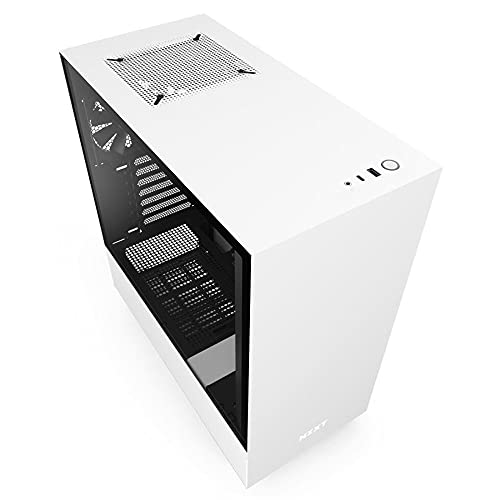
NZXT H510 ATX Mid-Tower Case with USB-C
Best for: Users needing front USB Type-C connectivity
- Connectivity
- Type-C (what this guide is about)
- Motherboard Support
- Mini-ITX, MicroATX, ATX
- Case Type
- Mid Tower
- Side Panel
- Tempered Glass
- Radiator Support
- 240mm
- Max GPU Length
- Up to 381mm
View on Amazon: NZXT H510 ATX Mid-Tower Case with USB-C Affiliate link
The NZXT H510 is a compact ATX mid-tower case featuring a tempered glass side panel and a front I/O USB Type-C port. It includes two Aer F120mm fans and supports motherboards up to ATX size. The case allows for graphics cards up to 381mm long and radiators up to 240mm. Its streamlined cable management system helps keep wiring organized. This case suits builders who want modern connectivity and clean aesthetics in a mid-sized chassis.
Pros
- Front I/O includes a USB Type-C port
- Tempered glass side panel with single screw installation
- Includes two Aer F120mm fans for airflow
- Patented cable routing kit with pre-installed channels
- Supports ATX, MicroATX, and Mini-ITX motherboards
Cons
- Only supports radiators up to 240mm
- No USB 3.0 Type-A ports listed on front panel
- Weight is 14.6 pounds, which is heavier than some compact cases
Good fit if
- You need a USB Type-C port on the front panel
- You want a mid-tower case with a tempered glass side panel
- You plan to use a graphics card up to 381mm long
Skip if
- You require USB 3.0 Type-A ports on the front panel
- You need support for 360mm radiators
- You prefer a case lighter than 14 pounds
Verdict: The NZXT H510 Mid-Tower with USB-C offers essential modern connectivity with its front Type-C port and clean cable management. It fits builders who prioritize a tempered glass look and standard ATX support without needing larger radiator options.

Fractal Design Meshify C ATX Mid Tower
Best for: ATX builds prioritizing USB 3.0 and airflow
- Connectivity
- USB 3.0 (what this guide is about)
- Motherboard Support
- ATX
- Case Type
- Mid Tower
- Included Fans
- 2x 120mm
- Dimensions
- 16.1 × 8.35 × 17.8 inches
- Weight
- 13.6 pounds
View on Amazon: Fractal Design Meshify C ATX Mid Tower Affiliate link
The Fractal Design Meshify C is a compact mid-tower case built for standard ATX motherboards. For external connectivity, it relies on USB 3.0 ports. Inside, you get two preinstalled 120 mm fans, up to 35 mm of cable routing clearance, and support for up to five storage drives. It suits you if you want direct airflow and standard USB connections.
Pros
- Two preinstalled Dynamic X2 GP-12 120 mm cooling fans
- Dedicated 35 mm space behind motherboard tray for cable management
- Drive trays and layout accommodating up to 5 drives
- Angular mesh front panel designed for unobstructed air intake
Cons
- Provides USB 3.0 connectivity with no front USB Type-C port listed
- Motherboard compatibility tops out at standard ATX
Good fit if
- You rely primarily on standard USB 3.0 ports for external peripherals.
- You want an open interior layout with two included 120 mm cooling fans.
- You need internal mounting capacity for up to 5 storage drives.
Skip if
- You require a front-panel USB Type-C port.
- You build with motherboard form factors larger than standard ATX.
Verdict: Fractal Design Meshify C ATX Mid Tower delivers compact ATX airflow and standard USB 3.0 connectivity. It fits builders seeking organized interior space and traditional peripheral support.

Fractal Design Torrent Compact ATX Mid-Tower
Best for: High-airflow ATX builds with Type-C needs
- Connectivity
- Type-C (what this guide is about)
- Motherboard Support
- ATX
- Case Type
- Mid Tower
- Side Panel
- Tempered Glass
- Use
- Gaming
- Lighting
- RGB
View on Amazon: Fractal Design Torrent Compact ATX Mid-Tower Affiliate link
This mid-tower case prioritizes airflow with an open grille and 180 mm front fans. It supports ATX motherboards and includes USB Type-C connectivity. The tempered glass side panel offers a view of your build. The design focuses on maximum air intake for GPU cooling. It suits users who need high performance and modern front-panel ports.
Pros
- USB Type-C front connectivity
- 180 mm front fans for high airflow
- Open grille design for maximum intake
- Tempered glass side panel
Cons
- Heavier build at 20.9 pounds
- Larger footprint than compact competitors
- No mention of included rear fans
Good fit if
- You need USB Type-C connectivity
- You prioritize extreme airflow performance
- You use an ATX motherboard
Skip if
- You require a small form factor case
- You need pre-installed rear fans
- You prefer a fully enclosed mesh front
Verdict: Fractal Design Torrent Compact delivers top-tier airflow and Type-C connectivity for ATX builds. It is ideal for users who value cooling performance over compact dimensions.

Bgears b-Voguish E-ATX Tempered Glass Case
Best for: E-ATX builds with standard USB needs
- Connectivity
- USB 3.0 (what this guide is about)
- Motherboard Support
- E-ATX, ATX, Micro-ATX, mini-ITX
- Side Panel
- Tempered Glass
- Radiator Support
- 240mm
- Max GPU Length
- 370mm
- Use
- Gaming
View on Amazon: Bgears b-Voguish E-ATX Tempered Glass Case Affiliate link
The Bgears b-Voguish is a large mid-tower case supporting E-ATX motherboards. It features a hinged tempered glass side panel for easy access. Connectivity includes a USB 3.0 port on the front I/O. You can install radiators up to 240mm at the front or top. It accommodates GPUs up to 370mm long. This case suits builders needing broad motherboard compatibility and straightforward connectivity.
Pros
- Supports E-ATX, ATX, Micro-ATX, and mini-ITX motherboards
- Front I/O includes a USB 3.0 port
- Hinged tempered glass side panel for easy access
- Supports 240mm radiators at the front and top
Cons
- Fans are not included in this model
- No USB Type-C port listed in specifications
- Large dimensions may not fit small desks
Good fit if
- You need E-ATX motherboard support
- You want a USB 3.0 front port
- You plan to install your own fans
Skip if
- You require USB Type-C connectivity
- You want pre-installed case fans
- You need a compact small form factor case
Verdict: The Bgears b-Voguish ATX Case offers broad motherboard support and standard USB 3.0 connectivity. It fits builders who prioritize E-ATX compatibility and easy access via a hinged glass panel.

Fractal Design Terra Mini-ITX Case
Best for: Mini ITX builds needing USB Type-C
- Connectivity
- Type-C (what this guide is about)
- Motherboard Support
- Mini ITX
- Case Type
- Small Form Factor
- Max GPU Length
- 322 mm
- Case Volume
- 10.4 L
- Use
- Gaming
View on Amazon: Fractal Design Terra Mini-ITX Case Affiliate link
The Fractal Design Terra is a 10.4 L Mini ITX case with a walnut front panel. It includes a USB Type-C port at 20Gbps and one USB 3.0 port on the front I/O. You get an 8 mm aluminum front and a slidable internal wall for GPU length adjustments. This compact build supports GPUs up to 322 mm long. It suits small setups needing modern connectivity.
Pros
- USB Type-C port with 20Gbps speed
- 10.4 L small form factor volume
- Supports GPUs up to 322 mm
- Stepless slidable central wall for flexibility
- Solid walnut front panel
Cons
- Only supports Mini ITX motherboards
- Single USB Type-C port limits device connections
- Heavy at 8.82 pounds
Good fit if
- You need a USB Type-C port in a small case
- You use Mini ITX motherboards
- You want a compact build under 11 L
Skip if
- You require ATX or Micro-ATX support
- You need multiple USB Type-C ports
- You prefer large mid-tower cases
Verdict: Fractal Design Terra Mini ITX offers 20Gbps USB Type-C connectivity in a tight 10.4 L space. It fits users with Mini ITX boards who prioritize compact size and modern front I/O.

Zalman ATX Mid-Tower with Tempered Glass
Best for: Standard USB 3.0 connectivity and glass panels
- Connectivity
- USB 3.0 (what this guide is about)
- Motherboard Support
- ATX
- Case Type
- Mid-Tower
- Side Panel
- Tempered Glass
- Included Fans
- 3x 120mm
- Max GPU Length
- 330mm
View on Amazon: Zalman ATX Mid-Tower with Tempered Glass Affiliate link
This ATX mid-tower case features a full tempered glass side panel and a front I/O panel with one USB 3.0 port and two USB 2.0 ports. It includes three pre-installed 120mm fans for airflow. The design offers dedicated power supply space and magnetic dust filters. It suits builders who want standard connectivity and a clear view of internal components without requiring USB Type-C.
Pros
- Includes three pre-installed 120mm fans
- Full tempered glass side panel
- Front I/O with USB 3.0 and two USB 2.0 ports
- Dedicated power supply space for improved cooling
Cons
- No USB Type-C port on the front I/O
- Only one USB 3.0 port available
- Lacks top fan mounts for exhaust
Good fit if
- You want a mid-tower case with a glass side panel
- You prefer standard USB 3.0 connectivity
- You need pre-installed case fans
Skip if
- You require USB Type-C connectivity
- You need support for larger motherboards like E-ATX
- You want a case without tempered glass
Verdict: Zalman S3 TG ATX Mid-Tower fits users who value standard USB 3.0 ports and a tempered glass side panel over modern USB Type-C connectivity.
Specifications side by side
| Spec | NZXT H510 ATX Mid-Tower Case with USB-C | Fractal Design Meshify C ATX Mid Tower | Fractal Design Torrent Compact ATX Mid-Tower | Bgears b-Voguish E-ATX Tempered Glass Case | Fractal Design Terra Mini-ITX Case | Zalman ATX Mid-Tower with Tempered Glass |
|---|---|---|---|---|---|---|
| Motherboard Support | Mini-ITX, MicroATX, ATX | ATX | ATX | E-ATX, ATX, Micro-ATX, mini-ITX | Mini ITX | ATX |
| Case Type | Mid Tower | Mid Tower | Mid Tower | not stated | Small Form Factor | Mid-Tower |
| Side Panel | Tempered Glass | not stated | Tempered Glass | Tempered Glass | not stated | Tempered Glass |
| Included Fans | not stated | 2x 120mm | not stated | not stated | not stated | 3x 120mm |
| Radiator Support | 240mm | not stated | not stated | 240mm | not stated | not stated |
| Max GPU Length | Up to 381mm | not stated | not stated | 370mm | 322 mm | 330mm |
| Case Volume | not stated | not stated | not stated | not stated | 10.4 L | not stated |
| Tower Size | Mid-Tower | Mid-Tower | Mid-Tower | not stated | not stated | Mid-Tower |
| Fan Size | not stated | not stated | not stated | not stated | not stated | 120mm |
| Use | Gaming | not stated | Gaming | Gaming | Gaming | not stated |
| Lighting | not stated | not stated | RGB | not stated | not stated | not stated |
| Connectivity | Type-C | USB 3.0 | Type-C | USB 3.0 | Type-C | USB 3.0 |
| Dimensions | 16.9 × 8.27 × 18.1 inches | 16.1 × 8.35 × 17.8 inches | 17.7 × 8.74 × 18.4 inches | 8.07 × 15.9 × 19.4 inches | 13.5 × 6.02 × 8.58 inches | 16.5 × 7.48 × 18.1 inches |
| Weight | 14.6 pounds | 13.6 pounds | 20.9 pounds | 11 pounds | 8.82 pounds | 11 pounds |
| Size | base | not stated | ATX | large | mITX | not stated |
| Color | White | Black | RGB Black - Light tint | Black | Silver | Tempered Glass |
| Model | CA-H510B-W1 | FD-CA-MESH-C-BKO | FD-C-TOR1C-02 | BG01893 | FD-C-TER1N-02 | S3 TG |
Frequently asked questions
Does the NZXT H510 support USB Type-C?
Yes, the NZXT H510 includes front USB Type-C connectivity. This mid-tower case features a tempered glass side panel and supports ATX motherboards. It provides modern I/O options for users who need reversible plug orientation and faster data speeds for daily tasks.
Is USB 3.0 available on the Fractal Design Meshify C?
Yes, the Fractal Design Meshify C offers standard USB 3.0 connectivity. This ATX mid-tower case prioritizes airflow and organized interior space. You get reliable data transfer speeds for peripherals without needing the newer Type-C standard, fitting traditional build preferences.
Can the Fractal Design Torrent Compact handle high-speed transfers?
Yes, the Fractal Design Torrent Compact includes USB Type-C connectivity. Designed for high-airflow ATX builds, it supports modern peripherals with reversible plugs. This mid-tower case delivers top-tier cooling performance while maintaining essential fast data transfer capabilities for gaming setups.
Does the Bgears b-Voguish case have USB 3.0 ports?
Yes, the Bgears b-Voguish case provides standard USB 3.0 connectivity. It supports E-ATX motherboards and features a hinged tempered glass side panel. You gain easy access to internal components and reliable data speeds for gaming builds requiring broad motherboard compatibility.
Is USB Type-C included in the Fractal Design Terra Mini-ITX?
Yes, the Fractal Design Terra Mini-ITX case offers 20Gbps USB Type-C connectivity. This compact 10.4 L case fits Mini-ITX boards and modern front I/O needs. You get high-speed data transfer in a small silver chassis with a tempered glass side panel.
Does the Zalman S3 TG case support USB 3.0?
Yes, the Zalman S3 TG ATX mid-tower case includes USB 3.0 ports. It features a tempered glass side panel and supports 120mm fans. This case suits users who value standard data speeds and visual appeal over newer USB Type-C connectivity options.