3 Best Ocypus Case Fans with ARGB, Compared
As an Amazon Associate we earn from qualifying purchases. Links on this page are affiliate links.
Finding the best Ocypus case fans with ARGB requires looking at published specifications rather than hype. This guide compares 3 products to help you choose. The top pick is the Ocypus Gamma F12 120mm ARGB Fan because its dual-zone lighting suits small builds needing synchronized aesthetics. Each selection is based strictly on the data listed on the product pages. We examine fan size, connector types, and lighting features to ensure compatibility with your motherboard. This guide helps you decide which fan or hub fits your build's ventilation and visual needs.
Quick picks
| # | Product | Best for | Price |
|---|---|---|---|
| 1 | Ocypus Gamma F12 120mm ARGB Fan Best overall | small builds needing synchronized ARGB lighting | Check price of Ocypus Gamma F12 120mm ARGB Fan on Amazon |
| 2 | Ocypus 10-Port ARGB and PWM Fan Hub Best budget | expanding 5V ARGB fan connections | Check price of Ocypus 10-Port ARGB and PWM Fan Hub on Amazon |
| 3 | Ocypus Gamma F12 Elite ARGB 120mm Best premium | Standard case ventilation with ARGB lighting | Check price of Ocypus Gamma F12 Elite ARGB 120mm on Amazon |
The best fit for you
- You want the most compact model on the list Ocypus 10-Port ARGB and PWM Fan Hub It measures 2.3 inches wide, making it the smallest item by width.
- You need to connect many ARGB fans to one header Ocypus 10-Port ARGB and PWM Fan Hub It features 10 ports for expanded lighting control from a single motherboard connection.
- You prefer white ARGB lighting for standard ventilation Ocypus Gamma F12 Elite ARGB 120mm It comes in white ARGB with a three-pack configuration for balanced airflow.
Our 3 picks
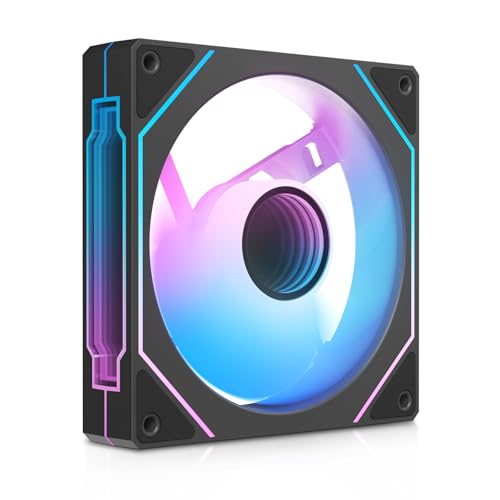
Ocypus Gamma F12 120mm ARGB Fan
Best for: small builds needing synchronized ARGB lighting
- Lighting
- ARGB (what this guide is about)
- Fan Size
- 120mm
- Max Fan Speed
- 1600RPM
- Connector Type
- 4-Pin PWM
- Bearing Type
- Hydraulic Bearing
- Lighting Type
- ARGB
View on Amazon: Ocypus Gamma F12 120mm ARGB Fan Affiliate link
The Ocypus Gamma F12 is a 120mm case fan featuring a dual-zone infinity mirror with 24 LEDs. It uses a 4-pin PWM connector for speed control and a 9-blade design for airflow. The unit supports daisy-chaining up to three fans. It includes rubber damping pads to reduce vibration. This fan suits builders who want synchronized ARGB lighting and stable operation for daily use.
Pros
- Dual-zone infinity mirror with 24 LEDs
- 4-pin PWM connector for motherboard control
- 9-blade design for enhanced airflow
- Supports daisy-chaining up to 3 fans
- Rubber damping pads reduce vibration
Cons
- Daisy-chain limit of 3 fans is restrictive
- Only available in forward blade direction
- Requires separate fan hub for more than 3 units
Good fit if
- You want synchronized ARGB lighting effects
- You need a 120mm fan with PWM control
- You are building a small case with few fans
Skip if
- You require reverse blade airflow direction
- You plan to daisy-chain more than 3 fans
- You prefer fans without infinity mirror lighting
Verdict: The Ocypus Gamma F12 120mm ARGB Fan delivers strong visual appeal with its dual-zone lighting and reliable PWM control. It is an ideal fit for compact builds where limited fan count and aesthetic synchronization are priorities.
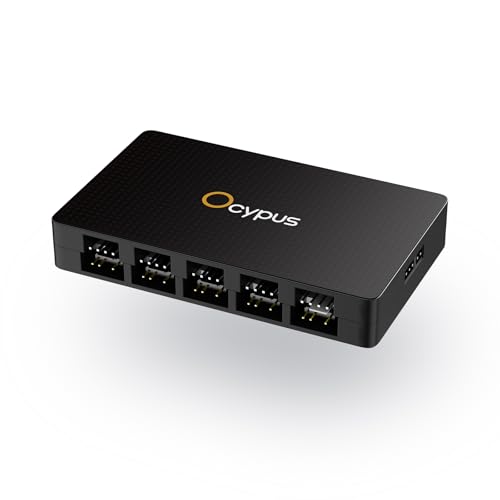
Ocypus 10-Port ARGB and PWM Fan Hub
Best for: expanding 5V ARGB fan connections
- Lighting
- RGB
- Connector Type
- 4-Pin
- Dimensions
- 3.8 × 2.3 × 0.62 inches
View on Amazon: Ocypus 10-Port ARGB and PWM Fan Hub Affiliate link
This hub expands your case lighting by providing ten individual 5V 3-pin ARGB ports. It uses a SATA power connection for stable output and includes magnetic mounting for easy installation inside your case. The unit measures 97 by 58.5 by 15.8 millimeters. You need a motherboard with a 5V ARGB header to control the lights. This is a practical solution for managing multiple fans without cluttering your motherboard headers.
Pros
- Ten dedicated 5V 3-pin ARGB output ports
- Individual short-circuit protection on each port
- Magnetic mounting design for easy placement
- Stable SATA power input for full load
- Compact dimensions of 97 by 58.5 by 15.8 mm
Cons
- Requires a motherboard with a 5V 3-pin ARGB header
- Does not support 12V 4-pin RGB headers
- PWM fan speed control is read-only from the white FAN 1 port
Good fit if
- You have more than four ARGB fans and need more headers
- Your motherboard has a 5V 3-pin ARGB header available
- You prefer magnetic mounting for easy case installation
Skip if
- Your motherboard only has 12V 4-pin RGB headers
- You need individual speed control for all connected fans
- You require software-based lighting synchronization without a motherboard header
Verdict: Ocypus Delta EH10 10-Port ARGB Hub fits builders who need to connect many ARGB fans to a single motherboard header. It provides safe, expanded lighting control for cases with high fan counts.

Ocypus Gamma F12 Elite ARGB 120mm
Best for: Standard case ventilation with ARGB lighting
- Lighting
- ARGB (what this guide is about)
- Fan Size
- 120mm
- Max Fan Speed
- 1800 RPM
- Max Airflow
- 56 CFM
- Static Pressure
- 1.8mmH₂O
- Noise Level
- ≤29dB(A)
View on Amazon: Ocypus Gamma F12 Elite ARGB 120mm Affiliate link
The Ocypus Gamma F12 Elite is a 120mm case fan featuring white ARGB lighting in a transparent frame. It reaches 1800 RPM with 56 CFM airflow and 1.8mmH₂O static pressure. Noise stays at or below 29dB(A). It uses 5V 3-pin ARGB and 4-pin PWM connectors. This fan suits users who want customizable lighting and steady cooling for gaming or office setups.
Pros
- 5V 3-pin ARGB with transparent frame
- 1800 RPM max speed and 56 CFM airflow
- Quiet operation at ≤29dB(A)
- Rubber damping pads reduce vibration
Cons
- Lower static pressure than infinity mirror models
- Requires motherboard sync software for control
- Forward blade design limits reverse airflow option
Good fit if
- You want customizable ARGB lighting effects
- You need quiet cooling for daily use
- You have a motherboard with 5V ARGB headers
Skip if
- You require high static pressure for radiators
- You prefer reverse blade airflow direction
- You want plug-and-play lighting without software
Verdict: Ocypus Gamma F12 Elite 120mm ARGB Fan offers balanced airflow and quiet performance for users prioritizing aesthetic lighting and standard case ventilation.
Specifications side by side
| Spec | Ocypus Gamma F12 120mm ARGB Fan | Ocypus 10-Port ARGB and PWM Fan Hub | Ocypus Gamma F12 Elite ARGB 120mm |
|---|---|---|---|
| Fan Size | 120mm | not stated | 120mm |
| Max Fan Speed | 1600RPM | not stated | 1800 RPM |
| Max Airflow | not stated | not stated | 56 CFM |
| Static Pressure | not stated | not stated | 1.8mmH₂O |
| Noise Level | not stated | not stated | ≤29dB(A) |
| Connector Type | 4-Pin PWM | not stated | 4-pin PWM |
| Bearing Type | Hydraulic Bearing | not stated | not stated |
| Lighting Type | ARGB | not stated | 5V 3-pin ARGB |
| Blade Direction | Forward | not stated | Forward |
| Lighting | ARGB | RGB | ARGB |
| Dimensions | 4.72 × 0.98 × 4.72 inches | 3.8 × 2.3 × 0.62 inches | 4.72 × 0.98 × 4.72 inches |
| Weight | 6.7 ounces | not stated | 1.12 pounds |
| Size | Gamma F12 Infinity Mirror - Forward Blade - 1 Pack | not stated | Gamma F12 Elite - Forward Blade - 3 Pack |
| Color | Black ARGB | Delta EH10 BK | White ARGB |
| Model | Gamma F12 Elite BK ARGB | Delta EH10 BK | Gamma F12 Elite WH ARGB 3 IN 1 |
Choosing the Right Ocypus ARGB Fan
-
Check Motherboard ARGB Support
You must verify your motherboard has a 5V ARGB header before buying. The Ocypus 10-Port ARGB Hub uses a 3-Pin connector to expand these connections. If your board lacks this header, you cannot control the lighting directly. The hub allows you to connect many fans to a single port. This ensures synchronized effects across your build. Always confirm your specific motherboard model supports 5V ARGB to avoid compatibility issues with these fans.
-
Match Fan Size to Case
Most listed fans are 120mm units, which is the standard size for many PC cases. You need to measure your case mounting points to ensure a 120mm fan fits. The Ocypus Gamma F12 Elite models are 120mm fans. If your case only supports 140mm or 80mm fans, these items will not work. Check your case specifications for maximum fan size compatibility. This prevents purchasing fans that physically cannot be installed in your chassis.
-
Consider Tower Clearance Height
You should check your CPU cooler height to ensure fans fit without obstruction. The listed fans have a thickness of 0.98 inches. This standard thickness usually fits behind most tower coolers. However, large air coolers may block the fan. Measure the distance between your CPU cooler and the case fan mount. This ensures the fan does not touch the cooler blades. Proper clearance maintains airflow and prevents noise from vibration.
-
Select Color for Aesthetics
The Ocypus Gamma F12 comes in Black ARGB and White ARGB options. You should choose the color that matches your case theme. Black fans blend into dark interiors, while white fans suit light-colored builds. The lighting effect remains the same regardless of the frame color. Pick the variant that complements your other components. This simple choice significantly impacts the final visual appeal of your PC build.
-
Use a Hub for Many Fans
If you plan to install multiple ARGB fans, you need a hub. The Ocypus 10-Port ARGB Hub connects up to ten fans. This reduces cable clutter and simplifies management. You connect the hub to one motherboard header. This allows you to control all connected fans simultaneously. Without a hub, you would need multiple motherboard headers or a separate controller. Use the hub to keep your build tidy and organized.
Frequently asked questions
What is the best Ocypus case fan for small builds?
The top choice is the Ocypus Gamma F12 120mm ARGB Fan. It features dual-zone lighting that synchronizes well in compact cases. Its compact dimensions and reliable PWM control make it ideal for builders with limited space. You get strong visual appeal without sacrificing fit. It is the best overall pick for aesthetic synchronization in tight chassis.
How do I connect many ARGB fans to one header?
Use the Ocypus 10-Port ARGB and PWM Fan Hub. This hub provides ten ports to expand your lighting connections from a single motherboard header. It uses a 3-Pin connector for safe, expanded lighting control. This solution fits builders who need to manage high fan counts. It ensures all connected fans remain synchronized without overloading your board.
Which Ocypus fan is best for standard ventilation?
The Ocypus Gamma F12 Elite 120mm ARGB Fan is the best fit. It offers balanced airflow for standard case ventilation needs. The white ARGB version comes in a 3-pack, providing consistent lighting across multiple fans. It prioritizes aesthetic lighting while maintaining quiet performance. This model suits users who want reliable cooling with synchronized visual effects.
What size are the Ocypus ARGB fans listed here?
All listed fans are 120mm units. The Gamma F12 Elite and Gamma F12 models both measure 4.72 inches in length and width. The hub is significantly smaller, measuring 2.3 inches wide. You should verify your case supports 120mm mounts before purchasing. These dimensions are standard for most mid-tower and small form factor cases.
Does the Ocypus hub support PWM fan control?
Yes, the Ocypus 10-Port ARGB and PWM Fan Hub supports PWM control. It manages both lighting and fan speed for connected units. The hub expands 5V ARGB connections while handling PWM signals. This allows you to control fan speeds and lighting from your motherboard. It is a practical solution for complex builds with many cooling components.
What color options are available for the Gamma F12 Elite?
The Gamma F12 Elite is available in White ARGB. The packaging indicates it comes in a 3-pack configuration. This white option provides a clean look for light-colored builds. The dual-zone lighting ensures consistent illumination across the fan blades. You can purchase multiple units to maintain uniformity in larger cases.
Is the Gamma F12 Infinity Mirror a single pack?
Yes, the top-ranked Gamma F12 Infinity Mirror fan is sold as a single pack. It features forward blades and a black ARGB finish. The unit weighs 6.7 ounces. This single-unit format is useful for adding accent lighting to specific areas. It pairs well with the hub for expanded synchronization in small builds.