4 Best Cooler Master Mid-Tower PC Cases, Compared
As an Amazon Associate we earn from qualifying purchases. Links on this page are affiliate links.
Choosing the best cooler master mid tower PC cases requires looking at published specifications rather than marketing claims. We compared 4 models to help you find the right fit. The Cooler Master QUBE 540 ATX Mid-Tower leads because its 19.4-inch height supports large motherboards and flexible orientation. All picks are based strictly on the specs listed on the product pages. This guide helps you decide which chassis matches your build needs, from airflow to connectivity.
Quick picks
| # | Product | Best for | Price |
|---|---|---|---|
| 1 | Cooler Master QUBE 540 ATX Mid-Tower Best overall | large motherboard support and flexible orientation | Check price of Cooler Master QUBE 540 ATX Mid-Tower on Amazon |
| 2 | Cooler Master TD500 Mesh ATX Mid-Tower Best budget | 360mm radiator support and airflow | Check price of Cooler Master TD500 Mesh ATX Mid-Tower on Amazon |
| 3 | Cooler Master N400 Mesh ATX Mid-Tower Also great | Airflow-focused mid-tower builds | Check price of Cooler Master N400 Mesh ATX Mid-Tower on Amazon |
| 4 | Cooler Master HAF 500 ATX Mid-Tower Case Best 200mm | High airflow ATX builds with 200mm fans | Check price of Cooler Master HAF 500 ATX Mid-Tower Case on Amazon |
The best fit for you
- You need flexible orientation and large motherboard support Cooler Master QUBE 540 ATX Mid-Tower It supports ATX motherboards and offers flexible orientation for your build.
- You want strong airflow with pre-installed ARGB lighting Cooler Master TD500 Mesh ATX Mid-Tower It includes pre-installed ARGB lighting and supports 360mm radiators for cooling.
- You prioritize high airflow with unique 200mm fans Cooler Master HAF 500 ATX Mid-Tower Case It features dual 200mm fans and a rotatable unit for airflow.
- You want a simple mid-tower focused on airflow Cooler Master N400 Mesh ATX Mid-Tower It is an ATX mid-tower designed for airflow without extra features.
Our 4 picks
Cooler Master QUBE 540 ATX Mid-Tower
Best for: large motherboard support and flexible orientation
- Tower Size
- Mid-Tower (what this guide is about)
- Motherboard Support
- ITX, ATX, E-ATX
- Case Type
- Mid-Tower
- Included Fans
- 1x 120mm
- Radiator Support
- 360mm
- Max GPU Length
- 415 mm
View on Amazon: Cooler Master QUBE 540 ATX Mid-Tower Affiliate link
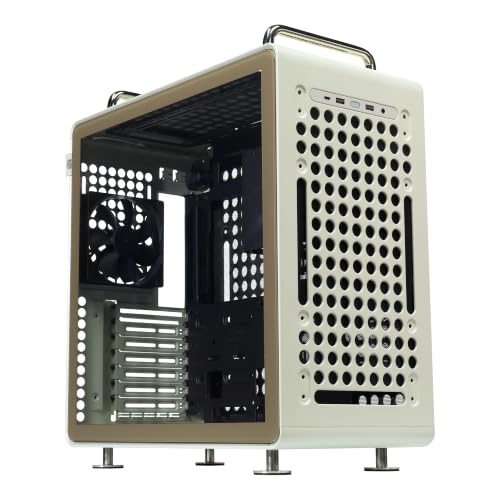
The Cooler Master QUBE 540 is an ATX mid-tower case with a beige finish and tempered glass side panel. It supports ITX, ATX, and large E-ATX motherboards up to 11 inches wide. You get 415 mm of GPU clearance and a full front mesh panel for airflow. The flexible orientation design allows horizontal or vertical placement with a reversible I/O panel. It includes one 120 mm fan and USB Type-C connectivity.
Pros
- Supports ITX, ATX, and large E-ATX motherboards
- 415 mm GPU clearance without front fans
- Full front mesh panel for optimized airflow
- Flexible horizontal or vertical orientation
- USB 3.2 Gen2 Type-C port on I/O
Cons
- Includes only one 120 mm fan
- Heavier build at 17.9 pounds
- Limited to ATX mid-tower form factor
Good fit if
- You need support for large E-ATX motherboards
- You want flexible horizontal or vertical placement
- You require USB Type-C connectivity
Skip if
- You need more than one included fan
- You prefer a lighter case under 15 pounds
- You want a standard ATX case without E-ATX support
Verdict: Cooler Master QUBE 540 Mid-Tower fits builders needing large motherboard support and flexible orientation. It suits those prioritizing airflow and modern connectivity in a sturdy mid-tower chassis.

Cooler Master TD500 Mesh ATX Mid-Tower
Best for: 360mm radiator support and airflow
- Tower Size
- Mid-Tower (what this guide is about)
- Case Type
- ATX Mid-Tower
- Side Panel
- Tempered Glass
- Included Fans
- 4x 120mm ARGB
- Radiator Support
- 360mm
- Compatible Device
- Radiator
View on Amazon: Cooler Master TD500 Mesh ATX Mid-Tower Affiliate link
The Cooler Master TD500 Mesh is an ATX mid-tower case featuring a polygonal mesh front panel for high airflow. It includes four pre-installed 120mm ARGB fans and supports up to a 360mm radiator. The tempered glass side panel showcases your build. It offers USB-C connectivity and easy access via a removable top panel. This case suits users who need strong cooling performance for high-end components without buying extra fans.
Pros
- Includes four 120mm ARGB fans
- Supports 360mm radiators
- Polygonal mesh front panel
- USB-C front port
Cons
- Heavy at 12.9 pounds
- Large footprint
- No app control mentioned
Good fit if
- You want a 360mm radiator
- You need pre-installed fans
- You prefer mesh airflow
Skip if
- You need ITX size
- You want no fans included
- You dislike tempered glass
Verdict: The Cooler Master TD500 Mesh Mid-Tower is a practical choice for builders prioritizing airflow and pre-installed ARGB lighting. It fits users who need robust cooling for high-performance CPUs.
Cooler Master N400 Mesh ATX Mid-Tower
Best for: Airflow-focused mid-tower builds
- Tower Size
- Mid-Tower (what this guide is about)
- Case Type
- Mid Tower
- Included Fans
- 2x 120mm
- Radiator Support
- 240mm
- Motherboard Support
- ATX
- Dimensions
- 19.7 × 7.5 × 16.7 inches
View on Amazon: Cooler Master N400 Mesh ATX Mid-Tower Affiliate link
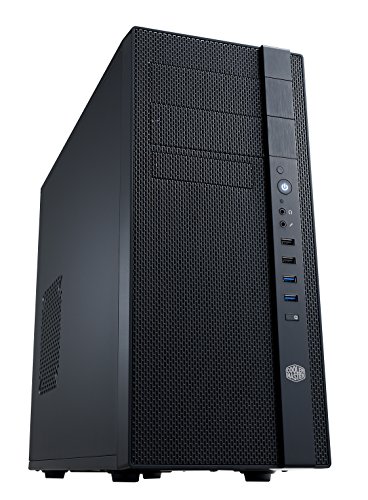
The Cooler Master N400 is an ATX mid-tower case with a fully meshed front panel for superior airflow. It includes two non-LED 120 mm fans and supports up to eight total. You can install a 240 mm radiator on the top or right side, or a 120 mm unit at the rear. The case holds three SSDs and features two USB 3.0 ports. It measures 19.7 by 16.7 by 7.5 inches and weighs 12.4 pounds.
Pros
- Fully meshed front panel for high airflow
- Supports up to eight fans total
- Includes two 120 mm XtraFlo fans
- Fits 240 mm radiators on top or side
- Three dust filters for easy maintenance
Cons
- Included fans are non-LED
- Only two USB 3.0 ports available
- No ARGB lighting support mentioned
Good fit if
- You prioritize maximum airflow over aesthetics
- You want a simple mid-tower build
- You plan to use multiple case fans
Skip if
- You require RGB lighting effects
- You need USB-C connectivity
- You prefer pre-installed ARGB fans
Verdict: Cooler Master N400 Mid-Tower is a practical option for builders who want strong airflow without extra features. It fits users who value cooling performance and simple maintenance over visual customization.

Cooler Master HAF 500 ATX Mid-Tower Case
Best for: High airflow ATX builds with 200mm fans
- Tower Size
- Mid-Tower (what this guide is about)
- Motherboard Support
- ATX
- Case Type
- Mid-Tower
- Side Panel
- Tempered Glass
- Fan Size
- 200mm
- Connectivity
- Type-C
View on Amazon: Cooler Master HAF 500 ATX Mid-Tower Case Affiliate link
This Cooler Master HAF 500 is an ATX mid-tower case in white. It features a mesh front panel for high airflow and includes dual 200mm ARGB fans. A unique 120mm rotatable fan sits above the HDD cage for dedicated GPU cooling. The I/O panel offers USB 3.2 Gen 2 Type-C support. You will appreciate the tool-free tempered glass side panel for easy access to components.
Pros
- Dual 200mm ARGB fans for high volume airflow
- 120mm rotatable fan for dedicated GPU cooling
- USB 3.2 Gen 2 Type-C on I/O panel
- Tool-free tempered glass side panel
Cons
- Large 200mm fans may not fit standard 120mm mounts
- No mention of included rear exhaust fans
- Limited to ATX motherboard support
Good fit if
- You want high airflow with 200mm fans
- You need dedicated GPU cooling via a rotatable fan
- You prefer a white ATX mid-tower build
Skip if
- You require E-ATX motherboard support
- You prefer 120mm fan configurations
- You need a black color scheme
Verdict: Cooler Master HAF 500 White Mid-Tower suits builders who prioritize high airflow and unique GPU cooling solutions. The dual 200mm fans and rotatable unit make it ideal for high-heat components in a white ATX chassis.
Specifications side by side
| Spec | Cooler Master QUBE 540 ATX Mid-Tower | Cooler Master TD500 Mesh ATX Mid-Tower | Cooler Master N400 Mesh ATX Mid-Tower | Cooler Master HAF 500 ATX Mid-Tower Case |
|---|---|---|---|---|
| Motherboard Support | ITX, ATX, E-ATX | not stated | not stated | ATX |
| Case Type | Mid-Tower | ATX Mid-Tower | Mid Tower | Mid-Tower |
| Side Panel | not stated | Tempered Glass | not stated | Tempered Glass |
| Included Fans | 1x 120mm | 4x 120mm ARGB | 2x 120mm | not stated |
| Radiator Support | 360mm | 360mm | 240mm | not stated |
| Max GPU Length | 415 mm | not stated | not stated | not stated |
| Tower Size | Mid-Tower | Mid-Tower | Mid-Tower | Mid-Tower |
| Fan Size | not stated | not stated | not stated | 200mm |
| Lighting | not stated | ARGB | not stated | not stated |
| Connectivity | not stated | not stated | not stated | Type-C |
| Compatible Device | not stated | Radiator | not stated | not stated |
| Dimensions | 17.3 × 8.86 × 19.4 inches | 16.7 × 8.27 × 19.7 inches | 19.7 × 7.5 × 16.7 inches | 23.4 × 12.2 × 23 inches |
| Weight | 17.9 pounds | 12.9 pounds | 12.4 pounds | 24.4 pounds |
| Size | ATX Mid-Tower | Large | ATX Mid-Tower | ATX Mid-Tower |
| Color | Charcoal | Black | N400 | White |
| Model | Q540-LGNN-S00 | MCB-D500D-KGNN-S02 | NSE-400-KKN2 | H500-WGNN-S00 |
Choose Cooler Master Mid-Tower Specs
-
Check Motherboard Compatibility
Verify that the case supports your specific motherboard form factor. The Cooler Master QUBE 540 ATX Mid-Tower accommodates standard ATX boards, which is common for most builds. Ensure the internal dimensions allow for proper mounting without obstruction. If you plan to use a larger board, confirm the chassis can handle it. This step prevents physical incompatibility issues during assembly. Matching the motherboard size to the case ensures a secure fit and proper airflow management for your components.
-
Evaluate Fan Size Options
Consider the maximum fan size the case supports for your cooling needs. The Cooler Master HAF 500 ATX Mid-Tower Case features dual 200mm fans, which move significant air volume for high-heat components. Larger fans can operate at lower speeds for quieter performance. Check the specifications to see if the chassis allows for these larger units. This decision impacts thermal performance and acoustic output. Selecting the right fan size ensures your CPU and GPU remain cool under load.
-
Assess Radiator Support
Determine if you need liquid cooling and check the radiator compatibility. The Cooler Master TD500 Mesh ATX Mid-Tower supports 360mm radiators, ideal for high-performance air-cooled or liquid-cooled setups. Verify that the case has mounting points for your desired radiator size. This spec is crucial for maintaining optimal temperatures during intensive tasks. Ensure the radiator fits without interfering with other components like the GPU. Proper radiator support enhances overall system stability and thermal efficiency.
-
Review Connectivity Features
Look at the rear I/O panel for modern connection options. The Cooler Master HAF 500 ATX Mid-Tower Case includes Type-C connectivity, offering faster data transfer speeds. This feature is useful for high-bandwidth peripherals and external storage. Check if the case provides the ports you need for your workflow. Modern connectivity reduces cable clutter and improves usability. Ensuring the case has the right ports saves you from needing additional adapters or hubs.
-
Consider Side Panel Material
Decide between tempered glass and mesh for the side panel based on your priorities. The Cooler Master QUBE 540 ATX Mid-Tower uses tempered glass, showcasing internal components. This choice affects visibility but may impact airflow slightly compared to mesh. If you prefer a clean look, glass is suitable. For maximum airflow, mesh might be better. The material choice influences both aesthetics and thermal dynamics. Select the panel type that aligns with your visual and cooling preferences.
Frequently asked questions
Which Cooler Master mid-tower case supports 360mm radiators?
The Cooler Master TD500 Mesh ATX Mid-Tower supports 360mm radiators. This specification allows you to install large liquid cooling blocks for high-performance CPUs. The case also features pre-installed ARGB lighting, adding visual appeal while maintaining strong airflow for your cooling components.
What is the largest motherboard format supported by these cases?
All listed Cooler Master mid-tower cases support ATX motherboards. The QUBE 540 and TD500 Mesh both accommodate standard ATX boards. This ensures compatibility with most modern desktop processors and graphics cards, providing ample space for component installation and cable management.
Do any of these cases include pre-installed fans?
The Cooler Master HAF 500 ATX Mid-Tower comes with dual 200mm fans. These large fans provide high airflow out of the box, which is ideal for cooling high-heat components. The unique fan size allows for efficient heat dissipation in a white ATX chassis design.
Which case offers the most flexible build orientation?
The Cooler Master QUBE 540 ATX Mid-Tower offers flexible orientation. You can adjust the internal layout to suit your specific component placement needs. This adaptability, combined with ATX motherboard support, makes it suitable for builders who prioritize customizable airflow paths and component arrangement.
Does the HAF 500 have USB Type-C connectivity?
Yes, the Cooler Master HAF 500 ATX Mid-Tower includes Type-C connectivity. This port allows for faster data transfer and device charging. It is located on the top panel for easy access, ensuring modern connectivity options are available without needing to reach behind the tower.
Which case is best for airflow-focused builds?
The Cooler Master N400 Mesh ATX Mid-Tower is designed for airflow-focused builds. It prioritizes cooling performance over extra features, making it practical for users who value thermal efficiency. The mesh design facilitates strong air intake, ensuring your components remain cool during intensive tasks.
What side panel material do these cases use?
The QUBE 540, TD500 Mesh, and HAF 500 all feature tempered glass side panels. This material provides a clear view of your internal components and lighting. The N400 Mesh does not list a side panel specification, so its material is not confirmed in the data.
How heavy is the Cooler Master HAF 500?
The Cooler Master HAF 500 ATX Mid-Tower weighs 24.4 pounds. Its substantial weight comes from its larger dimensions, including a 23-inch height and 23.4-inch length. This sturdy build supports the dual 200mm fans and accommodates high-airflow requirements for demanding PC configurations.