ASHATA Mini ITX PC Case Review: Specs, Pros and Cons
As an Amazon Associate we earn from qualifying purchases. Links on this page are affiliate links.
This ashata mini itx PC case review covers a compact, clear acrylic enclosure designed for Mini-ITX motherboards. Measuring 23x20.5x12cm, it prioritizes portability and high space utilization. The case supports graphics cards up to 190mm in length and accommodates a single cooling fan alongside two 2.5-inch SSDs and a Flex power supply. Its 360-degree open hollow design features perforations on the front, top, and bottom to maximize airflow. Clear acrylic panels provide a panoramic view of internal components, making it suitable for home entertainment or business environments where aesthetics matter as much as function.
What stands out
- Clear acrylic panels for a panoramic view of internals
- 360-degree open hollow design with perforations for airflow
- Supports Mini-ITX motherboards up to 170x170mm
- Accommodates graphics cards up to 190mm in length
- Compact dimensions of 23x20.5x12cm for easy portability
Who it fits
Good fit for
This case suits users building small, portable ITX systems who want to showcase their hardware. It is ideal for those with low-profile GPUs under 190mm and Flex power supplies. The clear acrylic design appeals to enthusiasts who value visibility and airflow over dust protection. It works well for home entertainment rigs or business setups where a compact footprint is necessary. DIY builders who prefer tool-free hand screw installation will appreciate the straightforward setup process.
Who should skip it
You should look elsewhere if you need to install a standard ATX or Micro-ATX motherboard, as this case only supports Mini-ITX. Users requiring high-end graphics cards longer than 190mm will find this enclosure too restrictive. Those who prefer steel or aluminum construction for durability may find the acrylic panels less robust. If you plan to use a standard ATX power supply, this case is not compatible since it only supports Flex PSUs. Gamers needing extensive cable management options might also find the limited internal space challenging.
Verdict: The ASHATA Mini ITX Acrylic Case offers a compact, visible, and portable solution for small form-factor builds. Its clear design and airflow-focused structure make it a practical choice for ITX enthusiasts with modest hardware requirements.
Key specs explained for this case
Motherboard Support: ITX
This case is built specifically for Mini-ITX motherboards, which measure 170x170mm. You cannot install larger ATX or Micro-ATX boards in this enclosure. This restriction keeps the overall footprint small. If you are building a compact desktop or a portable system, this is a necessary match. Verify your motherboard form factor before purchasing to ensure it fits the designated slot inside the chassis.
Max GPU Length: 190mm
The internal space allows for graphics cards up to 190mm long. This is a tight constraint for modern video cards, which often exceed 300mm. You must check the exact length of your intended graphics card before buying. Longer cards will not fit. This limit suits users with low-profile or compact GPU models who prioritize a small build over high-end gaming hardware.
Side Panel: Clear Acrylic
The side panel uses transparent acrylic material rather than tempered glass or metal. This allows you to see the internal components and lighting clearly. Acrylic is lighter than glass, which aids in the portability of this compact case. However, it may scratch more easily. This feature is ideal if you want a minimalist aesthetic that showcases your hardware without heavy weight.
Dimensions: 23x20.5x12cm
These measurements define the physical size of the enclosure. The case is small enough to fit on most desks without taking up excessive space. The compact volume contributes to its lightweight nature, making it easy to move between locations. You should measure your desk area to ensure it fits comfortably. This size is optimal for users who need a space-saving solution for their setup.
Acrylic panels and compact layout
According to the listing, this case features clear acrylic panels on all sides. You get a panoramic view of your internal components. The material choice allows for easy visibility while keeping the structure lightweight. The design includes hand screw installation, which means you do not need multiple tools for setup. This simplifies the building process for DIY enthusiasts who want a straightforward assembly experience.
The enclosure measures 23x20.5x12cm, making it a portable miniature desktop computer case. It is designed for high space utilization without taking up much room. You can carry it easily, which is practical for moving between locations or setting up in different environments. The compact footprint suits home entertainment, business, or gaming setups where space is limited.
Airflow is managed through a 360-degree open hollow design. Perforations are located on the front, top, and bottom to maximize air performance. This layout helps reduce overheating during use. You can install one cooling fan and accommodate graphics cards up to 190mm in length. The case also supports two 2.5-inch SSDs and a Flex power supply. These specifications define how you can configure your system within this small footprint.
Setup and everyday use guide
The ASHATA Mini ITX case is designed for straightforward assembly. The listing highlights hand screw installation, meaning you can secure the clear acrylic panels without needing a complex set of tools. This approach keeps the setup process simple and convenient. You install your Mini-ITX motherboard, which measures 170x170mm, into the compact 23x20.5x12cm chassis. The internal layout supports two 2.5-inch SSDs and a FLEX power supply. Graphics card compatibility is limited to models with a maximum length of 190mm. You must also ensure your cooling solution fits, as the case accommodates only one cooling fan.
Once built, the 360-degree open hollow design with perforations on the front, top, and bottom provides superior airflow. This structure helps reduce overheating during operation. The clear acrylic panels offer a panoramic view of your components, allowing you to see the internal hardware clearly. This transparency suits home entertainment, business, or gaming environments where visual appeal matters.
Portability is a key feature. The lightweight construction and compact dimensions make it easy to carry. You can move this desktop computer case with minimal effort. The high space utilization ensures the unit does not take up excessive desk space. You get a practical, compact performance suitable for various settings. The design prioritizes function and visibility, making it a viable option for users who value a small footprint and easy assembly.
Before you buy this case
You must verify that your graphics card fits within the 190mm length limit. Many modern cards exceed this, so measure yours first. The case supports only Mini-ITX motherboards, so confirm your board size matches the 170x170mm requirement. You can install two 2.5-inch SSDs, but no SATA drives are listed. Power supply options are limited to FLEX units, which are less common than standard ATX units. Check your PSU dimensions carefully. Acrylic panels require gentle cleaning to avoid scratches. Use a soft, dry cloth. Avoid harsh chemicals that might cloud the clear finish. This case suits users prioritizing portability and visibility over high airflow or large component support. It fits well alongside other compact ITX options if you need a lightweight build for travel or small desks. Compare it with larger cases if you plan to upgrade components later. The clear design highlights internal components, making cable management visible. Ensure your cables are neat to maintain the aesthetic. This enclosure is best for simple, static builds rather than frequent hardware changes.
Check before you buy
- Confirm GPU length is under 190mm.
- Verify motherboard is Mini-ITX size.
- Check FLEX power supply dimensions.
- Ensure two 2.5-inch SSDs fit.
The product at a glance
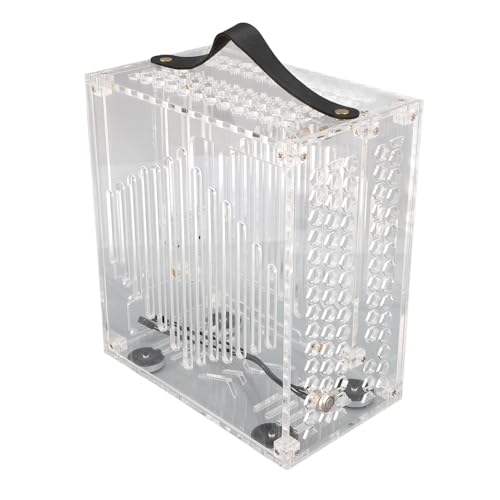
ASHATA Mini ITX Acrylic Case
Best for: small Mini-ITX builds with short GPUs
- Motherboard Support
- ITX
- Side Panel
- Clear Acrylic
- Max GPU Length
- 190mm
- Compatible Device
- Graphics Card
View on Amazon: ASHATA Mini ITX Acrylic Case Affiliate link
This ASHATA Mini ITX case measures 23x20.5x12cm and supports Mini-ITX motherboards. It features clear acrylic panels for a panoramic view of your build. The design includes a 360-degree open hollow structure with perforations for airflow. It fits graphics cards up to 190mm and holds two 2.5-inch SSDs. This compact, lightweight chassis is suitable for DIY enthusiasts who prioritize visibility and portability for small desktop setups.
Pros
- Supports Mini-ITX motherboards
- Clear acrylic side panels
- 360-degree open hollow design
- Fits 190mm graphics cards
- Lightweight and portable
Cons
- Limited to 190mm GPU length
- Supports only one cooling fan
- No mention of included fans
Good fit if
- You need a compact Mini-ITX build
- You want to display internal components
- You prioritize portability
Skip if
- You require a large graphics card
- You need pre-installed cooling fans
- You want a full-tower chassis
Verdict: ASHATA Mini ITX Clear Acrylic Case fits users who need a small, visible build for Mini-ITX parts. It works well for portable setups but limits GPU size and fan count.
Specifications side by side
| Spec | ASHATA Mini ITX Acrylic Case |
|---|---|
| Motherboard Support | ITX |
| Side Panel | Clear Acrylic |
| Max GPU Length | 190mm |
| Compatible Device | Graphics Card |
| Color | Clear |
Frequently asked questions
What motherboard size does the ASHATA Mini ITX case support?
This case is built specifically for Mini-ITX motherboards. You cannot install larger ATX or Micro-ATX boards in this enclosure. The internal space is optimized for the smaller 170x170mm form factor. This restriction keeps the overall footprint small and portable. Verify your board size matches this requirement before purchasing to ensure compatibility.
How long can my graphics card be in this case?
The ASHATA Mini ITX case supports graphics cards up to 190mm in length. You must verify that your specific GPU fits within this limit. Many modern high-end cards exceed this measurement. Measuring your card first is essential. If your GPU is longer than 190mm, it will not fit inside the chassis.
Does this case come in different colors?
The listed ASHATA Mini ITX Acrylic Case is available in a clear color. The transparent panels allow for a panoramic view of your internal components. This design choice prioritizes visibility of your build. You get to showcase your hardware without obstruction. The clear acrylic material keeps the structure lightweight while maintaining visibility.
Is assembly difficult for this mini itx case?
The listing highlights hand screw installation, meaning you can secure the clear acrylic panels without needing a complex set of tools. This approach keeps the setup process simple and convenient. You do not require specialized equipment to assemble the chassis. The design prioritizes straightforward assembly for users building compact desktops.
Can I add multiple fans to this case?
This case accommodates a single cooling fan alongside storage drives. It does not support multiple fan installations due to its compact 23x20.5x12cm dimensions. You must rely on the single fan or passive cooling for thermal management. This limitation is typical for small form factor enclosures designed for portability.
What storage options are available in this mini itx pc case?
The case accommodates two 2.5-inch drives. You can install SSDs or small hard drives in these slots. There is no mention of support for larger 3.5-inch drives in the specifications. The limited space is allocated primarily for the motherboard and graphics card. Plan your storage needs around the two 2.5-inch bays.
Is this case suitable for portable setups?
Yes, this case fits users who need a small, visible build for Mini-ITX parts. It works well for portable setups due to its compact 23x20.5x12cm size. The lightweight acrylic construction makes it easy to transport. However, it limits GPU size and fan count. Ensure your components fit before planning to move the system frequently.