Best PC Cases with Type-C in 2026: 15 Picks Ranked by Specs
As an Amazon Associate we earn from qualifying purchases. Links on this page are affiliate links.
Finding the right PC case with type c ensures fast front-panel connectivity for external storage and modern devices. We compared 15 models based strictly on the specifications published on their listings.
The NZXT H510 ATX Mid-Tower Case with USB-C takes the top position because it pairs front Type-C connectivity with integrated cable routing and tempered glass in a standard ATX layout. This comparison helps you decide which chassis provides the appropriate motherboard support, dimensions, and fan setup for your components.
Quick picks
The best fit for you
- You need a standard ATX case with Type-C NZXT H510 ATX Mid-Tower Case with USB-C This mid-tower provides front Type-C connectivity, tempered glass, and ATX motherboard support.
- You want high-airflow ARGB cooling for ATX hardware Fractal Design Torrent Compact ATX Mid-Tower This mid-tower equips two 180 mm ARGB intake fans alongside ATX support and front Type-C.
- You want a compact Mini-ITX case with fast Type-C Fractal Design Terra Mini-ITX Case It packs 20Gbps Type-C connectivity and 322 mm GPU clearance inside a 10.4-liter Mini-ITX chassis.
- You build a massive setup using an E-ATX motherboard Cooler Master HAF 700 EVO E-ATX Full-Tower It offers E-ATX motherboard support, 200mm fan mounts, and Type-C connectivity in a 55.33-pound chassis.
Our 15 picks
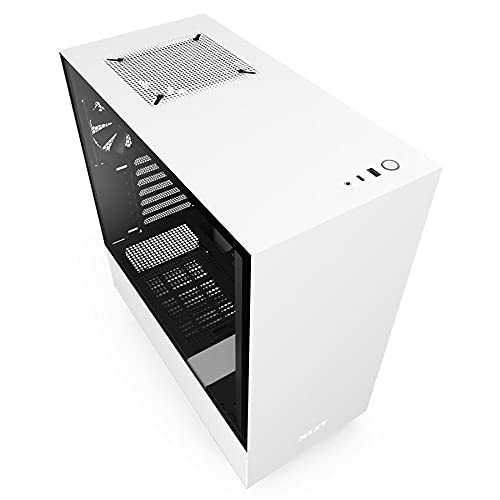
NZXT H510 ATX Mid-Tower Case with USB-C
Best for: clean ATX builds needing front Type-C
- Connectivity
- Type-C
- Motherboard Support
- Mini-ITX, MicroATX, ATX
- Case Type
- Mid Tower
- Side Panel
- Tempered Glass
- Radiator Support
- 240mm
- Max GPU Length
- Up to 381mm
View on Amazon: NZXT H510 ATX Mid-Tower Case with USB-C (paid link)
The NZXT H510 is a compact mid-tower case built for standard ATX, MicroATX, or Mini-ITX motherboards. For your front-panel connectivity, it provides a dedicated USB Type-C port. It includes two Aer F120mm fans, up to 165mm CPU cooler clearance, and up to 381mm for your graphics card. You also get 19 to 23mm of cable clearance and a removable bracket for radiators up to 240mm.
Pros
- Front I/O USB Type-C port
- Two Aer F120mm fans included
- GPU clearance up to 381mm without front radiator
- Pre-installed cable routing channels and straps with 19 to 23mm space
Cons
- Radiator bracket supports up to 240mm only
- GPU clearance drops to 325mm when using front liquid cooling
- Motherboard support limited to ATX, MicroATX, and Mini-ITX
Good fit if
- You want front-panel USB Type-C connectivity on a mid-tower chassis.
- You use an ATX, MicroATX, or Mini-ITX motherboard with a CPU cooler up to 165mm.
- You prefer built-in routing channels and straps for organizing cables.
Skip if
- You plan to mount radiators larger than 240mm.
- You use an E-ATX motherboard.
- You need more than 325mm of GPU clearance alongside front-mounted water cooling.
Verdict: NZXT H510 Compact ATX Mid-Tower Case delivers front Type-C connectivity, balanced component clearance, and integrated cable routing for standard ATX builds.

Fractal Design Torrent Compact ATX Mid-Tower
Best for: ATX gaming setups needing high-airflow ARGB cooling
- Connectivity
- Type-C
- Motherboard Support
- ATX
- Case Type
- Mid Tower
- Side Panel
- Tempered Glass
- Use
- Gaming
- Lighting
- RGB
View on Amazon: Fractal Design Torrent Compact ATX Mid-Tower (paid link)
The Fractal Design Torrent Compact RGB ATX Case provides front-panel Type-C connectivity paired with specialized cooling hardware. It includes two 180 mm by 38 mm Prisma ARGB PWM intake fans, an open front grille, and an ARGB top PSU shroud. Light-tint tempered glass exposes your core components. This mid-tower suits you if you run a standard ATX gaming system requiring direct air intake.
Pros
- Two 180 x 38 mm Prisma ARGB PWM front fans included
- Open front grille optimized for intake airflow
- Dedicated front-panel Type-C connectivity
- Top-mounted PSU shroud with integrated ARGB effects
Cons
- Heavy chassis weighing nearly 21 pounds unbuilt
- Base fan support requires leaving the bottom PCI slot free
Good fit if
- You want pre-installed 180 mm ARGB fans and an open grille layout.
- You need an ATX mid-tower chassis featuring front Type-C connectivity.
Skip if
- You need a lightweight chassis under 20 pounds.
- You plan to populate the lowest PCI expansion slot alongside bottom intake fans.
Verdict: Fractal Design Torrent Compact RGB ATX Case pairs front Type-C connectivity with two high-capacity 180 mm ARGB intake fans. It is an effective mid-tower option if you prioritize direct airflow and built-in lighting for an ATX setup.

Fractal Design Terra Mini-ITX Case
Best for: compact Mini-ITX builds needing fast Type-C connectivity
- Connectivity
- Type-C
- Motherboard Support
- Mini ITX
- Case Type
- Small Form Factor
- Max GPU Length
- 322 mm
- Case Volume
- 10.4 L
- Use
- Gaming
View on Amazon: Fractal Design Terra Mini-ITX Case (paid link)
The Fractal Design Terra is a compact 10.4-liter Mini-ITX gaming chassis built with an anodized aluminum exterior and a solid walnut front accent. For connectivity, you get front access to a high-speed 20Gbps USB Type-C port alongside standard USB. Inside, a stepless slidable central wall provides 30 mm of adjustment space, accommodating graphics cards up to 322 mm long. It suits you if you need high-bandwidth front I/O on a minimal desk footprint.
Pros
- Front-facing USB Type-C port supports 20Gbps transfer speeds
- Space-saving 10.4 L chassis accommodates GPUs up to 322 mm long
- Stepless slidable central wall offers 30 mm of internal clearance adjustment
- Includes a PCIe 4.0 riser cable for graphics card mounting
Cons
- Limited exclusively to Mini-ITX motherboards
- Front panel includes only two total USB ports
Good fit if
- You want a compact 10.4-liter case with 20Gbps USB Type-C front connectivity.
- You build with a Mini-ITX motherboard and a graphics card up to 322 mm.
- You need internal component flexibility via an adjustable spine.
Skip if
- You plan to use a Micro-ATX or ATX motherboard.
- You require more than two USB ports on your front panel.
- Your graphics card exceeds 322 mm in length.
Verdict: Fractal Design Terra Mini-ITX Case delivers 20Gbps Type-C connectivity and 322 mm GPU clearance inside a 10.4-liter aluminum frame. Its slidable spine offers practical clearance adjustments for small-form-factor setups.
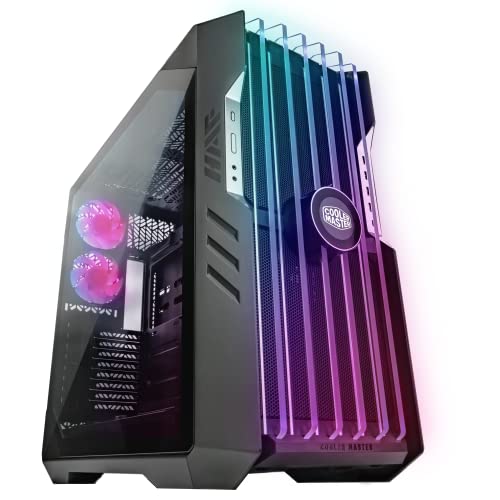
Cooler Master HAF 700 EVO E-ATX Full-Tower
Best for: high-end E-ATX builds needing massive airflow space
- Connectivity
- Type-C
- Motherboard Support
- E-ATX
- Case Type
- Full-Tower
- Included Fans
- 200mm Sickleflow Fans
- Dimensions
- 26.2 × 11.5 × 24.6 inches
- Weight
- 55.3 pounds
View on Amazon: Cooler Master HAF 700 EVO E-ATX Full-Tower (paid link)
The Cooler Master HAF 700 EVO is a full-tower chassis built for massive hardware setups. It features front I/O Type-C connectivity, support for large E-ATX motherboards, and mounts for 200mm fans. An integrated IRIS customizable LCD display sits on the breathable tempered glass front panel. You get tool-less installation features inside a chassis measuring over 26 inches long and weighing 55.33 pounds, making it suitable for heavy-duty builds requiring maximum internal room.
Pros
- Built-in Type-C front connectivity
- Accommodates oversized E-ATX motherboards
- Supports large 200mm cooling fans
- Integrated IRIS customizable LCD display
Cons
- Very heavy frame weighing 55.33 pounds empty
- Massive footprint measuring over 26 inches long and 24 inches high
Good fit if
- You need front Type-C connectivity on an expansive E-ATX chassis.
- You want an integrated front LCD screen and 200mm fan support.
- You have plenty of dedicated physical space for a deep, heavy full-tower.
Skip if
- You need a lightweight or compact case for a small desk.
- You prefer a standard mid-tower chassis size.
Verdict: Cooler Master HAF 700 EVO E-ATX Full-Tower provides Type-C connectivity, E-ATX motherboard support, and an integrated LCD in an expansive chassis. Its heavy 55.33-pound build suits setups where physical footprint is not an issue.

Fractal Design North ATX Mid-Tower Case
Best for: ATX builds needing 140mm fan cooling
- Connectivity
- Type-C
- Motherboard Support
- ATX, mATX, ITX
- Case Type
- Mid Tower
- Side Panel
- Mesh
- Included Fans
- 2x 140 mm Aspect PWM
- Radiator Support
- 360 mm
View on Amazon: Fractal Design North ATX Mid-Tower Case (paid link)
Fractal Design North is an ATX mid-tower chassis featuring front Type-C connectivity and real wood front bars. It comes equipped with two 140mm Aspect PWM intake fans and mesh side panels for ventilation. You get clearance for graphics cards up to 355mm, or 300mm if you install a 360mm front radiator. This layout suits builders wanting dual 140mm airflow, standard ATX hardware support, and front-panel Type-C connectivity in a standard desk footprint.
Pros
- Includes two 140mm Aspect PWM cooling fans
- Front-panel Type-C connectivity
- Supports graphics cards up to 355mm long
- Includes two combined 3.5"/2.5" mounts and two dedicated 2.5" mounts
Cons
- GPU clearance drops to 300mm when using a 360mm front radiator
- No pre-installed rear exhaust fan listed
Good fit if
- You want pre-installed 140mm PWM intake fans with front Type-C access.
- You need standard ATX motherboard support and up to four internal storage drives.
Skip if
- You plan to mount a 360mm front radiator with a graphics card longer than 300mm.
- You require an included rear exhaust fan straight out of the box.
Verdict: Fractal Design North ATX Mid-Tower Case pairs front Type-C access with two 140mm PWM intake fans for direct airflow. It offers solid hardware clearance and four storage drive mounts in a standard mid-tower layout.

Lian Li Lancool 205 Mesh Type-C ATX Case
Best for: ATX airflow builds needing front Type-C
- Connectivity
- Type-C
- Motherboard Support
- ATX, Micro ATX, Mini-ITX
- Case Type
- Mid-Tower
- Side Panel
- Tempered Glass
- Included Fans
- 2x 140mm, 1x 120mm ARGB PWM
- Use
- Gaming
View on Amazon: Lian Li Lancool 205 Mesh Type-C ATX Case (paid link)
The Lian Li Lancool 205 Mesh is a mid-tower chassis featuring a dedicated top-panel USB Type-C port alongside two USB 3.0 Type-A ports. It includes three pre-installed ARGB PWM fans with two 140mm in front and one 120mm at the rear. You get support for ATX, Micro ATX, and Mini-ITX motherboards, making it practical if you need built-in ventilation and modern connectivity.
Pros
- Top I/O panel includes one USB Type-C port and two USB 3.0 Type-A ports
- Three pre-installed ARGB PWM fans with two 140mm front fans and one 120mm rear fan
- Mesh front panel paired with removable magnetic dust filters on top and bottom
- Built-in C/M button provides onboard control for seven lighting colors and modes
Cons
- Does not support larger E-ATX motherboards
- Requires cycling through onboard lighting modes before syncing to the motherboard
Good fit if
- You need top-panel USB Type-C connectivity out of the box
- You want included 140mm and 120mm PWM intake and exhaust fans
- You plan to install an ATX, Micro ATX, or Mini-ITX motherboard
Skip if
- You require support for an E-ATX motherboard
- You prefer a solid front panel over a ventilated mesh design
Verdict: Lian Li Lancool 205 Mesh Type-C ATX Case provides accessible top-panel Type-C connectivity alongside three pre-installed ARGB PWM fans. It is a practical mid-tower option for cooling standard ATX, Micro ATX, or Mini-ITX builds.
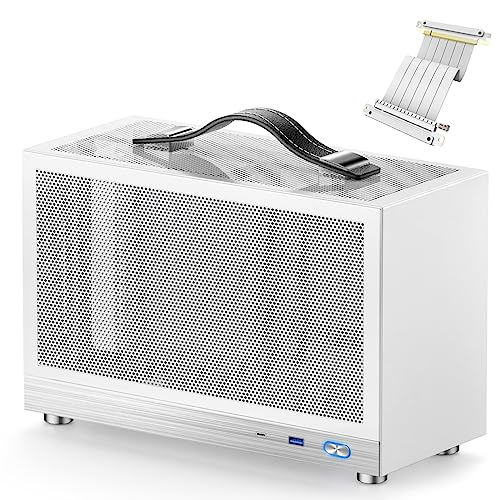
KXRORS Portable Mini-ITX Case
Best for: portable small-form-factor builds needing front Type-C
- Connectivity
- Type-C, USB 3.0
- Motherboard Support
- Mini-ITX
- Side Panel
- Mesh
- Max GPU Length
- ≤ 305mm
- Case Volume
- 8.1L
- Use
- Gaming
View on Amazon: KXRORS Portable Mini-ITX Case (paid link)
This compact 8.1-liter chassis from KXRORS is built for portable Mini-ITX setups. It features a front-panel USB 3.0 Type-C port alongside standard USB 3.0 connectivity for fast peripheral access. Inside, you get dedicated room for a standard 170 by 170 millimeter Mini-ITX motherboard, an SFX power supply up to 130 millimeters, and graphics cards up to 305 millimeters long. It suits you if you need a ventilated, handle-equipped small-form-factor build.
Pros
- Front I/O USB 3.0 Type-C port
- Compact 8.1L volume with built-in top leather handle
- Three-sided mesh panels for cooling ventilation
- Accommodates graphics cards up to 305mm long
- Includes a PCIe 3.0 16X riser extension cable
Cons
- CPU cooler height is capped at 60mm
- Motherboard BIOS requires manual setting to PCIe Gen3 for riser cable operation
- Only fits SFX and SFX-L power supplies up to 130mm
Good fit if
- You want an 8.1L Mini-ITX chassis with an integrated carrying handle.
- You need front-panel USB 3.0 Type-C connectivity on a small-form-factor case.
- You are using a graphics card measuring 305mm or less.
Skip if
- You plan to build with a standard ATX motherboard or ATX power supply.
- You use a CPU cooler taller than 60mm.
- You require PCIe 4.0 speeds directly out of the box without BIOS configuration.
Verdict: KXRORS Portable Mini-ITX Case provides essential front USB 3.0 Type-C connectivity in an ultra-compact 8.1-liter footprint. It delivers solid small-form-factor hardware clearance if your build fits within its 60mm CPU cooler and SFX power limits.

MUSETEX Dual Tempered Glass ATX Mid Tower
Best for: builders wanting included fans and Type-C connectivity
- Connectivity
- Type-C
- Motherboard Support
- ATX
- Case Type
- Mid Tower
- Side Panel
- Tempered Glass
- Included Fans
- 6 PWM ARGB
- Max GPU Length
- 420mm
View on Amazon: MUSETEX Dual Tempered Glass ATX Mid Tower (paid link)
You get a mid-tower ATX chassis equipped with a dedicated USB Type-C port and dual USB 3.0 ports on the front I/O panel. It includes six pre-installed PWM ARGB fans and features dual tempered glass panels giving a 270-degree view. With clearance for 420mm graphics cards and a 360mm top radiator, it suits high-airflow gaming builds that need modern front-panel connectivity right out of the box.
Pros
- Six pre-installed PWM ARGB fans with motherboard control support
- Front I/O features one USB Type-C port and two USB 3.0 ports
- Substantial clearances supporting GPUs up to 420mm and CPU coolers up to 178mm
- Top panel supports liquid cooling radiators up to 360mm
Cons
- Dual tempered glass panels omit a direct front mesh intake
- Motherboard compatibility tops out at ATX with no listed E-ATX support
Good fit if
- You want front-panel Type-C along with dual USB 3.0 ports.
- You need six pre-installed PWM ARGB fans for immediate cooling.
- You plan to install an extra-long graphics card up to 420mm.
Skip if
- You require an E-ATX motherboard form factor.
- You prefer a full front mesh panel for direct linear intake.
Verdict: MUSETEX Mid-Tower ATX Case with Type-C delivers high-speed front I/O alongside six pre-installed PWM ARGB fans. Its dual tempered glass layout accommodates 420mm graphics cards and 360mm liquid radiators.

MUSETEX Mid-Tower ATX Case with 6 ARGB Fans
Best for: showcase ATX builds needing included fans
- Connectivity
- Type-C
- Motherboard Support
- ATX
- Case Type
- Mid Tower
- Side Panel
- Tempered Glass
- Included Fans
- 6 PWM ARGB
- Radiator Support
- 360mm
View on Amazon: MUSETEX Mid-Tower ATX Case with 6 ARGB Fans (paid link)
This white ATX mid-tower chassis pairs front I/O USB 3.2 Type-C connectivity with dual tempered glass panels for a 270-degree view. You get six pre-installed PWM ARGB fans, including two reverse-blade side intakes, plus space for top-mounted 360mm radiators. With clearance for 400mm graphics cards and 176mm CPU coolers, it suits builders who want high-airflow components and modern external connectivity without buying extra case fans.
Pros
- Integrated USB 3.2 Type-C and USB 3.0 ports
- Six pre-installed PWM ARGB cooling fans
- Clearance for GPUs up to 400mm and CPU coolers up to 176mm
- Top mounting support for up to 360mm liquid radiators
Cons
- Wide 11.61-inch footprint requires substantial desk space
- Dual glass panel configuration omits direct front mesh ventilation
Good fit if
- You need a dedicated USB Type-C port on your front I/O panel.
- You want six pre-wired ARGB fans included out of the box.
- You plan to run a high-end graphics card up to 400mm long.
Skip if
- You prefer a full front mesh panel for direct straight-through airflow.
- You have a narrow workspace that cannot accommodate an 11.61-inch wide case.
Verdict: MUSETEX Y6 ATX Mid-Tower Case delivers modern Type-C connectivity, dual-glass viewing, and six pre-installed fans straight out of the box. Its generous interior leaves ample clearance for 400mm graphics cards and 360mm liquid cooling setups.

MUSETEX ATX Mid-Tower Dual Glass Case
Best for: ATX builds needing Type-C and long GPU clearance
- Connectivity
- Type-C
- Motherboard Support
- ATX
- Case Type
- Mid Tower
- Side Panel
- Tempered Glass
- Included Fans
- 3x 120mm
- Radiator Support
- 360mm
View on Amazon: MUSETEX ATX Mid-Tower Dual Glass Case (paid link)
The MUSETEX ATX Mid-Tower Dual Glass Case provides front USB 3.2 Type-C connectivity alongside a dual-chamber chassis layout. You get support for graphics cards up to 400mm, CPU coolers up to 176mm, and top radiators up to 360mm. Three 120mm fans come pre-installed behind dual tempered glass panels. Tool-free snap-on panels simplify your build process. This case fits builders who want high-clearance ATX hardware support and panoramic visibility on their desks.
Pros
- Equipped with USB 3.2 Type-C and USB 3.0 front ports
- Accommodates GPUs up to 400mm and CPU coolers up to 176mm
- Supports up to a 360mm radiator on the top panel
- Includes three pre-installed 120mm fans and magnetic dust filters
Cons
- Wide 11.61-inch footprint requires extra desk space
- Motherboard support maxes out at standard ATX
Good fit if
- You need high-speed USB 3.2 Type-C connectivity on your chassis.
- You mount extra-long graphics cards measuring up to 400mm.
- You want tool-free snap-on panels with a dual tempered glass view.
Skip if
- You require support for oversized E-ATX motherboards.
- You have limited desktop width to spare for a dual-chamber frame.
Verdict: MUSETEX ATX Mid-Tower Dual Glass Case delivers front-panel Type-C connectivity with extensive clearance for 400mm GPUs and 360mm top liquid coolers. Its dual-chamber layout separates the power supply while displaying components across seamless glass panels.

Okinos Aqua 3 Panoramic Micro-ATX Case
Best for: compact Micro-ATX builds needing fast Type-C
- Connectivity
- Type-C
- Motherboard Support
- MATX, ITX
- Case Type
- Micro ATX
- Side Panel
- Tempered Glass
- Included Fans
- 3x 120mm ARGB
- Max GPU Length
- 320mm
View on Amazon: Okinos Aqua 3 Panoramic Micro-ATX Case (paid link)
The Okinos Aqua 3 is a compact chassis built for Micro-ATX and Mini-ITX motherboards. For high-speed connectivity, you get a front-panel USB 3.2 Gen 2 Type-C port rated at 10Gbps alongside dual USB 3.0 ports. The enclosure includes three 120mm 3-pin ARGB fans and a four-port lighting controller. It suits you if you want a panoramic tempered glass display without the footprint of a full ATX tower.
Pros
- Front-panel USB 3.2 Gen 2 Type-C port supports 10Gbps transfer speeds
- Pre-installed with three 120mm ARGB fans and a built-in 4-port ARGB controller
- Accommodates CPU coolers up to 164mm tall and GPUs up to 320mm long
- Quick-release rivet-mounted front and side tempered glass panels
Cons
- Limits motherboard support to Micro-ATX and Mini-ITX form factors
- Pre-installed fans use 3-pin connectors rather than 4-pin PWM
Good fit if
- You build with a Micro-ATX or Mini-ITX motherboard.
- You need a dedicated 10Gbps USB Type-C port on the front panel.
- You want pre-installed ARGB fans paired with a hardware lighting controller.
Skip if
- You need to install a standard ATX or larger motherboard.
- You use graphics cards longer than 320mm.
Verdict: Okinos Aqua 3 Panoramic Micro-ATX Case delivers 10Gbps Type-C connectivity and multi-angle glass panels in a compact footprint. It provides solid clearance for mid-range components along with integrated lighting hardware.

darkFlash ATX Mid-Tower Dual Glass Case
Best for: panoramic liquid cooling builds needing Type-C
- Connectivity
- Type-C
- Case Type
- Mid-Tower
- Side Panel
- Tempered Glass
- Included Fans
- 4x PWM ARGB
- Radiator Support
- 360mm
- Motherboard Support
- ATX
View on Amazon: darkFlash ATX Mid-Tower Dual Glass Case (paid link)
The darkFlash ATX Mid-Tower Dual Glass Case provides front-panel USB Type-C connectivity alongside support for a 360mm radiator and up to 10 total fans. It features a 270-degree dual tempered glass enclosure and arrives with four pre-installed PWM ARGB fans. Top magnetic and side panel dust filters keep debris out. This mid-tower suits you if you want panoramic hardware visibility paired with liquid cooling and modern front I/O.
Pros
- Supports 360mm radiators and up to 10 total cooling fans
- Front I/O panel includes USB Type-C and USB 3.0 ports
- Pre-installed with four PWM ARGB fans
- 270-degree dual tempered glass provides panoramic component views
Cons
- Does not include an RGB hub controller
- Motherboard compatibility stops at standard ATX size
Good fit if
- You want a panoramic glass chassis with 360mm radiator mounting.
- You require front-panel USB Type-C alongside pre-installed PWM ARGB fans.
Skip if
- You require an included hardware RGB controller hub.
- You plan to build with an oversized E-ATX motherboard.
Verdict: darkFlash ATX Mid-Tower Dual Glass Case delivers wide component visibility alongside 360mm radiator support and front-panel Type-C connectivity. It equips you with four PWM ARGB fans right out of the box, though lighting control requires your own motherboard header or hub.

MUSETEX Mid-Tower Dual-Chamber ATX Case
Best for: panoramic builds using high-speed Type-C peripherals
- Connectivity
- Type-C
- Motherboard Support
- ATX, Micro-ATX, Mini-ITX
- Case Type
- Mid Tower
- Side Panel
- Tempered Glass
- Included Fans
- 3 x 120mm Non-ARGB
- Radiator Support
- 360mm
View on Amazon: MUSETEX Mid-Tower Dual-Chamber ATX Case (paid link)
This mid-tower chassis provides front I/O USB 3.2 Type-C connectivity alongside standard USB 3.0 ports. It features a dual-chamber layout with 270-degree column-free tempered glass panels, tool-free snap-on access, and support for back-connect ATX motherboards. With room for 400mm GPUs, 176mm tall CPU coolers, and a 360mm top liquid radiator, it suits you if you want a panoramic display build with modern peripheral access.
Pros
- Front I/O equipped with USB 3.2 Type-C and USB 3.0 ports
- Supports graphics cards up to 400mm and CPU coolers up to 176mm
- Dual-chamber design accommodates back-connect ATX motherboards
- Includes three pre-installed 120mm fans and top 360mm radiator support
Cons
- Pre-installed 120mm fans lack ARGB lighting
- Wide 11.61-inch footprint requires substantial desk or floor space
Good fit if
- You need high-speed USB 3.2 Type-C connectivity directly on the case.
- You plan to build with a back-connect motherboard or a GPU up to 400mm long.
- You want a column-free dual-tempered-glass view of your internal components.
Skip if
- You need pre-installed ARGB lighting straight out of the box.
- You have limited desk width for an 11.61-inch wide dual-chamber case.
Verdict: MUSETEX Mid-Tower Dual-Chamber ATX Case delivers versatile Type-C connectivity alongside broad hardware clearance for 400mm GPUs and back-connect boards. Its 270-degree column-free glass layout highlights your build without sacrificing cooling radiator options.
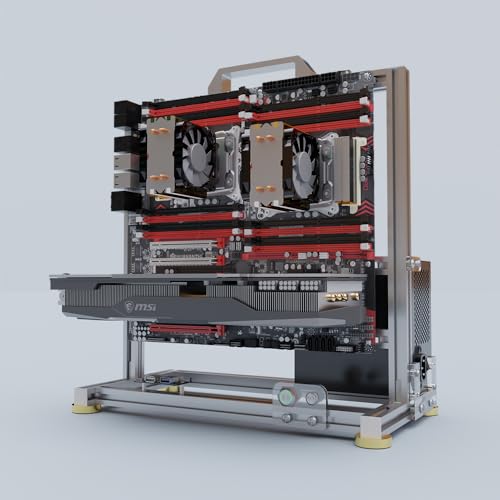
DALAIBUKESI Open Frame E-ATX Chassis
Best for: open-frame dual-CPU server builds
- Connectivity
- Type-C
- Motherboard Support
- ITX, MATX, ATX, EATX
- Case Type
- Open Frame
- Max GPU Length
- Unlimited
- Use
- Server
- Dimensions
- 8.7 × 15 × 15 inches
View on Amazon: DALAIBUKESI Open Frame E-ATX Chassis (paid link)
This DALAIBUKESI chassis is an aluminum open-frame test bench built for large hardware configurations, featuring Type-C connectivity for modern peripherals. Measuring 15 by 15 by 8.7 inches and weighing 4.9 pounds, it accommodates motherboards from Mini-ITX up to Dual CPU Server and E-ATX formats. You get unlimited graphics card length and broad power supply support spanning ATX, SFX, and 1U units, making it suitable for custom server and enthusiast workstation setups.
Pros
- Supports Dual CPU Server and E-ATX motherboards
- Accommodates unlimited graphics card length
- Compatible with ATX, SFX, and 1U power supplies
- Supports both air and liquid cooling setups
Cons
- Open frame provides no dust filtration or enclosed side panels
- Requires complete DIY assembly
Good fit if
- You need to mount a dual-CPU server or E-ATX motherboard on an open bench.
- You run oversized graphics cards that exceed standard enclosed case dimensions.
- You want versatile power supply compatibility for ATX, SFX, or 1U units.
Skip if
- You need a sealed enclosure to block dust and reduce component noise.
- You prefer a pre-assembled case ready for immediate component installation.
Verdict: DALAIBUKESI Open Frame E-ATX Chassis delivers maximum hardware freedom for dual-CPU and E-ATX server configurations without GPU length constraints. It is an effective platform for open-air testing and accessible workstation builds that utilize Type-C connectivity.

darkFlash Curved Glass ATX Mid-Tower
Best for: back-connect BTF builds wanting curved panoramic glass
- Connectivity
- Type-C
- Case Type
- Mid-Tower
- Side Panel
- Tempered Glass
- Included Fans
- 4x ARGB
- Radiator Support
- 360mm
- Motherboard Support
- ATX
View on Amazon: darkFlash Curved Glass ATX Mid-Tower (paid link)
This darkFlash mid-tower computer chassis gives you modern connectivity with a front-panel Type-C port alongside support for both standard and BTF back-plug motherboards. Its structure features a 270-degree curved tempered glass panel, four included ARGB fans, and capacity for dual 360mm radiators with up to ten total fans. It suits you if you want a clean view of internal hardware while routing cables directly behind the motherboard tray.
Pros
- Dedicated I/O panel Type-C port
- Supports back-connect BTF motherboards and standard ATX boards
- Includes 4 pre-installed ARGB fans
- Supports dual 360mm radiators and up to 10 fans
- 270-degree panoramic curved tempered glass panel
Cons
- RGB hub controller is not included
- Chassis width of 18.11 inches takes up significant desk width
Good fit if
- You plan to build with a back-connect BTF motherboard to conceal internal cabling.
- You need front I/O Type-C connectivity along with dual 360mm radiator support.
- You want a panoramic curved glass enclosure with ARGB lighting already installed.
Skip if
- You require an integrated RGB hub controller included in the box.
- You have a narrow workspace that cannot fit an 18.11-inch wide footprint.
Verdict: darkFlash Curved Glass ATX Mid-Tower pairs modern Type-C connectivity with back-connect BTF motherboard support for an uncluttered interior. Its capacity for dual 360mm radiators and large graphics cards makes it a capable foundation for high-end gaming hardware.
Specifications side by side
| Spec | NZXT H510 ATX Mid-Tower Case with USB-C | Fractal Design Torrent Compact ATX Mid-Tower | Fractal Design Terra Mini-ITX Case | Cooler Master HAF 700 EVO E-ATX Full-Tower | Fractal Design North ATX Mid-Tower Case | Lian Li Lancool 205 Mesh Type-C ATX Case | KXRORS Portable Mini-ITX Case | MUSETEX Dual Tempered Glass ATX Mid Tower | MUSETEX Mid-Tower ATX Case with 6 ARGB Fans | MUSETEX ATX Mid-Tower Dual Glass Case | Okinos Aqua 3 Panoramic Micro-ATX Case | darkFlash ATX Mid-Tower Dual Glass Case | MUSETEX Mid-Tower Dual-Chamber ATX Case | DALAIBUKESI Open Frame E-ATX Chassis | darkFlash Curved Glass ATX Mid-Tower |
|---|---|---|---|---|---|---|---|---|---|---|---|---|---|---|---|
| Motherboard Support | Mini-ITX, MicroATX, ATX | ATX | Mini ITX | E-ATX | ATX, mATX, ITX | ATX, Micro ATX, Mini-ITX | Mini-ITX | ATX | ATX | ATX | MATX, ITX | not specified | ATX, Micro-ATX, Mini-ITX | ITX, MATX, ATX, EATX | not specified |
| Case Type | Mid Tower | Mid Tower | Small Form Factor | Full-Tower | Mid Tower | Mid-Tower | not specified | Mid Tower | Mid Tower | Mid Tower | Micro ATX | Mid-Tower | Mid Tower | Open Frame | Mid-Tower |
| Side Panel | Tempered Glass | Tempered Glass | not specified | not specified | Mesh | Tempered Glass | Mesh | Tempered Glass | Tempered Glass | Tempered Glass | Tempered Glass | Tempered Glass | Tempered Glass | not specified | Tempered Glass |
| Included Fans | not specified | not specified | not specified | 200mm Sickleflow Fans | 2x 140 mm Aspect PWM | 2x 140mm, 1x 120mm ARGB PWM | not specified | 6 PWM ARGB | 6 PWM ARGB | 3x 120mm | 3x 120mm ARGB | 4x PWM ARGB | 3 x 120mm Non-ARGB | not specified | 4x ARGB |
| Radiator Support | 240mm | not specified | not specified | not specified | 360 mm | not specified | not specified | not specified | 360mm | 360mm | not specified | 360mm | 360mm | not specified | 360mm |
| Max GPU Length | Up to 381mm | not specified | 322 mm | not specified | 355 mm | not specified | ≤ 305mm | 420mm | 400mm | 400mm | 320mm | not specified | not specified | Unlimited | not specified |
| Case Volume | not specified | not specified | 10.4 L | not specified | not specified | not specified | 8.1L | not specified | not specified | not specified | not specified | not specified | not specified | not specified | not specified |
| Tower Size | Mid-Tower | Mid-Tower | not specified | not specified | Mid-Tower | Mid-Tower | not specified | Mid-Tower | Mid-Tower | Mid-Tower | not specified | Mid-Tower | Mid-Tower | not specified | Mid-Tower |
| Fan Size | not specified | not specified | not specified | 200mm | 140mm | not specified | not specified | not specified | not specified | 120mm | 120mm | not specified | 120mm | not specified | not specified |
| Use | Gaming | Gaming | Gaming | not specified | Gaming | Gaming | Gaming | Gaming | Gaming | Gaming | not specified | Gaming | Gaming | Server | Gaming |
| Lighting | not specified | RGB | not specified | not specified | not specified | ARGB | not specified | ARGB | ARGB | not specified | ARGB | ARGB | ARGB | not specified | ARGB |
| Connectivity | Type-C | Type-C | Type-C | Type-C | Type-C | Type-C | Type-C, USB 3.0 | Type-C | Type-C | Type-C | Type-C | Type-C | Type-C | Type-C | Type-C |
| Connector Type | not specified | not specified | not specified | not specified | not specified | not specified | not specified | not specified | not specified | not specified | 3-Pin | not specified | not specified | not specified | not specified |
| Compatible Device | not specified | not specified | not specified | not specified | not specified | not specified | not specified | not specified | not specified | not specified | not specified | Radiator | not specified | not specified | not specified |
| Dimensions | 16.9 × 8.27 × 18.1 inches | 17.7 × 8.74 × 18.4 inches | 13.5 × 6.02 × 8.58 inches | 26.2 × 11.5 × 24.6 inches | 17.6 × 8.46 × 18.5 inches | 415 × 205 × 485 inches | 5.31 × 12.3 × 7.6 inches | 16.6 × 9.06 × 18.1 inches | 11.6 × 16.5 × 14.5 inches | 16.5 × 11.6 × 14.5 inches | 13.8 × 8.27 × 15.4 inches | 8.6 × 17.8 × 17 inches | 16.5 × 11.6 × 14.5 inches | 8.7 × 15 × 15 inches | 11.2 × 18.1 × 15.6 inches |
| Weight | 14.6 pounds | 20.9 pounds | 8.82 pounds | 55.3 pounds | 20.9 pounds | not specified | 4.41 pounds | 17.6 pounds | not specified | 16.9 pounds | 9.19 pounds | 15 pounds | 15 pounds | 4.9 pounds | 18.9 pounds |
| Size | base | ATX | mITX | E-ATX Full-Tower | ATX | not specified | not specified | 16.57"D x 9.06"W x 18.05"H | 16.54"D x 11.61"W x 14.49"H | 16.54"D x 11.61"W x 14.49"H | not specified | 17.1''L x 8.5''W x 17.8'H | 16.54"D x 11.61"W x 14.49"H | 4.EATX | not specified |
| Color | White | RGB Black - Light tint | Silver | Black | Charcoal Black | LANCOOL 205 MESH RGB - TYPE C - ATX - Pink | S300 White | Black | White | Black | Black | Black | Black | Red | White |
| Model | CA-H510B-W1 | FD-C-TOR1C-02 | FD-C-TER1N-02 | H700E-IGNN-S00 | FD-C-NOR1C-01 | G99.OE764CP.00AM | not specified | K2 | Y6-N5-W | Y6 | OKICC-AQUA3-MATXB-H3BA | DS900 | Y6 | not specified | DPW90 |
Is a PC Case with Type-C Worth It?
A front or top Type-C port gives you direct chassis access for modern peripherals. Instead of routing cables to the back of the case, you connect high-speed hardware right at the front panel. Listed case specifications provide bandwidth rates ranging from USB 3.0 up to 10Gbps and 20Gbps on select models. Having this dedicated connection lets you attach Type-C devices directly without extra converters. It ensures your chassis matches modern peripheral standards across Mini-ITX, Micro-ATX, ATX, and E-ATX form factors.
Worth it if
- You regularly plug high-speed Type-C peripherals directly into your front or top chassis panel.
- You require specific front-panel transfer speeds reaching 10Gbps or 20Gbps for external devices.
Skip it if
- You do not own or use any peripherals that rely on a Type-C connection.
- You do not need high-speed 10Gbps or 20Gbps transfer rates on your case I/O panel.
If you prefer a prebuilt compact system over building in a desktop chassis, compare specifications for a mini PC under 200 instead.
How We Picked These Cases
To build this list of 15 picks for 2026, we selected PC cases that explicitly list USB Type-C connectivity in their official title or specifications. You will find only one model per product family to prevent duplicate sizes or color options from repeating across the guide.
All details come directly from published manufacturer specifications, as products are not physically handled. You can compare options using hardware specs such as motherboard form factors, case dimensions, fan support, and side panel materials. The guide displays products in stock first, so you can easily review currently available cases for your setup.
How to Choose the Best Type-C Case
-
Check Type-C Transfer Speed
Not every Type-C port runs at identical transfer speeds. Some cases supply USB 3.0 speeds, while others reach 10Gbps or 20Gbps bandwidth. You should inspect the specific front-panel Type-C rating if you frequently move large files to high-speed external drives. The Fractal Design Terra, for example, lists 20Gbps Type-C connectivity on its front I/O. Make sure your motherboard features an internal Type-E or USB-C header that matches the case rating, or the port will operate at lower speeds.
-
Verify Maximum GPU Length
Graphics card dimensions vary widely between dual-fan and triple-fan models. Always check the published maximum GPU clearance before you pick a chassis. If you install an oversized graphics card, a compact frame will restrict placement or collide with intake fans. The MUSETEX Dual Tempered Glass ATX Mid Tower accommodates cards up to 420mm long, which leaves ample clearance for modern components. Measure your graphics card length from bracket to tip, and compare it against the chassis clearance spec.
-
Compare Radiator Mounting Space
Liquid cooling requires dedicated radiator mounting brackets along the top, side, or front panels. Check whether the specifications designate support for 120mm, 240mm, or 360mm radiators before buying liquid hardware. The darkFlash ATX Mid-Tower Dual Glass Case lists support for a 360mm radiator alongside its front Type-C port. If you plan to cool your processor with an all-in-one liquid unit, ensure your chosen radiator size matches the chassis mounting points so your tubing and fans fit cleanly.
-
Evaluate Intake Fan Diameters
Cases use various fan sizes to direct airflow across internal components. Standard enclosures rely on 120mm mounts, but options featuring 140mm, 180mm, or 200mm mounts push higher volumes of air through the interior. For instance, the Fractal Design North includes two 140mm PWM intake fans right out of the box. Larger fans move comparable air volume while spinning at lower rotations per minute. Review the listed fan size specifications to confirm your airflow setup matches your thermal needs.
-
Count Included Pre-Installed Fans
A chassis that ships without fans forces you to spend extra time buying and installing cooling units. Review the specifications to confirm how many fans come pre-installed and whether they feature ARGB lighting. The Lian Li Lancool 205 Mesh equips three pre-installed ARGB PWM fans to handle airflow immediately. If you want illuminated hardware without separate controller purchases, verify that the case includes built-in lighting cables and fan headers that connect directly to your system board.
-
Check Physical Weight and Dimensions
Chassis exterior measurements and total weight determine where you can place your assembled computer. Compact setups fit easily on narrow desks, while expansive full-tower enclosures require substantial dedicated surface area or floor positioning. The Cooler Master HAF 700 EVO weighs 55.33 pounds unpopulated and stands over 24 inches tall. Check the listed width, height, and depth specs against your available workspace before you decide on a frame, especially if you plan to move the machine.
Frequently asked questions
Does every motherboard support a case front-panel Type-C port?
No, you must ensure your motherboard includes a dedicated internal USB Type-C header to connect the front-panel port. Standard mid-tower cases like the NZXT H510 or Lian Li Lancool 205 Mesh route their front or top Type-C cables directly to this internal header. If your motherboard lacks this internal connector, the front Type-C port on the chassis will remain inactive unless you install an adapter card.
What fan sizes come pre-installed in high-airflow Type-C cases?
Included fan configurations vary widely depending on the chassis design and cooling focus. For instance, the Fractal Design Torrent Compact includes two 180mm ARGB intake fans, while the Fractal Design North features two 140mm PWM fans. Other cases, such as the Cooler Master HAF 700 EVO, accommodate massive 200mm fans to maximize direct chassis airflow alongside front Type-C connectivity.
Can you find small-form-factor Mini-ITX cases with front Type-C connectivity?
Yes, several compact small-form-factor enclosures integrate Type-C directly into their front panels. The Fractal Design Terra provides 20Gbps Type-C connectivity within a 10.4-liter aluminum chassis that supports 322mm graphics cards. For even smaller footprints, the KXRORS Portable Mini-ITX case offers front Type-C and USB 3.0 access in an 8.1-liter frame with strict limits for 60mm CPU coolers and SFX power supplies.
Which PC cases support back-connect motherboards alongside Type-C?
Certain modern mid-tower models support back-connect motherboard designs to hide interior cabling while maintaining front Type-C access. The darkFlash Curved Glass chassis accommodates back-connect BTF motherboards and dual 360mm radiators. Similarly, the MUSETEX Mid-Tower Dual-Chamber ATX case features back-connect board compatibility alongside clearance for 400mm graphics cards, keeping front I/O wiring separated from the visible main chamber.
What radiator sizes can you install in panoramic Type-C cases?
Most panoramic dual-glass mid-towers on this list support liquid cooling radiators up to 360mm. For example, the darkFlash DS900 mid-tower case pairs front Type-C access with 360mm radiator support and four included PWM ARGB fans. The MUSETEX Y6 mid-tower also accommodates 360mm liquid cooling setups alongside front Type-C ports and clearance for long graphics cards up to 400mm.
Are open-frame chassis available with front Type-C connectivity?
Yes, open-frame options provide direct Type-C connectivity for specialized or workstation builds. The DALAIBUKESI Open Frame E-ATX Chassis includes Type-C connectivity while supporting E-ATX and dual-CPU server motherboard form factors. Its open frame eliminates standard GPU length restrictions, giving you complete access to your hardware for expansive server or multi-processor workstation setups.
How much graphics card clearance do mid-tower cases with Type-C provide?
Modern mid-tower cases with Type-C typically offer extensive clearance for full-length graphics cards. For example, the MUSETEX K2 mid-tower accommodates graphics cards up to 420mm in length. Other mid-tower options, including multiple MUSETEX Y6 models, support GPUs up to 400mm alongside front Type-C access, ensuring compatibility with oversized triple-fan modern cards.