Best PC Cases Under $50 in 2026: 10 Picks Ranked by Specs
As an Amazon Associate we earn from qualifying purchases. Links on this page are affiliate links.
Finding the right PC case under 50 requires balancing chassis dimensions, motherboard support, and cooling mounts. We compared 10 options using the specifications published on their listings to identify the most practical designs for 2026.
The Zalman T6 ATX Mid-Tower Case leads the list with its ATX motherboard support, room for four cooling fans, and a dedicated optical drive bay for standard desktop builds. This guide helps you choose the proper enclosure size, layout, and component clearance for your hardware setup.
Quick picks
The best fit for you
- You need standard desktop compatibility with an optical drive Zalman T6 ATX Mid-Tower Case This ATX mid-tower chassis includes an optical drive bay and holds up to four storage drives.
- You want maximum pre-installed fans and large motherboard support Bgears b-Voguish ATX Case with 6 ARGB Fans It accommodates E-ATX motherboards and includes six pre-installed ARGB cooling fans with a controller hub.
- You need an ultra-compact chassis for Mini-ITX hardware Goodisory 3.8L Mini-ITX Case The steel chassis features a 3.8-liter volume designed specifically for Mini-ITX motherboards.
- You want panoramic tempered glass for Micro-ATX builds MOROVOL Micro-ATX Panoramic Glass PC Case It features 270-degree panoramic tempered glass panels paired with three factory cooling fans.
Our 10 picks

Zalman T6 ATX Mid-Tower Case
Best for: standard desktop builds needing an optical drive
- Motherboard Support
- ATX, mATX, mini-ITX
- Case Type
- Mid Tower
- Included Fans
- 1x 120mm
- Dimensions
- 7.87 × 16.9 × 14.8 inches
- Weight
- 8 pounds
View on Amazon: Zalman T6 ATX Mid-Tower Case (paid link)
The Zalman ATX Mid-Tower with Optical Drive Bay provides a powder-coated steel chassis built for standard ATX, micro-ATX, or mini-ITX builds. You get one preinstalled 120mm rear exhaust fan, mounting space for three additional cooling fans, and a dedicated 5.25-inch external bay for optical media drives. This enclosure suits you if you need traditional storage bays alongside legacy drive support in a standard desk footprint.
Pros
- Dedicated external 5.25-inch drive bay
- Preinstalled 120mm rear exhaust fan
- Supports up to four total cooling fans
- Accommodates ATX, micro-ATX, and mini-ITX motherboards
- Internal bays for two 2.5-inch and two 3.5-inch drives
Cons
- Incompatible with ATX motherboards using side-facing SATA ports
- Includes only one USB 3.0 front port
- Limited to four total cooling fans
Good fit if
- You require an external 5.25-inch bay for an optical drive
- You use a motherboard with top-facing SATA ports
- You need internal space for up to four storage drives
Skip if
- You use an ATX motherboard with side-facing SATA ports
- You need more than one front USB 3.0 port
- You want more than four cooling fans installed
Verdict: Zalman ATX Mid-Tower with Optical Drive Bay provides essential component compatibility and legacy drive support for standard desktop systems. It delivers straightforward steel housing with room for up to four drives and four cooling fans.

Zalman Compact ATX Mid-Tower with Dual Fans
Best for: lightweight ATX builds needing dual included fans
- Motherboard Support
- ATX
- Case Type
- Mid Tower
- Side Panel
- Acrylic
- Included Fans
- 2x 120mm
- Dimensions
- 8.11 × 18 × 15 inches
- Weight
- 7.9 pounds
View on Amazon: Zalman Compact ATX Mid-Tower with Dual Fans (paid link)
This compact ATX mid-tower chassis supports standard ATX motherboards and comes equipped with two 120mm fans. It features a full acrylic tinted side panel and an airflow-focused front bezel design. Weighing 7.9 pounds with an all-black coated frame, it gives you a functional layout for standard desktop builds. You will find it well suited if you need full-size motherboard support in a smaller footprint with out-of-the-box cooling.
Pros
- Includes two 120mm fans preinstalled
- Supports standard ATX motherboards
- Full tinted acrylic side panel
- Lightweight 7.9-pound frame
Cons
- Uses acrylic instead of scratch-resistant tempered glass
- Limited to two preinstalled fans out of the box
Good fit if
- You want an ATX-compatible chassis with two preinstalled 120mm fans.
- You prefer a lightweight tower weighing under eight pounds.
- You want a tinted side panel to view your internal components.
Skip if
- You require a tempered glass side panel rather than acrylic.
- You need more than two cooling fans included from the factory.
Verdict: Zalman Compact ATX Mid-Tower Case provides standard ATX motherboard compatibility and dual 120mm fans in a lightweight frame. It delivers essential airflow and component visibility without unnecessary bulk.
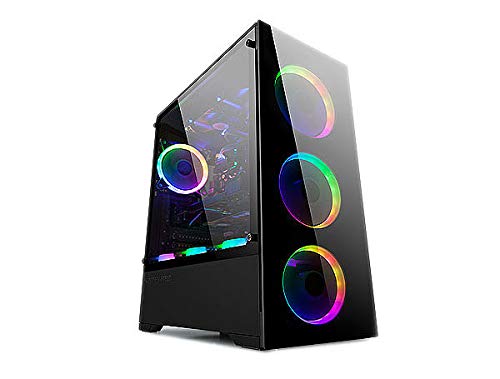
Bgears b-Voguish ATX Case with 6 ARGB Fans
Best for: maximum pre-installed fans and large motherboard support
- Motherboard Support
- E-ATX, ATX, MicroATX, ITX
- Case Type
- ATX
- Included Fans
- 6x 120mm ARGB
- Max GPU Length
- 380mm
- Use
- Gaming
- Connectivity
- USB 3.0
View on Amazon: Bgears b-Voguish ATX Case with 6 ARGB Fans (paid link)
The Bgears b-Voguish is an ATX chassis built for airflow and large components. It comes equipped with six pre-installed 120mm ARGB fans and a 10-channel hub with remote control. You get room for graphics cards up to 380mm and support for motherboards ranging from Mini-ITX up to E-ATX. This setup suits you if you want extensive cooling hardware included from the start.
Pros
- Includes six 120mm ARGB fans
- 10-channel fan hub with remote control included
- Supports motherboards up to E-ATX
- Accommodates graphics cards up to 380mm long
Cons
- Motherboard sync cable must be purchased separately
- Front panel includes only one USB 3.0 port alongside two USB 2.0 ports
Good fit if
- You want six pre-installed ARGB fans with a dedicated controller hub.
- You are building with an E-ATX motherboard or a long GPU up to 380mm.
Skip if
- You need motherboard ARGB software sync straight out of the box.
- You require multiple front-panel USB 3.0 ports.
Verdict: Bgears b-Voguish ATX Case with 6 ARGB Fans provides complete cooling coverage and generous clearance for E-ATX motherboards and long graphics cards. Its bundled 10-port hub and remote handle fan speed and lighting control without requiring extra controller hardware.
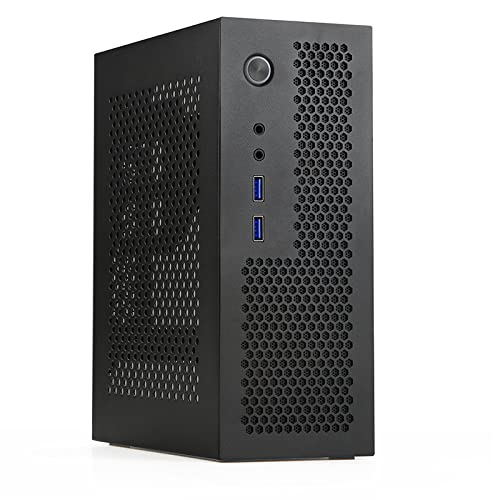
Goodisory 3.8L Mini-ITX Case
Best for: ultra-portable Mini-ITX desktop builds
- Motherboard Support
- Mini-ITX
- Case Volume
- 3.8L
- Dimensions
- 7.4 × 3.5 × 9 inches
- Weight
- 2.6 pounds
View on Amazon: Goodisory 3.8L Mini-ITX Case (paid link)
The Goodisory Mini-ITX 3.8L Compact PC Case is a small-form-factor chassis measuring 9 by 7.4 by 3.5 inches and weighing 2.6 pounds. It accommodates a Mini-ITX motherboard and a compact Flex power supply. Front panel ports include two USB 3.0 ports and HD audio jacks. Depending on your top drive selection, CPU cooler clearance ranges from 45mm to 75mm. This setup suits you if you need a portable desktop for travel or tight spaces.
Pros
- Compact 3.8-liter volume and lightweight 2.6-pound frame
- Front I/O features two USB 3.0 ports and HD audio
- Built-in cutouts for two Wi-Fi antenna mounts
- Ventilation holes across panels including the front
Cons
- Requires a Flex power supply rather than standard ATX
- Limited to a single PCIe expansion slot
- CPU cooler clearance restricted to a maximum of 75mm
Good fit if
- You build with a Mini-ITX board and a Flex power supply.
- You want a 3.8-liter enclosure you can pack into luggage or a backpack.
- You use low-profile CPU coolers under 75mm.
Skip if
- You plan to use a standard ATX power supply.
- You require more than one PCIe expansion card.
- You need a CPU cooler taller than 75mm.
Verdict: Goodisory Mini-ITX 3.8L Compact PC Case provides an ultra-dense 3.8-liter steel enclosure tailored for Mini-ITX motherboards and Flex power supplies. It delivers essential front connectivity and ventilation holes for ultra-compact desktop builds.

MOROVOL Mid-Tower Mesh ATX Case
Best for: out-of-the-box multi-fan airflow on ATX builds
- Motherboard Support
- ATX, Micro-ATX, Mini-ITX
- Case Type
- Mid Tower
- Side Panel
- Tempered Glass
- Included Fans
- 4x 120mm RGB
- Max GPU Length
- 300mm
- Use
- Gaming
View on Amazon: MOROVOL Mid-Tower Mesh ATX Case (paid link)
The MOROVOL ATX Mid-Tower with 4 RGB Fans is a standard ATX chassis featuring a mesh front panel and a tempered glass side window. It includes four pre-installed 120mm RGB fans to supply direct internal airflow. Inside, you get space for motherboards up to ATX, graphics cards up to 300mm, and CPU coolers up to 155mm. This case suits you if you want a complete multi-fan layout right out of the box.
Pros
- Four pre-installed 120mm RGB cooling fans
- Tempered glass side panel for viewing interior components
- Mesh front panel structured for direct ventilation
- Mounting space for two 2.5-inch SSDs and two 3.5-inch HDDs
Cons
- RGB lighting is fixed and not addressable
- Maximum CPU cooler height is limited to 155mm
- GPU clearance is restricted to 300mm
Good fit if
- You want four pre-installed case fans included with your chassis.
- You build with a standard ATX, Micro-ATX, or Mini-ITX motherboard.
- You prefer a tempered glass side panel to show your hardware.
Skip if
- You require addressable or customizable RGB lighting.
- You plan to install a graphics card longer than 300mm.
- You use a CPU tower cooler taller than 155mm.
Verdict: MOROVOL ATX Mid-Tower with 4 RGB Fans delivers four built-in fans, a front mesh panel, and tempered glass for ATX setups. It requires planning your build around its 300mm graphics card and 155mm cooler limits.

Apevia Phenom Micro-ATX Case with 3 ARGB Fans
Best for: Micro-ATX builders wanting synchronized ARGB lighting
- Motherboard Support
- Micro-ATX
- Side Panel
- Tempered Glass
- Included Fans
- 3x 120mm ARGB
- Radiator Support
- 240mm
- Max GPU Length
- 340mm
- Use
- Gaming
View on Amazon: Apevia Phenom Micro-ATX Case with 3 ARGB Fans (paid link)
The Apevia Phenom is a Micro-ATX mini-tower designed for compact setups that need addressable lighting out of the box. You get three pre-installed 120mm ARGB fans controllable via a top-panel button or a 3-pin motherboard header. Dual tempered glass panels showcase your components, while the interior accommodates graphics cards up to 340mm long and CPU coolers up to 155mm tall. It suits builders wanting integrated ARGB and modern front-panel connectivity.
Pros
- Three pre-installed 120mm ARGB fans with 3-pin motherboard sync
- Supports graphics cards up to 340mm in length
- Dual tempered glass front and side panels
- Front support for a 240mm liquid cooling radiator
Cons
- Maximum CPU cooler height is limited to 155mm
- Does not support standard ATX motherboards
Good fit if
- You want out-of-the-box ARGB fans with motherboard sync support.
- You plan to build with a Micro-ATX motherboard and a long GPU up to 340mm.
- You prefer dual tempered glass panels for viewing internal hardware.
Skip if
- You are building with a full-size ATX motherboard.
- You plan to install a CPU air cooler taller than 155mm.
Verdict: Apevia Phenom Micro-ATX Case with 3 ARGB Fans provides solid component clearance and triple addressable lighting fans for Micro-ATX builds. It balances dual-glass styling with room for a 240mm radiator and up to 340mm graphics cards.

MOROVOL Micro-ATX Panoramic Glass PC Case
Best for: Micro-ATX builds needing panoramic glass views
- Motherboard Support
- Micro-ATX
- Case Type
- Mid-Tower
- Side Panel
- Tempered Glass
- Included Fans
- 3
- Use
- Gaming
- Connectivity
- USB 3.0
View on Amazon: MOROVOL Micro-ATX Panoramic Glass PC Case (paid link)
The MOROVOL Micro-ATX Panoramic Glass Case gives you a three-sided 270-degree tempered glass view of your internal hardware. It supports Micro-ATX motherboards and measures 13.39 inches deep, 10.87 inches wide, and 12.44 inches high. Three pre-installed fans provide ready cooling straight from the box, alongside a front-panel USB 3.0 port. This chassis suits you if you want a compact desktop showcase with immediate multi-fan airflow.
Pros
- 270-degree three-sided panoramic tempered glass panel
- Three pre-installed fans included out of the box
- Front-panel USB 3.0 port for peripheral connectivity
Cons
- Supports Micro-ATX motherboards only, excluding full ATX boards
- Lists only a single USB 3.0 port on the front panel
Good fit if
- You want a three-sided panoramic glass enclosure for your hardware.
- You build with a Micro-ATX motherboard and want pre-installed fans.
Skip if
- You need compatibility with a standard full-size ATX motherboard.
- You require multiple front-panel USB 3.0 ports.
Verdict: MOROVOL Micro-ATX Panoramic Glass Case provides a wide 270-degree multi-side view with three cooling fans ready out of the box. It gives Micro-ATX builders a dedicated display chassis without requiring separate fan purchases.

DALAIBUKESI Mini-ITX Open Frame Chassis
Best for: open-frame Mini-ITX builds requiring Type-C connectivity
- Motherboard Support
- ITX, MATX, ATX, EATX
- Case Type
- Open Frame
- Max GPU Length
- Unlimited
- Connectivity
- Type-C
- Dimensions
- 7.9 × 9.4 × 9.4 inches
- Weight
- 4 pounds
View on Amazon: DALAIBUKESI Mini-ITX Open Frame Chassis (paid link)
This open-frame aluminum chassis accommodates Mini-ITX motherboards within a 9.4 by 9.4 by 7.9-inch footprint. You get dedicated Type-C connectivity alongside support for ATX, SFX, and 1U power supplies. Because the frame lacks outer panels, your graphics card length remains completely unrestricted, and you can mount either air or liquid CPU coolers. It suits you if you want a compact bench-style rig with direct component access.
Pros
- Integrated Type-C connectivity
- Unlimited graphics card clearance
- Compatible with ATX, SFX, and 1U power supplies
- Supports both air and water CPU cooling hardware
Cons
- Requires manual frame assembly
- Lacks enclosed side panels and dust filtration
Good fit if
- You need Type-C connectivity on an open frame setup.
- You use an oversized graphics card with no length constraints.
- You want flexible power supply mounting for ATX, SFX, or 1U units.
Skip if
- You require an enclosed case to block dust.
- You want a chassis that comes pre-assembled out of the box.
Verdict: DALAIBUKESI Mini-ITX Open Frame Chassis delivers unrestricted GPU clearance and modern Type-C connectivity for bench-style setups. It suits builders who want an exposed, compact layout with versatile power supply support.

Trunab ATX PC Tower Carrying Bag
Best for: transporting ATX and Micro-ATX desktop towers
- Motherboard Support
- ATX
- Dimensions
- 20.5 × 9.8 × 19 inches
- Weight
- 2.89 pounds
View on Amazon: Trunab ATX PC Tower Carrying Bag (paid link)
This Trunab product is a padded transport bag designed to carry an existing ATX or Micro-ATX desktop tower rather than a standalone chassis. It features interior dimensions of 20 by 9 by 18.5 inches, an outer nylon shell, and PE foam padding. You get dedicated storage pockets for a full-size keyboard, cables, and drives. It suits you if you already own a system and need a backpack harness to transport your setup.
Pros
- Interior fits towers up to 20 x 9 x 18.5 inches
- Padded shoulder straps with buckle chest strap and top handle
- Six accessory pockets include dedicated full-size keyboard sleeve
- Nylon exterior with PE foam padding and scratch-proof bottom
Cons
- Fabric transport bag rather than a rigid computer enclosure
- Cannot accommodate towers exceeding 20 inches in length or 18.5 inches in height
Good fit if
- You need a portable carrier for a mid-tower ATX or Micro-ATX PC.
- You want built-in exterior pockets to pack a keyboard, cables, and drives.
Skip if
- You need an actual computer case to mount PC components.
- Your PC tower exceeds 20 by 9 by 18.5 inches.
Verdict: Trunab ATX PC Tower Carrying Bag is a protective nylon transport pack for mobile PC setups rather than a bare computer enclosure. It offers dedicated peripheral storage and padded straps to move complete ATX or Micro-ATX towers.

DALAIBUKESI DIY Aluminum Open Frame Chassis
Best for: open-air server setups and hardware test benches
- Motherboard Support
- ITX, M-ATX, ATX, E-ATX
- Case Type
- Test Bench
- Max GPU Length
- Unlimited
- Use
- Server
- Dimensions
- 7.9 × 11.8 × 11 inches
- Weight
- 4.41 pounds
View on Amazon: DALAIBUKESI DIY Aluminum Open Frame Chassis (paid link)
This DALAIBUKESI open-frame aluminum chassis serves as an open test bench or server frame. Measuring 11.8 by 11 by 7.9 inches and weighing 4.4 pounds, it accommodates graphics cards of unlimited length. You get broad component versatility with support for ATX, SFX, and 1U power supplies, alongside air or water CPU cooling. It suits you if you need accessible hardware mounting for server builds or regular component swaps.
Pros
- Accommodates graphics cards of unlimited length
- Supports ATX, SFX, and 1U power supplies
- Supports both water and air cooling setups
- Weighs 4.41 pounds with an open aluminum structure
Cons
- Requires DIY manual assembly
- Open frame provides no dust filtration or enclosed side panels
- No pre-installed cooling fans or front-panel ports listed
Good fit if
- You need an open-frame server chassis with unlimited graphics card clearance.
- You use an ATX, SFX, or 1U power supply in your build.
- You want an open test bench that supports water or air CPU cooling.
Skip if
- You want an enclosed PC case with pre-installed intake fans and dust filters.
- You prefer a pre-assembled chassis ready out of the box.
Verdict: DALAIBUKESI DIY Aluminum Open Frame Chassis delivers versatile power supply support and unrestricted GPU length for open-air server builds. It provides a lightweight aluminum layout if you need accessible hardware testing without panel constraints.
Specifications side by side
| Spec | Zalman T6 ATX Mid-Tower Case | Zalman Compact ATX Mid-Tower with Dual Fans | Bgears b-Voguish ATX Case with 6 ARGB Fans | Goodisory 3.8L Mini-ITX Case | MOROVOL Mid-Tower Mesh ATX Case | Apevia Phenom Micro-ATX Case with 3 ARGB Fans | MOROVOL Micro-ATX Panoramic Glass PC Case | DALAIBUKESI Mini-ITX Open Frame Chassis | Trunab ATX PC Tower Carrying Bag | DALAIBUKESI DIY Aluminum Open Frame Chassis |
|---|---|---|---|---|---|---|---|---|---|---|
| Motherboard Support | ATX, mATX, mini-ITX | ATX | E-ATX, ATX, MicroATX, ITX | Mini-ITX | ATX, Micro-ATX, Mini-ITX | Micro-ATX | Micro-ATX | ITX, MATX, ATX, EATX | not specified | ITX, M-ATX, ATX, E-ATX |
| Case Type | Mid Tower | Mid Tower | ATX | not specified | Mid Tower | not specified | Mid-Tower | Open Frame | not specified | Test Bench |
| Side Panel | not specified | Acrylic | not specified | not specified | Tempered Glass | Tempered Glass | Tempered Glass | not specified | not specified | not specified |
| Included Fans | 1x 120mm | 2x 120mm | 6x 120mm ARGB | not specified | 4x 120mm RGB | 3x 120mm ARGB | 3 | not specified | not specified | not specified |
| Radiator Support | not specified | not specified | not specified | not specified | not specified | 240mm | not specified | not specified | not specified | not specified |
| Max GPU Length | not specified | not specified | 380mm | not specified | 300mm | 340mm | not specified | Unlimited | not specified | Unlimited |
| Case Volume | not specified | not specified | not specified | 3.8L | not specified | not specified | not specified | not specified | not specified | not specified |
| Tower Size | Mid-Tower | Mid-Tower | not specified | not specified | Mid-Tower | not specified | not specified | not specified | not specified | not specified |
| Fan Size | 120mm | 120mm | 120mm | not specified | not specified | 120mm | not specified | not specified | not specified | not specified |
| Use | not specified | not specified | Gaming | not specified | Gaming | Gaming | Gaming | not specified | not specified | Server |
| Lighting | not specified | not specified | ARGB | not specified | RGB | ARGB | not specified | not specified | not specified | not specified |
| Connectivity | not specified | not specified | USB 3.0 | not specified | USB 3.0 | not specified | USB 3.0 | Type-C | not specified | not specified |
| Dimensions | 7.87 × 16.9 × 14.8 inches | 8.11 × 18 × 15 inches | 15.9 × 8.07 × 19.4 inches | 7.4 × 3.5 × 9 inches | 14.6 × 7.28 × 16.7 inches | 15.4 × 7.87 × 15.2 inches | 13.4 × 10.9 × 12.4 inches | 7.9 × 9.4 × 9.4 inches | 20.5 × 9.8 × 19 inches | 7.9 × 11.8 × 11 inches |
| Weight | 8 pounds | 7.9 pounds | not specified | 2.6 pounds | not specified | 11.6 pounds | 10.7 pounds | 4 pounds | 2.89 pounds | 4.41 pounds |
| Size | T6 | Mid Tower | not specified | not specified | Large Size | PHENOM BLACK | 13.39"D x 10.87"W x 12.44"H | 1.ITX | 20.5" L x 20" W x 19" H | 2.M-ATX |
| Color | Black | S4 | Black | Black | black | Black | Black | Black | Black | Black |
| Model | T6 | S4 | BG01725 | not specified | 621 | PHENOM-BK | V3 | not specified | 1 | not specified |
Specification trade-offs to consider Under $50
Cases Under $50 provide core motherboard support across Mini-ITX, Micro-ATX, and ATX layouts. However, published specifications show clear functional limits. Connectivity centers on USB 3.0 ports, with modern Type-C appearing on only one model. Cooling options restrict you to 120mm fan sizes, and liquid cooling radiator support appears on only a single chassis with a 240mm mount. Enclosures also present specific component clearances, such as 300mm graphics card limits, 155mm cooler height ceilings, or specialized Flex power supply requirements.
- Radiator support: only one chassis documents a 240mm liquid cooling mount
- Connectivity: Type-C ports appear on only one option, with most utilizing USB 3.0
- Fan size: cooling mounts cap strictly at 120mm across listed specifications
- Component clearance: select models restrict graphics card lengths to 300mm
When your chosen chassis lacks preinstalled cooling, you can compare specifications for a fan under 50 to match its mount sizes and CFM ratings.
How We Picked These Cases
This guide compiles 10 computer cases from listings matching Under $50 for 2026. You see only one size or variant per product family to keep selections distinct. All details come directly from published specifications and feature lists on the listings. You can evaluate motherboard support, fan sizes, and frame dimensions through these documented measurements.
Products in stock show first so you find ready hardware quickly. Stock figures refresh at least daily on the page. A case qualifies for this guide whenever it falls into Under $50. Items move in or out of the list as listings update.
Key Specifications to Check Before Buying
-
Verify Graphics Card Clearance
Check internal clearances before picking hardware. Compact enclosures frequently limit the length of your graphics card and the height of your CPU air cooler. For instance, the MOROVOL Mid-Tower Mesh ATX Case caps graphics card length at 300mm and cooler height at 155mm. If you plan to install a triple-fan graphics card or a tall tower cooler, compare these dimensions against your components. Selecting a chassis without sufficient clearance prevents your side panels from closing properly or blocks front intake airflow entirely.
-
Inspect Radiator Mount Support
Examine radiator mounting specifications if you plan to use an all-in-one liquid cooler instead of standard air cooling. Not all budget enclosures provide clearance for water-cooling hardware, even if they support multiple case fans. Look for dedicated radiator dimensions on the top or front panels. The Apevia Phenom Micro-ATX Case lists clearance for a 240mm radiator alongside its case fan mounts. Choosing a model with verified radiator support prevents clearance conflicts with your motherboard heatsinks and memory modules during setup.
-
Confirm Power Supply Compatibility
Match your power supply form factor to the chassis specifications before finalizing your build. Standard mid-tower cases accept standard ATX power supplies, but compact enclosures often deviate from this standard. For example, the Goodisory 3.8L Mini-ITX Case requires a specialized Flex power supply to fit within its small footprint. Verifying power supply specifications ensures you do not buy a unit that exceeds chassis depth limits or lacks mounting holes. Check the specifications for exact power supply dimensions and mounting brackets.
-
Check Front Panel Ports
Review the front panel connectivity specifications to confirm compatibility with your daily peripherals. Most budget chassis feature standard USB 3.0 and USB 2.0 Type-A ports, which match older peripheral cables. If you rely on newer external drives or mobile devices, search the specifications for reversible Type-C ports. The DALAIBUKESI Mini-ITX Open Frame Chassis includes modern Type-C connectivity directly on the frame. Choosing a case with your required port layout eliminates the need for external adapter hubs on your desk.
-
Assess Bundled Fan Hardware
Check the quantity and control method of pre-installed fans to simplify airflow management. While some enclosures come with unlighted fans, others bundle lighting controllers to streamline installation. The Bgears b-Voguish ATX Case includes a ten-port fan hub and remote control to manage its lighting and fan speeds directly. If your motherboard has limited fan headers or lacks addressable lighting headers, selecting a chassis with an integrated control hub saves motherboard connections and eliminates the need for separate fan splitter cables.
-
Evaluate Side Panel Material
Examine side panel specifications based on whether you prefer component display or structural durability. Solid steel panels offer durable protection and hide internal cable routing, while tempered glass exposes internal hardware and lighting. If your priority is viewing internal components from multiple angles, check for wraparound glass layouts. The MOROVOL Micro-ATX Panoramic Glass PC Case provides a 270-degree view using dual glass panels. Consider your workspace environment, as glass panels require careful handling during routine maintenance and cleaning.
Frequently asked questions
Which PC cases include pre-installed fans?
Multiple models on this list come with factory-installed cooling fans. The Bgears b-Voguish includes six addressable RGB fans with a ten-port hub. The MOROVOL Mesh Mid-Tower comes with four RGB fans, while the Apevia Phenom and MOROVOL Panoramic Glass models supply three fans each. The Zalman S4 includes two 120mm fans.
Can you install liquid cooling radiators in these budget chassis?
Some models support liquid cooling radiators based on published dimensions and component specs. The Apevia Phenom Micro-ATX chassis specifically accommodates a 240mm radiator alongside its three addressable RGB fans. In contrast, smaller selections like the Goodisory 3.8L enclosure rely on compact air cooling due to their dense dimensions and Flex power supply constraints.
Are open frame chassis suitable for regular PC builds?
Open frame designs serve specific needs such as hardware test benches and server setups. The DALAIBUKESI DIY Aluminum Open Frame supports large E-ATX boards with unrestricted graphics card clearance. The DALAIBUKESI Mini-ITX Open Frame adds Type-C connectivity for bench setups. However, open frames lack exterior side panels, leaving components exposed compared to enclosed steel towers.
Which cases support an internal optical drive?
You can install an optical disc drive in the Zalman T6 ATX Mid-Tower Case. Its chassis specifications feature a dedicated optical drive bay alongside internal drive mounts accommodating up to four storage drives. Most modern gaming enclosures omit optical bays to prioritize front mesh airflow panels or glass displays, making the Zalman T6 a dedicated choice for physical media.
How do you control RGB and ARGB lighting on these cases?
Lighting control depends on the included hardware specified for each chassis. The Bgears b-Voguish bundles a ten-port hub and a dedicated remote control to manage lighting profiles and fan speeds directly. Other models, such as the MOROVOL Mesh case and Apevia Phenom, feature integrated RGB or ARGB fans that connect to your motherboard lighting headers or internal controls.
What power supply form factors do compact Mini-ITX cases require?
Compact Mini-ITX chassis often require specialized power supplies rather than standard ATX units. The Goodisory 3.8L Mini-ITX case specifically requires a Flex power supply to fit within its 3.5-inch width and 7.4-inch length. Meanwhile, open-frame options like the DALAIBUKESI Mini-ITX specify versatile power supply support that can accommodate hardware without restrictive enclosure walls.
What is the difference between standard tempered glass and panoramic glass cases?
Standard tempered glass models, like the MOROVOL Mid-Tower Mesh, feature a single transparent side panel paired with a ventilated front panel. Panoramic designs, such as the MOROVOL Micro-ATX Panoramic Glass case, offer a 270-degree view spanning multiple glass sides. Panoramic cases emphasize complete internal hardware visibility from multiple angles while still providing three pre-installed cooling fans.