Best Mid-Tower PC Cases in 2026: 15 Picks Ranked by Specs
As an Amazon Associate we earn from qualifying purchases. Links on this page are affiliate links.
A mid tower PC case balances internal hardware clearance with desk space for your build. We compared 15 products, ranking each option based on the specifications published on the listings.
The Thermaltake Versa H21 ATX Mid Tower earns the top spot because it combines standard ATX motherboard support with tool-free mounting and perforated ventilation panels. These technical details show you exact dimensions, cooling options, and drive capacities across each chassis. This guide helps you decide which enclosure matches your hardware dimensions, cooling requirements, and port preferences.
Quick picks
The best fit for you
- You need standard ATX support with mesh front ventilation Thermaltake Versa H21 ATX Mid Tower Perforated ventilation panels and tool-free mounting accommodate standard ATX components with direct airflow.
- You build large E-ATX systems with heavy liquid cooling ASUS ROG Strix Helios RGB Mid-Tower Case It supports E-ATX motherboards, four pre-installed 140mm fans, and 420mm liquid cooling radiators.
- You want modern front-panel USB Type-C connectivity NZXT H510 ATX Mid-Tower Case with USB-C Its front I/O panel features USB Type-C connectivity combined with integrated internal cable management channels.
- You need dedicated space for an internal optical drive Zalman T6 ATX Mid-Tower Case The chassis provides a dedicated 5.25-inch external bay for optical media drives.
Our 15 picks

Thermaltake Versa H21 ATX Mid Tower
Best for: standard ATX builds needing mesh airflow
- Tower Size
- Mid-Tower
- Motherboard Support
- ATX
- Case Type
- Mid Tower
- Dimensions
- 18.7 × 8.2 × 16.9 inches
- Weight
- 9.3 pounds
View on Amazon: Thermaltake Versa H21 ATX Mid Tower (paid link)
The Thermaltake Versa H21 is an SPCC steel ATX mid-tower chassis. It measures 16.9 inches tall, 8.2 inches wide, and 18.7 inches long, weighing 9.3 pounds. The chassis features perforated metal mesh on the front and top panels, elevated feet for airflow, and tool-free drive installation. You get front-top connectivity including one USB 3.0 port and one USB 2.0 port. It suits you if you need a standard ATX enclosure with liquid cooling support.
Pros
- Perforated metal mesh front and top panels for ventilation
- Tool-free drive bay installation design
- Support for standard ATX motherboards and liquid cooling
- Front-top I/O with USB 3.0 and USB 2.0 ports
Cons
- Only one USB 3.0 port on the front panel
- No USB Type-C front-panel port
Good fit if
- You build with a standard ATX motherboard.
- You prefer tool-free installation for your components.
- You want top and front perforated mesh panels for airflow.
Skip if
- You need multiple front-panel USB 3.0 or USB Type-C connections.
- You require a larger case format than standard mid-tower dimensions.
Verdict: Thermaltake Versa H21 ATX Mid-Tower Case delivers essential ATX support with tool-free mounting and perforated ventilation panels. It covers fundamental cooling and hardware mounting requirements without unnecessary bulk.
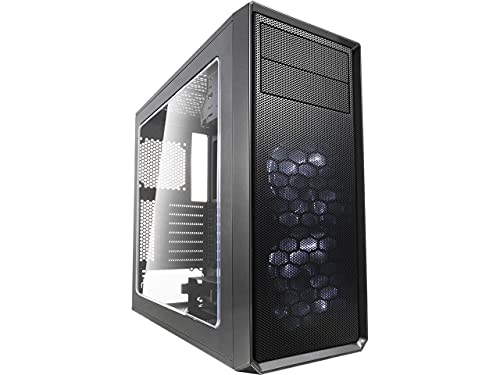
Fractal Design Focus G ATX Mid Tower
Best for: ATX setups needing preinstalled white LED cooling
- Tower Size
- Mid-Tower
- Motherboard Support
- ATX
- Case Type
- Mid Tower
- Side Panel
- Window
- Included Fans
- 2x 120mm White LED
- Max GPU Length
- up to 380 mm
View on Amazon: Fractal Design Focus G ATX Mid Tower (paid link)
The Fractal Design Focus G White LED Mid-Tower provides out-of-the-box illumination with two preinstalled 120 mm white LED fans. You get mounting room for up to six fans, filtered intakes at the front, top, and base, and clearance for graphics cards up to 380 mm long. With support for standard ATX motherboards and two universal drive bays, this mid-tower suits your build if you want clean airflow, basic drive expansion, and subtle single-color lighting.
Pros
- Two preinstalled 120 mm white LED intake fans
- Clearance for graphics cards up to 380 mm long
- Dust filtration on front, top, and base intakes
- Supports up to six total fan mounting positions
Cons
- Lighting is limited to single-color white LEDs
- Capacity is restricted to three total storage drive mounts
Good fit if
- You want preinstalled white LED fans out of the box.
- You need room for graphics cards measuring up to 380 mm.
- You prefer dust filters covering front, top, and base intakes.
Skip if
- You require multi-color addressable RGB lighting.
- You plan to install more than three storage drives.
Verdict: Fractal Design Focus G White LED Mid-Tower balances component clearance with dual preinstalled illuminated fans for reliable ATX airflow. It accommodates 380 mm graphics cards and protects components using triple intake filtration.

Fractal Design Meshify C ATX Mid Tower
Best for: compact ATX builds prioritizing front-to-back airflow
- Tower Size
- Mid-Tower
- Motherboard Support
- ATX
- Case Type
- Mid Tower
- Included Fans
- 2x 120mm
- Connectivity
- USB 3.0
- Dimensions
- 16.1 × 8.35 × 17.8 inches
View on Amazon: Fractal Design Meshify C ATX Mid Tower (paid link)
The Fractal Design Meshify C is an ATX mid-tower case designed for high airflow in a compact footprint. It measures 17.83 inches tall and 16.10 inches long, featuring an angular mesh front panel and an open interior layout. You get two preinstalled 120 mm fans, storage space for up to five drives, and 35 mm of cable routing clearance behind the motherboard. It suits you if you want focused cooling without extra bulk.
Pros
- Includes two preinstalled Dynamic X2 GP-12 120 mm fans
- Up to 35 mm of cable routing depth behind the motherboard tray
- Accommodates up to five storage drives with rubber grommets
- Angular mesh front panel with integrated filters for intake
Cons
- Front I/O features USB 3.0 without a USB-C port listed
- Motherboard support limited to standard ATX without E-ATX compatibility
Good fit if
- You need a compact ATX mid-tower under 18 inches tall.
- You prioritize direct airflow from front mesh to rear exhaust.
- You require mounting trays for up to five storage drives.
Skip if
- You need native front-panel USB Type-C connectivity.
- You intend to build with a larger E-ATX form factor board.
Verdict: Fractal Design Meshify C Compact Mid-Tower delivers structured front-to-back ventilation and generous cable routing space in a shortened ATX chassis. It remains a balanced, space-efficient option among 15 picks in 2026.
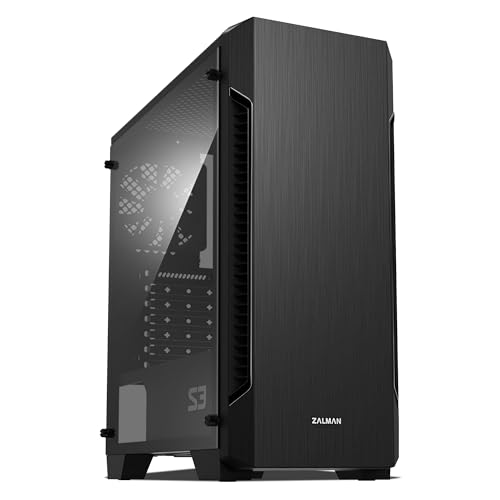
Zalman S3 Compact ATX Mid-Tower Case
Best for: compact ATX builds using air cooling
- Tower Size
- Mid-Tower
- Motherboard Support
- ATX
- Case Type
- Mid Tower
- Side Panel
- Acrylic
- Included Fans
- 3x 120mm
- Radiator Support
- 120mm
View on Amazon: Zalman S3 Compact ATX Mid-Tower Case (paid link)
The Zalman S3 Acrylic ATX Mid-Tower is a compact desktop chassis engineered for standard ATX motherboards. It includes three 120mm fans, accommodates up to eight fans total, and fits graphics cards up to 330mm in length. Top and bottom dust filters protect your hardware from debris. If you want solid standard airflow options with an acrylic window without oversized exterior dimensions, this mid-tower fits your build requirements.
Pros
- Includes three 120mm fans preinstalled
- Supports up to eight total cooling fans
- Accommodates graphics cards up to 330mm long
- Features top and bottom dust filters
Cons
- Front radiator size is limited to 120mm
- Side panel uses acrylic rather than tempered glass
Good fit if
- You need an ATX chassis that supports up to eight 120mm fans.
- You use a graphics card measuring 330mm or less in length.
Skip if
- You plan to mount a 240mm or larger front liquid cooling radiator.
- You require a tempered glass side panel instead of acrylic.
Verdict: Zalman S3 Acrylic ATX Mid-Tower delivers capable standard air cooling with room for eight fans and a 330mm GPU. Its front radiator support tops out at 120mm, making it best suited for fan-focused builds.

Zalman T6 ATX Mid-Tower Case
Best for: Budget builds requiring an optical drive bay
- Tower Size
- Mid-Tower
- Motherboard Support
- ATX, mATX, mini-ITX
- Case Type
- Mid Tower
- Included Fans
- 1x 120mm
- Dimensions
- 7.87 × 16.9 × 14.8 inches
- Weight
- 8 pounds
View on Amazon: Zalman T6 ATX Mid-Tower Case (paid link)
The Zalman T6 ATX Mid-Tower is a compact steel chassis designed for standard ATX, micro-ATX, or mini-ITX motherboards. It includes one preinstalled 120mm rear exhaust fan and supports up to four fans total. You also get a dedicated external 5.25-inch optical drive bay, alongside space for four internal storage drives. This chassis fits you well if you need legacy drive support and basic cooling in an eight-pound mid-tower frame.
Pros
- External 5.25-inch drive bay accommodates an optical drive
- Preinstalled 120mm rear exhaust fan with support for up to four fans
- Internal drive capacity accommodates up to four 2.5-inch or 3.5-inch drives
- Corrosion-resistant powder-coated steel chassis weighs 8 pounds
Cons
- Will not fit ATX motherboards with side-facing SATA ports
- Front I/O lacks USB-C and provides only one USB 3.0 port
Good fit if
- You need an external 5.25-inch optical drive bay.
- You plan to install an ATX, micro-ATX, or mini-ITX board without side-facing SATA connectors.
- You want a lightweight steel chassis with basic 120mm fan ventilation.
Skip if
- You have an ATX motherboard that uses side-facing SATA ports.
- You need front-panel USB-C or mounting space for more than four fans.
Verdict: Zalman T6 ATX Mid-Tower delivers basic steel housing and dedicated 5.25-inch drive access for standard PC components. It serves everyday configurations reliably as long as your motherboard does not feature side-oriented SATA ports.
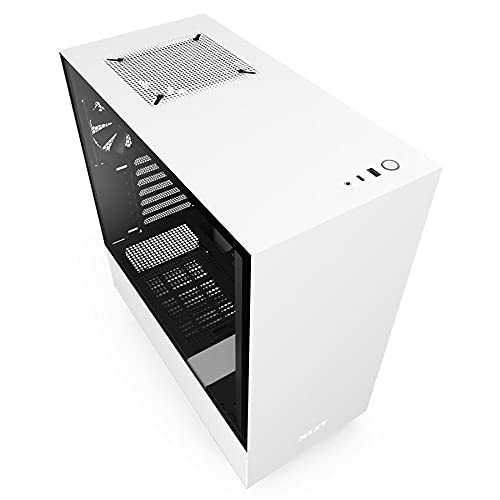
NZXT H510 ATX Mid-Tower Case with USB-C
Best for: clean ATX builds needing front USB-C
- Tower Size
- Mid-Tower
- Motherboard Support
- Mini-ITX, MicroATX, ATX
- Case Type
- Mid Tower
- Side Panel
- Tempered Glass
- Radiator Support
- 240mm
- Max GPU Length
- Up to 381mm
View on Amazon: NZXT H510 ATX Mid-Tower Case with USB-C (paid link)
The NZXT H510 is a compact mid-tower case supporting Mini-ITX, MicroATX, and ATX motherboards. It includes two 120mm Aer F fans, a front USB Type-C port, and a tempered glass side panel. You get 19 to 23mm of cable routing clearance with built-in channels and straps. With room for graphics cards up to 381mm and CPU coolers up to 165mm, it suits builders who want clean cable routing in a standard ATX footprint.
Pros
- Front-panel USB Type-C port
- Includes two 120mm Aer F airflow fans
- Pre-installed cable routing channels and straps with 19 to 23mm of clearance
- Removable radiator bracket supporting up to 240mm liquid coolers
- Supports GPUs up to 381mm without front water cooling
Cons
- Radiator bracket limited to 240mm sizes
- GPU clearance drops to 325mm with a front radiator installed
- Does not support EATX motherboards
Good fit if
- You want front-panel USB Type-C connectivity.
- You build with an ATX, MicroATX, or Mini-ITX motherboard.
- You want pre-installed channels and straps for organized cable management.
Skip if
- You need to mount a 280mm or 360mm liquid cooling radiator.
- You are building with an EATX form-factor motherboard.
- You use a graphics card longer than 325mm alongside a front liquid cooler.
Verdict: NZXT H510 Compact Mid-Tower Case delivers essential modern connectivity with its front USB Type-C port and simplifies clean builds using integrated cable routing channels. It provides balanced hardware clearances for standard ATX components and up to 240mm radiators.
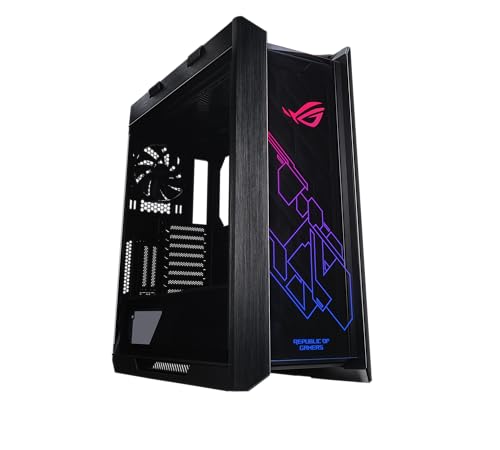
ASUS ROG Strix Helios RGB Mid-Tower Case
Best for: large E-ATX liquid-cooled gaming builds
- Tower Size
- Mid-Tower
- Motherboard Support
- EATX
- Case Type
- Mid Tower
- Side Panel
- Tempered Glass
- Included Fans
- 4x 140mm
- Radiator Support
- 420mm
View on Amazon: ASUS ROG Strix Helios RGB Mid-Tower Case (paid link)
The ASUS ROG Strix Helios RGB is an E-ATX mid-tower chassis designed for large hardware setups. It arrives with four 140mm fans, a built-in fan hub, and mounting support for radiators up to 420mm long. You get room for nine storage drives, dual vertical graphics cards, and three dust filters. It suits you if you want expansive liquid cooling support and integrated cable management covers inside a heavy metal frame.
Pros
- Includes four 140mm fans and an integrated fan hub
- Supports liquid cooling radiators up to 420mm long and 90mm thick
- Provides mounting space for up to nine storage drives
- Supports up to two vertical or three horizontal graphics cards
Cons
- Heavy chassis weighing nearly 40 pounds empty
- Large exterior height exceeding 23 inches
Good fit if
- You build with an E-ATX motherboard and multiple graphics cards.
- You plan to install a large 420mm liquid cooling radiator.
- You need internal mounting capacity for up to nine storage drives.
Skip if
- You need a lightweight PC case that is easy to relocate.
- You have tight desk space with vertical clearance under 24 inches.
Verdict: ASUS ROG Strix Helios RGB Mid-Tower Case delivers extensive liquid cooling support with room for a 420mm radiator and an E-ATX motherboard. Its four pre-installed 140mm fans, dedicated pump bracket, and nine drive bays accommodate complex, hardware-dense builds.

Zalman Compact ATX Mid-Tower with Dual Fans
Best for: lightweight ATX setups with basic cooling
- Tower Size
- Mid-Tower
- Motherboard Support
- ATX
- Case Type
- Mid Tower
- Side Panel
- Acrylic
- Included Fans
- 2x 120mm
- Dimensions
- 8.11 × 18 × 15 inches
View on Amazon: Zalman Compact ATX Mid-Tower with Dual Fans (paid link)
The Zalman S4 is an ATX mid-tower chassis designed for standard desktop builds. It features support for ATX motherboards, comes equipped with two preinstalled 120mm fans, and incorporates a full acrylic tinted side panel to display your hardware. Weighing 7.9 pounds with dimensions of 18.03 by 8.11 by 14.96 inches, this compact case suits you if you need a lightweight mid-tower layout with direct front airflow channeling.
Pros
- Preinstalled with two 120mm fans
- Full acrylic tinted side panel
- Supports standard ATX motherboards
- Lightweight design at 7.9 pounds
Cons
- Side panel is acrylic rather than tempered glass
- Limited to two preinstalled fans
Good fit if
- You want an ATX mid-tower chassis with two preinstalled 120mm fans.
- You prefer a lightweight 7.9-pound case with a tinted acrylic side panel.
Skip if
- You require a tempered glass side panel.
- You need more than two preinstalled fans out of the box.
Verdict: Zalman S4 Compact Mid-Tower Case provides standard ATX motherboard compatibility and dual 120mm fans in a lightweight frame. It serves builders who want a simple mid-tower layout with a tinted acrylic window.

Phanteks XT Pro Silent Mid-Tower Case
Best for: quiet builds using 360mm liquid cooling
- Tower Size
- Mid-Tower
- Case Type
- Mid-Tower
- Included Fans
- 3x M25-120
- Radiator Support
- 360mm
- Use
- Gaming
- Dimensions
- 17.7 × 9.05 × 19.7 inches
View on Amazon: Phanteks XT Pro Silent Mid-Tower Case (paid link)
The Phanteks XT Pro Silent is a mid-tower chassis built for reduced noise. It features closed panels lined with sound-dampening foam across the front, left, and right sides. You get three preinstalled M25-120 black fans, mounting capacity for up to seven 120mm fans, and support for a 360mm top radiator. This layout suits you if you run high-load hardware but want sound suppression instead of glass panels or visible lighting.
Pros
- Sound-dampening foam on front, left, and right panels
- Three preinstalled M25-120 black fans
- Dedicated 360mm radiator support in the top position
- Compatible with rear-side connector motherboards
Cons
- Closed solid panels provide no view of interior hardware
- No integrated RGB lighting or lighted fans included
Good fit if
- You want noise reduction via foam-lined solid panels.
- You plan to install a 360mm top radiator.
- You build with a rear-side connector motherboard.
Skip if
- You prefer a transparent side window to display components.
- You require preinstalled RGB lighting.
Verdict: Phanteks XT Pro Silent Mid-Tower Case combines triple-panel sound-dampening foam with support for 360mm liquid coolers and rear-side connector motherboards. It provides quiet operation and broad hardware clearance without exposed glass or lighting.
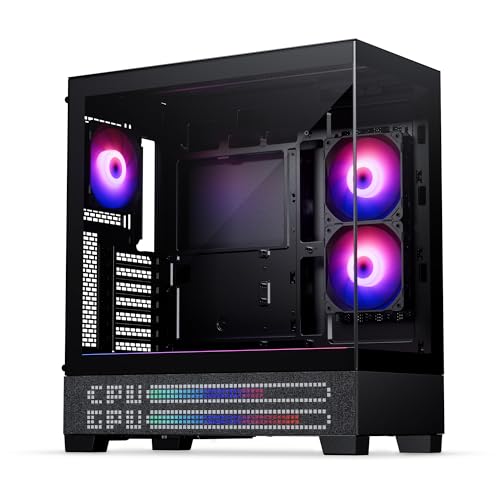
Phanteks XT View Matrix Mid-Tower Case
Best for: Rear-connector showcase builds with liquid cooling
- Tower Size
- Mid-Tower
- Motherboard Support
- ATX
- Case Type
- Mid-Tower
- Side Panel
- Tempered Glass
- Included Fans
- 3x M25-120mm D-RGB
- Radiator Support
- 360mm
View on Amazon: Phanteks XT View Matrix Mid-Tower Case (paid link)
The Phanteks XT View Matrix is a mid-tower ATX case built for showcase setups. It features dual tempered-glass panels and an integrated 600-LED matrix display for animations and system telemetry. For cooling, you get three pre-installed 120mm D-RGB fans with capacity for nine total fan mounts and a top 360mm radiator. It suits you if you want back-connect motherboard support and component visibility in a 21-pound chassis.
Pros
- Includes 3 pre-installed M25-120mm D-RGB fans
- Integrated 600-LED Matrix Display for animations and system stats
- Supports up to 9 total 120mm fan positions
- Dedicated top mounting for 360mm radiators
- Compatible with rear-connector ATX motherboards
Cons
- Dual glass panels omit direct front mesh intake
- Heavy empty chassis weight of 21 pounds
Good fit if
- You want an integrated LED screen for system stats and animations.
- You plan to assemble a build with a rear-connector ATX motherboard.
- You need top clearance for a 360mm liquid cooling radiator.
Skip if
- You prefer a high-airflow chassis with a traditional front mesh intake.
- You want a lightweight case that weighs under 20 pounds.
Verdict: Phanteks XT View Matrix Mid-Tower Case pairs dual tempered-glass panels with a 600-LED matrix display and support for rear-connector motherboards. It delivers solid cooling expansion with nine fan mounts and room for a top 360mm radiator.

Apevia Genesis Pro Mid Tower with 6 ARGB Fans
Best for: builds needing maximum preinstalled ARGB fans
- Tower Size
- Mid-Tower
- Motherboard Support
- ATX, Micro-ATX, Mini-ITX
- Case Type
- Mid Tower
- Side Panel
- Tempered Glass
- Included Fans
- 6x ARGB
- Radiator Support
- 240mm
View on Amazon: Apevia Genesis Pro Mid Tower with 6 ARGB Fans (paid link)
The Apevia Genesis Pro is a mid-tower case equipped with two tempered glass panels and six preinstalled ARGB fans. It accommodates standard ATX, Micro-ATX, and Mini-ITX motherboards alongside graphics cards up to 350mm long and CPU coolers up to 160mm tall. Liquid cooling support handles radiators up to 240mm on the top or front. You will find this suits builds needing complete lighting coverage immediately.
Pros
- Includes six preinstalled ARGB fans
- Dual tempered glass panels on front and left
- Supports graphics cards up to 350mm in length
- Top I/O LED button toggles 366 lighting modes
Cons
- Radiator support tops out at 240mm
- Uses proprietary fans designed specifically for this case
- Maximum CPU cooler height limited to 160mm
Good fit if
- You want six ARGB fans preinstalled without buying extra cooling.
- You run a GPU measuring up to 350mm in length.
- You prefer controlling lighting modes through a dedicated hardware button.
Skip if
- You need support for 280mm or 360mm liquid cooling radiators.
- You plan to use a tall CPU air cooler exceeding 160mm.
- You prefer standard fan connectors rather than proprietary units.
Verdict: Apevia Genesis Pro Mid-Tower with 6 ARGB Fans gives you a fully populated six-fan setup and dual glass panels right out of the box. Its 350mm GPU clearance handles large cards, though liquid cooling is limited to 240mm radiators.
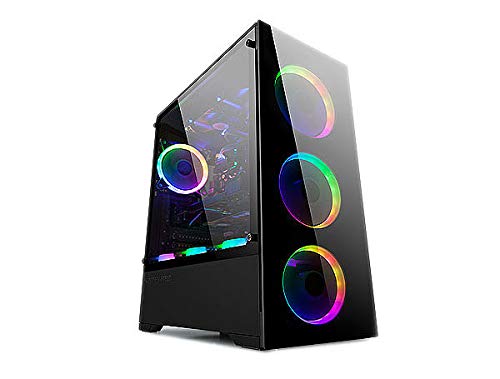
Bgears b-Voguish Plus Mid-Tower with 550W PSU
Best for: E-ATX builds needing included fans and power
- Tower Size
- Mid-Tower
- Motherboard Support
- E-ATX, ATX, MicroATX, ITX
- Case Type
- Mid Tower
- Included Fans
- 6x 120mm ARGB
- Dimensions
- 15.9 × 8.07 × 19.4 inches
- Weight
- 18 pounds
View on Amazon: Bgears b-Voguish Plus Mid-Tower with 550W PSU (paid link)
The Bgears b-Voguish Plus is a black mid-tower chassis bundled with a b-Vigor 550W power supply and six pre-installed 120mm ARGB fans. It accommodates E-ATX, ATX, MicroATX, and ITX motherboards. An integrated control hub provides connections for ten fan channels and two LED strips, managed via remote control. This case suits you if you want a complete cooling setup and an included power supply straight out of the box.
Pros
- Includes six 120mm ARGB fans and a remote control
- Bundled with a b-Vigor 550W power supply
- Hub supports 10 fan channels and 2 LED strip connections
- Accommodates motherboards up to E-ATX
Cons
- Front panel includes only one USB 3.0 port alongside two USB 2.0 ports
- Included power supply is limited to 550W capacity
Good fit if
- You need a chassis bundled with both case fans and a 550W power supply.
- You plan to mount an E-ATX, ATX, MicroATX, or ITX motherboard.
- You want remote control over a pre-wired 10-channel fan and lighting hub.
Skip if
- You require more than 550W of power for your components.
- You want multiple front-panel USB 3.0 or modern USB-C ports.
Verdict: Bgears b-Voguish Plus Mid-Tower with 6 ARGB Fans delivers out-of-the-box cooling and broad motherboard compatibility with its bundled 550W power supply and six fans. It gives you a fully illuminated enclosure without requiring separate fan or power purchases.

Fractal Design Torrent Compact ATX Mid-Tower
Best for: high-airflow ATX gaming builds
- Tower Size
- Mid-Tower
- Motherboard Support
- ATX
- Case Type
- Mid Tower
- Side Panel
- Tempered Glass
- Use
- Gaming
- Lighting
- RGB
View on Amazon: Fractal Design Torrent Compact ATX Mid-Tower (paid link)
The Fractal Design Torrent Compact RGB Mid-Tower delivers focused airflow in an ATX chassis. You get dual 180 mm front intake fans, an open front grille, and a top-mounted power supply shroud with integrated RGB lighting. The case includes light-tint tempered glass side panels and a front Type-C port. It suits builders who want high-volume front intake and bottom airflow for dedicated graphics cooling without moving to a full-sized enclosure.
Pros
- Two thick 180 x 38 mm front ARGB PWM intake fans
- Open front grille for direct airflow
- Built-in Type-C front connectivity
- Base intake support dedicated to GPU cooling
Cons
- Top-mounted power supply location limits top ventilation options
- Heavy empty weight at nearly 21 pounds
Good fit if
- You want large 180 mm front fans for intake airflow.
- You need front-panel Type-C connectivity.
- You prefer direct bottom air intakes for GPU cooling.
Skip if
- You want a lightweight chassis under 20 pounds.
- You require motherboard support larger than standard ATX.
Verdict: Fractal Design Torrent Compact RGB Mid-Tower prioritizes air intake with its dual 180 mm front fans and open grille design. It provides a solid ATX platform for air-cooled builds requiring focused front-to-back ventilation.

ZXFF Mid-Tower Glass ATX Case
Best for: builders supplying their own cooling fans
- Tower Size
- Mid-Tower
- Motherboard Support
- ATX, Micro-ATX, ITX
- Case Type
- Mid-Tower
- Side Panel
- Transparent Glass
- Radiator Support
- 240mm
- Max GPU Length
- 310mm
View on Amazon: ZXFF Mid-Tower Glass ATX Case (paid link)
The ZXFF Mid-Tower ATX Case features a transparent left-side glass window and space behind the motherboard tray for cable management. It accommodates ATX, Micro-ATX, and ITX motherboards, graphics cards up to 310mm long, and CPU coolers up to 165mm tall. With mounts for six 120mm fans or a 240mm radiator, it gives you a practical layout if you want to provide your own case cooling.
Pros
- Supports CPU coolers up to 165mm tall
- Mounts up to six 120mm fans and a 240mm radiator
- Dedicated space behind the motherboard tray for cable management
- Transparent glass side window
Cons
- Does not include pre-installed cooling fans
- Maximum graphics card length capped at 310mm
- Storage mounts limited to one 3.5-inch drive and two 2.5-inch drives
Good fit if
- You plan to install your own 120mm fans or a 240mm radiator.
- You need clearance for an air cooler up to 165mm tall.
- You use a graphics card measuring 310mm or shorter.
Skip if
- You want a chassis that comes with fans included.
- You use a graphics card longer than 310mm.
- You need to mount more than one 3.5-inch hard drive.
Verdict: ZXFF Mid-Tower ATX Case with Glass Window provides balanced clearance for mainstream components and liquid cooling, provided you supply your own fans.

Montech X3 Mesh ATX Mid-Tower Case
Best for: builds needing maximum pre-installed fan cooling
- Tower Size
- Mid-Tower
- Case Type
- Mid-Tower
- Side Panel
- Tempered Glass
- Included Fans
- 6x Fixed RGB
- Motherboard Support
- ATX
- Dimensions
- 14.6 × 8.3 × 18.9 inches
View on Amazon: Montech X3 Mesh ATX Mid-Tower Case (paid link)
The Montech X3 Mesh is an ATX mid-tower case built for high airflow. It includes six pre-installed fans, featuring three 140mm intake fans at the front alongside top and rear exhaust fans. The chassis measures 18.9 inches tall and 8.3 inches wide, featuring a swivel-hinged tempered glass side panel. This setup suits you if you want a complete cooling configuration out of the box without purchasing additional case fans.
Pros
- Six pre-installed fans including three 140mm front intake fans
- Swivel-mount tempered glass side panel with zero drill holes
- Dedicated LED button to toggle fan lighting on or off
- Mesh front panel paired with pre-mounted top and rear ventilation
Cons
- Fan lighting is fixed RGB rather than addressable ARGB
- Motherboard support limited to standard ATX without E-ATX support listed
Good fit if
- You want six pre-installed cooling fans directly out of the box.
- You prefer a tool-free swivel glass side panel for easy hardware access.
- You want physical button control to toggle case lighting.
Skip if
- You require addressable ARGB lighting control via motherboard software.
- You plan to install an E-ATX form factor motherboard.
Verdict: Montech X3 Mesh ATX Mid-Tower Case delivers extensive stock cooling through six pre-installed fans and a convenient swivel glass door. It is a practical mid-tower layout if you do not need customizable lighting effects.
Specifications side by side
| Spec | Thermaltake Versa H21 ATX Mid Tower | Fractal Design Focus G ATX Mid Tower | Fractal Design Meshify C ATX Mid Tower | Zalman S3 Compact ATX Mid-Tower Case | Zalman T6 ATX Mid-Tower Case | NZXT H510 ATX Mid-Tower Case with USB-C | ASUS ROG Strix Helios RGB Mid-Tower Case | Zalman Compact ATX Mid-Tower with Dual Fans | Phanteks XT Pro Silent Mid-Tower Case | Phanteks XT View Matrix Mid-Tower Case | Apevia Genesis Pro Mid Tower with 6 ARGB Fans | Bgears b-Voguish Plus Mid-Tower with 550W PSU | Fractal Design Torrent Compact ATX Mid-Tower | ZXFF Mid-Tower Glass ATX Case | Montech X3 Mesh ATX Mid-Tower Case |
|---|---|---|---|---|---|---|---|---|---|---|---|---|---|---|---|
| Motherboard Support | ATX | ATX | ATX | ATX | ATX, mATX, mini-ITX | Mini-ITX, MicroATX, ATX | EATX | ATX | not specified | ATX | ATX, Micro-ATX, Mini-ITX | E-ATX, ATX, MicroATX, ITX | ATX | ATX, Micro-ATX, ITX | not specified |
| Case Type | Mid Tower | Mid Tower | Mid Tower | Mid Tower | Mid Tower | Mid Tower | Mid Tower | Mid Tower | Mid-Tower | Mid-Tower | Mid Tower | Mid Tower | Mid Tower | Mid-Tower | Mid-Tower |
| Side Panel | not specified | Window | not specified | Acrylic | not specified | Tempered Glass | Tempered Glass | Acrylic | not specified | Tempered Glass | Tempered Glass | not specified | Tempered Glass | Transparent Glass | Tempered Glass |
| Included Fans | not specified | 2x 120mm White LED | 2x 120mm | 3x 120mm | 1x 120mm | not specified | 4x 140mm | 2x 120mm | 3x M25-120 | 3x M25-120mm D-RGB | 6x ARGB | 6x 120mm ARGB | not specified | not specified | 6x Fixed RGB |
| Radiator Support | not specified | not specified | not specified | 120mm | not specified | 240mm | 420mm | not specified | 360mm | 360mm | 240mm | not specified | not specified | 240mm | not specified |
| Max GPU Length | not specified | up to 380 mm | not specified | 330mm | not specified | Up to 381mm | not specified | not specified | not specified | not specified | 350mm | not specified | not specified | 310mm | not specified |
| Tower Size | Mid-Tower | Mid-Tower | Mid-Tower | Mid-Tower | Mid-Tower | Mid-Tower | Mid-Tower | Mid-Tower | Mid-Tower | Mid-Tower | Mid-Tower | Mid-Tower | Mid-Tower | Mid-Tower | Mid-Tower |
| Fan Size | not specified | 120mm | not specified | 120mm | 120mm | not specified | not specified | 120mm | not specified | not specified | not specified | 120mm | not specified | not specified | not specified |
| Use | not specified | not specified | not specified | not specified | not specified | Gaming | Gaming | not specified | Gaming | Gaming | Gaming | not specified | Gaming | not specified | not specified |
| Lighting | not specified | LED | not specified | not specified | not specified | not specified | RGB | not specified | not specified | RGB | ARGB | ARGB | RGB | not specified | RGB |
| Connectivity | not specified | USB 3.0 | USB 3.0 | not specified | not specified | Type-C | not specified | not specified | not specified | not specified | not specified | not specified | Type-C | USB 3.0 | not specified |
| Dimensions | 18.7 × 8.2 × 16.9 inches | 18.3 × 8.07 × 17.5 inches | 16.1 × 8.35 × 17.8 inches | 16.2 × 7.44 × 17.8 inches | 7.87 × 16.9 × 14.8 inches | 16.9 × 8.27 × 18.1 inches | 22.2 × 9.8 × 23.3 inches | 8.11 × 18 × 15 inches | 17.7 × 9.05 × 19.7 inches | 17.3 × 9.06 × 19.7 inches | 15.9 × 7.91 × 17.1 inches | 15.9 × 8.07 × 19.4 inches | 17.7 × 8.74 × 18.4 inches | not specified | 14.6 × 8.3 × 18.9 inches |
| Weight | 9.3 pounds | 9.92 pounds | 13.6 pounds | 8.38 pounds | 8 pounds | 14.6 pounds | 39.7 pounds | 7.9 pounds | 16.8 pounds | 21 pounds | 16 pounds | 18 pounds | 20.9 pounds | 12.1 pounds | 11.9 pounds |
| Size | H21 | not specified | not specified | 16.22 x 7.44 x 17.76 inches | T6 | base | GX601|Black | Mid Tower | Mid-Tower" | not specified | GENESIS PRO BLACK | not specified | ATX | not specified | X3 MESH |
| Color | Black | Gunmetal | Black | Acrylic | Black | White | Helios GX601|Black | S4 | Black | Charcoal Black | Black | Black | RGB Black - Light tint | Transparent | X3-Black |
| Model | CA-1B2-00M1NN-00 | FD-CA-FOCUS-GY-W | FD-CA-MESH-C-BKO | not specified | T6 | CA-H510B-W1 | 90DC0020-B39000 | S4 | PH-XT523PSC_BK01 | PH-XT523VM1_DBK01_MS | G-PRO-BK | BG01671 | FD-C-TOR1C-02 | not specified | X3 MESH |
Is a Mid-Tower Case Worth It?
A mid-tower enclosure dictates physical footprint and hardware layout. Chassis weights across these models range from 7.9 pounds to nearly 40 pounds, determining mobility on your desk. Lengths run between 14.5 and 22.2 inches. Internally, mid-tower spacing accommodates graphics cards measuring from 330 mm to 380 mm and cooling layouts with up to nine fan mounts. Choosing this size gives you room for features like 5.25-inch optical bays or multi-fan arrays without taking up full-tower floor space.
Worth it if
- You install long graphics cards measuring up to 380mm in length.
- You plan to mount extensive air cooling with up to nine fans.
- You need dedicated chassis space for a 5.25-inch optical drive.
Skip it if
- You need an ultra-light enclosure weighing under 7.9 pounds for transport.
- You have a shallow workspace unable to fit cases measuring 16 to 22 inches deep.
If your space cannot accommodate an ATX chassis, you can compare specifications for a mini PC under 200 instead of assembling a standalone tower.
How We Picked Mid-Tower Cases
You find mid-tower cases in this guide through their published specifications on Amazon. A case qualifies when its listing explicitly states Tower Size: Mid-Tower in the title or feature list. Only one size or variant of each product family appears on the list. All details come directly from specifications and feature lists published on the listings without physical handling.
Products in stock appear first. You can evaluate the picks by comparing published specifications such as motherboard form factor support, frame dimensions, and cooling fan compatibility across 15 options for 2026. Stock status updates live on the page at least daily.
How to Choose a Mid-Tower Case
-
Verify Front Panel Connectivity
Examine the front input and output port specifications before buying. If you use high-speed external storage or modern mobile devices, choose a mid-tower case featuring a native USB Type-C port on the front panel. Cases like the NZXT H510 ATX Mid-Tower Case with USB-C provide Type-C connectivity directly on the top panel. If your motherboard header only supports standard USB 3.0 connections, a chassis with standard Type-A ports prevents unused front plugs. Matching external ports to your motherboard connectors ensures every case port functions properly.
-
Select Side Panel Material
Compare the side panel material listed on the case specifications. Tempered glass panels display internal components and RGB lighting clearly, but they add weight to the chassis. Acrylic windows, such as the panel on the Zalman S3 Compact ATX Mid-Tower Case, reduce overall chassis weight while still letting you view internal hardware. If you prioritize low noise over component visibility, select a chassis that uses solid steel side panels with internal sound-dampening foam instead of transparent windows. Choose the panel type that matches your display goals.
-
Count Included Cooling Fans
Check the product specifications to see how many cooling fans arrive pre-installed inside the chassis. Cases without pre-installed fans, such as the ZXFF Mid-Tower Glass ATX Case, require you to supply, install, and wire your own cooling units before powering on the system. Other enclosures come with multiple fans already mounted. Buying a case with pre-installed fans saves assembly steps during your build. Selecting a chassis without included fans lets you select custom fan sizes, specific bearing types, and preferred lighting controls directly.
-
Assess External Drive Bays
Verify the external drive bay specifications if your build requires legacy media devices. Most modern mid-tower cases omit external drive bays to maximize front intake airflow or radiator mounting clearance. If you plan to install an internal optical DVD drive, Blu-ray burner, or 5.25-inch fan controller, you must choose an enclosure specifically built with an external 5.25-inch bay. The Zalman T6 ATX Mid-Tower Case includes a dedicated 5.25-inch slot for these components. Make sure to check that your internal motherboard layout does not block these front bays.
-
Check Rear Connector Support
Look at the motherboard tray cutouts if you plan to install a motherboard with backside cable connections. Standard mid-tower cases only accommodate conventional motherboards with front-facing power and data headers. Chassis models like the Phanteks XT Pro Silent Mid-Tower Case feature specialized motherboard tray cutouts designed specifically for rear-connector motherboards. This layout routes main power plugs, fan headers, and SATA ports directly behind the tray. If you purchase a standard ATX motherboard, this specification is optional, but it remains essential if you choose a motherboard designed with reverse connections.
-
Evaluate Bundled Power Supplies
Check whether the chassis listing includes an integrated power supply unit. Most mid-tower cases come as bare enclosures, requiring you to buy a separate ATX power supply matching your exact component wattage. In contrast, options such as the Bgears b-Voguish Plus Mid-Tower with 550W PSU include a pre-installed 550W power unit in the box. Check the wattage rating and power cable configurations against your graphics card and processor power requirements. Choosing an enclosure with a bundled power supply simplifies parts purchasing if the provided wattage covers your build.
Frequently asked questions
Can you install an optical drive in a modern mid-tower case?
Yes, but only specific mid-tower cases offer dedicated external bays for optical drives. Most modern designs eliminate external bays to maximize front intake airflow, but options like the Zalman T6 retain a 5.25-inch drive bay. When choosing this layout, make sure your motherboard does not use side-facing SATA ports that might interfere with internal drive clearances.
What should you look for in a quiet mid-tower case?
You should look for a chassis with solid panels lined with dedicated sound-absorbing material rather than exposed glass or mesh. Models such as the Phanteks XT Pro Silent incorporate triple-panel sound-dampening foam to control system acoustics. These closed enclosures still support liquid cooling hardware up to 360mm radiators while omitting illuminated fans and window panels.
How many cooling fans come pre-installed in a mid-tower case?
Pre-installed fan counts vary widely, ranging from zero up to six included fans out of the box. Some options, such as the ZXFF Mid-Tower ATX Case, come without fans so you can supply your own setup. Others, like the Apevia Genesis Pro and Montech X3 Mesh, include six pre-installed fans to provide complete airflow immediately without extra purchases.
Do mid-tower cases support rear-connector motherboards?
No, only select mid-tower models provide the specific motherboard tray cutouts required for rear-mounted connectors. Standard chassis lack the clearance needed to access plugs routed behind the board. If you plan to build with reverse-connector hardware, look for dedicated frames such as the Phanteks XT Pro Silent or Phanteks XT View Matrix that feature specialized rear openings.
Can a mid-tower PC case fit extra-large intake fans?
Yes, select mid-tower cases accommodate oversized front intake fans exceeding standard 120mm or 140mm sizes. While most mid-towers rely on arrays of standard 120mm fans, performance models like the Fractal Design Torrent Compact incorporate dual 180mm front fans behind an open grille. These wider fans push substantial airflow through the main chamber without needing multiple smaller intake units.
What graphics card length fits inside an ATX mid-tower chassis?
Mid-tower cases generally accommodate graphics cards measuring between 330mm and 380mm in length depending on internal layout. For example, the compact Zalman S3 fits cards up to 330mm, while the Apevia Genesis Pro supports cards up to 350mm. Larger chassis like the Fractal Design Focus G offer clearance for 380mm graphics cards to ensure adequate GPU clearance.
Do mid-tower PC cases ever include a built-in power supply?
Most mid-tower enclosures arrive empty, but select models bundle an internal power supply in the box. While standalone cases require you to purchase a separate PSU, options like the Bgears b-Voguish Plus come equipped with a 550W power supply alongside six pre-installed ARGB fans. This setup provides essential system power and illuminated cooling in a single enclosure package.