Best Micro-Atx PC Cases: 15 Spec-Based Picks
As an Amazon Associate we earn from qualifying purchases. Links on this page are affiliate links.
Choosing the right Micro-ATX PC case requires balancing a compact footprint with clearance for your components. We compared 15 models based strictly on the specifications published on their listings.
The Cooler Master N200 Mesh Mini-Tower leads the rankings because it fits 355mm graphics cards, 160mm CPU coolers, and a 240mm radiator inside a mini-tower frame. This guide helps you compare exterior dimensions, fan mounts, and internal hardware clearances so you can decide which case matches your hardware needs.
Quick picks
The best fit for you
- You need high component clearance in a mini-tower. Cooler Master N200 Mesh Mini-Tower It accommodates graphics cards up to 355mm, 160mm CPU coolers, and 240mm radiators.
- You want a compact case that fits 360mm radiators. ASUS Prime AP201 Mesh Micro-ATX Case Its 33-liter mesh frame provides clearance for full 360mm radiators and ATX power supplies.
- You want the most compact ultra-slim desktop footprint. JOYJOM 7.3L Slim Micro-ATX Case The 7.3-liter slim profile measures just 3.62 inches wide for low-profile hardware.
- You need a rack-mounted setup for server hardware. SilverStone 4U Rackmount Server Chassis The 4U chassis installs into standard server racks and includes lockable front access.
Our 15 picks

Cooler Master N200 Mesh Mini-Tower
Best for: versatile Micro-ATX builds needing high component clearance
- Motherboard Support
- Micro-ATX
- Case Type
- Mini Tower
- Radiator Support
- 240mm
- Max GPU Length
- 355mm (14 inches)
- Dimensions
- 17.5 × 7.9 × 14.9 inches
- Weight
- 9.5 pounds
View on Amazon: Cooler Master N200 Mesh Mini-Tower (paid link)
The Cooler Master N200 is a mini-tower case designed for Micro-ATX motherboards. It accommodates graphics cards up to 355mm long and CPU air coolers up to 160mm tall. For liquid cooling, the front panel accepts a 240mm radiator. You also get space for three 3.5-inch hard drives and four 2.5-inch solid-state drives. This layout suits you if you need compact desktop dimensions alongside standard component clearances.
Pros
- Accommodates graphics cards up to 355mm long
- Supports a 240mm liquid cooling radiator in the front
- Fits CPU air coolers up to 160mm tall
- Holds up to three 3.5-inch HDDs and four 2.5-inch SSDs
Cons
- No radiator support listed beyond the 240mm front mount
- Removable dust filtration limited to the bottom power supply area
Good fit if
- You need room for graphics cards up to 355mm in length.
- You plan to mount a 240mm front liquid cooling radiator.
- You require storage bays for multiple 2.5-inch and 3.5-inch drives.
Skip if
- You plan to install a standard full-size ATX motherboard.
- You require support for radiators larger than 240mm.
Verdict: Cooler Master N200 Mesh Micro-ATX Mini Tower balances compact exterior dimensions with clearance for 355mm GPUs, 160mm CPU coolers, and a 240mm radiator. It provides reliable hardware clearances and broad drive support for standard Micro-ATX setups.
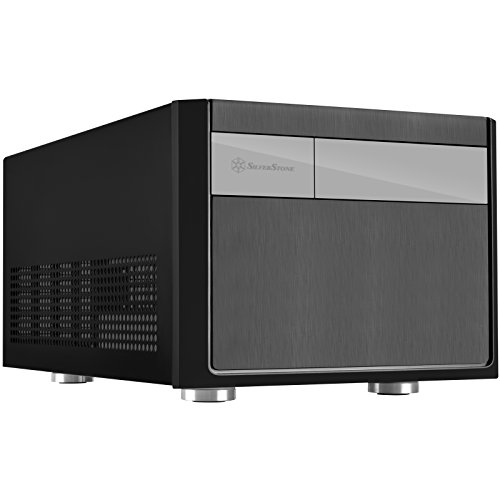
SilverStone Micro-ATX Small Form Factor Case
Best for: compact builds needing full-length graphics card clearance
- Motherboard Support
- Micro-ATX
- Case Type
- SFF
- Max GPU Length
- Any length
- Tower Size
- Small Form Factor
- Dimensions
- 19 × 15 × 13 inches
- Weight
- 13.5 pounds
View on Amazon: SilverStone Micro-ATX Small Form Factor Case (paid link)
This SilverStone chassis delivers a small form factor design that supports standard Micro-ATX motherboards and full-size ATX power supplies. It accommodates graphics cards of any length alongside multiple 2.5-inch drives. You get an 82mm CPU cooler height clearance inside a compact footprint measuring 19 by 15 by 13 inches. It suits you if you need a space-saving desktop build without sacrificing full-length GPU compatibility.
Pros
- Supports graphics cards of any length
- Accommodates standard ATX power supplies
- High capacity for 2.5-inch drives
- Compatible with Micro-ATX, Mini-DTX, and Mini-ITX motherboards
Cons
- CPU cooler height clearance limited to 82mm
- Chassis weighs 13.45 pounds empty
Good fit if
- You want a small form factor build that houses a full-length graphics card.
- You plan to use a standard ATX power supply with a Micro-ATX board.
- You need dedicated mounting capacity for multiple 2.5-inch drives.
Skip if
- You plan to install a tall CPU tower cooler over 82mm.
- You need an ultralight case for frequent travel.
Verdict: SilverStone Small Form Factor Micro-ATX Case fits standard ATX power supplies and full-length graphics cards into a space-conscious chassis. Its 82mm cooler clearance requires low-profile CPU cooling components.

Chieftec Micro-ATX Case
Best for: builders needing an external 5.25-inch drive bay
- Motherboard Support
- Micro-ATX
- Max GPU Length
- 320mm
- Dimensions
- 15.7 × 18.1 × 13 inches
- Weight
- 11.2 pounds
View on Amazon: Chieftec Micro-ATX Case (paid link)
The Chieftec Micro-ATX Case with 5.25 Drive Bay is a black chassis designed for Micro-ATX motherboards. It accommodates graphics cards up to 320 mm in length and CPU coolers up to 150 mm tall. You get dedicated storage mounting for two 3.5-inch drives, three 2.5-inch drives, and an external 5.25-inch bay. Front connectivity features two USB 3.0 ports and audio jacks. It suits you if you run standard drives alongside a long GPU.
Pros
- External 5.25-inch drive bay for optical media or accessories
- Fits graphics cards up to 320 mm long
- Internal bays fit two 3.5-inch drives and three 2.5-inch drives
- Front I/O features two USB 3.0 ports and one USB 2.0 port
Cons
- Maximum CPU cooler height is limited to 150 mm
- No USB Type-C front-panel port listed
Good fit if
- You need an external 5.25-inch drive bay.
- You use a dedicated graphics card up to 320 mm long.
- You plan to mount multiple 2.5-inch and 3.5-inch storage drives.
Skip if
- You plan to install a CPU cooler taller than 150 mm.
- You need a front-panel USB Type-C connection.
Verdict: Chieftec Micro-ATX Case with 5.25 Drive Bay delivers generous internal drive support and 320 mm graphics clearance in a compact footprint. Make sure your CPU cooler does not exceed the 150 mm height limit.

Cooler Master Q300L Modular Micro-ATX Case
Best for: flexible port positioning and long graphics cards
- Motherboard Support
- Micro-ATX
- Side Panel
- Transparent
- Radiator Support
- 240mm
- Max GPU Length
- up to 360mm
- Dimensions
- 15.4 × 9.06 × 15 inches
- Weight
- 1.06 pounds
View on Amazon: Cooler Master Q300L Modular Micro-ATX Case (paid link)
The Cooler Master Q300L Modular Micro-ATX Case houses Micro-ATX and Mini-ITX motherboards within a compact footprint. It fits graphics cards up to 360mm, CPU air coolers up to 159mm, and power supplies up to 160mm. The modular I/O panel relocates to the top, front, or bottom on either side. Perforated panels support up to five fans and a 240mm radiator, giving you a configurable setup for standard components.
Pros
- GPU clearance accommodates cards up to 360mm
- Modular I/O panel mounts in six positions across both sides
- Supports up to five cooling fans and a 240mm radiator
- Magnetic patterned dust filters on perforated panels
Cons
- CPU cooler height is limited to 159mm
- Power supply clearance is capped at 160mm
Good fit if
- You need flexibility to reposition your case I/O ports.
- You plan to run a full-length GPU up to 360mm.
- You want perforated panels with magnetic dust filtration.
Skip if
- You use a CPU tower cooler exceeding 159mm.
- You have a power supply longer than 160mm.
Verdict: Cooler Master Q300L Modular Micro-ATX Case delivers strong clearance for full-length graphics cards and an adaptable I/O panel. It offers a straightforward layout for compact builds needing standard liquid or air cooling.

Thermaltake Versa H18 Tempered Glass Micro-ATX Case
Best for: Micro-ATX gaming builds using AIO liquid cooling
- Motherboard Support
- Micro-ATX
- Side Panel
- Tempered Glass
- Radiator Support
- 280mm
- Use
- Gaming
- Dimensions
- 15.4 × 8.07 × 15 inches
- Weight
- 10.2 pounds
View on Amazon: Thermaltake Versa H18 Tempered Glass Micro-ATX Case (paid link)
The Thermaltake Versa H18 Tempered Glass Micro-ATX Case is a compact gaming enclosure designed for Micro-ATX motherboards. You get a mesh front panel with an integrated blue LED strip, a tempered glass side panel, and support for 240 mm or 280 mm liquid cooling radiators. It suits you if you want a full-length power supply cover along with internal mounts for two 2.5-inch and two 3.5-inch storage drives.
Pros
- Supports 240 mm and 280 mm AIO cooling radiators
- Mesh front panel paired with a tempered glass side window
- Full-length power supply cover keeps cables hidden
- Accommodates two 2.5-inch and two 3.5-inch drive bays
Cons
- Front panel includes only one USB 3.0 port alongside two USB 2.0 ports
- Integrated front light strip is limited to blue illumination
Good fit if
- You plan to run a 240 mm or 280 mm AIO liquid cooler in a Micro-ATX build.
- You want a tempered glass side panel to show your internal components.
- You need dedicated mounting points for up to four storage drives.
Skip if
- You require a modern front-panel USB Type-C port.
- You prefer customizable RGB lighting over a static blue front strip.
Verdict: Thermaltake Versa H18 Tempered Glass Micro-ATX Case balances airflow and component visibility with support for radiators up to 280 mm. Its internal shroud and four drive mounts provide practical structure for standard Micro-ATX configurations.

iTek QBO 8 Evo Micro-ATX Cube Case
Best for: Micro-ATX cube setups needing included ARGB fans
- Motherboard Support
- Micro-ATX
- Case Type
- Cube
- Fan Size
- 120mm
- Lighting
- ARGB
- Dimensions
- 14.2 × 10.5 × 13.1 inches
- Weight
- 6.61 pounds
View on Amazon: iTek QBO 8 Evo Micro-ATX Cube Case (paid link)
The iTek QBO 8 Evo is a black cube-style chassis designed for Micro-ATX motherboards. It includes a pre-installed 200mm ARGB fan, a 120mm ARGB fan, and an integrated card reader. Three transparent windows let you view your build from multiple angles. Measuring 10.5 inches wide, it suits you if you need compact cube dimensions with dual ARGB fans included.
Pros
- Includes one 200mm ARGB fan and one 120mm ARGB fan
- Built-in card reader and USB 3.0 connectivity
- Three transparent windows for hardware visibility
- Micro-ATX cube layout measuring 14.2 inches long
Cons
- Wider desk footprint at over 10.5 inches across
- Lacks support for standard ATX motherboards
Good fit if
- You want pre-installed 200mm and 120mm ARGB fans.
- You need an integrated chassis card reader.
- You prefer a cube case layout with three viewing windows.
Skip if
- You plan to install a full-size ATX motherboard.
- You have narrow desk clearance under 10.5 inches wide.
Verdict: iTek QBO 8 Evo Micro-ATX Cube Case delivers a compact cube chassis equipped with 200mm and 120mm ARGB fans and an integrated card reader. It provides multi-angle component visibility across three transparent windows for Micro-ATX builds.
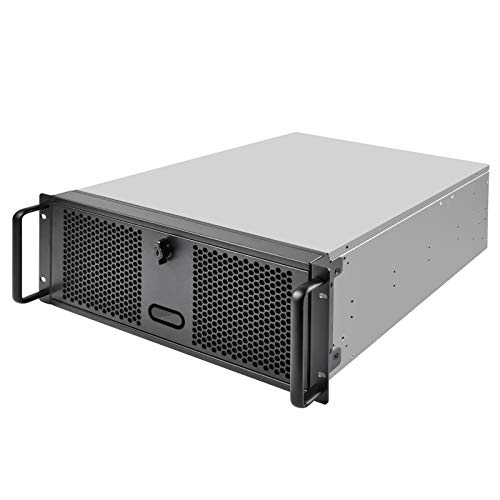
SilverStone 4U Rackmount Server Chassis
Best for: secure rackmount Micro-ATX server setups
- Motherboard Support
- Micro-ATX
- Case Type
- 4U Rackmount
- Use
- Server
- Dimensions
- 16.9 × 17.6 × 6.93 inches
- Weight
- 23.8 pounds
View on Amazon: SilverStone 4U Rackmount Server Chassis (paid link)
The SilverStone 4U Rackmount Server Chassis gives you a dedicated server enclosure compatible with Micro-ATX, ATX, and SSI-CEB motherboards. You get three external 5.25-inch drive bays, seven standard expansion slots, and front USB 3.1 Gen 1 ports protected by a locking front door. It accommodates ATX or mini redundant power supplies up to 160mm deep, suiting you if you need secure, rack-mounted hardware.
Pros
- Three front-facing 5.25-inch drive bays
- Seven standard-profile PCI or PCIe expansion slots
- Lockable front door for physical security
- Supports ATX and mini redundant power supplies up to 160mm deep
Cons
- Weighs 23.81 pounds unpopulated
- Requires 4U rackmount space measuring 17.56 inches wide
- Power supply depth capped at 160mm
Good fit if
- You mount your Micro-ATX system into a standard 4U server rack.
- You need multiple external 5.25-inch drive bays.
- You want physical key-lock security over front ports and drive bays.
Skip if
- You need a standard standalone desktop tower.
- You plan to use a power supply longer than 160mm.
Verdict: SilverStone 4U Rackmount Server Chassis delivers dedicated rack infrastructure for your Micro-ATX board with front-accessible drive bays and lockable security. Its 4U dimensions and 160mm power supply limit require intentional space planning.
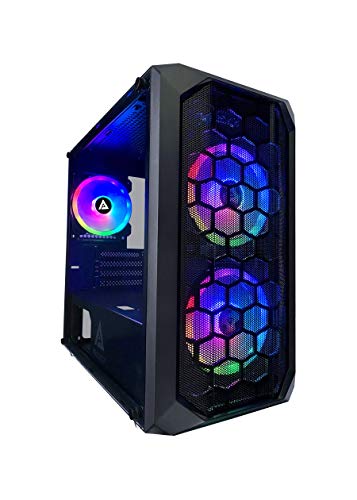
Apevia Prodigy Micro-ATX Case
Best for: Micro-ATX builds prioritizing preinstalled multi-mode RGB fans
- Motherboard Support
- Micro-ATX
- Case Type
- Micro-ATX
- Side Panel
- Tempered Glass
- Included Fans
- 3x RGB
- Radiator Support
- 120mm
- Max GPU Length
- 350mm
View on Amazon: Apevia Prodigy Micro-ATX Case (paid link)
Apevia Prodigy Micro-ATX RGB Case houses Micro-ATX and Mini-ITX motherboards behind a mesh front and tempered glass side panel. You get three preinstalled dual-ring RGB fans featuring 16 lighting modes operated directly from the top panel. The interior accommodates graphics cards up to 350mm long and CPU coolers up to 165mm tall. This chassis suits you if you prioritize integrated multi-pattern lighting alongside substantial component clearance.
Pros
- Three preinstalled dual-ring RGB fans with 16 selectable modes
- Generous clearance for graphics cards up to 350mm long
- Supports tall CPU air coolers up to 165mm in height
- Mesh front panel paired with a tempered glass side window
Cons
- Included RGB fans use proprietary connections
- Radiator mounting is limited to a single 120mm rear location
- Fan mounts are restricted strictly to 120mm sizes
Good fit if
- You want built-in RGB lighting controlled directly via a top I/O button.
- You run a long graphics card measuring up to 350mm.
- You need space for a tower CPU cooler up to 165mm tall.
Skip if
- You plan to use liquid cooling radiators larger than 120mm.
- You require standard fan headers for aftermarket fan replacement.
Verdict: Apevia Prodigy Micro-ATX RGB Case provides solid cooling clearance and 350mm GPU support alongside three pre-wired dual-ring RGB fans. It delivers plug-and-play lighting control directly through the chassis I/O panel.
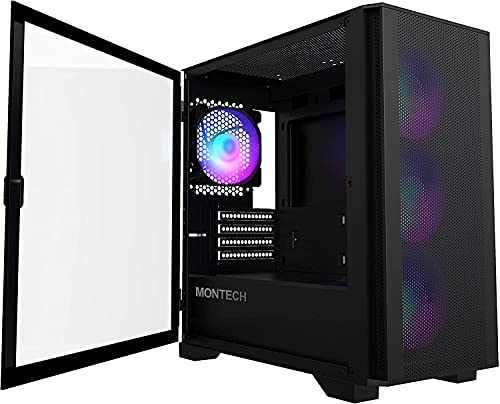
Montech AIR 100 ARGB Micro-ATX Case
Best for: compact Micro-ATX builds needing pre-installed ARGB cooling
- Motherboard Support
- Micro-ATX
- Case Type
- Micro ATX
- Side Panel
- Tempered Glass
- Included Fans
- 4x 120mm ARGB
- Radiator Support
- 280mm
- Max GPU Length
- 330mm
View on Amazon: Montech AIR 100 ARGB Micro-ATX Case (paid link)
The Montech Air 100 ARGB is a compact mini-tower case built for Micro-ATX and Mini-ITX motherboards. It includes four 120mm ARGB fans and a lighting controller out of the box, paired with a mesh front panel for ventilation. You get clearance for graphics cards up to 330mm, CPU coolers up to 161mm, and power supplies up to 160mm. It suits you if you want pre-installed lighting and straightforward cable routing.
Pros
- Includes four pre-installed 120mm ARGB fans and a controller
- Swivel tempered-glass side panel and tool-free mesh front
- Supports graphics cards up to 330mm and radiators up to 280mm
- Built-in cable loops and Velcro straps for routing
Cons
- ATX power supply length capped at 160mm
- CPU cooler height limited to 161mm
- Top radiator support limited to 240mm
Good fit if
- You want four pre-installed ARGB fans with an included controller.
- You need a hinged tempered-glass side door for easy internal access.
- You plan to install a graphics card up to 330mm in length.
Skip if
- You need to fit an ATX power supply longer than 160mm.
- You plan to mount a 280mm or larger radiator at the top.
- You use a CPU air cooler taller than 161mm.
Verdict: Montech Air 100 ARGB Micro-ATX Case delivers strong out-of-the-box airflow with four pre-installed fans, a mesh faceplate, and room for a 330mm GPU. It offers accessible maintenance through its hinged glass panel and tool-free front filter.

Antec Dual 5.25 Bay Micro-ATX Mini Tower
Best for: Micro-ATX builds needing external 5.25-inch drive bays
- Motherboard Support
- Micro-ATX
- Case Type
- Mini Tower
- Included Fans
- 1x 92mm
- Dimensions
- 14.4 × 6.8 × 15.5 inches
- Weight
- 8.2 pounds
View on Amazon: Antec Dual 5.25 Bay Micro-ATX Mini Tower (paid link)
The Antec Dual 5.25 Bay Micro-ATX Mini Tower is a steel chassis built for Micro-ATX motherboards. It measures 15.5 inches high, 14.4 inches long, and 6.8 inches wide, weighing approximately 8.2 pounds. The enclosure provides two external 5.25-inch drive bays, two internal 3.5-inch hard drive bays, and dual USB 3.0 ports. You get a 92 mm rear exhaust fan, making this case suitable if you require optical drive support in a compact workstation build.
Pros
- Two external 5.25-inch drive bays
- Two internal 3.5-inch HDD bays
- Dual front USB 3.0 ports and audio jacks
- SGCC steel construction
Cons
- Front 92 mm fan is optional rather than included
- Fan mounts restricted to 92 mm sizes
Good fit if
- You need external 5.25-inch bays for optical drives or accessories.
- You plan to install up to two internal 3.5-inch hard drives.
Skip if
- You plan to mount standard 120 mm or larger cooling fans.
- You require pre-installed front intake cooling.
Verdict: Antec Dual 5.25 Bay Micro-ATX Mini Tower provides essential optical drive accommodation and USB 3.0 connectivity in a compact SGCC steel frame. It handles standard Micro-ATX desktop layouts that rely on traditional storage drives.
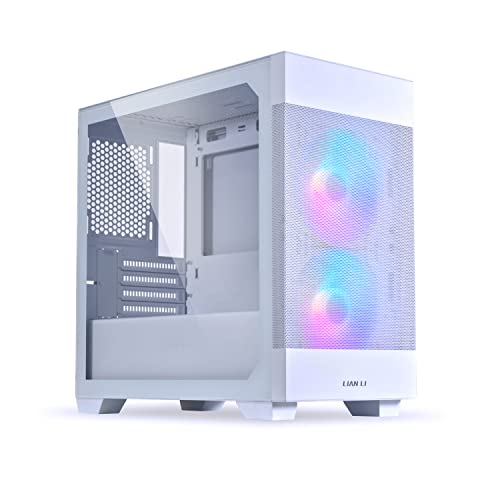
Lian Li Lancool 205M Mesh Micro-ATX Case
Best for: Micro-ATX builds needing high intake airflow
- Motherboard Support
- Micro-ATX
- Case Type
- Mid-Tower
- Side Panel
- Tempered Glass
- Included Fans
- 2x 140mm ARGB PWM
- Use
- Gaming
- Dimensions
- 15.8 × 8.27 × 15.7 inches
View on Amazon: Lian Li Lancool 205M Mesh Micro-ATX Case (paid link)
The Lian Li LANCOOL 205M Mesh is a mid-tower chassis built for Micro-ATX and Mini-ITX systems. It features a mesh front panel paired with two pre-installed 140mm ARGB PWM intake fans for airflow. You get a tempered glass side panel, magnetic dust filters on top and bottom, and removable drive bays. It suits your build if you want mid-tower spacing, dedicated cable channels, and liquid cooling readiness for a compact motherboard.
Pros
- Includes two 140mm ARGB PWM front intake fans
- Mesh front panel with magnetic top and bottom dust filters
- Tempered glass side panel for interior component visibility
- Removable SSD brackets and bottom HDD bay
Cons
- Lacks a front-panel USB Type-C port
- No pre-installed rear exhaust fan listed
Good fit if
- You want a Micro-ATX case with factory-installed 140mm PWM intake fans.
- You need modular storage mounts with removable drive bays.
- You prioritize front mesh airflow with magnetic dust filtration.
Skip if
- You require top-panel USB Type-C connections.
- You plan to install a standard ATX motherboard.
Verdict: Lian Li LANCOOL 205M Mesh Mid-Tower provides dedicated Micro-ATX mounting inside a roomy mid-tower frame equipped with dual 140mm ARGB fans. It keeps airflow high and cable routing simple for your compact gaming setup.
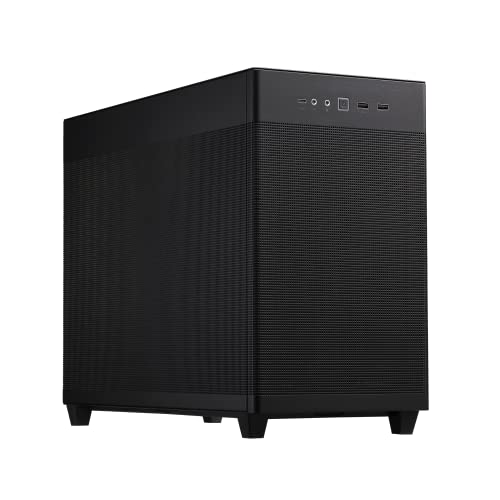
ASUS Prime AP201 Mesh Micro-ATX Case
Best for: high-airflow compact builds with large radiators
- Motherboard Support
- Micro-ATX
- Side Panel
- Mesh
- Radiator Support
- 360mm
- Max GPU Length
- 338 mm
- Case Volume
- 33L
- Dimensions
- 18.1 × 8.07 × 13.8 inches
View on Amazon: ASUS Prime AP201 Mesh Micro-ATX Case (paid link)
The ASUS Prime AP201 is a 33-liter Micro-ATX chassis wrapped in quasi-filter mesh panels. You get space for graphics cards up to 338 mm long, standard ATX power supplies up to 180 mm, and radiators measuring up to 360 mm. With mounting points for six fans and 32 mm of clearance behind the motherboard tray for cables, this case suits builders wanting large hardware support in a compact footprint.
Pros
- Supports radiators up to 360 mm or 280 mm
- Accommodates graphics cards up to 338 mm long
- Fits standard ATX power supplies up to 180 mm long
- Tool-free clip mechanism on side panels
- Provides 32 mm of space for cable management
Cons
- No pre-installed case fans listed in specifications
- Does not support standard full-size ATX motherboards
Good fit if
- You want to mount a 280 mm or 360 mm liquid cooling radiator.
- You need room for a long graphics card up to 338 mm.
- You prefer a mesh exterior with tool-free side panel access.
Skip if
- You plan to build with a full-size ATX motherboard.
- You want a case that includes pre-installed cooling fans.
Verdict: ASUS Prime AP201 Mesh Micro-ATX Case balances a 33-liter volume with clearance for 360 mm radiators, large ATX power supplies, and full-length graphics cards. It delivers high-end cooling compatibility for compact builds.

Jonsbo Mesh Micro-ATX Case
Best for: large graphics cards and dual 360mm radiators
- Motherboard Support
- Micro-ATX
- Case Type
- Micro ATX
- Radiator Support
- 360mm
- Max GPU Length
- 400mm
- Dimensions
- 17.3 × 8.07 × 14.3 inches
View on Amazon: Jonsbo Mesh Micro-ATX Case (paid link)
The Jonsbo Mesh Micro-ATX Case is a compact black enclosure engineered for Micro-ATX and Mini-ITX builds. It supports large graphics cards measuring up to 400mm in length and CPU air coolers up to 168mm tall. You also get space for 360mm liquid cooling radiators along the top and bottom panels. This chassis suits you if you plan to install full-size hardware alongside flexible ATX or SFX power supplies.
Pros
- Fits graphics cards from 330mm up to 400mm long
- Supports 360mm radiators on both top and bottom mounts
- Accommodates CPU air coolers up to 168mm high
- Four-level height adjustment for ATX and SFX power supplies
Cons
- No pre-installed cooling fans listed in specifications
- Limited to Micro-ATX and Mini-ITX motherboards without full ATX support
Good fit if
- You need room for a graphics card up to 400mm long.
- You plan to run a 280mm or 360mm liquid cooling radiator.
- You want four adjustable height mounting levels for your power supply.
Skip if
- You need a chassis that includes pre-installed case fans.
- You plan to build with a standard full-size ATX motherboard.
Verdict: Jonsbo Mesh Micro-ATX Case delivers extensive radiator and GPU clearance inside a compact footprint. It provides flexible component placement with an adjustable four-level power supply bracket.

JOYJOM 7.3L Slim Micro-ATX Case
Best for: ultra-compact builds requiring Micro-ATX motherboard support
- Motherboard Support
- Micro-ATX
- Case Volume
- 7.3L
- Dimensions
- 10.2 × 3.62 × 12.2 inches
View on Amazon: JOYJOM 7.3L Slim Micro-ATX Case (paid link)
The JOYJOM 7.3L Slim Micro-ATX Case is an ultra-compact chassis designed for space-constrained desks. It accommodates standard Micro-ATX motherboards within a 7.3-liter volume measuring 3.6 inches wide. You get dual orientation options for vertical or horizontal placement. Component clearance is limited to Flex-1U power supplies, low-profile CPU coolers under 73mm, and half-height expansion cards. This enclosure suits you if you need a minimal desktop footprint for basic computing.
Pros
- Ultra-compact 7.3L volume supports horizontal and vertical orientation
- Fits standard Micro-ATX motherboards up to 24.4x24.4cm
- Front panel includes two USB 3.0 and two USB 2.0 ports
- Built from 0.8mm SPCC steel
Cons
- Requires a specialized Flex-1U power supply
- Supports only half-height graphics cards and excludes HDDs when GPU is installed
- CPU cooler clearance is restricted to 63mm to 73mm
Good fit if
- You want an ultra-compact 7.3-liter enclosure for a standard Micro-ATX board.
- You plan to build a low-profile system using a Flex-1U power supply.
Skip if
- You plan to install a full-height graphics card or standard ATX power supply.
- You need both a dedicated graphics card and a 3.5-inch drive.
Verdict: JOYJOM 7.3L Slim Micro-ATX Case provides a remarkably small footprint for standard Micro-ATX boards if you build with low-profile hardware.

Cooler Master Mini-Tower Case with 500W PSU
Best for: Micro-ATX builds needing included power and storage
- Motherboard Support
- Micro-ATX
- Case Type
- Mini Tower
- Radiator Support
- 240mm
- Max GPU Length
- 355mm
View on Amazon: Cooler Master Mini-Tower Case with 500W PSU (paid link)
This Cooler Master mini-tower chassis accommodates Micro-ATX motherboards and bundles a Thermaltake 500W power supply. For storage, you get mounting space for three hard drives and four solid-state drives. It fits graphics cards up to 355mm long, CPU coolers up to 160mm tall, and a 240mm radiator in the front. This setup suits you if you want a complete case and power package with extensive drive capacity.
Pros
- Bundled 500W 80+ certified power supply
- Supports graphics cards up to 355mm long
- Accommodates up to 3 HDDs and 4 SSDs
- Front clearance for a 240mm radiator
Cons
- Power supply limited to 500W output
- Power supply includes only two PCIe 6+2 pin connectors
- Front radiator mount capped at 240mm
Good fit if
- You need an included 500W power supply with your build.
- You plan to run multiple storage drives across HDD and SSD bays.
- You use a long graphics card measuring up to 355mm.
Skip if
- You require more than 500W of continuous power.
- You need more than two PCIe 6+2 pin power connectors.
- You plan to install liquid cooling radiators larger than 240mm.
Verdict: Cooler Master Mini Tower with 500W Power Supply pairs broad component clearance and seven drive mounts with an integrated power source. It provides a direct hardware foundation for moderate Micro-ATX configurations.
Specifications side by side
| Spec | Cooler Master N200 Mesh Mini-Tower | SilverStone Micro-ATX Small Form Factor Case | Chieftec Micro-ATX Case | Cooler Master Q300L Modular Micro-ATX Case | Thermaltake Versa H18 Tempered Glass Micro-ATX Case | iTek QBO 8 Evo Micro-ATX Cube Case | SilverStone 4U Rackmount Server Chassis | Apevia Prodigy Micro-ATX Case | Montech AIR 100 ARGB Micro-ATX Case | Antec Dual 5.25 Bay Micro-ATX Mini Tower | Lian Li Lancool 205M Mesh Micro-ATX Case | ASUS Prime AP201 Mesh Micro-ATX Case | Jonsbo Mesh Micro-ATX Case | JOYJOM 7.3L Slim Micro-ATX Case | Cooler Master Mini-Tower Case with 500W PSU |
|---|---|---|---|---|---|---|---|---|---|---|---|---|---|---|---|
| Motherboard Support | mATX, Mini-ITX | Micro-ATX, Mini-DTX, Mini-ITX | mATX | Micro-ATX, Mini-ITX | Micro ATX | Micro ATX | SSI-CEB, ATX, mATX, Mitx | Micro-ATX, Mini-ITX | Micro-ATX, Mini-ITX | MicroATX | Micro ATX, Mini-ITX | not specified | MATX, MicroATX, ITX | Micro ATX, DTX, ITX | not specified |
| Case Type | Mini Tower | SFF | not specified | not specified | not specified | Cube | 4U Rackmount | Micro-ATX | Micro ATX | Mini Tower | Mid-Tower | not specified | Micro ATX | not specified | Mini Tower |
| Side Panel | not specified | not specified | not specified | Transparent | Tempered Glass | not specified | not specified | Tempered Glass | Tempered Glass | not specified | Tempered Glass | Mesh | not specified | not specified | not specified |
| Included Fans | not specified | not specified | not specified | not specified | not specified | not specified | not specified | 3x RGB | 4x 120mm ARGB | 1x 92mm | 2x 140mm ARGB PWM | not specified | not specified | not specified | not specified |
| Radiator Support | 240mm | not specified | not specified | 240mm | 280mm | not specified | not specified | 120mm | 280mm | not specified | not specified | 360mm | 360mm | not specified | 240mm |
| Max GPU Length | 355mm (14 inches) | Any length | 320mm | up to 360mm | not specified | not specified | not specified | 350mm | 330mm | not specified | not specified | 338 mm | 400mm | not specified | 355mm |
| Case Volume | not specified | not specified | not specified | not specified | not specified | not specified | not specified | not specified | not specified | not specified | not specified | 33L | not specified | 7.3L | not specified |
| Tower Size | Mini-Tower | Small Form Factor | not specified | not specified | not specified | not specified | not specified | not specified | not specified | Mini-Tower | Mid-Tower | not specified | not specified | not specified | Mini-Tower |
| Fan Size | not specified | not specified | not specified | not specified | not specified | 120mm | not specified | not specified | not specified | not specified | not specified | not specified | not specified | not specified | not specified |
| Use | not specified | not specified | not specified | not specified | Gaming | not specified | Server | Gaming | not specified | not specified | Gaming | not specified | not specified | not specified | not specified |
| Lighting | not specified | not specified | not specified | not specified | not specified | ARGB | not specified | RGB | ARGB | not specified | ARGB | not specified | not specified | not specified | not specified |
| Dimensions | 17.5 × 7.9 × 14.9 inches | 19 × 15 × 13 inches | 15.7 × 18.1 × 13 inches | 15.4 × 9.06 × 15 inches | 15.4 × 8.07 × 15 inches | 14.2 × 10.5 × 13.1 inches | 16.9 × 17.6 × 6.93 inches | 16.1 × 7.95 × 15.6 inches | 15.9 × 8.27 × 16.7 inches | 14.4 × 6.8 × 15.5 inches | 15.8 × 8.27 × 15.7 inches | 18.1 × 8.07 × 13.8 inches | 17.3 × 8.07 × 14.3 inches | 10.2 × 3.62 × 12.2 inches | not specified |
| Weight | 9.5 pounds | 13.5 pounds | 11.2 pounds | 1.06 pounds | 10.2 pounds | 6.61 pounds | 23.8 pounds | 13 pounds | 13.2 pounds | 8.2 pounds | 13.2 pounds | 12.7 pounds | not specified | not specified | not specified |
| Size | N200 | not specified | One Size | Micro-ATX | H18 | not specified | 4U | PRODIGY BLACK | Air 100 Black | not specified | not specified | Mesh|Black | not specified | 7.3L | not specified |
| Color | N200 | Black (SG11) | Black | Dark Gray | Black | Black | grey | Black | Black | Black | LANCOOL 205M MESH - microATX - Snow | AP201/BLK/MESH// | BLACK | Black | N200 |
| Model | NSE-200-KKN1 | SG11B | CI-01B-OP | MCB-Q300L-KANN-S00 | CA-1J4-00S1WN-01 | ITGCAQBO30E | SST-RM400 | PRODIGY-BK | AIR 100 ARGB | VSK3000E-U3_US | G99.OE744MS.10AM | TB305FU | D31 | MATX Case | not specified |
Is a Micro-ATX Case Worth It?
A Micro-ATX case gives you versatile chassis formats without the bulk of standard full towers. Spec sheets show these cases span slim 7.3-liter frames, cubes, mini-towers, and 4U server enclosures. You can house multi-drive setups, external 5.25-inch bays, or full-length graphics cards up to 355 millimeters depending on the enclosure design. Some options also integrate standard ATX power supplies or pre-installed power units. Choosing Micro-ATX lets you tailor total desk footprint or rack space directly to your specific hardware layout.
Worth it if
- You want chassis choices that range from slim 7.3-liter cases to 4U rackmount servers.
- You need specialized frame features like external 5.25-inch bays or integrated power supplies.
Skip it if
- You plan to build with a standard ATX motherboard rather than a Micro-ATX board.
- You use power supplies that exceed compact depth restrictions such as 160 millimeters.
If your Micro-ATX case requires a standard unit, you can compare specifications for an ATX PC power supply to ensure proper clearance.
How We Picked Micro-ATX Cases
You find 15 cases here based strictly on published manufacturer specifications. Every model is selected when its listing confirms Micro-ATX motherboard support directly in the product title or feature list. We show only one variant per product family to keep the comparison clear. Products are not physically handled.
We evaluate published hardware limits, such as maximum graphics card clearance, CPU cooler height, and radiator accommodation. Products in stock appear first on the list. Every detail comes directly from published technical specifications to help you plan your build and verify component compatibility.
Choosing the Right Micro-ATX Case
-
Verify Graphics Card Clearance
Check your graphics card length against the published chassis clearance before you buy. Modern triple-fan cards require generous front-to-back interior space. If your graphics card exceeds internal allowances, it will hit front fans or internal framework. For example, the Apevia Prodigy Micro-ATX Case accommodates graphics cards up to 350mm in length. Measure your graphics card dimensions from mounting bracket to shroud edge. Compare your measurement directly against listed clearance limits so your expansion card seats properly into your Micro-ATX motherboard PCIe slot.
-
Check Radiator Size Support
Inspect radiator mounting options if you plan to install an all-in-one liquid cooler. Micro-ATX enclosures vary widely in fan bracket spacing and internal liquid cooling allowances. If you select a 280mm radiator, verify that the case explicitly lists front or top support for dual 140mm fan brackets. For instance, the Thermaltake Versa H18 Tempered Glass Micro-ATX Case lists support for radiators up to 280mm. Matching radiator dimensions to official frame specifications prevents spacing conflicts with your motherboard heatsinks, memory sticks, and power supply cables.
-
Evaluate External Drive Bays
Check front-panel hardware configurations if your setup requires optical media drives or front-bay accessories. Most modern Micro-ATX chassis omit external drive cutouts entirely to maximize front airflow or reduce case length. If you use optical disc writers, fan controllers, or removable drive drawers, you must choose a chassis with dedicated 5.25-inch cutouts. The Antec Dual 5.25 Bay Micro-ATX Mini Tower provides dual 5.25-inch external drive bays for these legacy components. Verify external bay specifications to avoid buying an enclosure that blocks your hardware.
-
Confirm Power Supply Clearance
Review power supply clearance limits before selecting your power unit. While Micro-ATX cases typically accept standard ATX power supplies, internal depth restrictions vary considerably between chassis designs. Long modular power supplies need extra physical clearance behind the unit to accommodate thick power cables without bending them sharply against internal drive brackets. For example, the SilverStone 4U Rackmount Server Chassis specifies a 160mm power supply limit. Check your power supply length against the published maximum chassis dimension to ensure adequate room for clean cable installation.
-
Assess Pre-Installed Case Fans
Look at the number and specification of included fans to determine out-of-the-box airflow performance. Some Micro-ATX enclosures ship without cooling fans, requiring separate hardware purchases, while others provide complete intake and exhaust configurations right away. If you prefer factory-installed cooling with addressable illumination, verify the fan diameter and controller connections on the spec sheet. For instance, the Montech AIR 100 ARGB Micro-ATX Case includes four pre-installed ARGB fans. Checking included fan specs ensures your chassis delivers sufficient airflow immediately without needing aftermarket fan additions.
-
Measure Exterior Chassis Dimensions
Measure your available desk, shelf, or workspace area before deciding on a specific chassis form factor. Micro-ATX enclosures range from wide cubes to ultra-narrow desktop towers, directly affecting how much surface area they occupy. If your workspace has strict clearance limits, check width, height, and depth measurements on the specification sheet. For example, the JOYJOM 7.3L Slim Micro-ATX Case measures just 3.62 inches wide and 10.24 inches long. Confirming exact dimensions ensures the chassis fits your physical environment while maintaining proper room for external ventilation.
Frequently asked questions
Can you install liquid cooling radiators in a Micro-ATX case?
Yes, many Micro-ATX cases support liquid cooling radiators. For instance, the Thermaltake Versa H18 fits radiators up to 280mm, while the Jonsbo Mesh chassis accommodates dual 360mm radiators. You should always check internal clearance for your radiator and fans before purchasing, because compact frames often restrict top or front radiator thicknesses depending on motherboard heatsink placement.
Do Micro-ATX cases support standard ATX power supplies?
Yes, several Micro-ATX cases accommodate standard ATX power supplies. The SilverStone Small Form Factor case fits standard ATX units despite its compact exterior, while the SilverStone 4U Rackmount limits power supply length to 160mm. Some models, such as the Cooler Master Mini-Tower, bundle an integrated 500W power supply directly inside the chassis to simplify your power installation.
Can you install optical drives in a modern Micro-ATX case?
Yes, select Micro-ATX enclosures feature external drive bays for optical hardware. The Antec Dual 5.25 Bay Mini Tower offers two external 5.25-inch bays built into its SGCC steel frame, and the Chieftec Micro-ATX Case also provides an external 5.25-inch drive bay alongside room for a 320mm graphics card. Most modern chassis omit these bays to maximize front intake ventilation.
Do Micro-ATX cases come with pre-installed cooling fans?
Yes, multiple Micro-ATX cases include pre-installed cooling fans directly from the factory. The Montech AIR 100 ARGB includes four pre-installed fans behind a mesh faceplate, while the Lian Li Lancool 205M Mesh comes equipped with dual 140mm ARGB intake fans. Other options, like the Apevia Prodigy, feature three pre-wired dual-ring RGB fans with lighting controls on the chassis I/O panel.
What hardware fits inside an ultra-slim Micro-ATX case?
Ultra-slim Micro-ATX chassis demand low-profile components to fit within their narrow enclosures. For example, the JOYJOM Slim case features a 7.3-liter volume with an exterior width of only 3.62 inches. You must use low-profile expansion cards and compact CPU coolers, as standard full-height expansion brackets and tower air coolers will physically exceed the case's slim internal depth.
How many storage drives can a Micro-ATX case hold?
Storage capacity varies widely across Micro-ATX designs based on their layout. The Thermaltake Versa H18 provides four drive mounts alongside its internal shroud, whereas the Cooler Master Mini-Tower accommodates up to seven drive mounts. If you maintain enterprise or backup storage, rackmount enclosures like the SilverStone 4U chassis offer front-accessible drive bays for convenient hard drive access and swapping.
Which Micro-ATX cases offer modular or adjustable internal layouts?
Several Micro-ATX cases provide adjustable hardware positions to ease component installation. The Cooler Master Q300L features a movable I/O panel that you can reposition into different orientations on the frame. Additionally, the Jonsbo Mesh case utilizes a four-level adjustable power supply bracket, giving you flexibility to shift your power supply height to clear long graphics cards or ceiling-mounted liquid cooling radiators.